

Passkey — Ushering in a New Era of Account Security
An experienced crypto investor received an "official email" one day, asking him to log in and verify his account security. The website looked exactly like his exchange homepage, so he entered his username and password without hesitation.
Within minutes, hackers had broken into his account, and thousands of dollars in digital assets were stolen. Li was shocked: "I set a strong password — how could this happen?"
The truth is simple: passwords are no longer a guarantee of safety; they have become the weakest link.
The Problems with Passwords
Easily Stolen
-
Many users reuse the same password across different platforms.
-
If one site leaks data, hackers can use "credential stuffing" to access others.
Easily Phished
-
Fake websites mimic official logins. Entering your password once can compromise your account.
Hard to Remember
-
Strong passwords demand complexity: upper/lowercase, symbols, numbers.
-
Users either forget them or use weak ones.
Insufficient Protection
-
Even SMS or email codes can be intercepted or forged.
Conclusion: passwords are outdated and no longer effective against modern threats.
Benefits of Using Passkey
Superior Security 🔐
-
No password transmission means nothing for hackers to steal.
-
Domain-bound credentials block phishing websites.
-
Immune to credential stuffing and brute-force attacks.
Better User Experience ⚡
-
Log in with fingerprint, face recognition, or device unlock.
-
No more memorizing complex passwords or typing verification codes.
-
Faster login — crucial for active traders.
Cross-Device Seamlessness 📱💻
-
Sync via iCloud, Google, or other secure managers.
-
Switch between mobile and desktop effortlessly.
-
Secure access anytime, anywhere.
Global Trend 🌍
-
Already supported by Google, Apple, and Microsoft.
-
Financial institutions and tech platforms are adopting Passkey rapidly.
-
Exchanges integrating Passkey align with international security standards.
Password vs Passkey
|
Category
|
Password Login
|
Passkey Login
|
|
Security
|
Vulnerable to leaks and theft
|
Public-key encryption, private key never leaves device
|
|
Phishing
|
Users may enter password on fake sites
|
Domain-bound, phishing fails
|
|
Convenience
|
Remember and type passwords
|
Fingerprint / Face unlock
|
|
Multi-Device
|
Must re-enter password everywhere
|
Cloud sync, seamless across devices
|
|
Future
|
Becoming obsolete
|
The global standard
|
The mainstream hardware protection mechanism for Passkey
Apple Passkey Hardware Security Mechanism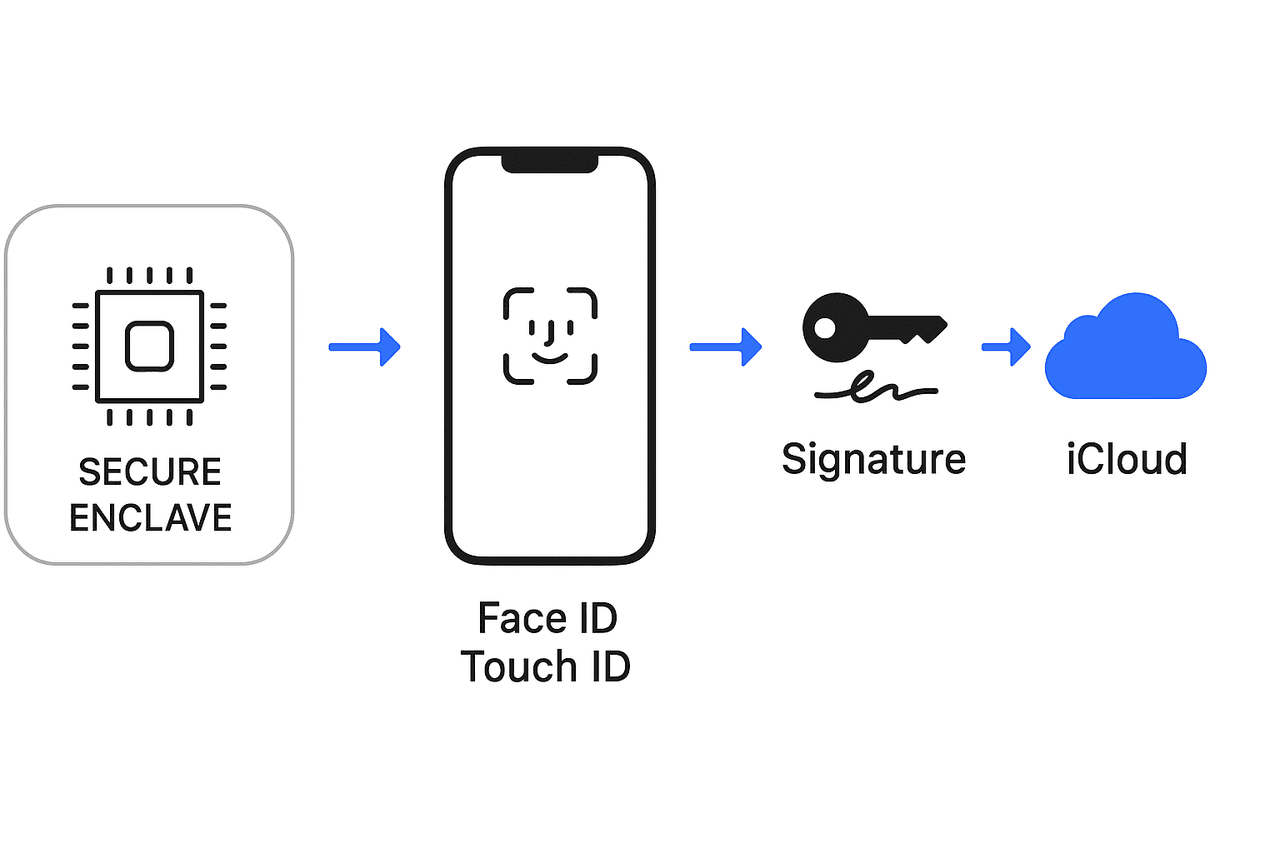
Apple Passkey security relies on Secure Enclave (hardware isolation) + biometrics (Face ID/Touch ID) + iCloud Keychain end-to-end encryption.
Secure Enclave Chip
-
Every iPhone / iPad / Mac (with T2 chip) has an independent Secure Enclave security processor.
-
The private key of Passkey is only stored inside Secure Enclave. External systems (including Apple itself) cannot read it.
-
Any signing operation with Passkey (such as website login) must be computed inside Secure Enclave, and the private key never leaves the chip.
Biometrics + Hardware Binding
-
Face ID / Touch ID / device passcode are the only ways to trigger Secure Enclave to use the private key.
-
Even if someone steals your phone, they must pass biometric authentication or device passcode to use Passkey.
-
This process happens at the hardware level, avoiding software tampering risks.
iCloud Keychain + End-to-End Encryption
-
If iCloud Keychain is enabled, Passkey can be synchronized across multiple Apple devices.
-
During synchronization:
-
Passkey uses end-to-end encryption, only your devices can decrypt.
-
Apple servers only transmit encrypted data and cannot decrypt it.
-
-
Additional device keys and Apple ID two-factor authentication further secure the process.
Anti-cloning and Anti-phishing
-
Hardware ensures that private keys are non-exportable, preventing copying to hacker devices.
-
Passkey is bound to the website domain inside the hardware, preventing misuse.
Google Passkey Hardware Security Mechanism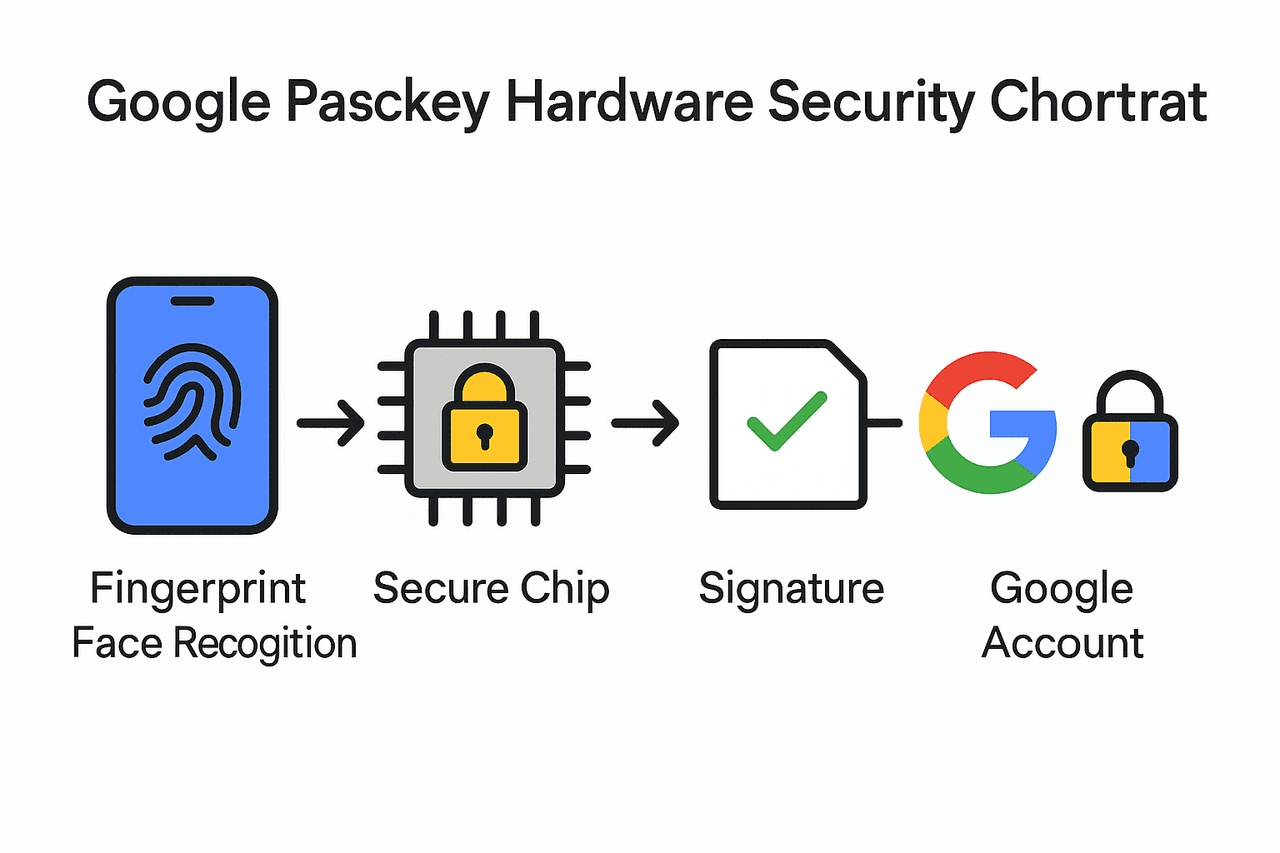
Google Passkey protection relies on: Secure chip (Titan M / TEE) stores private keys (non-exportable) + biometrics / passcode + end-to-end encryption sync.
Hardware Security Module (HSM / TEE / Titan M chip)
-
On Android devices, Passkey private keys are stored in device security hardware:
-
Titan M chip (Pixel series, higher security level)
-
or Trusted Execution Environment (TEE).
-
-
Private keys are generated and used only within the hardware, never exported to OS or apps.
Biometrics and Device Binding
-
When invoking Passkey login, users must pass fingerprint, face recognition, or device passcode.
-
The secure chip performs signing only after confirming identity.
-
Even if the device is stolen, attackers cannot use Passkey without biometrics/passcode.
Google Account + Password Manager
-
Passkey can be synchronized to Google Password Manager.
-
Sync process uses end-to-end encryption, only devices can decrypt.
-
Private keys are never stored in Google servers, only encrypted data tied to the account.
Anti-phishing (Domain Binding)
-
Passkey is bound to the registered website domain, and hardware checks the domain during login.
-
If the website is fake, the hardware refuses to provide a signature, blocking phishing.
Why Exchanges Recommend Passkey
-
Protects user funds from phishing and leaks.
-
Reduces fraud risks, even against impersonators.
-
Speeds up trading with quick login for active users.
-
Meets global standards, keeping pace with industry leaders.
👉 Enable Passkey today, protect your digital assets, and trade with peace of mind.
👉Please refer to the instructions for the official setting:
Passkey — the new era of account security begins with your choice.