
How to Create and Send a KuCoin Gift Card?
Last updated: 08/07/2026 07:22:00
To create and send KuCoin Gift Cards, you need to become a KuCoin Pay partner merchant.
What is KuCoin Gift Card?
KuCoin Gift Card is a prepaid cryptocurrency instrument that can be used for the efficient transfer and trading of digital assets. Both crypto and non‑crypto users can purchase KuCoin Gift Cards from merchants and redeem them into their KuCoin accounts.
KuCoin Gift Cards also serve as an important on‑/off‑ramp for the KuCoin exchange: when you need to deposit or transfer assets, the Gift Card can act as a convenient payment medium. Once the recipient redeems the gift card code, the corresponding cryptocurrency balance will be credited to their KuCoin wallet.
What are the use cases and advantages of distributing KuCoin Gift Cards?
As a KuCoin Gift Card Distributor, the most common use cases and benefits include:
-
Reaching a wider audience: Gift Cards can be sold to both non‑KuCoin users and KuCoin users, while holding a Gift Card essentially means holding crypto assets.
-
As a KuCoin Pay partner merchant, you will receive platform traffic and marketing support to boost your business.
-
Use Gift Cards as loyalty rewards to attract and reward global customers.
-
Become a B2B Gift Card provider to attract and collaborate with other enterprises.
-
Use Gift Cards as employee incentives within your organization.
What are the prerequisites for creating and sending Gift Cards?
You must be a KuCoin Pay partner merchant and have signed the Gift Card related agreement. Individual accounts or regular corporate accounts can only redeem Gift Cards, not create/send them.
What methods can be used to create Gift Cards?
-
Method 1: Create Gift Cards directly in the [Gift Cards] section of the KuCoin Pay merchant dashboard.
-
Method 2: Integrate Gift Card creation via the Merchant Unified API. During the application process for KuCoin Pay partnership, the platform operation team will provide the API documentation.
How to create Gift Cards in batch?
Step 1: Ensure you have registered a corporate account and completed the KYB (Know Your Business) process.
Step 2: Apply to become a KuCoin Pay partner merchant. After submission, the operation team will contact you. The function will be enabled within one working day after signing the Gift Card related agreement.
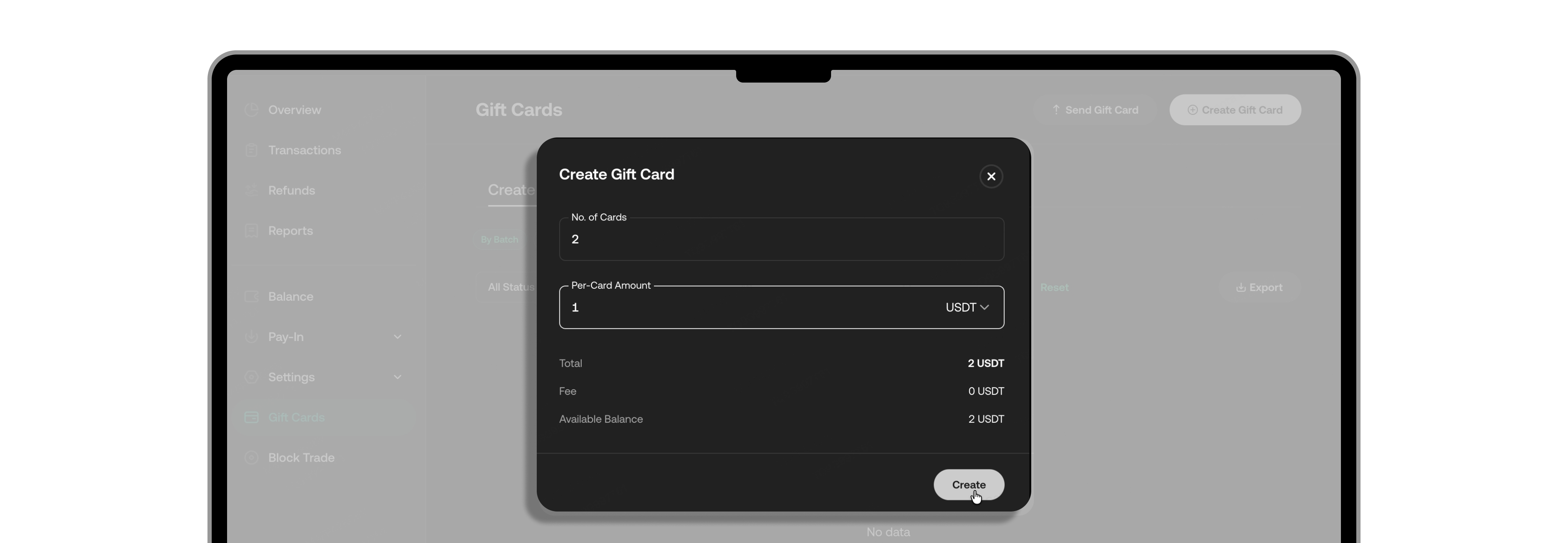
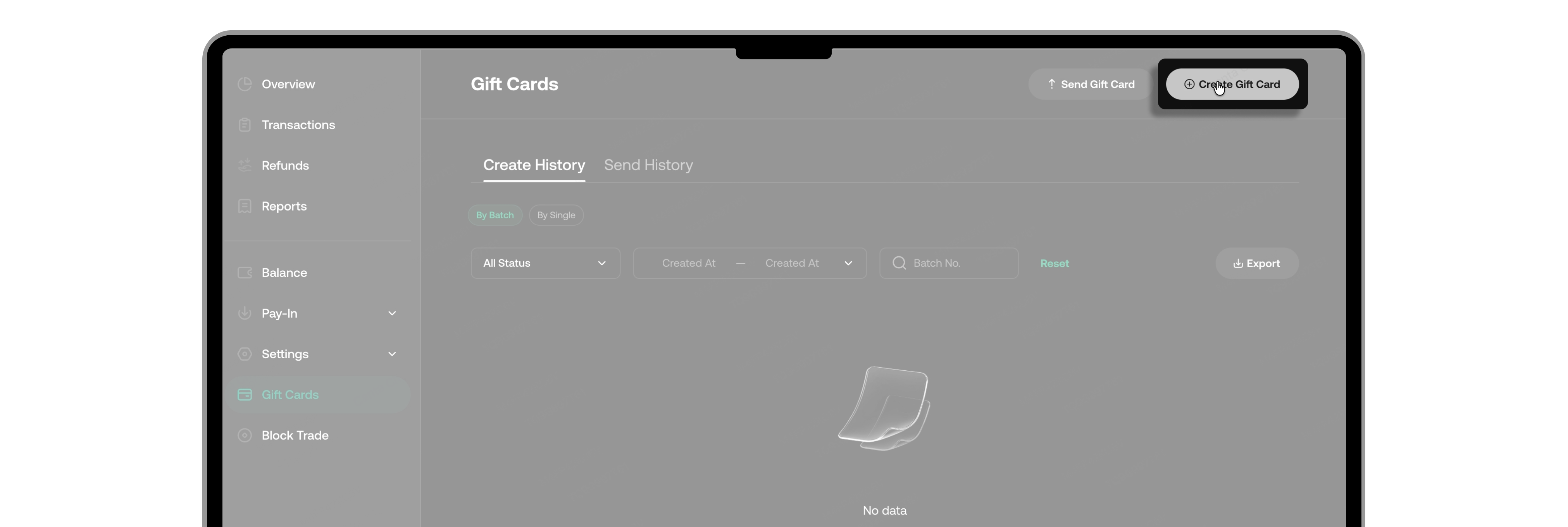
Step 3: Log in to your KuCoin account, go to the KuCoin Pay merchant dashboard, and click [Gift Cards] > [Create Gift Card].
Step 4: Select the desired cryptocurrency, enter the total amount and the number of cards you wish to purchase, then click [Create].
Step 5: Complete the security verification (2FA etc.). The total creation amount will be deducted from your funding/spot account.
Step 6: In the [Gift Cards] page, you can view 'Create Gift Card' and Gift Card generation list, filtered by creation time, order status, and batch ID. If the status shows [Processing], the batch creation is still being processed – please wait. When the status changes to [Success], you can download the Gift Card list. Go to [Create History] > [By Batch], select the record, and click 'Download' . Once downloaded, the file will contain the generated card numbers, redemption codes (card secrets), and other details.
Step 7: You are free to distribute and trade Gift Cards to both KuCoin and non‑KuCoin users. Gift Cards can be redeemed for crypto within KuCoin platform, or traded as crypto assets outside the platform. The Gift Card number serves as a unique identifier, and recipients need to enter the redemption code to redeem the crypto.
What are the ways to send Gift Cards?
-
Method 1: Send directly from the [Gift Cards] section in the merchant dashboard.
-
Method 2: Provide Gift Card numbers and redemption codes to buyers via email, SMS, social media, or other text channels. Recipients can then redeem the funds by going to the KuCoin App > KuCoin Pay > Gift Cards.
-
Method 3: Use the Merchant Unified API to send Gift Cards programmatically.
How to send Gift Cards via the merchant dashboard?
-
Single Send: After creating a card, go to the [Gift Cards] section, click the [Send Gift Card] button in the top right, choose “Single Gift Card Send”, fill in the recipient’s UID, and select the card to send.
-
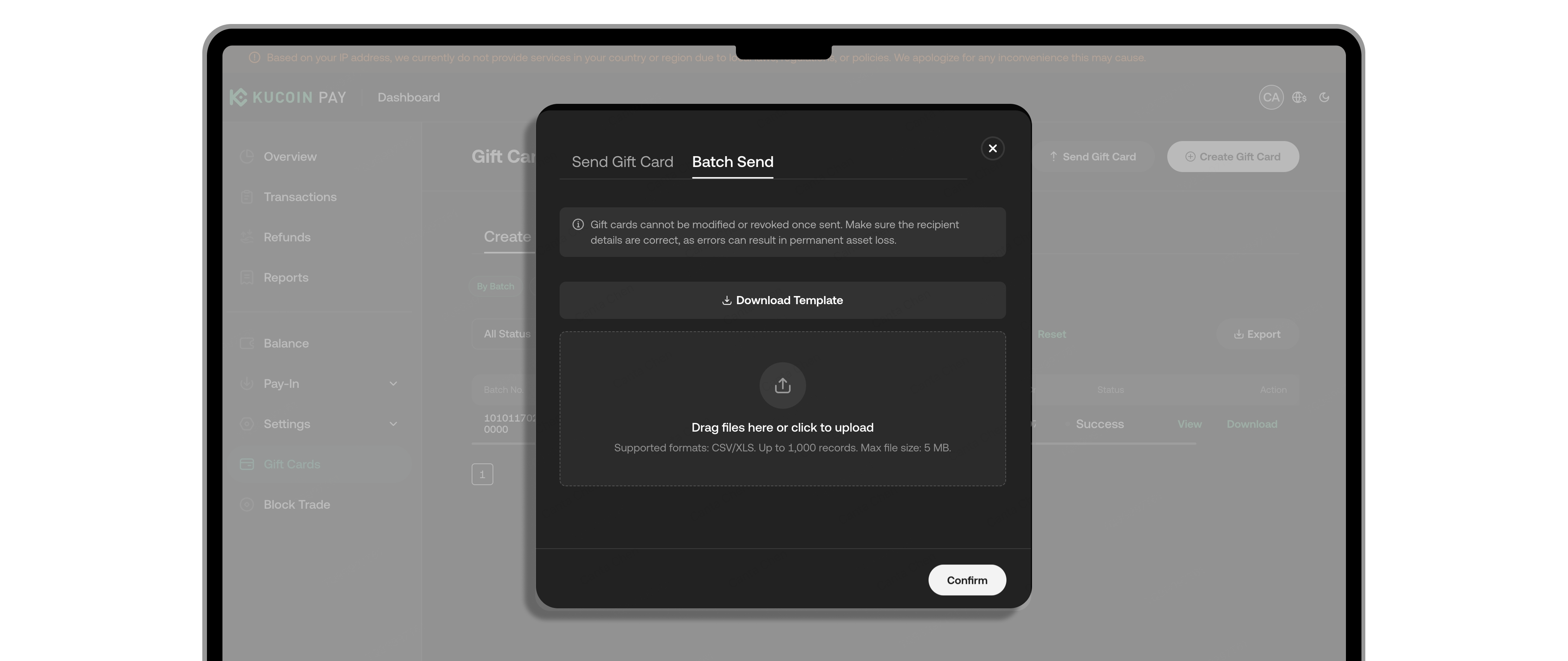
Batch send: Click [Send Gift Card] > “Batch Gift Card Send”, and upload a list of cards (with target UIDs) to send in batch.
-
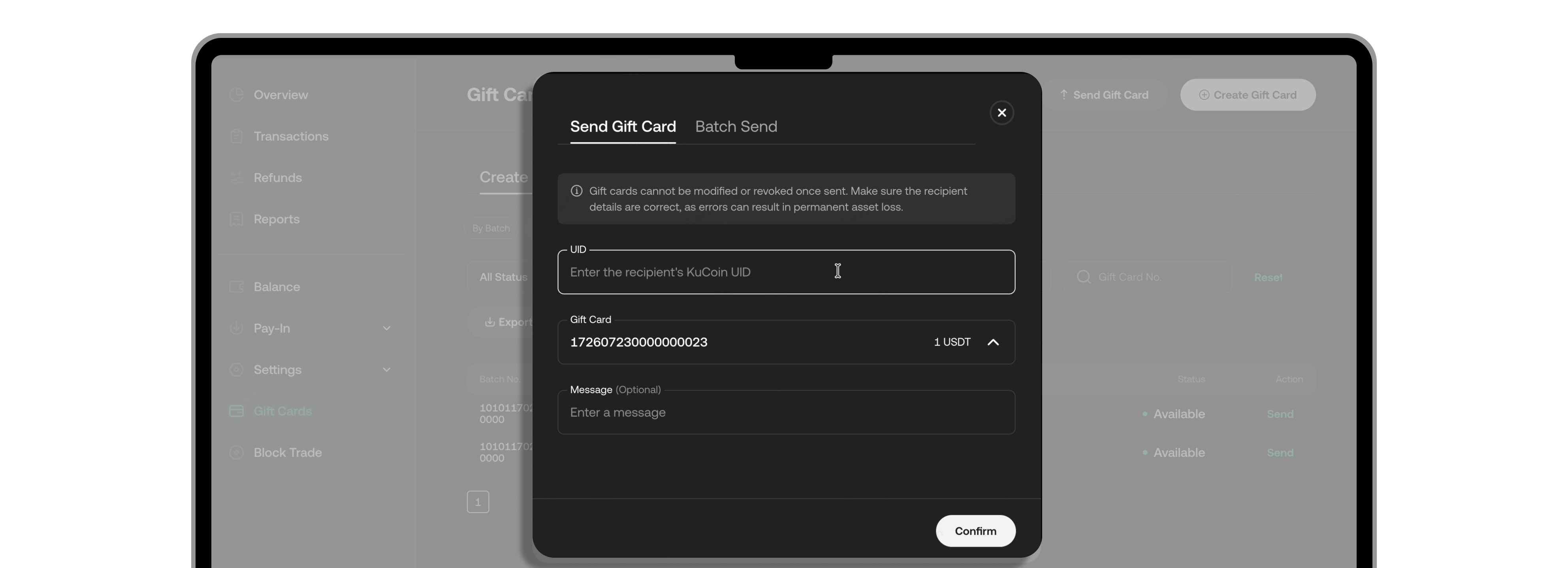
Send from history: In the [Gift Card] section, go to [Create History] > “By single”, find the desired card, click the [Send] button on the right, and enter the target UID to complete.
Frequently Asked Questions
Q1: How do I enable the Gift Card creation and sending permission? Are they enabled by default for all KuCoin corporate accounts?
No. Corporate accounts must become KuCoin Pay partner merchants and sign the Gift Card related agreement. Once that’s done, the platform will activate the relevant Gift Card functions for you.
Q2: What are the ways to create Gift Cards?
-
Method 1: Integrate the Gift Card creation function via the Merchant Unified API.
-
Method 2: Create them directly through the Gift Card section in the merchant dashboard.
Q3: Is batch creation supported? Can I create Gift Cards of different amounts in the same batch?
Yes, batch creation is supported. However, for the same batch, only cards of the same amount and same currency can be created. To have different denominations, you need to create multiple batches.
Q4: What are the ways to send Gift Cards?
-
Method 1: Send through [Gift Cards] section in the merchant dashboard.
-
Method 2: Provide the Gift Card number and redemption code to buyers via email, SMS, social media, or other text channels. Recipients can then redeem the funds by going to the KuCoin App > KuCoin Pay > Gift Card.
-
Method 3: Use the Merchant Unified API to send Gift Cards programmatically.
Q5: Is batch sending supported?
Yes. After creating Gift Cards, go to [Gift Cards] section, click [Send Gift Card] in the upper‑right corner, choose 'Batch Gift Card Send', and upload an Excel file listing the cards to be sent (with target UIDs).
Q6: What currencies are currently supported for Gift Cards?
USDT and USDC. Other currencies will be added gradually – stay tuned.
Q7: Is there a fee for creating Gift Cards?
Yes. For specific fee rates, please contact the platform operation team during your application to become a KuCoin Pay partner merchant.
Q8: How can distributors set the selling price of Gift Cards?
Once you become a KuCoin Gift Card distributor, you can set your desired selling price on your own.
Q9: Where can I sell Gift Cards?
You can sell them through your own distributor platform and merchant channels.
Q10: How can I use Gift Cards as incentive rewards for customers?
You can set redemption conditions using your internal loyalty point system – for example, airline miles, e‑commerce platform points, etc.
Q11: Do you provide invoices?
Invoices are not currently provided for Gift Card purchases.
Q12: How can I obtain the merchant API documentation for Gift Card integration?
During your application to become a KuCoin Pay partner merchant, the platform operation team will provide you with the API documentation.