
How to Buy and Sell Cryptocurrency via P2P on KuCoin Lite Version
Last updated: 02/11/2026 02:19:01
When you buy/sell cryptocurrency on the KuCoin Lite Version and select a payment method marked with "P2P", the system will generate a corresponding P2P order. This type of order requires you to leave the KuCoin app and open another application to complete the payment to the recipient (for buying) or to confirm receipt of payment from the payer (for selling). Let's take a look at the process and key considerations for P2P orders.
Content
1.Buying Cryptocurrency via P2P
1.1.Visit the Trade Page
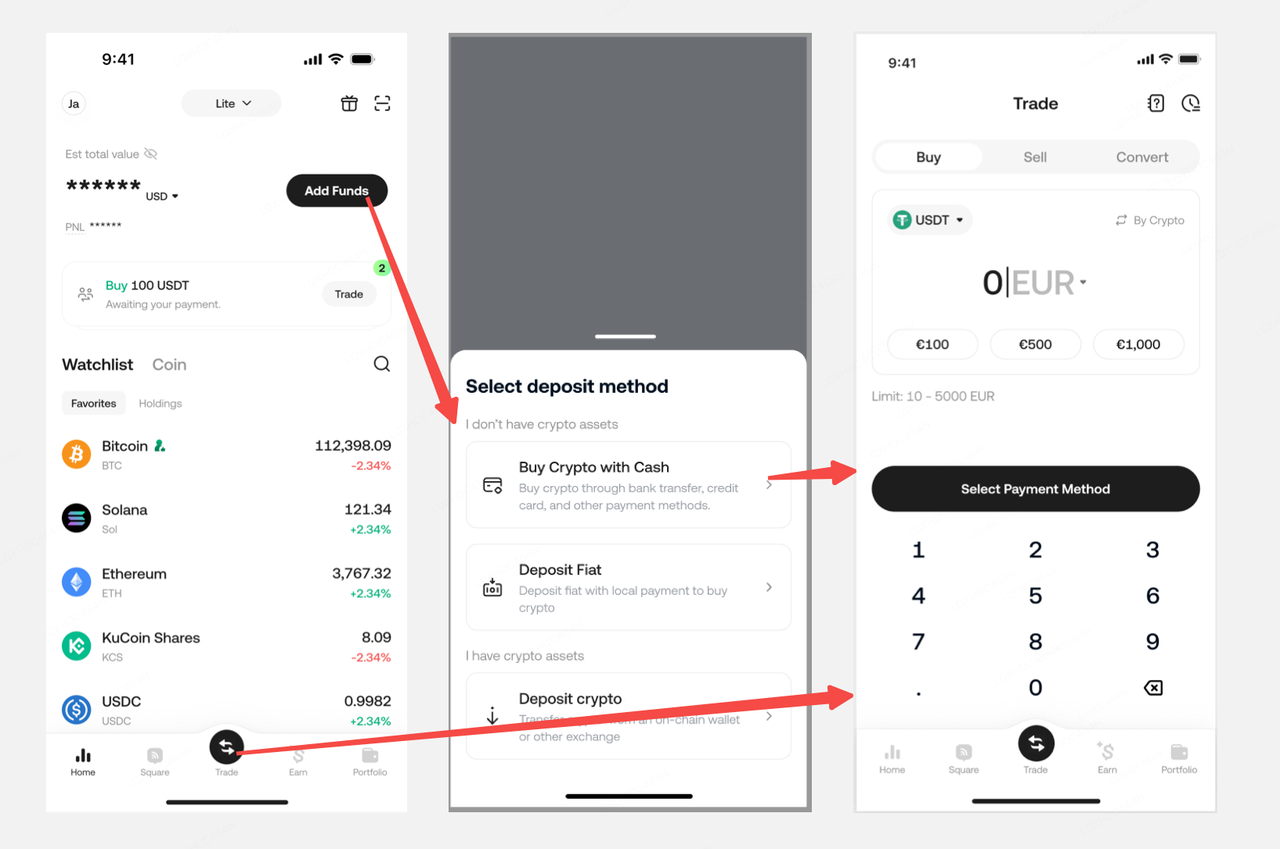
This process is largely the same as other cryptocurrency purchase flows. Tap the "Trade" button at the bottom and then you will visit the Buy page directly.
Alternatively, tap the "Add Funds" section at the top of the Lite Version interface. You can find the "Buy" option in the expanded deposit menu.
Both methods will lead you into the "Buy crypto" flow.
1.2.Create a P2P Order
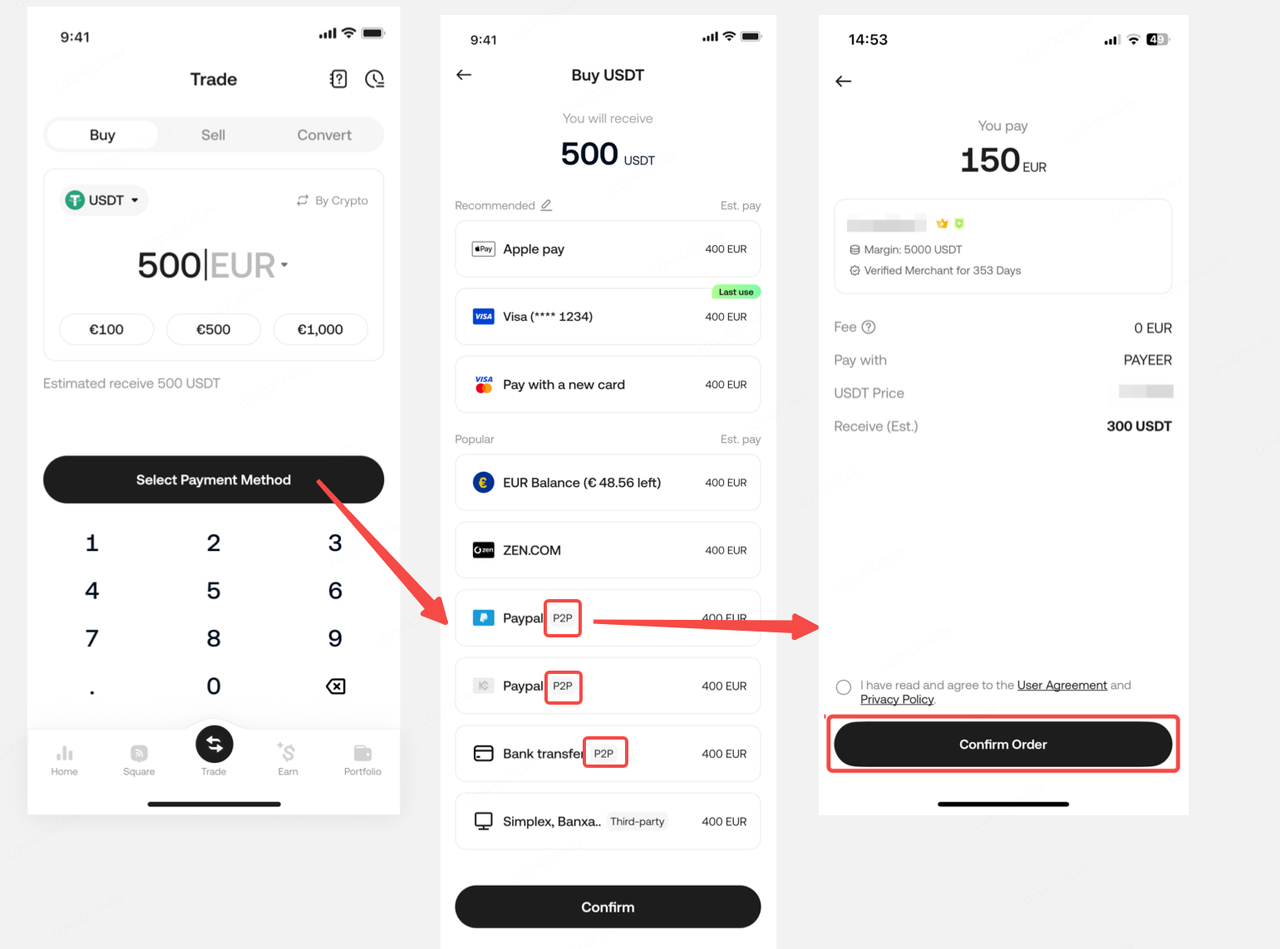
On the Trade page, set the amount and other details for the cryptocurrency you wish to purchase, and then proceed to the payment method selection page. If the payment method you choose has "P2P" indicated, it means you have selected a P2P channel. Click "Confirm" on the subsequent order confirmation page to finalize the creation of the P2P order.
1.3.Complete the P2P Order Transaction
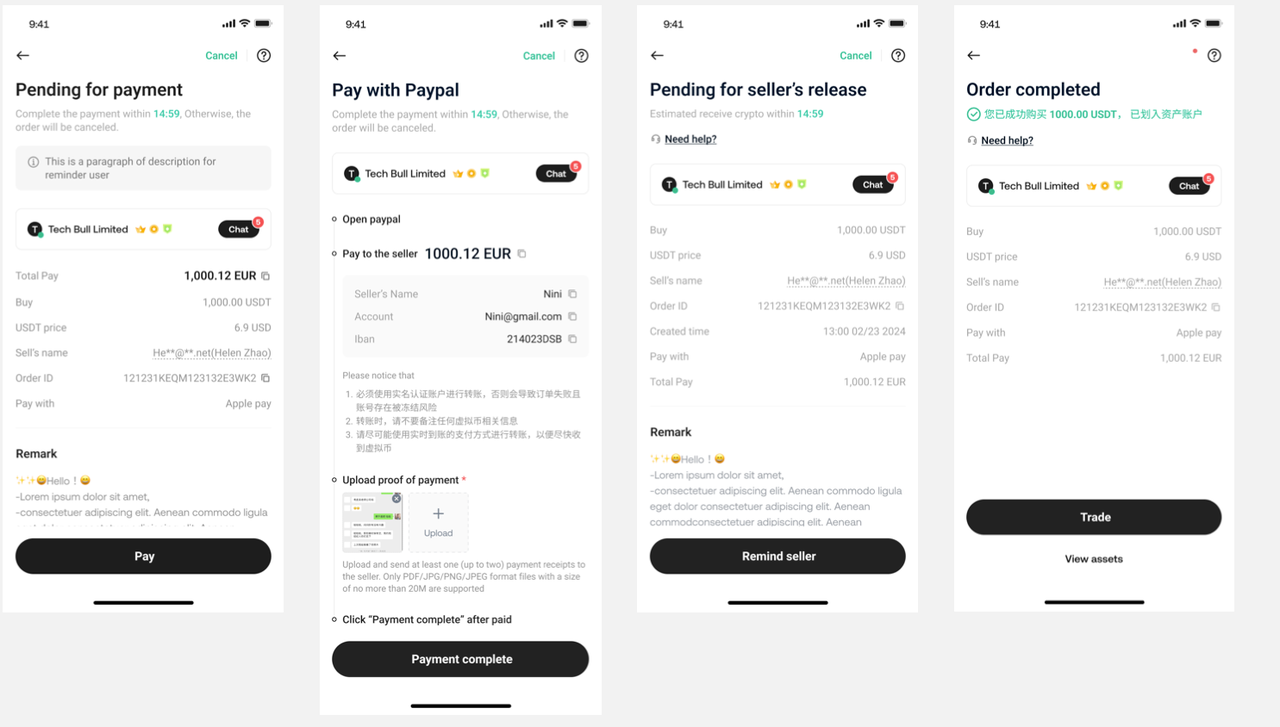
After creating the order, you will be directed to the P2P order page. Here, you can see the payment details of the merchant selling cryptocurrency. You need to transfer the money according to the details shown on the page.
Please note: You may need to leave the KuCoin app and use another payment app to complete the transfer. Please double-check the recipient's details carefully to avoid any errors. After completing the transfer, return to the KuCoin app and tap the "Payment Completed" button on the order page.
Please note: This page displays a countdown timer for your payment. If you do not complete your transfer and tap the "Payment Completed" button before the timer expires, the order will be automatically canceled.
Once the seller receives your payment, they will confirm receipt and release the crypto to your account. If the seller does not confirm receipt promptly, you can tap the button at the bottom of the order page to remind the seller, or use the Chat feature to notify them.
2.Selling Cryptocurrency via P2P
2.1.Create a P2P Sell Order
This step is similar to buying cryptocurrency. Tap the "Trade" button at the bottom of the KuCoin Lite Version interface, then select "Sell" to enter the cryptocurrency sell page. Set the amount of cryptocurrency you want to sell, and proceed to the payment receipt channel page.
2.2.Awaiting Payment Transfer
Unlike when buying crypto, you now need to wait for the buyer to pay you. After the buyer completes their payment, you need to check your receiving platform to confirm the funds have arrived. Once you have received the buyer's transfer, promptly confirm this on the order page. The system will then release the cryptocurrency to the buyer, completing the order.
2.3.Viewing Ongoing Orders
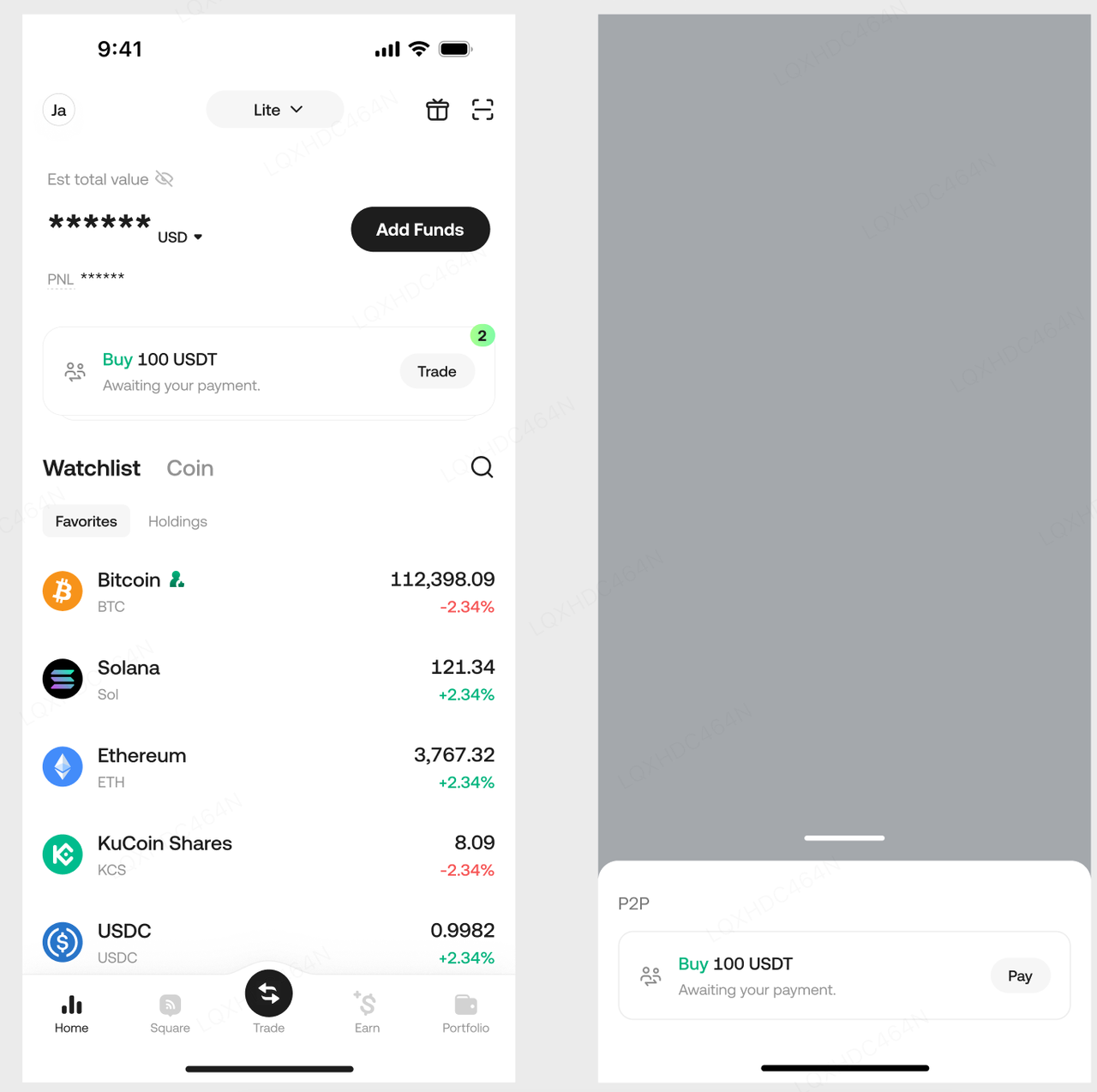
Each P2P order has a specific duration. If the order is not canceled, it remains active even if you leave the order page. If you want to return to the P2P order page to check its status, you can find a card for the ongoing order on the home screen of the KuCoin Lite Version. Tapping this card will show your current ongoing P2P orders. Tapping a specific order will return to its detailed P2P order page. Once an order is completed or canceled, it will no longer be displayed on the home screen.
3.What Are the Common Crypto P2P Scams, and How Can You Avoid Them?
Crypto Peer-to-peer (P2P) transactions have gained popularity recently due to their convenience and ease of use. However, knowing the potential risks associated with P2P transfers is important.
Based on feedback from our customer surveys, we have prepared this guide to offer insights into the common P2P scams in crypto transactions. We’ll also explore some essential tips to protect yourself from falling victim to these fraudulent activities.
3.1.Can a Person Scam You with P2P Transfers?
Yes, scammers can take advantage of P2P transfers to defraud unsuspecting victims. They may employ sophisticated tactics to manipulate transactions, misrepresent payments, or impersonate reputable platforms or individuals. By understanding the common crypto P2P scams, you can minimize the risk of falling prey to these fraudulent schemes.
3.2.How Do Crypto P2P Scams Work?
P2P scams exploit the trust and anonymity inherent in peer-to-peer transactions. Scammers use various techniques to deceive individuals and trick them into releasing funds or sensitive information. Understanding these scams and staying vigilant to safeguard your money and digital assets is crucial.
4.What Are the Common Crypto P2P Scams, and How to Spot Them?
4.1.Proof of Payment Scams
Scammers can digitally manipulate payment screenshots to falsely claim they have fulfilled their part of the transaction. They pressure you into releasing funds or digital assets without verifying the receipt of payment.
4.2.SMS Scams
SMS scams are a type of proof of payment scam where fraudsters send SMS text messages to victims that appear similar to notifications sent by banks or wallet apps. The messages falsely claim that the victim has received a payment from their counterparty.
Here’s how you can protect yourself from proof of payment scams:
Always check your bank account or e-wallet to confirm the receipt of funds before marking a transaction as complete..
Be cautious and skeptical if your counterparty insists on releasing funds before confirming the payment's arrival.
To avoid falling for SMS scams, always verify the receipt of funds by checking your bank account or crypto wallet directly rather than blindly trusting the content of the text message.
4.3.Chargeback Scams
Fraudsters initiate chargebacks, retracting payments made to their counterparties. They may use third-party accounts to process payments, making it easier to reverse transactions.
One such example is the counterparty offering to pay you with a cheque deposit. This is because requesting a chargeback from cheque payments is very easy, making it most likely a scam.
To avoid chargeback scams:
Verify that the buyer's name on the payment details matches their verified name on the P2P platform.
Do not accept payments from third-party accounts, as they pose a higher risk of chargebacks.
If someone insists on paying via a cheque, consider it a red flag and file an appeal immediately.
4.4.Man-in-the-Middle (MitM) Scams
In this scam, a fraudster pretends to be a reputable merchant on KuCoin P2P and contacts victims through external channels, such as Telegram, WhatsApp, or social networks. They provide their bank account details and a link to a P2P ad and ask victims to confirm by copying them into the order page’s P2P chat.
Unknowingly, the victim shares the scammer’s bank account details with an unrelated buyer on KuCoin P2P, who also has no clue about the scam. The victim releases crypto to the unrelated buyer, who sends their money to the scammer’s bank account instead.
Reversing a transaction or having the customer service team intervene and resolve the issue is impossible in such cases. Since the victim communicated with the fraudster and obtained the details via external communication outside the KuCoin platform, and the funds were transferred to a third-party account unconnected to KuCoin users, KuCoin’s customer support cannot offer a solution.
To protect yourself from MitM scams, you must:
1.Only communicate within the P2P platform and avoid engaging in transactions outside of it.
Remind buyers that third-party transfers violate P2P transaction policies.
Double-check the counterparty's bank account details directly on the KuCoin P2P platform.
Do not trust offers or information received on external channels when making P2P trades on KuCoin.
4.5.Triangle Scams
Triangle scams involve two scammers simultaneously placing orders with the same seller. They exploit the seller's trust and urgency to release funds without proper verification.
Here’s how a triangle P2P scam unfolds:
Scammer A makes an order for 5,000 USDT worth of crypto (order A), and Scammer B makes an order worth 6,000 USDT (order B). Scammer B then transfers 5,000 USDT to the seller.
At the same time, Scammer A marks order A as paid. The seller releases the crypto to Buyer A, thus completing order A for 5,000 USDT. Scammer B sends another 1,000 USDT to the seller, provides the 5,000 USDT payment proof they got from Buyer A, and pressures the seller to release digital assets under order B.
Users who conduct triangle scams aim to pressure the seller to release funds immediately without verifying the transfer. It can be easy to release funds without verifying who initiated the transfer. If you're not careful, you could release the funds twice but only receive half or less of the assets you bought.
To avoid falling victim to triangle scams during P2P trading, you must:
Confirm the receipt of all funds from pending P2P transactions before releasing any assets.
Be cautious with proof of payment provided by counterparties, as scammers may attempt to reuse them.
4..6.KuCoin Imposter Scams
Scammers impersonate KuCoin employees to deceive users and steal their funds. They contact potential victims through unofficial emails or social media accounts, requesting personal information and initiating fraudulent transactions.
They could ask you to share your email address on the P2P chat window, claiming that the KuCoin P2P Escrow service needs this information to confirm payment. They could then send you a phishing email similar to official KuCoin communication and trick you into releasing your crypto first to receive payment.
To stay safe from KuCoin imposter scams, do the following:
KuCoin will never ask you to complete a P2P transaction via email. Always release funds only after receiving payment through the P2P platform.
Never share personal information or offline contact information on the chat.
Ensure that payments are submitted using the counterparty's specified payment method and that the name on the account matches the counterparty's verified name on KuCoin..
Stay cautious of external offers or information received through unofficial channels.
You can check the KuCoin Official Verification Center to confirm the authenticity of the relevant channels.
4.7.Conclusion
While P2P transactions offer convenience, it's crucial to be aware of common scams and take necessary precautions to protect yourself. By understanding how these scams work and following the provided security tips, you can minimize the risk of falling victim to P2P fraud in the crypto market.
Stay vigilant, be skeptical of offers that seem too good to be true, and always verify transactions and payment receipts before releasing any funds or digital assets. By following best practices, such as conducting transactions within KuCoin’s chat system, double-checking payment details, and reporting suspicious behavior to customer support, you can minimize the risk of falling victim to P2P crypto scams and protect your investments.
4.8.Additional Security Tips From KuCoin
-
Support: How to File an Appeal for P2P Scams
-
Support: How to Set Google 2FA on KuCoin