


Start Cloud Mining with KuMining
Want to participate in crypto mining without buying machines or managing complex equipment?
KuMining offers a simpler and more flexible way to participate in PoW mining. Choose from BTC, ZEC, DOGE, and LTC, select your budget and mining duration, purchase hashrate through the KuCoin App, and then deposit electricity fees separately into your Mining Account.
Why Choose KuMining?
-
No mining machines required No need to purchase or maintain physical equipment.
-
Flexible mining options Choose your preferred coin, budget, hashrate, and duration.
-
Separate electricity payment Purchase hashrate first, then deposit electricity fees separately.
-
Beginner-friendly Lite Mode matches a mining plan based on your budget.
-
Professional management KuMining manages mining operations and hashrate services.
-
Track outputs daily View orders, electricity balance, and mining outputs in your Mining Account.
Ready to get started?
Continue reading this guide to learn how to open a Mining Account, purchase hashrate, prepay electricity fees, and start mining.
This guide provides a step-by-step introduction to how to participate in KuMining Cloud Mining, including account registration, identity verification, plan purchase, order payment, and output tracking.
Through mining accounts, dual order modes, and ecosystem integrations, KuMining offers a more professional and flexible mining experience. With just a few simple steps, you can start your PoW mining journey.
I. Registration and Verification
Register an Account
Visit the KuCoin official website or download the KuCoin App.
Click “Sign Up” and complete account registration.
Complete Identity Verification (KYC / KYB)
Click “Verify Now”, submit the required information, and wait for approval.
Once verified, you will be eligible to participate in KuMining cloud mining products.
Access the KuMining Cloud Mining Page
Click the link to access the KuMining Cloud Mining page.
II. Order Placement and Mining Operations
Step 1: Open a Mining Account
Navigation
-
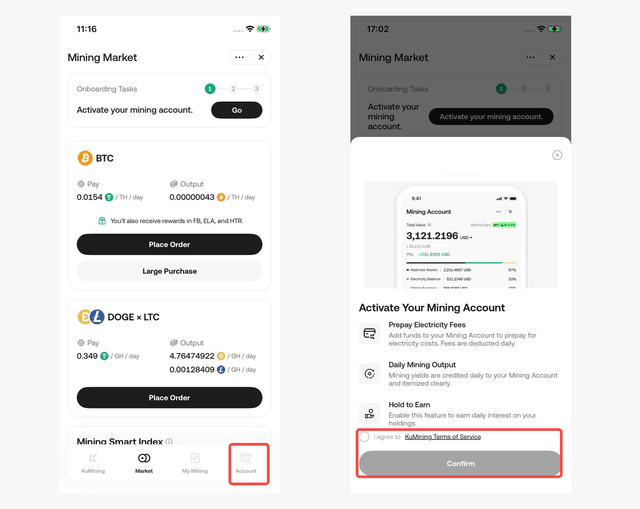
Go to [Account] tab → Click “Open Mining Account”
-
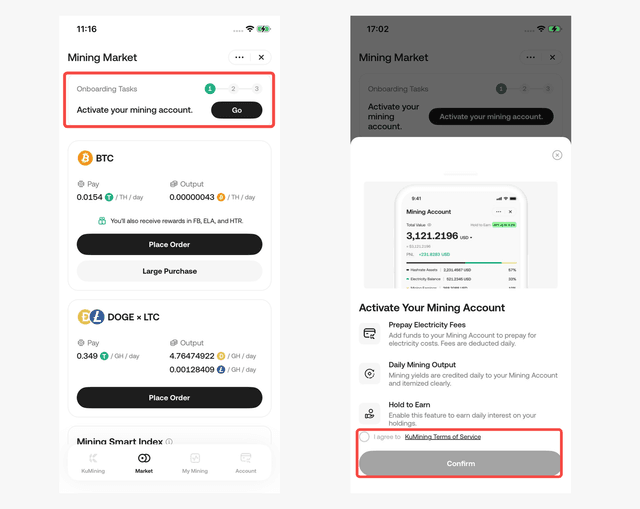
Go to [Market] tab → Click “Beginner Guide” at the top → Complete the sub-task “Open Mining Account”
-
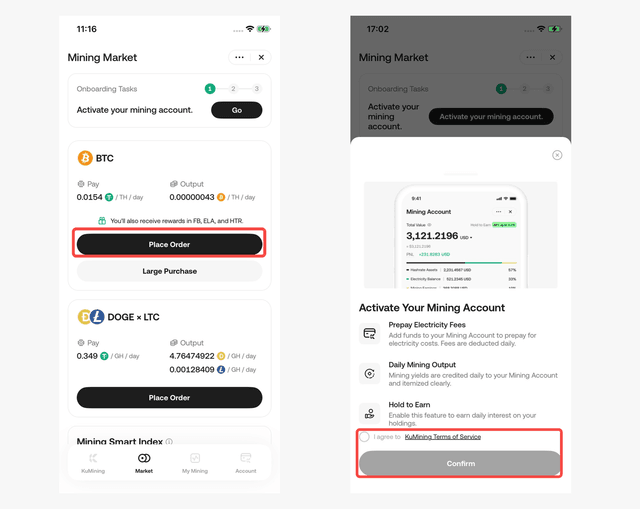
Go to [Market] tab → Select a coin → Click “Place Order” → Follow the prompt to open a Mining Account and proceed to the order page
Notes
A dedicated Mining Account must be opened before using KuMining for the first time.
Step 2: Choose an Order Mode and Configure Your Mining Plan
Navigation
-
Open the KuCoin App → [KuMining]→ [Market]
-
Select a coin (e.g. BTC, DOGE & LTC) → Click “Place Order”
-
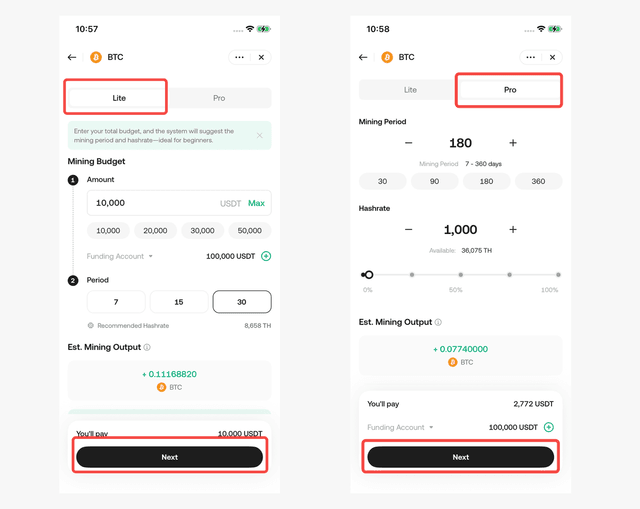
Choose an order mode on the order page:
Mode 1: Lite Mode (Recommended for Beginners)
-
Enter your budget (USDT)
-
Select a mining duration (7 / 14 / 30 days)
-
The system automatically matches a hashrate plan → Click “Next”
Mode 2: Pro Mode (For Advanced Users)
-
Enter the desired hashrate amount
-
Select a mining duration (7–360 days)
-
The system calculates the total hashrate fee → Click “Next”
Notes
-
Only the hashrate fee is paid during order placement
-
Electricity fees are post-paid via pre-deposit and do not affect order submission
Step 3: Confirm the Order and Pay the Hashrate Fee
Navigation
-
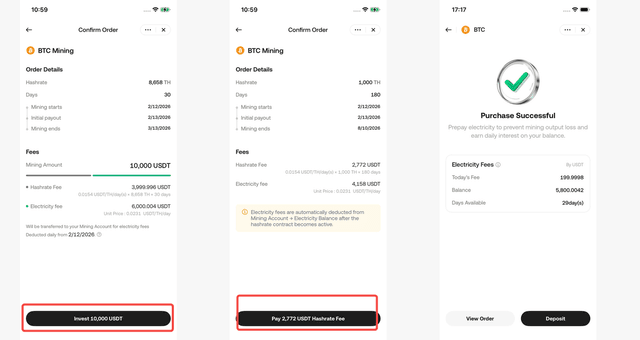
On the order page → Click “Next”
-
Review order details carefully, including:
-
Hashrate amount
-
Plan duration
-
Estimated outputs
-
Mining start time
-
-
Click “Invest” (Lite) or “Pay” (Pro) to pay the fees.
Notes
-
After payment, the order status will show “In Progress”
-
Order details can be viewed under [My Mining] → [Orders]
Step 4: Prepay Electricity Fees and Start Mining
After purchasing hashrate, remember to “fuel” your mining operation.
Navigation
-
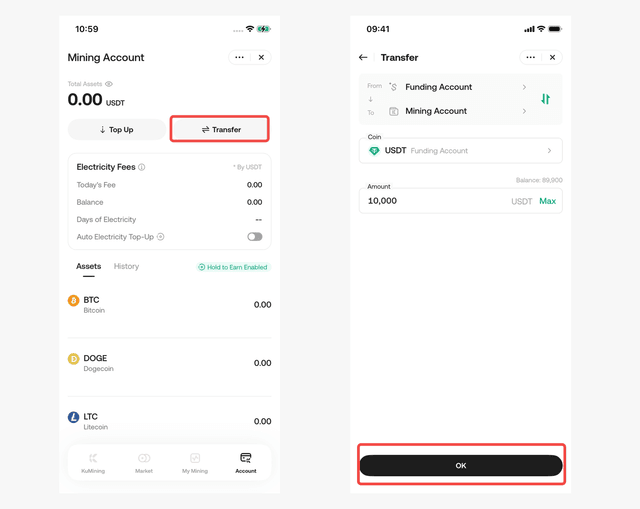
Transfer USDT from other accounts to the Mining Account.
-
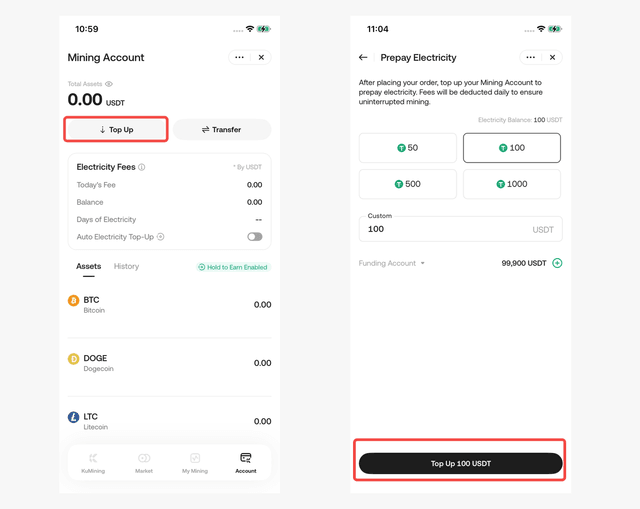
Or directly deposit USDT into the Mining Account (considered as electricity fee prepayment)
-
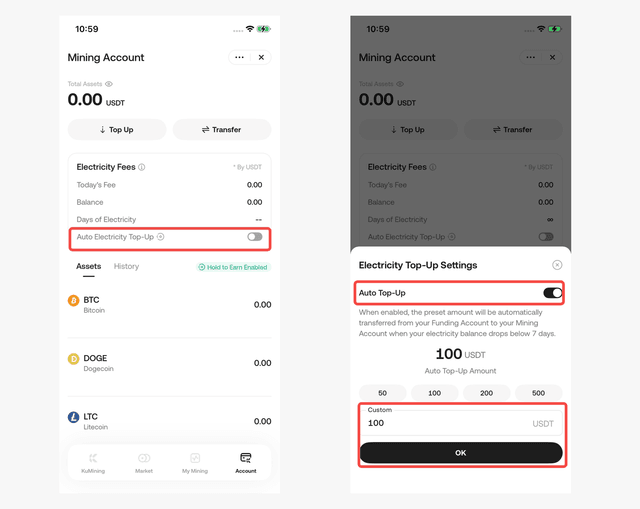
Enable the Auto Transfer feature
-
Wait for mining to start and outputs to be credited
Important Notes
-
Strongly recommended to enable Auto Transfer. When the electricity balance is insufficient, the system will automatically transfer USDT from other accounts to cover electricity fees.
-
Prepaid electricity fees, before being deducted, can participate in Hold-to-Earn to generate additional yield.
-
Electricity fees are deducted daily
-
Please maintain sufficient electricity balance to avoid output freezing
-
Frozen outputs enjoy a 7-day grace period (including the overdue day). If electricity fees are replenished within 7 days, frozen outputs will be released.
Step 5: View Mining Outputs
Navigation
[My Mining]
You can view:
-
Orders Overview – view a summary of all your orders
-
Order Details – view details of individual orders
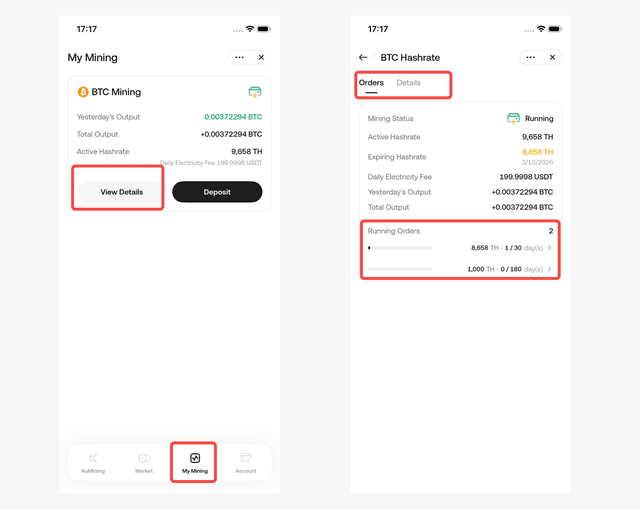
[Mining Account]
You Can View
-
Daily mining outputs
-
Cumulative outputs
-
Remaining estimated outputs
-
Estimated value in USDT (for reference only)
Timeline Tips
-
T Day: Order payment completed and electricity fees prepaid
-
T + 1 Day: Mining machines go live and begin 24/7 mining
-
T + 2 Day: First mining outputs are automatically credited to your Mining Account
Ready to Start Mining?
You have now learned how to open a Mining Account, select a mining plan, purchase hashrate, prepay electricity fees, and track your mining outputs.
Complete the quiz and KYC verification to unlock an 18 USDT hashrate coupon package.
After receiving the coupons, return to KuMining and use an eligible coupon on your first hashrate order.
Disclaimer: The information on this page may come from third parties and does not necessarily reflect the views or opinions of KuCoin. This content is for reference only and does not constitute any form of representation or warranty, nor should it be construed as financial or investment advice. KuCoin is not responsible for any errors or omissions, or for any outcomes resulting from the use of this information. Investing in virtual assets may involve risks. Please carefully assess the product risks and your risk tolerance based on your financial situation. For more information, please refer to our Terms of Use and Risk Disclosure.