UTA RESTful Rate Limit#
1. Introduction of Rate Limit Pool#
The platform uses multiple Rate Limit Pools to manage API request rates across different business scenarios.
Each API endpoint is assigned to a specific Rate Limit Pool. The corresponding Rate Limit Pool is indicated in the API documentation for each endpoint.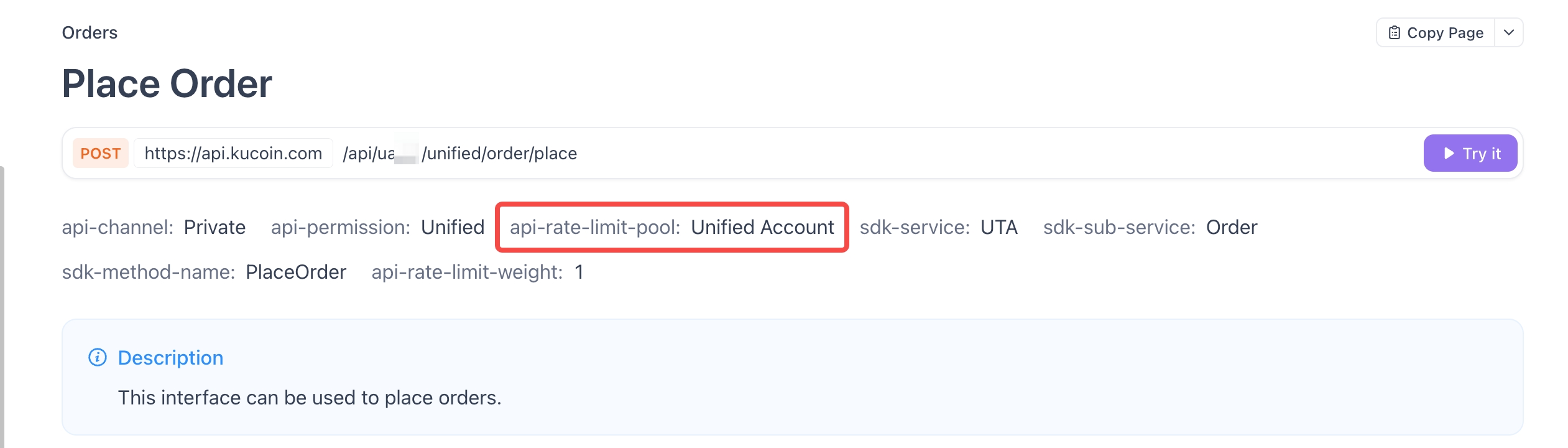
When a user makes an API request, the system controls the request rate based on the Rate Limit Pool assigned to the endpoint and the user's corresponding rate limit quota.
API Rate Limit Pools are currently divided into the following two categories:1.1 Private Rate Limit Pool#
The Private Rate Limit Pool applies to API endpoints that require authentication. Rate limits for these endpoints are managed based on the UID.1.2 Public Rate Limit Pool#
The Public Rate Limit Pool applies to API endpoints that can be accessed without authentication. Rate limits for these endpoints are managed based on the IP address.
If you need to make a large number of requests to public endpoints, we recommend using the WebSocket API instead of the REST API whenever the corresponding WebSocket endpoint is available.
To avoid IP-based rate limits, you can use the following approaches:Bind multiple IP addresses (IPv4 or IPv6) to a single server.
Send requests from different IP addresses.
2. Weight#
2.1 Weight Rules#
When a user makes an API request, the endpoint's Rate Limit Weight is counted against the user's rate limit quota and updated every 1 second, starting from the time the user's first request arrives.
For the specific Rate Limit Weight of each endpoint, please refer to the rate limit rules specified in the corresponding API documentation.If the quota of any Rate Limit Pool is exhausted within a 1-second window (meaning the rate limit is exceeded), the API will return HTTP code 429 with error code 429000. The response header will also indicate when the user can send requests again.
During this period, the user must stop sending requests and wait until the Rate Limit Pool quota is reset before continuing.For example:
When user 00123 has VIP Level 5, the user's total Rate Limit quota is 700 requests/second.
If each Batch Cancel Orders By ID request consumes a weight of 4, the user's remaining quota will be:After the first batch cancellation request: 696
After the second batch cancellation request: 692
And so on.
If the quota is not fully consumed within the 1-second window, the Rate Limit Pool quota will be reset at the beginning of the next window, and the available quota will return to 700.
gw-ratelimit-remaining: 696
gw-ratelimit-reset: 489 (ms)3. Rate Limit Quota by VIP Level#
Users at different VIP levels are assigned corresponding rate limit quotas in each Rate Limit Pool.Each API resource pool has a certain quota, the specific amount of which depends on the VIP level:| VIP Level / Rate Limit Pool | UTA Trading (Includes WebSocket Trade) | Management (UTA REST)(Coming Soon) | Public |
|---|
| VIP0 | 300/s | 300/s | 2000/30s |
| VIP1 | 400/s | 400/s | 2000/30s |
| VIP2 | 450/s | 450/s | 2000/30s |
| VIP3 | 500/s | 500/s | 2000/30s |
| VIP4 | 750/s | 750/s | 2000/30s |
| VIP5 | 900/s | 900/s | 2000/30s |
| VIP6 | 1100/s | 1100/s | 2000/30s |
| VIP7 | 1200/s | 1200/s | 2000/30s |
| VIP8 | 1500/s | 1500/s | 2000/30s |
| VIP9 | 2000/s | 2000/s | 2000/30s |
| VIP10 | 2500/s | 2500/s | 2000/30s |
| VIP11 | 3500/s | 3500/s | 2000/30s |
| VIP12 | 4000/s | 4000/s | 2000/30s |
4. Master-Sub Account Rate Limit Rules#
The platform adopts a "Master-Sub Account Unified Rate Limit + Self-Managed Quota Allocation" model.The system assigns a unified total UTA API rate limit quota based on the user's VIP level.
All sub-accounts share the total rate limit pool at the user level. Users can allocate the total rate limit quota to different sub-accounts as needed.
[Related API] The default API rate limit for a new sub-account is 10 requests/second. This default quota is not included in the user's total API rate limit quota.
The master account's rate limit quota = the user's current total rate limit quota - the total quota allocated to sub-accounts (excluding the default 10 requests/second).
Upgrade Rule: If an upgrade occurs, the rate limit for the master and sub-accounts will be increased accordingly. Users can manually reset the rate limit for their sub-accounts.
Downgrade Rule: If a downgrade occurs, the rate limit of each sub-account will be automatically adjusted proportionally to the new rate limit, and the master account's rate limit will be updated based on the total rate limit of the sub-accounts.Example: If a user is downgraded from VIP 7 to VIP 5, the total rate limit quota will be reduced from 1,000 to 700. The rate limit for each UID will be reduced proportionally by 30%.
5. Additional Limits & Requesting Higher Limits#
5.1 Server Overload Limits#
In addition to the standard rate limits, temporary rate limits may be triggered when the server is overloaded.
In this case, the system will return error code 429000, but the response header will not contain individual rate limit information. These limits do not count toward the standard rate limit quota. We recommend trying again later.5.2 Requesting Higher Limits#
If you are a professional trader or market maker and require a higher rate limit quota, please send the following information to api@kucoin.com:KuCoin account information
WebSocket Rate Limits#
1. Maximum Concurrent Connections#
Calculated by IP address:Public:Spot ≤ 500, Futures ≤ 800
2. Maximum Connection Establishment Rate#
Spot: Each IP can establish a maximum of 300 new connections every 5 minutes.
Futures:Each IP can establish a maximum of 250 new connections every 5 minutes.
Private:
Each IP can establish a maximum of 300 new connections every 5 minutes.
We recommend reusing existing connections and avoiding frequent disconnects and reconnects.3. Client-to-Server Messages#
Public: 300 messages per 10 seconds
Private: 100 messages per 10 seconds
If this limit is exceeded, the server may disconnect the WebSocket connection.4. Maximum Number of Topics per Connection#
5. Usage Recommendations#
Reuse existing WebSocket connections whenever possible.
Control the frequency of client messages (no more than 100 messages per 10 seconds per connection).
When subscribing to a large number of topics, distribute the subscriptions across multiple connections.
1. WebSocket Connection Control#
For establishing new UTA WebSocket market data connections, an additional sliding-window rate limit applies: each IP can establish a maximum of 300 connections within 5 minutes. As the gateway has recently experienced DDoS attacks that caused service interruptions, users are also required to implement connection frequency control on their side. When a WebSocket connection is disconnected (whether due to 429 or other errors), please add a sleep interval before reconnecting (e.g., 3 or 5 seconds). This should allow the connection to recover automatically.
For example, when you establish a connection from an IP at 10:03, we will check whether the total number of connections established from that IP within the previous 5-minute sliding window (i.e., 09:58 to 10:03) exceeds 300. When the system checks again at 10:07, the window will move to 10:02 to 10:07.2. Load Balancing Mechanism#
The Automatic Load Balancing has been launched to further improve API service stability and latency performance.
The system will dynamically balance traffic and allocate resources based on the real-time load conditions of each shard, helping users achieve more stable connections and improved latency performance.
During future load balancing switches, some WebSocket connections may be temporarily disconnected by the server. These switches are expected to occur at most once or twice per week. Users may reconnect to restore normal connectivity.
This mechanism applies to UTA order placement and cancellation, as well as WebSocket data push.3. V1 and V2 Rate Limit Compatibility#
Requests made through the V1 and V2 APIs will consume the corresponding rate limit pool quota collectively.
Upgrading to V2 will not provide an additional rate limit quota independent of V1.
Modified at 2026-10-11 13:55:30


