KUCOIN API
HomeChange LogAPI DOC V1
Language
  • 繁體中文
HomeChange LogAPI DOC V1
Language
  • 繁體中文
SDK
Telegram
Kucoin
  1. Home
  • Introduction
  • Authentication
  • Enums Definitions
  • Terms Definitions
  • SDK
  • OpenClaw
  • Rate Limit
  • Change Log
  • User Service
    • Market Making Incentive Scheme
    • VIP Fast Track
    • Broker Program
  • Pro REST
    • Introduction
    • Market Data
      • Get Announcements
      • Get Currency
      • Get Currencies
      • Get Symbol
      • Get Ticker
      • Get OrderBook
      • Get Klines
      • Get Trades
      • Get Collateral Ratio
      • Get Cross Margin Config
      • Get Index Price
      • Get Current Funding Rate
      • Get History Funding Rate
      • Get Position Tiers
      • Get Futures Open Interest
      • Get Service Status
    • Account
      • Get Account Overview (UTA)
      • Get Account Currency Assets (UTA)
      • Get Account Currency Assets (Classic)
      • Get Sub Account Currency Assets
      • Get Transfer Quotas
      • Flex Transfer
      • Set Sub Account Transfer Permission
      • Get Account Mode
      • Set Account Mode
      • Get Fee Rate
      • Get Account Ledger
      • Get Interest History (UTA)
      • Modify Leverage (UTA)
      • Get Deposit Address
    • Orders
      • Place Order
      • Batch Place Order (Classic)
      • Cancel Order
      • Batch Cancel Orders By ID
      • Batch Cancel Orders By Symbol
      • Get Order Details
      • Get Open Order List
      • Get Order History
      • Get Trade History
      • Set DCP (Classic)
      • Get DCP (Classic)
    • Positions
      • Get Position List (UTA)
      • Get Positions History (UTA)
      • Get Account Position Tiers
  • Pro WebSocket
    • Base Info
      • Introduction
      • Get Private Token - Pro API Private Channels
    • Public Channels
      • Kline
      • Ticker
      • Orderbook
      • Trade
    • Private Channels
      • Order
      • Balance
      • Execution
      • Position
      • Leverage
      • LiquidationWarning
    • Add/Cancel Order
      • Add Order
      • Cancel Order
  • Classic REST
    • Account Info
      • Account & Funding
        • Get Account Summary Info
        • Get Apikey Info
        • Get Account Type - Spot
        • Get Account List - Spot
        • Get Account Detail - Spot
        • Get Account - Cross Margin
        • Get Account - Isolated Margin
        • Get Account - Futures
        • Get Account Ledgers - Spot/Margin
        • Get Account Ledgers - Trade_hf
        • Get Account Ledgers - Margin_hf
        • Get Account Ledgers - Futures
      • Sub Account
        • Add sub-account
        • Add sub-account Margin Permission
        • Add sub-account Futures Permission
        • Get sub-account List - Summary Info
        • Get sub-account Detail - Balance
        • Get sub-account List - Spot Balance (V2)
        • Get sub-account List - Futures Balance (V2)
      • Sub Account API
        • Get sub-account API List
        • Add sub-account API
        • Modify sub-account API
        • Delete sub-account API
      • Deposit
        • Add Deposit Address (V3)
        • Get Deposit Address (V3)
        • Get Deposit History
      • Withdrawals
        • Get Withdrawal Quotas
        • Withdraw (V3)
        • Cancel Withdrawal
        • Get Withdrawal History
        • Get Withdrawal History By ID
      • Transfer
        • Get Transfer Quotas
        • Flex Transfer
      • Trade Fee
        • Get Basic Fee - Spot/Margin
        • Get Actual Fee - Spot/Margin
        • Get Actual Fee - Futures
    • Spot Trading
      • Market Data
        • Get Announcements
        • Get Currency
        • Get All Currencies
        • Get Symbol
        • Get All Symbols
        • Get Ticker
        • Get All Tickers
        • Get Trade History
        • Get Klines
        • Get Part OrderBook
        • Get Full OrderBook
        • Get Call Auction Part OrderBook
        • Get Call Auction Info
        • Get Fiat Price
        • Get 24hr Stats
        • Get Market List
        • Get Client IP Address
        • Get Server Time
        • Get Service Status
        • Get KYC Regions
      • Orders
        • Add Order
        • Add Order Sync
        • Add Order Test
        • Batch Add Orders
        • Batch Add Orders Sync
        • Cancel Order By OrderId
        • Cancel Order By OrderId Sync
        • Cancel Order By ClientOid
        • Cancel Order By ClientOid Sync
        • Cancel Partial Order
        • Cancel All Orders By Symbol
        • Cancel All Orders
        • Modify Order
        • Get Order By OrderId
        • Get Order By ClientOid
        • Get Symbols With Open Order
        • Get Open Orders
        • Get Open Orders By Page
        • Get Closed Orders
        • Get Trade History
        • Get DCP
        • Set DCP
        • Add Stop Order
        • Cancel Stop Order By ClientOid
        • Cancel Stop Order By OrderId
        • Batch Cancel Stop Orders
        • Get Stop Orders List
        • Get Stop Order By OrderId
        • Get Stop Order By ClientOid
        • Add OCO Order
        • Cancel OCO Order By OrderId
        • Cancel OCO Order By ClientOid
        • Batch Cancel OCO Order
        • Get OCO Order By OrderId
        • Get OCO Order By ClientOid
        • Get OCO Order Detail By OrderId
        • Get OCO Order List
    • Margin Trading
      • Market Data
        • Get Symbols - Cross Margin
        • Get Symbols - Isolated Margin
        • Get ETF Info
        • Get Mark Price Detail
        • Get Margin Config
        • Get Mark Price List
        • Get Margin Collateral Ratio
        • Get Market Available Inventory
      • Orders
        • Add Order
        • Add Order Test
        • Cancel Order By OrderId
        • Cancel Order By ClientOid
        • Cancel All Orders By Symbol
        • Get Symbols With Open Order
        • Get Open Orders
        • Get Closed Orders
        • Get Trade History
        • Get Order By OrderId
        • Get Order By ClientOid
        • Add Stop Order
        • Cancel Stop Order By OrderId
        • Cancel Stop Order By ClientOid
        • Batch Cancel Stop Orders
        • Get Stop Orders List
        • Get Stop Order By OrderId
        • Get Stop Order By ClientOid
        • Add OCO Order
        • Cancel OCO Order By OrderId
        • Cancel OCO Order By ClientOid
        • Batch Cancel OCO Order
        • Get OCO Order By OrderId
        • Get OCO Order By ClientOid
        • Get OCO Order Detail By OrderId
        • Get OCO Order List
      • Debit
        • Get Borrow Interest Rate
        • Borrow
        • Get Borrow History
        • Repay
        • Get Repay History
        • Get Interest History
        • Modify Leverage
      • Credit
        • Get Loan Market
        • Get Loan Market Interest Rate
        • Purchase
        • Modify Purchase
        • Get Purchase Orders
        • Redeem
        • Get Redeem Orders
      • Risk Limit
        • Get Margin Risk Limit
    • Futures Trading
      • Introduction
      • Market Data
        • Get Symbol
        • Get All Symbols
        • Get Ticker
        • Get All Tickers
        • Get Full OrderBook
        • Get Part OrderBook
        • Get Trade History
        • Get Klines
        • Get Mark Price
        • Get Spot Index Price
        • Get Interest Rate Index
        • Get Premium Index
        • Get 24hr stats
        • Get Server Time
        • Get Service Status
      • Orders
        • Add Order
        • Add Order Test
        • Batch Add Orders
        • Add Take Profit And Stop Loss Order
        • Cancel Order By OrderId
        • Cancel Order By ClientOid
        • Batch Cancel Orders
        • Cancel All Orders
        • Cancel All Stop orders
        • Get Order By OrderId
        • Get Order By ClientOid
        • Get Order List
        • Get Recent Closed Orders
        • Get Stop Order List
        • Get Open Order Value
        • Get Recent Trade History
        • Get Trade History
      • Positions
        • Get Margin Mode
        • Switch Margin Mode
        • Batch Switch Margin Mode
        • Get Position Mode
        • Switch Position Mode
        • Get Max Open Size
        • Get Position Details
        • Get Position List
        • Get Positions History
        • Get Max Withdraw Margin
        • Get Cross Margin Leverage
        • Modify Cross Margin Leverage
        • Add Isolated Margin
        • Remove Isolated Margin
        • Get Cross Margin Risk Limit
        • Get Cross Margin Requirement
        • Get Isolated Margin Risk Limit
        • Modify Isolated Margin Risk Limit
      • Funding Fees
        • Get Current Funding Rate
        • Get Public Funding History
        • Get Private Funding History
    • Earn
      • Simple Earn
        • Purchase
        • Get Redeem Preview
        • Redeem
        • Get Savings Products
        • Get Promotion Products
        • Get Staking Products
        • Get KCS Staking Products
        • Get ETH Staking Products
        • Get Account Holding
      • Structured Earn - Dual
        • Structured Product Purchase
        • Get Dual Investment Products
        • Get Structured Product Orders
    • VIP Lending
      • Introduction
      • Get Collateral Ratio
      • Get Loan Info
      • Get Accounts
    • Affiliate
      • Introduction
      • Get Invited
      • Get Commission
      • Get Trade History
      • Get Transaction
      • Get Kumining
    • Broker
      • Introduction
      • Broker Application
      • Instructions
      • Broker Pro
        • Introduction
        • Broker Fast API Service
        • Get Broker Rebate
        • Get Commission
        • Get User List
        • Get User Transactions
      • Exchange Broker
        • Introduction
        • Submit KYC
        • Get KYC Status
        • Get KYC Status List
        • Get Broker Info
        • Add sub-account
        • Get sub-account
        • Add sub-account API
        • Get sub-account API
        • Modify sub-account API
        • Delete sub-account API
        • Transfer
        • Get Transfer History
        • Get Deposit List
        • Get Deposit Detail
        • Get Withdraw Detail
        • Get Broker Rebate
    • Copy Trading
      • Introduction
      • Add Order
      • Add Order Test
      • Add Take Profit And Stop Loss Order
      • Cancel Order By OrderId
      • Cancel Order By ClientOid
      • Get Max Open Size
      • Get Max Withdraw Margin
      • Add Isolated Margin
      • Remove Isolated Margin
      • Modify Isolated Margin Risk Limit
      • Modify Isolated Margin Auto-Deposit Status
      • Switch Margin Mode
      • Modify Cross Margin Leverage
      • Get Cross Margin Requirement
      • Switch Position Mode
    • Convert
      • Introduction
      • Get Convert Symbol
      • Get Convert Currencies
      • Get Convert Quote
      • Add Convert Order
      • Get Convert Order Detail
      • Get Convert Order History
      • Add Convert Limit Order
      • Get Convert Limit Quote
      • Get Convert Limit Order Detail
      • Get Convert Limit Orders
      • Cancel Convert Limit Order
  • Classic WebSocket
    • Base Info
      • Introduction
      • Get Public Token - Classic Spot/Margin
      • Get Private Token - Classic Spot/Margin
      • Get Public Token - Classic Futures
      • Get Private Token - Classic Futures
    • Spot Trading
      • Public Channels
        • Ticker
        • All Tickers
        • Orderbook - Level 1
        • Orderbook - Level 5
        • Orderbook - Level 50
        • Orderbook - Increment
        • Call Auction Orderbook - Level 50
        • Call Auction Data
        • Klines
        • Trade
        • Symbol Snapshot
        • Market Snapshot
      • Private Channels
        • Order V2
        • Order V1
        • Balance
        • Stop Order
    • Margin Trading
      • Public Channels
        • Index Price
        • Mark Price
      • Private Channels
        • Cross Margin Position
        • Isolated Margin Position
    • Futures Trading
      • Public Channels
        • Ticker V2
        • Ticker V1
        • Orderbook - Level 5
        • Orderbook - Level 50
        • Orderbook - Increment
        • Klines
        • Trade
        • Instrument
        • Funding Fee Settlement
        • Symbol Snapshot
      • Private Channels
        • Orders
        • Balance
        • Positions
        • Margin Mode
        • Cross Margin Leverage
        • Stop Orders
    • Add/Cancel Order
      • Add Order
      • Cancel Order
  • Error Code
    • HTTP
    • Spot
    • Margin
    • Futures
    • Earn
    • Broker
    • CopyTrading
    • Websocket
    • Pro API
  • Abandoned Endpoints
    • Introduction
    • Account & Funding
      • Get sub-account List - Summary Info (V1)
      • Get sub-account List - Spot Balance (V1)
      • Get Deposit Addresses (V2)
      • Get Deposit Addresses - V1
      • Sub-account Transfer
      • Get Deposit History - Old
      • Internal Transfer
      • Get Futures Account Transfer Out Ledger
      • Get Withdrawal History - Old
      • Futures Account Transfer Out
      • Futures Account Transfer In
      • Add Deposit Address - V1
      • Withdraw - V1
    • Spot Trading
      • Orders
        • Add Order - Old
        • Add Order Test - Old
        • Batch Add Orders - Old
        • Cancel Order By OrderId - Old
        • Cancel Order By ClientOid - Old
        • Batch Cancel Order - Old
        • Get Orders List - Old
        • Get Recent Orders List - Old
        • Get Order By OrderId - Old
        • Get Order By ClientOid - Old
        • Get Trade History - Old
        • Get Recent Trade History - Old
    • Margin Trading
      • Get Account Detail - Margin
      • Add Order - V1
      • Add Order Test - V1
      • Get Account List - Isolated Margin - V1
      • Get Account Detail - Isolated Margin - V1
    • Futures Trading
      • Modify Isolated Margin Auto - Deposit Status
      • Cancel All Orders - V1
      • Get Position Details - V1
    • Affiliate
      • Get Account
    • Broker
      • Broker Pro
        • Get Broker Rebate
  • Developing
    • Introduction
  1. Home

OpenClaw

OpenClaw Skills Hub#

KuCoin Skills Hub is a public skills repository for OpenClaw that enables AI agents to access KuCoin exchange data through reusable, domain-based OpenClaw skills. The current implementation is based on the KuCoin Classic REST API and provides read-only access only.
Each skill is packaged as a standard OpenClaw skill and can be installed into an OpenClaw workspace, where it becomes available to the active agent session. After installation, agents can invoke the corresponding business capabilities through skill-based prompts rather than direct REST endpoint handling.
Note
All currently available skills support GET (read-only) endpoints only. State-changing operations, including order placement, order cancellation, transfers, repayments, subscriptions, redemptions, and other write actions, are not supported at this time.

Overview#

Protocol: KuCoin Classic REST API
Access Mode: Read-only
Integration Target: OpenClaw, AI agents, LLM-powered tools
Current Repository: https://github.com/Kucoin/kucoin-skills-hub

Skill Directory#

SkillBusiness DomainMain Capabilities
spotSpot TradingSpot market data, high-frequency order queries, stop order queries, and OCO order queries
margin-tradingMargin TradingCross margin data, isolated margin data, borrow history, repay history, lending data, and risk limit queries
futures-tradingFutures TradingFutures market data, order queries, position queries, and funding fee queries
assetsAssetsAccount balances, account ledgers, sub-accounts, deposits, withdrawals, and trading fee queries
earnEarnSimple Earn product queries and Structured Earn product queries
convertConvertInstant convert quotes, market order history, and limit order queries
brokerBrokerAffiliate queries, Broker Pro queries, and ND Exchange Broker queries

Quick Start#

Step 1. Create and enter a dedicated OpenClaw agent#

Before installing KuCoin skills, create a dedicated OpenClaw agent for the KuCoin workflow and switch into that agent's session context.
After the TUI opens, switch to the dedicated KuCoin agent session:
/session agent:kucoin:main
When prompted during agent creation, complete the setup flow and keep the generated workspace for KuCoin-related operations.
image.png
Why create a dedicated agent
Creating a dedicated kucoin agent provides a cleaner and safer installation scope for KuCoin Skills Hub:
It creates an isolated KuCoin workspace instead of reusing the main agent workspace.
It keeps KuCoin-related session history separate from general-purpose conversations.
It reduces the risk of mixing demo data, installation artifacts, and KuCoin-specific rules with the user's primary agent.
It makes later management easier, including skill verification, session cleanup, and workspace-level troubleshooting.
Why switch to the dedicated agent session
Skill installation and later KuCoin-related interactions should be performed inside the dedicated agent context, not inside the default main agent session.
The following command explicitly switches the TUI to the KuCoin agent session:
/session agent:kucoin:main
This ensures the next steps are executed in the KuCoin agent workspace.
Notes
The main isolation boundary is the dedicated agent, not the session name itself.
A separate session such as agent:kucoin:demo can still be created later for demo or testing purposes.
If the user remains in the default main agent session, KuCoin-related installation and history may end up mixed with the main workspace.

Step 2. Install KuCoin skills#

Summary
Install a specific skill or the full KuCoin Skills Hub into the current OpenClaw workspace.
All npx skills ... commands in the following steps should be entered directly in the active OpenClaw session input box like /status session CLI.
image.png
Install one specific skill, for example spot:
Install all skills into the current OpenClaw workspace:
If the installation stops at the interactive skill selector, rerun it in non-interactive mode:
image.png
Notes
Use --skill <name> when only one skill is needed.
The Skills CLI scans only the first directory level by default.
Because KuCoin Skills Hub stores each skill under skills/<name>/SKILL.md, --full-depth is required for correct skill discovery.
Without --full-depth, the repository may be cloned successfully but the installer may fail to detect all nested skill definitions.
By default, installation may stop at an interactive picker when multiple skills are discovered.
Adding --yes allows the installation to continue non-interactively.
In a project installation, skills are linked only to the current OpenClaw workspace context.
Different OpenClaw workspaces or sessions may require separate installation actions.

Step 3. Confirm the installed skill set#

Summary
A full successful installation of the current repository adds the following seven skills to the active OpenClaw workspace.
assets
broker
convert
earn
futures-trading
margin-trading
spot

Step 4. Verify the installed skills#

Summary
Use this command to verify which project-level skills are currently available in the active OpenClaw workspace.
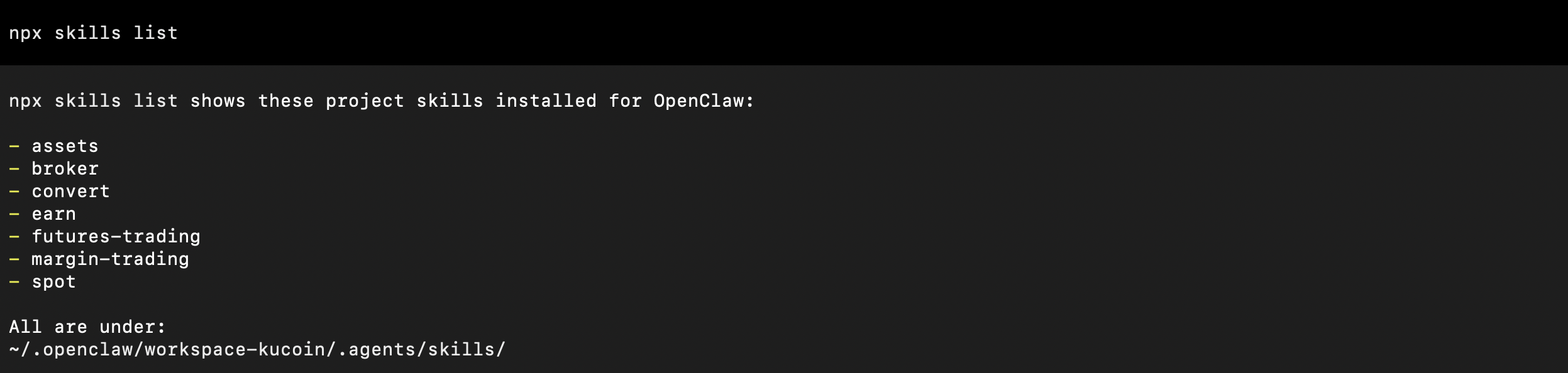
image.png
Notes
This command lists the skills currently available to the active workspace.
Run it after installation to confirm that the expected skills were discovered and linked correctly.

Step 5. Remove unnecessary skills#

Summary
Use the following commands to remove installed skills from the current project workspace.
Remove installed skills interactively:
Notes
Removal behavior may still involve interactive selection depending on the Session CLI flow.
In some cases, manual review of the resulting workspace state may still be required after removal.

Step 6. Review security implications before use#

Summary
Imported skills are executable capability layers inside the active agent environment, so each installed skill should be reviewed before being used in a sensitive workspace.
Notes
During installation, the Skills CLI may display security or risk-assessment results.
Different scanners may produce different conclusions, including:
safe assessments
high-risk flags
socket-related alerts
dependency-related alerts
Because installed skills run with the effective permissions of the active agent and workspace, they should be reviewed before use in environments containing:
API credentials
production trading systems
private data
other sensitive resources
Security Warning
Installed OpenClaw skills run with the effective permissions of the active agent and workspace. Review the skill contents before enabling them in environments containing API credentials, production trading systems, private data, or other sensitive resources.

Usage#

After installation, skills are used through the OpenClaw agent interface rather than as standalone shell commands.
Example 1, after installing spot, an agent can be prompted with requests such as:
 What's the BTC price on KuCoin?                                                                                                           
image.png
Example 2, after installing futures-trading, an agent can be prompted with requests such as:
 Get the Spot Index Price for the BTCUSDT contract.                                                                                        
image.png
In this model, the skill acts as the capability layer that maps an agent request to the corresponding KuCoin API query flow.

Notes#

Skills are organized by business capability and can be installed independently.
The repository currently provides read-only integration only.
Project installation and global installation are distinct scopes.
Skill availability is tied to the OpenClaw workspace or installation scope in which the skill was installed.
The Skills Hub is intended to reduce repeated custom integration work for AI-agent-based KuCoin access.
Skill coverage may expand as additional KuCoin API capabilities are added in the future.
Modified at 2026-03-25 13:43:58
Previous
SDK
Next
Rate Limit