

What Happens When You Get Liquidated Trading Futures? (And How to Never Find Out)
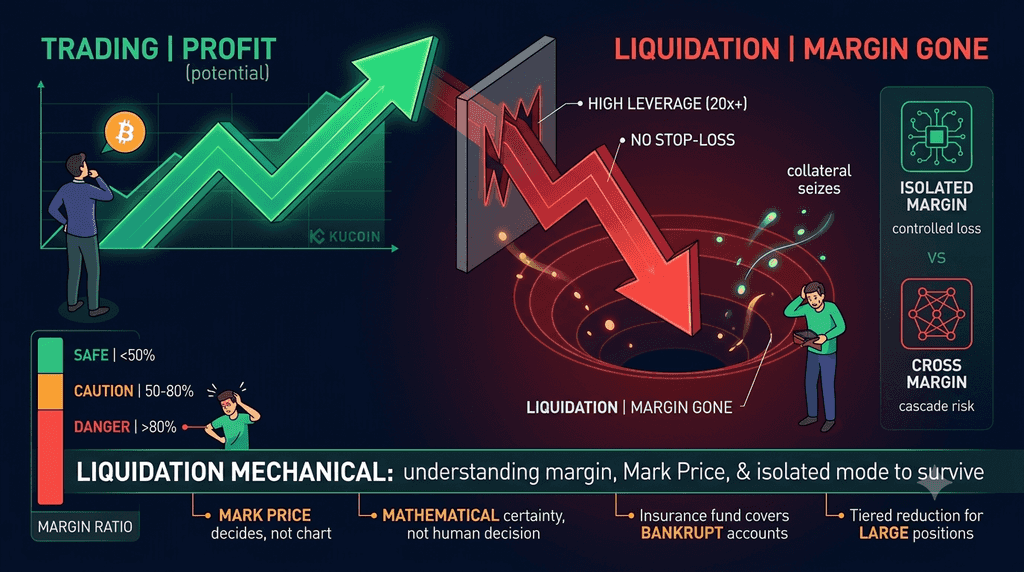
TL;DR — The Brutal Truth
-
When you get liquidated, KuCoin's engine force-closes your position and your margin is gone. Not "transferred." Not "held." Gone.
-
Liquidation triggers when your Margin Balance drops below the Maintenance Margin—a mathematical tripwire, not an opinion.
-
KuCoin uses Mark Price (global fair value) to trigger liquidation, not the Last Price on your chart. Your position can be liquidated even if the candle on your screen never touched your liquidation level.
-
65% of all liquidations happen to traders using 20x leverage or higher without stop-losses.
-
The only way to never find out what liquidation feels like: stop-losses placed far from liquidation price, 3x–5x leverage max, and isolated margin.
The Story Nobody Wants to Tell
It starts with a notification.
You check your phone and see an alert: "Your BTCUSDT Perpetual position has been liquidated." You open the app. Your position is gone. The $500 you put in? Vanished. Not partially lost. Not recoverable. The exchange closed your trade, kept the margin to cover losses, and left you with zero.
This is what happens when you get liquidated. No drama. No negotiation. Just a line in your trade history and a hollow feeling in your stomach.
If you're reading this, you're either researching what happens when you get liquidated because you saw it happen to someone else, or because you're afraid it might happen to you. Either way, understanding the mechanics is the best defense against becoming a statistic. As of early 2026, data from major derivatives platforms shows that over 65% of BTC/USDT liquidations are triggered by traders exceeding 20x leverage without adequate stop-loss buffers.
Let's pull back the curtain on exactly how KuCoin's liquidation engine works—and how to make sure you never meet it.
What "Getting Liquidated" Actually Means
Liquidation is the forced, automatic closure of your leveraged position by the exchange. It happens when your account equity—specifically your Margin Balance—drops below the Maintenance Margin required to keep the position open.
Think of it like a mortgage. You put down a deposit (margin) to control a much larger asset (your leveraged position). The exchange says: "We'll let you control $10,000 worth of Bitcoin with just $500, but you must maintain at least $100 in equity at all times." If your losses eat through that $100 floor, the exchange seizes the collateral and sells the position to prevent further losses.
Two Types of Liquidation
|
Type
|
What Happens
|
When It Occurs
|
|
Partial Liquidation
|
The system closes only a portion of your position to bring margin back above the maintenance requirement.
|
Your margin is slightly below the threshold; the engine tries to save part of your position.
|
|
Total Liquidation
|
Your entire position is closed and your full initial margin is forfeited.
|
Extreme leverage (50x+) or flash crashes where there's no time for partial exits.
|
KuCoin uses a tiered reduction mechanism (also called ladder liquidation) for larger positions. Instead of nuking your whole position at once, the system partially reduces your size, drops you to a lower risk tier, and reassesses. This gives you a fighting chance—something total-liquidation engines don't offer.
The hard truth: Liquidation isn't a bug or an exchange scam. It's a mathematical certainty built into the system. The exchange has no choice—if it let your losses exceed your collateral, it would owe money. Liquidation exists to keep the exchange solvent, not to punish you.
The Four Numbers That Decide Your Fate
To understand liquidation, you need to understand four numbers. KuCoin calculates all of them automatically, but knowing how they work lets you predict your own liquidation before it happens.
1. Initial Margin (IM) — The Cost of Entry
The collateral you deposit to open a position. At 10x leverage on a $10,000 position, your Initial Margin is $1,000.
2. Initial Margin Rate (IMR) — The Percentage
IMR = 1 ÷ Leverage. At 10x leverage, IMR = 10%. At 5x, it's 20%. At 20x, it's 5%.3. Maintenance Margin (MM) — The Point of No Return
The minimum equity you must maintain to keep the position alive. This is typically a fraction of your Initial Margin. On KuCoin, the Maintenance Margin Rate (MMR) for standard BTC positions starts around 0.4%–0.5% of the position's notional value for smaller sizes, rising with position size due to the tiered risk limit system.
4. Liquidation Price — Where It All Ends
The price at which your Margin Balance equals your Maintenance Margin. When the Mark Price touches this level, the liquidation engine activates.
Approximate formula (Isolated Margin, short position):
Liquidation Price ≈ Entry Price × (1 + IMR) ÷ (1 + MMR)
Live example: You short BTC at $64,000 with $1,000 margin at 10x leverage (position size: $10,000). With a 0.5% MMR:
|
Metric
|
Value
|
|
Entry Price
|
$64,000
|
|
Leverage
|
10x
|
|
Position Size
|
$10,000
|
|
Initial Margin
|
$1,000
|
|
Maintenance Margin (~0.5%)
|
~$50
|
|
Liquidation Price
|
~$70,400 (a ~10% rise in BTC)
|
If BTC rises from $64,000 to $70,400, your position is liquidated. Your $1,000 margin is forfeited. Not partially returned. Forfeited.
Mark Price vs. Last Price: The Cruel Difference
Here's where most traders get blindsided. Liquidation is triggered by the Mark Price, not the Last Price on your chart.
What Each Price Means
|
Price
|
What It Is
|
What It Controls
|
Can It Liquidate You?
|
|
Last Price
|
The price of the most recent trade on KuCoin. This is what you see on the candlestick chart.
|
Order fills, chart patterns, realized PnL
|
No
|
|
Index Price
|
A weighted average of BTC spot prices across multiple global exchanges (Binance, Coinbase, Kraken, etc.).
|
Foundation for Mark Price calculation
|
No
|
|
Mark Price
|
A smoothed, manipulation-resistant fair value calculated from the Index Price + funding rate basis.
|
Unrealized PnL, liquidation triggers, margin health
|
Yes
|
Why This Matters
The Last Price can be temporarily distorted by a single large order or a liquidity gap. The Mark Price cannot—it's anchored to the global spot market and smoothed over time. This is a protection mechanism, but it creates a scenario that confuses and angers traders:
Your chart shows BTC at $69,800. Your liquidation price was $70,000. But your position got liquidated anyway.
Why? Because the Mark Price hit $70,000 even though the Last Price (your chart) never did. The Mark Price uses the global Index Price, which can differ from KuCoin's Last Price during volatile conditions.
This is why you cannot eyeball your liquidation level on the chart. You must watch the Mark Price displayed on the KuCoin trading interface, not the candlestick.
Real Numbers: How Much Protection Does Mark Price Provide?
In April 2026, data suggests that over 15% of potential liquidations on major platforms were avoided specifically because the Mark Price protection ignored localized "scam wicks" that didn't reflect the broader market. The Mark Price saved those positions. But for traders whose positions were genuinely underwater, the Mark Price still executed liquidation fairly.
Inside KuCoin's Liquidation Engine: Step by Step
When the Mark Price hits your liquidation threshold, here's exactly what happens—millisecond by millisecond.
Step 1: Trigger Detection (0ms)
KuCoin's risk engine continuously monitors every open position. When your Margin Ratio (Margin Balance ÷ Maintenance Margin × 100%) drops to 100%, liquidation is triggered. At this moment, you can no longer add margin, cancel the closure, or place new orders on the position. The engine has taken control.
Step 2: Tiered Reduction Assessment (<10ms)
If your position is large enough to fall into a higher risk tier, KuCoin doesn't close the entire thing at once. Instead:
-
The engine calculates which risk limit tier your position occupies.
-
It partially reduces your position size to drop you to the next lower tier.
-
It recalculates your Margin Ratio.
-
If you're still below 100%, it repeats the process.
This ladder liquidation is KuCoin's attempt to give you a partial reprieve. It's not guaranteed—if the market is moving too fast, the engine may need to fully liquidate. But for moderately sized positions, you might lose 30% of your size and survive, rather than losing everything.
Step 3: Position Closure (10–100ms)
The engine places a market order to close your position at the best available price. During extreme volatility, this can result in slippage—your position closes at a worse price than expected, increasing your realized loss. This is why liquidated positions often lose more than the theoretical maximum.
Step 4: Margin Distribution (100–500ms)
The closed position's remaining margin (if any) is distributed as follows:
|
Priority
|
Destination
|
Purpose
|
|
1st
|
Cover the position's losses
|
Pays for the adverse price move
|
|
2nd
|
Insurance Fund
|
Replenishes the fund that covers bankrupt positions (where losses exceed margin)
|
|
3rd
|
Trader's wallet
|
Any leftover margin is returned (rare after full liquidation)
|
KuCoin maintains an Insurance Fund specifically to cover positions where liquidation slippage exceeds the trader's margin. If your position goes "bankrupt" (losses > margin), the Insurance Fund covers the shortfall—not other traders.
Step 5: Notification (1–5 seconds)
You receive a push notification, email, and in-app alert: "Your BTCUSDT Perpetual position has been liquidated." Your position tab shows the closure. Your margin balance is updated. The entire process, from trigger to notification, takes less than 5 seconds. There's no human review. No appeal process. No "but the chart never touched that price."
Isolated vs. Cross Margin: Two Very Different Deaths
The type of liquidation you experience depends entirely on your margin mode.
Isolated Margin: The "Controlled Burn"
Your position has its own dedicated margin. If liquidated, only that margin is lost. The rest of your KuCoin Futures wallet is untouched.
Example: You have $2,000 in your futures wallet. You allocate $300 to a BTC short at 10x. The position is liquidated. You lose the $300. Your remaining $1,700 stays safe.
This is the beginner-friendly mode. It caps your maximum loss to what you explicitly allocated, functioning like a circuit breaker for your account.
Cross Margin: The Cascade Wipeout
Your entire futures wallet backs all positions. Profits from one trade can cover losses from another, but a single catastrophic position can drain everything.
Example: You have $2,000 in your futures wallet. You open a BTC short using cross margin. BTC rallies hard. The system pulls from your entire $2,000 balance to avoid liquidation—until there's nothing left. All positions may be liquidated simultaneously.
The danger zone: KuCoin displays your Risk Rate in real time for cross margin positions. When it hits 95%, the system starts canceling your open orders to free up margin. At 100%, liquidation triggers.
|
Feature
|
Isolated Margin
|
Cross Margin
|
|
Collateral
|
Fixed per position
|
Entire account balance
|
|
Liquidation Impact
|
Only that position's margin lost
|
Can wipe entire account
|
|
Risk Control
|
Hard cap per trade
|
Flexible but dangerous
|
|
Best For
|
Beginners, short sellers, high-leverage trades
|
Hedgers, multi-position pros
|
|
Risk Display
|
Per-position margin ratio
|
Account-wide Risk Rate (liquidation at ≥100%)
|
Verdict: If you're reading this article because you're afraid of liquidation, you should be using Isolated Margin exclusively. Cross margin is for professionals running hedged strategies. Period.
How to Never Find Out: The Stop-Loss Strategy That Actually Works
Now for the part that matters: how to never experience any of this.
Rule 1: Place Your Stop-Loss Far From Liquidation
The most common mistake: setting a stop-loss near your liquidation price. If your stop is at $69,500 and liquidation is at $70,000, a volatile wick can liquidate you before your stop triggers.
The buffer rule: Your stop-loss should be at least 3–5% away from your liquidation price (at 10x leverage). This gives the stop room to execute before the liquidation engine activates.
|
Leverage
|
Min Stop-to-Liquidation Buffer
|
Example (Entry $64K)
|
|
3x
|
~20% price move
|
Stop at $74K, liquidation at ~$83K
|
|
5x
|
~12% price move
|
Stop at $70K, liquidation at ~$76K
|
|
10x
|
~5% price move
|
Stop at $67K, liquidation at ~$70K
|
|
20x
|
~2% price move
|
Stop at $65.5K, liquidation at ~$67K
|
|
50x
|
~0.8% price move
|
Almost no buffer—liquidation is imminent
|
The higher your leverage, the less room you have. At 20x, a 2% adverse move kills you. At 50x, a single wick ends your trade. This is why the only sustainable leverage is 3x–5x.
Rule 2: Use Market Stop-Losses (Not Stop-Limits)
-
Stop-Market: Triggers a market order when your stop price hits. Guaranteed to execute, though slippage is possible. Use this for liquidation protection.
-
Stop-Limit: Triggers a limit order. If the market gaps past your limit price, you won't get filled. Your position stays open while the price races toward liquidation. Dangerous for liquidation defense.
On KuCoin: When setting your TP/SL, ensure the stop-loss is configured as a market order (the default on most platforms). Check the order type before confirming.
Rule 3: Monitor Your Margin Ratio (Not Just PnL)
On the KuCoin Futures interface, your Margin Ratio is displayed in real time:
|
Zone
|
Margin Ratio
|
What It Means
|
|
Safe
|
< 50%
|
Comfortable buffer. Sleep well.
|
|
Caution
|
50–80%
|
Position is moving against you. Consider reducing size or adding margin.
|
|
Danger
|
> 80%
|
High liquidation risk. Act immediately—add margin, reduce position, or close.
|
Don't just watch your PnL. Watch your Margin Ratio. It's the only number that tells you how close you are to the edge.
Rule 4: Never Move Your Stop "Just a Little"
The most expensive four words in trading: "I'll move my stop." You set a stop-loss for a reason—because you decided, in a calm moment, where your thesis would be invalidated. Moving it to avoid getting stopped out is how $100 losses become $1,000 liquidations. Honor your original plan. The market doesn't care about your opinion.
Rule 5: Use KuCoin's Demo Account First
Before risking real money, open a KuCoin Futures Demo account. Place a trade with 10x leverage. Set a stop-loss. Watch how fast the Margin Ratio changes. See the liquidation calculator in action. Feel what it's like to have a position move 5% against you—without the financial pain. Only move to real capital after 20+ demo trades with consistent risk management.
Conclusion
Understanding what happens when you get liquidated isn't morbid curiosity—it's survival training. KuCoin's liquidation engine is a relentless, automated system that operates on math, not mercy. When your Margin Balance drops below Maintenance Margin, the engine triggers. When the Mark Price hits your liquidation threshold, your position closes. When slippage exceeds your margin, the Insurance Fund covers the gap. Your money is gone in under 5 seconds.
But here's the good news: liquidation is entirely preventable. The traders who never find out what it feels like follow five simple rules: use 3x–5x leverage, place stop-losses far from liquidation, monitor the Margin Ratio, use Isolated Margin, and never move a stop to avoid getting hit. The 65% of liquidated traders using 20x+ leverage aren't unlucky—they're underprepared.
Don't be a statistic. Open a KuCoin Futures Demo account, watch the Mark Price and Margin Ratio in action, and practice the rules above with virtual capital. The only way to truly understand liquidation is to see the mechanics up close—without feeling the pain.
FAQs
Can I recover my margin after liquidation?
No. Once liquidation occurs, your margin is used to cover losses and potentially replenish the Insurance Fund. There is no appeal process, no human review, and no refund. This is why prevention—through stop-losses and conservative leverage—is the only strategy.
Why was I liquidated when the price never touched my liquidation level?
Because liquidation uses the Mark Price, not the Last Price on your chart. The Mark Price is derived from a global index of spot exchanges and can differ from KuCoin's Last Price. If the global spot market hit your liquidation level—even if KuCoin's last trade didn't—the engine triggers. In April 2026, this Mark Price protection actually saved ~15% of positions from unfair liquidation during localized wicks, but it also means you must monitor Mark Price, not just your chart.
What's the difference between partial and total liquidation?
Partial liquidation closes only a portion of your position to bring your Margin Ratio back above 100%. You keep the rest of your position (and some margin). Total liquidation closes your entire position and forfeits all margin. KuCoin's tiered system attempts partial liquidation first for larger positions, but total liquidation is inevitable at extreme leverage (50x+).
Does KuCoin's Insurance Fund protect me?
Not directly. The Insurance Fund covers "bankrupt" positions where liquidation slippage exceeds the trader's margin. It ensures the exchange remains solvent and other traders aren't affected by someone else's blown account. It does not prevent your liquidation or return your margin.
What leverage is actually safe?
3x–5x maximum for 95% of traders. At 3x, BTC can move ~30% against you before liquidation. At 5x, ~18%. At 10x, ~9%. Given Bitcoin's average daily volatility of 3–5%, 10x puts you within liquidation range on a normal day. The 65% of liquidations happening at 20x+ tell the story: high leverage is a statistical guarantee of eventual ruin.
Can I add margin to avoid liquidation?
Yes—if you catch it in time. In Isolated Margin mode, you can manually add USDT to a specific position, which increases your Margin Balance and pushes your liquidation price further away. In Cross Margin, transferring more USDT into your futures wallet has the same effect. But once your Margin Ratio hits 100%, it's too late. The engine takes over.