
Lead Trader's Guide to Futures Trading
How to Become a Lead Trader
Now you can become a Lead Trader on the KuCoin App by following the steps below and let other users copy your trades.
1. Open the KuCoin App, log in to your KuCoin account, and tap on Markets > Copy Trading.
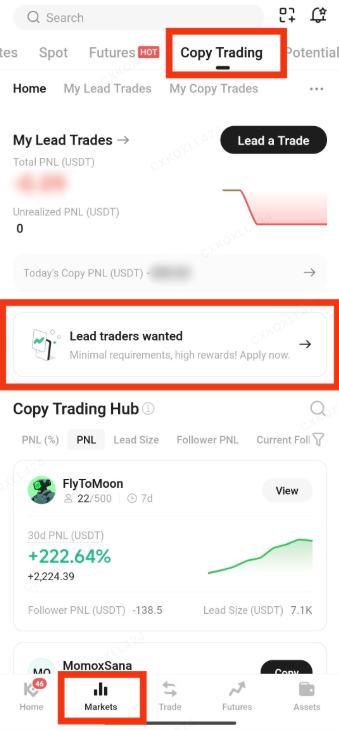

2. Tap on "Lead traders wanted" to submit your application.
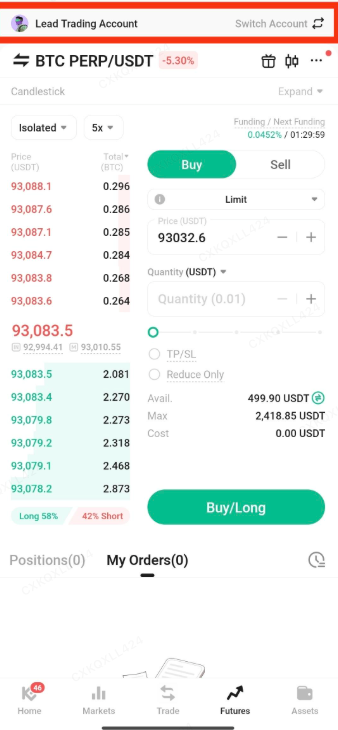
3. Once approved, a lead trading account will automatically be created for you. You can transfer funds to this account.
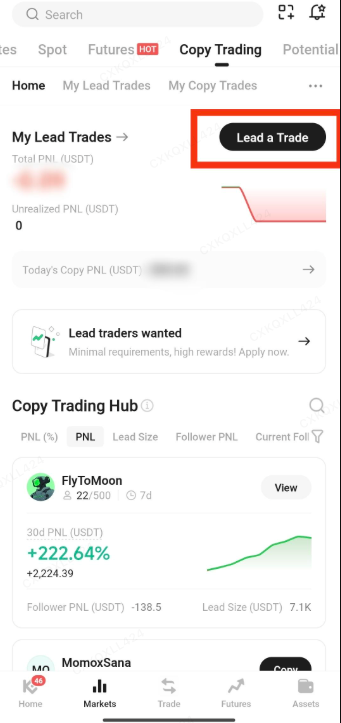
4. Tap on "Lead a Trade" to access the lead trading page for futures.
Lead Trader Management
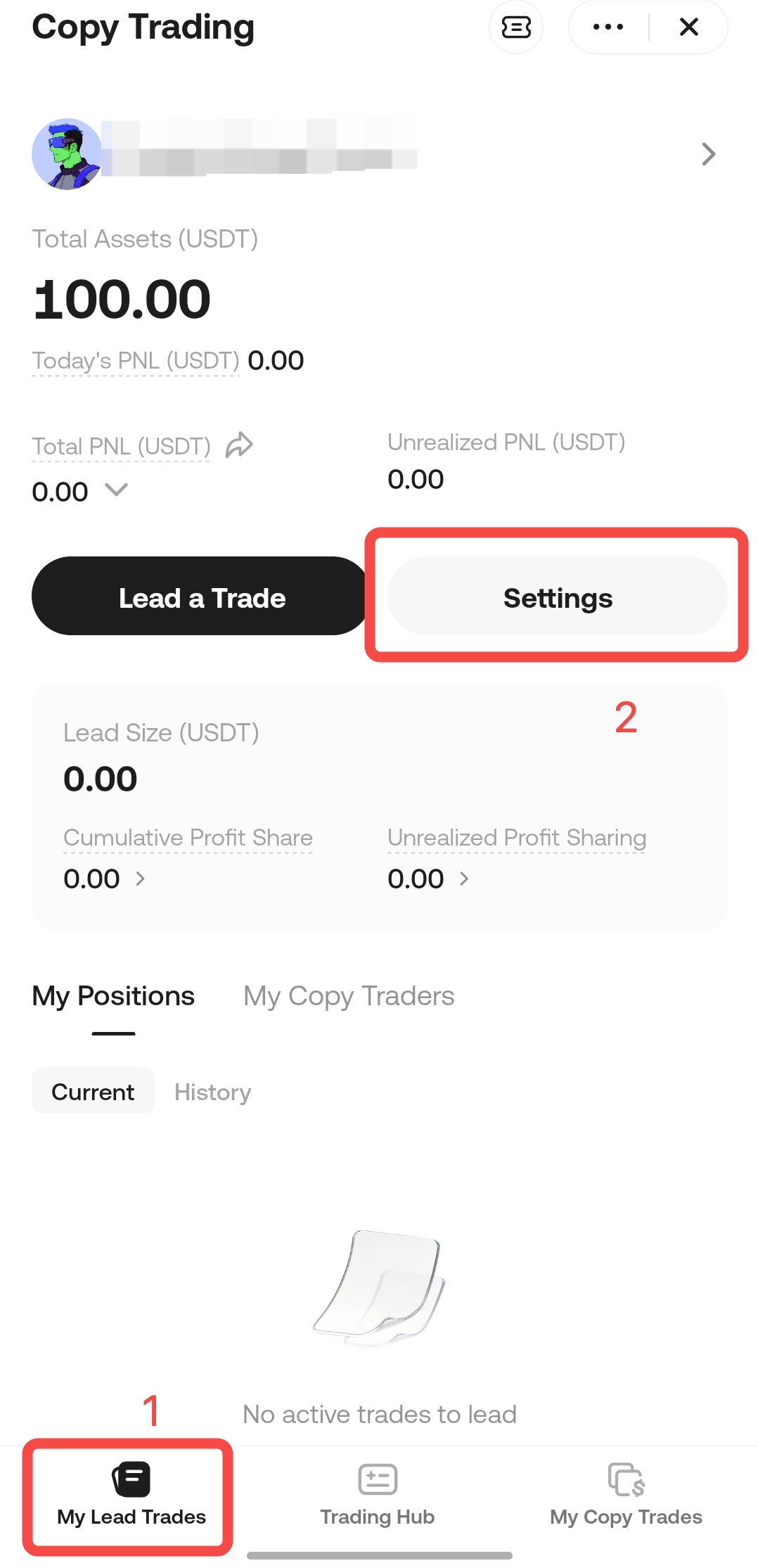
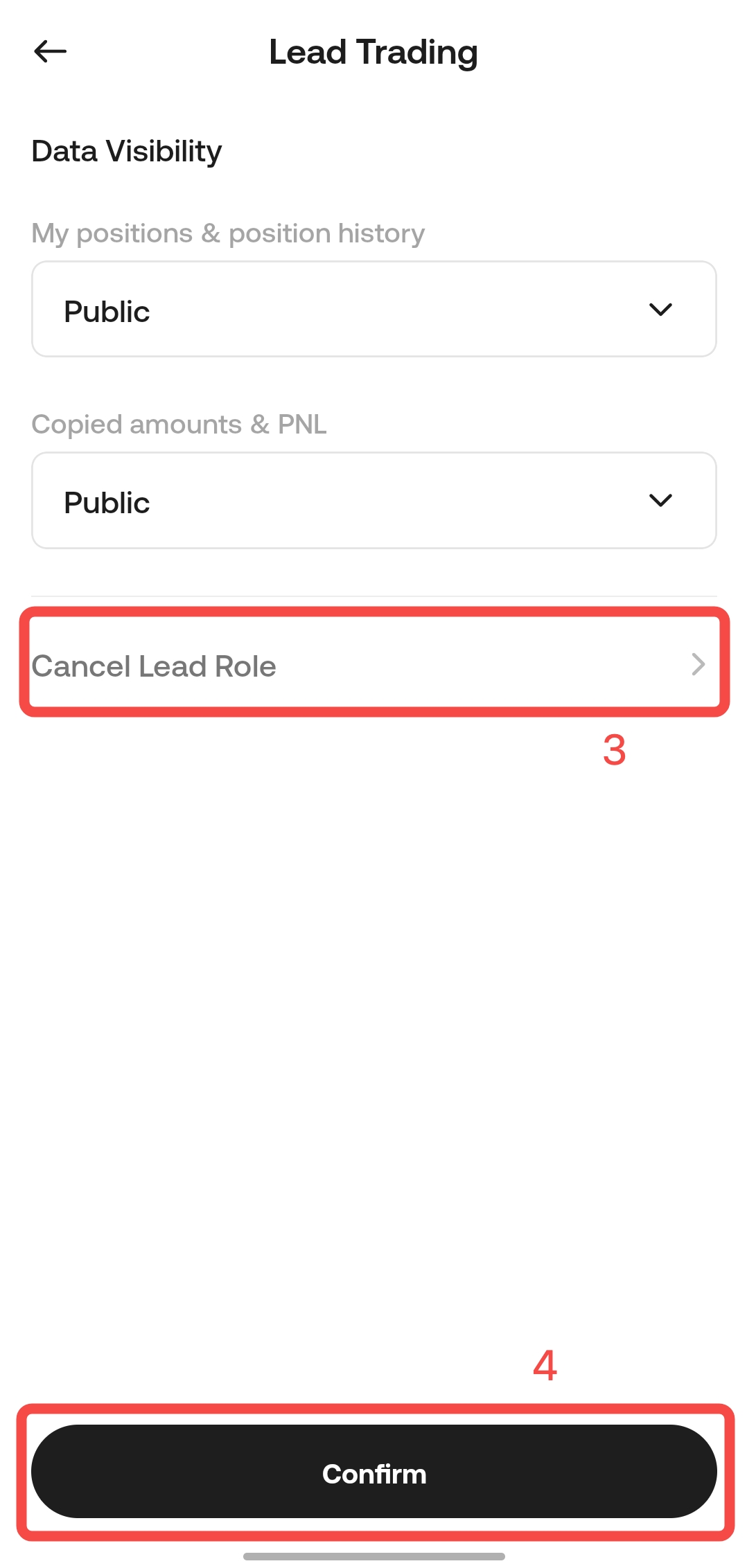
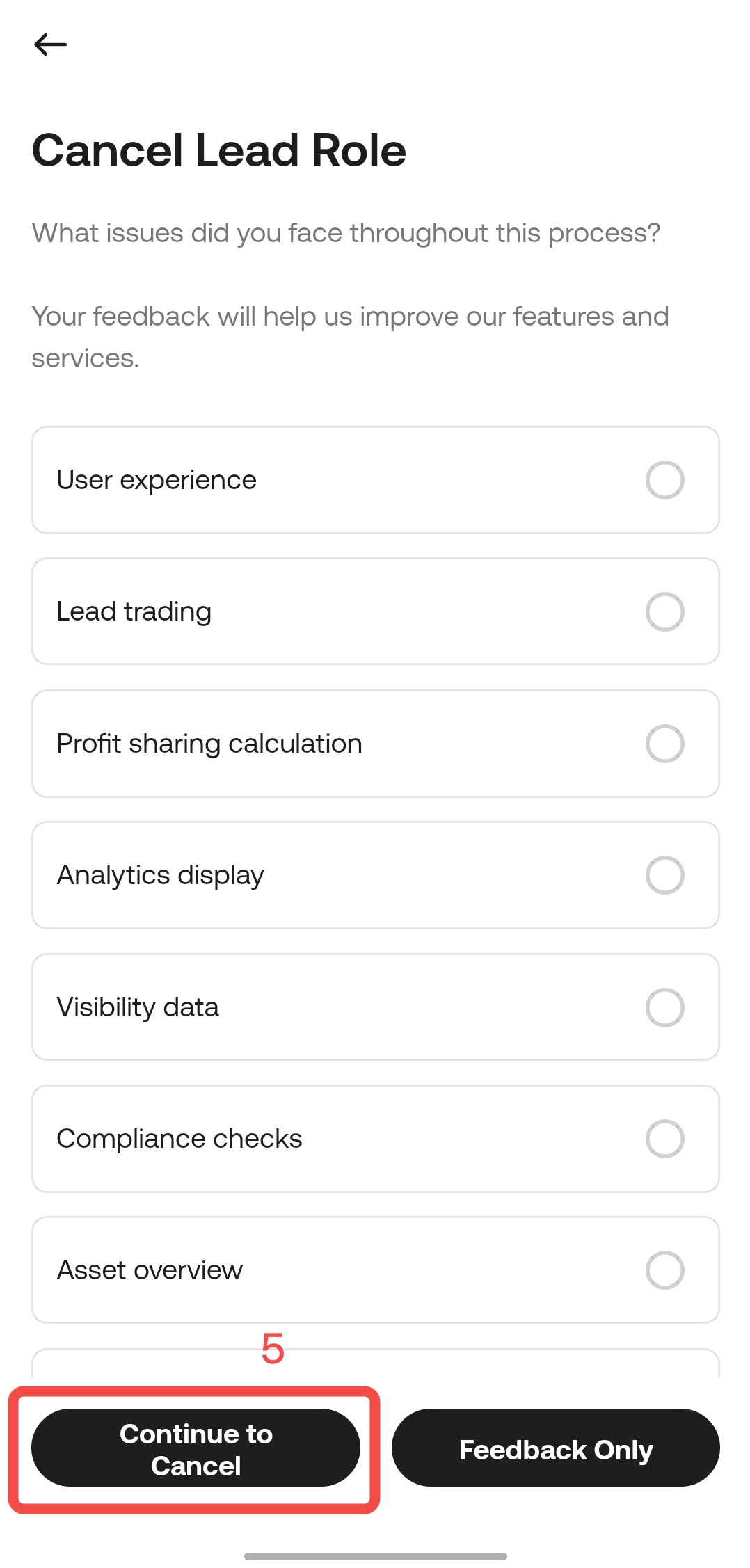
Tap on "My Lead Trades" > "Nickname" to access your lead trader profile, where you can view trade details and other actions.
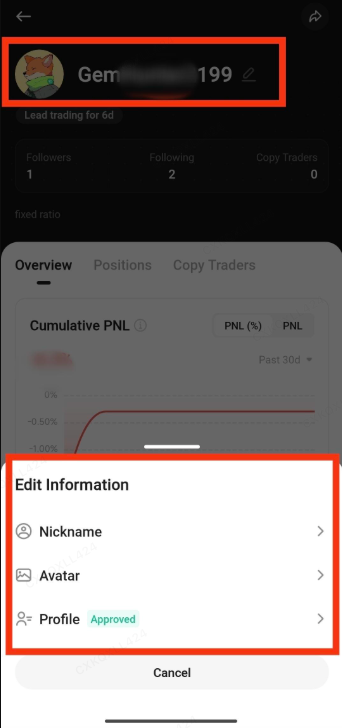
Currently, Nickname, Profile Picture, and Bio are available for editing.
Lead Trader Risk Management
Leverage Limit: The maximum leverage that lead traders can use is restricted based on the AUM (Assets Under Management) of their copy traders.
-
When a lead trader’s copy trading AUM is less than 100,000 USDT, the leverage will be limited by the lower of:
-
the AUM-based leverage limit (no additional restriction at this level),
-
the maximum leverage of the contract pair, and
-
the leverage cap corresponding to the trader’s risk limit tier.
-
-
When a lead trader’s copy trading AUM is between 100,000 USDT and 400,000 USDT (inclusive), the lead trader can only use up to 20x leverage.
-
When a lead trader’s copy trading AUM exceeds 400,000 USDT, the lead trader can only use up to 10x leverage.
- AUM-based leverage limits are as follows:
|
AUM (USDT)
|
AUM Leverage Restriction
|
|
AUM < 100,000 USDT
|
No additional restriction
|
|
100,000 USDT ≤ AUM ≤ 400,000 USDT
|
LV1 restriction (max = 20x)
|
|
AUM > 400,000 USDT
|
LV2 restriction (max = 10x)
|
- AUM (Assets Under Management) definition: The total assets of all active copy traders following a lead trader.
Follower Limit: The maximum number of followers is 1,000.
Risk Handling: The system will monitor indicators such as position opening frequency, ROI, maximum drawdown ratio, and risk exposure. In the case of rule violations, KuCoin may suspend or freeze the account.
Profit Sharing for Lead Trader
Lead traders can share profit from followers’ PNL. The specific rules are as follows:
- Daily profit sharing settlement. Settlement Time: every day at 00:00 (UTC+0).
- Profit sharing will be automatically distributed daily to the KuCoin spot trading account of the trader.
- Profit sharing is calculated based on the followers’ cumulative realized PNL.
- If settlement cannot be completed due to an open position, it will be postponed to the position closing date.
- When a follower stops copying, or the lead trader cancels a lead trade, profit sharing distribution also occurs.
- If the copier’s available balance is lower than the profit-sharing amount, causing the transfer to fail, the system will retry the transfer until the full profit-sharing amount is successfully transferred.
Profit Sharing Formula:
It is calculated based on the follower’s cumulative realized PNL. Realized PNL, minus fees, funding fee, and taxes (if any), is distributed according to the profit-sharing ratio.
- When cumulative realized PNL exceed distributed PNL, the lead trader’s share is calculated as: (Followers' Cumulative Realized PNL - Distributed PNL) × Profit-Sharing Ratio
- When cumulative realized PNL are less than or equal to distributed PNL, the lead trader’s share is zero, meaning no profit-sharing.
Example: A follower starts copying on DAY 1, with a profit-sharing ratio of 10%. Multiple trades are completed daily, and the cumulative daily PNL and profit sharing are shown below.
| Time (UTC+0) | Cumulative Realized PNL | Distributed PNL | Profit Sharing for Lead Trader | Profit Sharing Formula |
| DAY 1 - Start of Copy Trade | - | - | - | - |
| DAY 2 00:00 | +300 | 0 | 30 | When 300 > 0, lead trader’s share = (300 - 0) * 10% = 30 |
| DAY 3 00:00 | +50 | 300 | 0 | When 50 ≤ 300, lead trader’s share = 0 |
| DAY 4 00:00 | +200 | 300 | 0 | When 200 ≤ 300, lead trader’s share = 0 |
| DAY 5 00:00 | +400 | 300 | 10 | When 400 > 300, lead trader’s share = (400 - 300) * 10% = 10 |
| DAY 6 00:00 | +300 | 400 | 0 | When 300 ≤ 400, lead trader’s share = 0 |
How to View Profit Sharing Records?
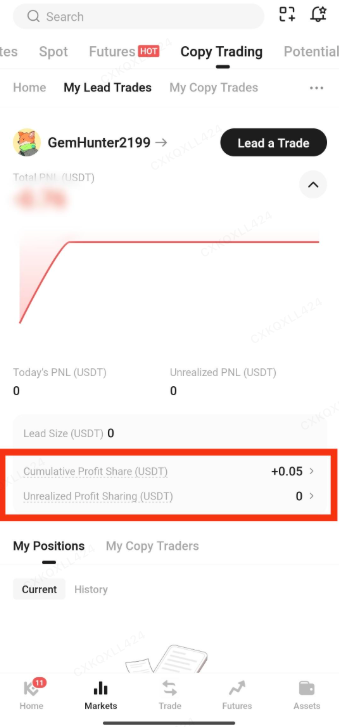
You can view the profit sharing records via the lead trader profile:
Go to "My Lead Trades" > "Cumulative Profit Sharing" for detailed records.
Lead Trader Performance Indicators
| Indicator | Explanation |
| Profit and Loss (PNL) | The total PNL of the lead trader. PNL = Ending Assets - Beginning Assets + Withdrawals During Period - Deposits During Period |
| PNL Rate (PNL%) |
Calculated using the fund net asset value method.
|
| Total PNL of Followers | Follower’s realized profit and loss (net of fees and funding fee) + unrealized profit and loss (net of fees) - profit sharing amount |
| Lead Trading Principal Amount | Total assets in the lead trader’s lead trading sub-account |
| Assets Under Management (AUM) | Total investment amount from lead trades |
| Trading Frequency | Number of times the lead trader opens and closes positions |
| Time Held | Duration and profit/loss status for each opened and closed position |
| Preferred Assets | Reflects the lead trader’s cryptocurrency preferences, based on the proportion of each cryptocurrency’s closed trade volume. |
Please note that performance indicator data for lead traders is updated every hour.