
How to Trade Prediction Markets on KuCoin: A Step-by-Step Guide
Beginner
Prediction markets let you trade on the outcomes of real-world events — and with KuCoin Predictions, you can do it without leaving the KuCoin App. This tutorial walks through the complete process step by step: entering Predictions, choosing an event market, reviewing the rules and prices, selecting Yes or No, entering an amount and confirming your order, viewing your position, and finally selling early or waiting for settlement. It's written for eligible KuCoin users placing their first prediction market trade.
What Is KuCoin Predictions?
KuCoin Predictions lets users access supported prediction markets through KuCoin's integration with Polymarket. KuCoin provides the in-app interface, technical integration, and related account functions; the specific markets, prices, liquidity, order execution, and results are not independently determined by KuCoin. In a normally resolved binary market, each winning share settles at $1 and each losing share settles at $0.
Step 1: Enter Predictions
-
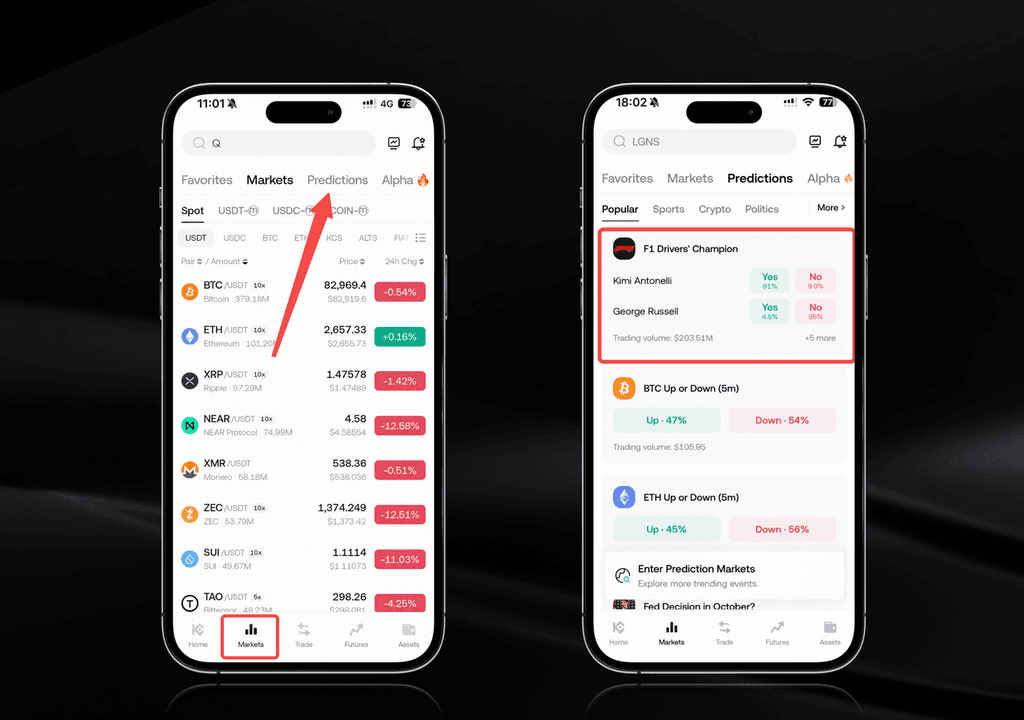
Open the KuCoin App and sign in;
-
Tap Markets at the bottom;
-
Select Predictions at the top;
-
Browse the prediction markets available to you — availability may change over time.
Step 2: Choose an Event Market
Each market corresponds to a Polymarket market with its own question, possible outcomes, and resolution rules. Not every Polymarket market may be displayed to you, and each has its own availability period. Pick a market you genuinely understand — you'll be trading on how its specific question resolves.
Step 3: Review the Rules and Prices
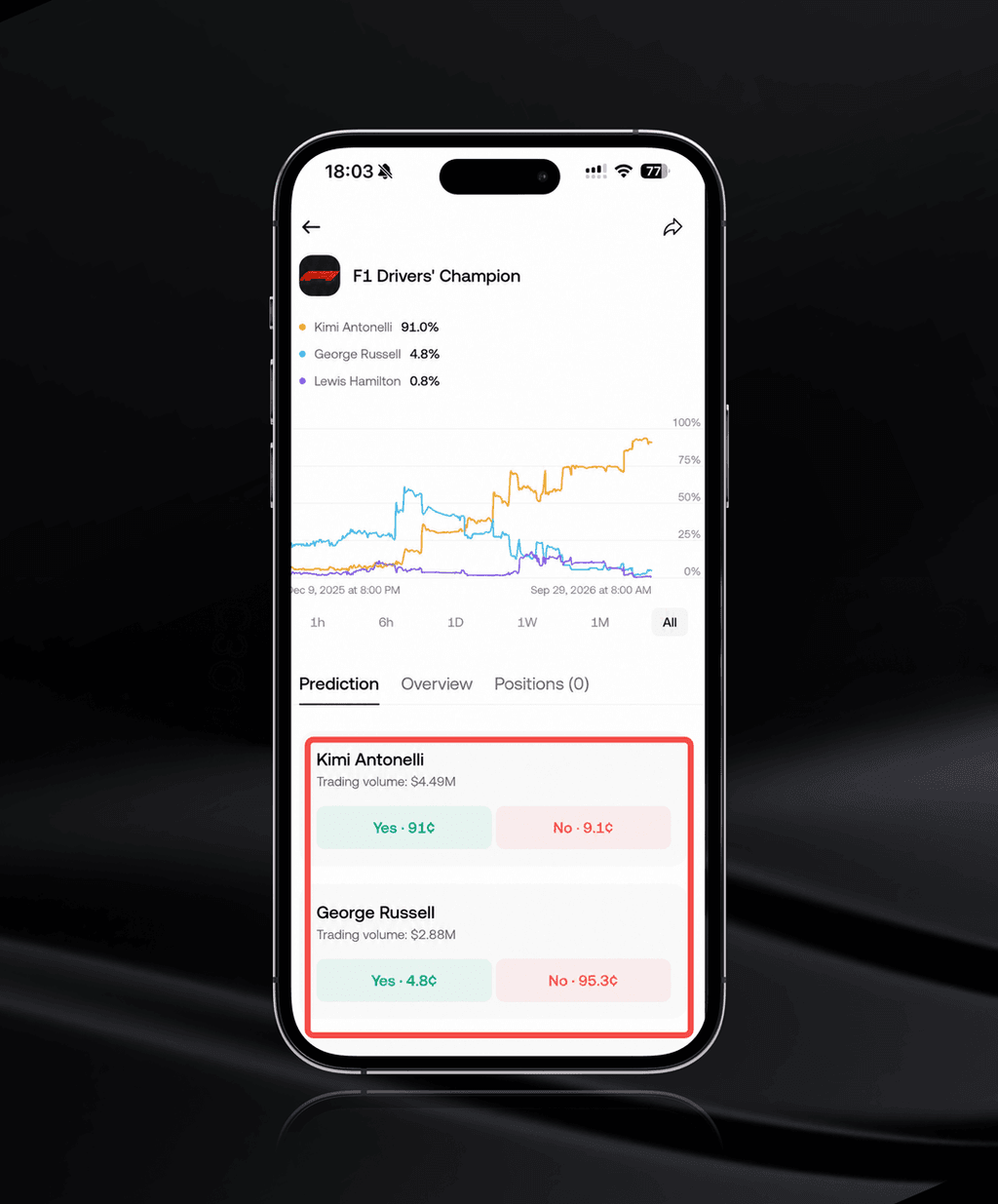
This is the step most beginners skip — and the one that matters most. Before trading, read the market's complete question and rules, and check the current displayed prices for each outcome. Keep in mind:
-
A displayed outcome price reflects current trading activity and participant expectations in the corresponding Polymarket market. It is not KuCoin's prediction and does not guarantee the result;
-
Similar-looking markets can differ in deadlines, outcome definitions, or result sources — read the full rules, not just the title.
Step 4: Choose Yes or No
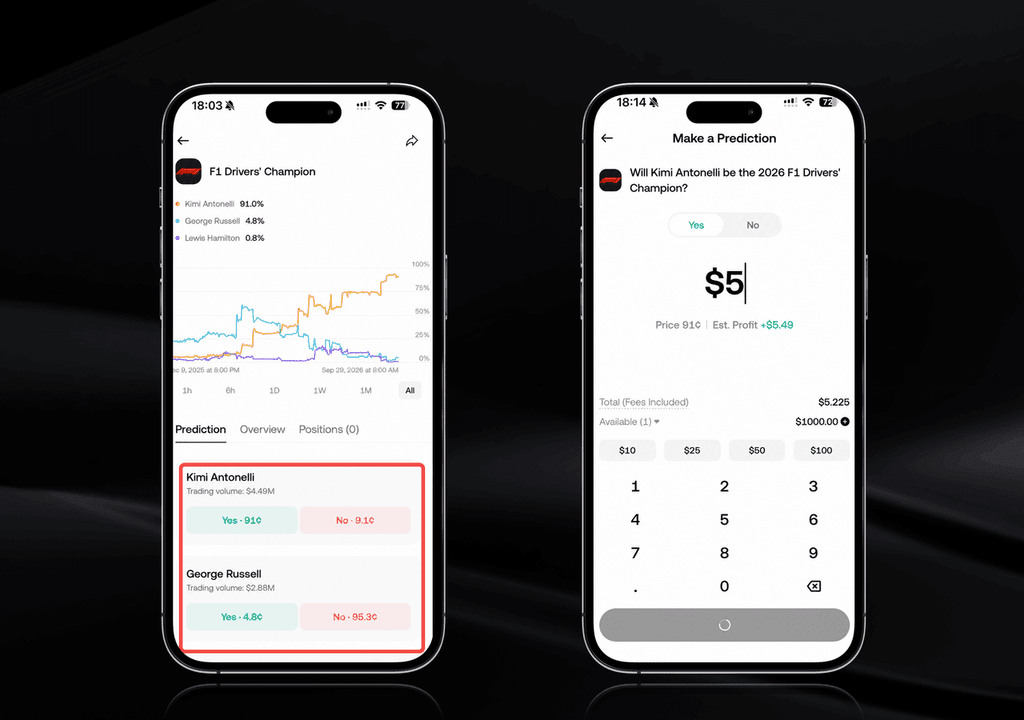
Select the outcome you want to trade. Your choice should reflect your own assessment of how the event will resolve under the market's published resolution rules — not which side currently looks popular.
Step 5: Enter an Amount and Confirm Your Order
-
Enter the amount of USDT you want to use;
-
Select your source account — Funding Account is selected by default; if you choose your Financial Account or Trading Account, the required USDT is transferred automatically to your Funding Account;
-
Review the estimated price, estimated shares, and any applicable fees;
-
Confirm and submit the order.
Important execution details:
-
Predictions currently supports market orders only — once submitted, an order cannot be canceled;
-
Execution depends on the prices and liquidity available in the corresponding Polymarket market. Within applicable price-protection limits, an order may be fully filled, partially filled, or unfilled;
-
The final execution price and shares received may differ from the displayed estimate — always check the completed order record.
Step 6: View Your Position
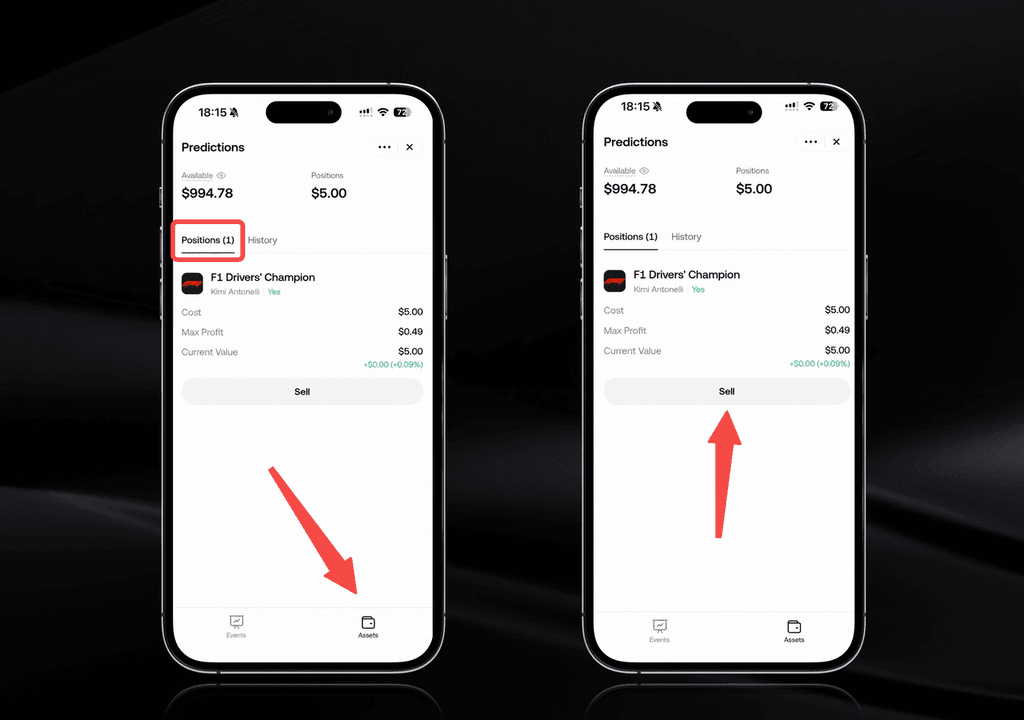
Go to Predictions > Assets to see your open position. Your trading history, market status, and settlement records are also shown there, so this page is your home base for tracking performance.
Step 7: Sell Early or Wait for Settlement
You have two ways to realize a result:
Option A — Sell early. If selling is available, you can submit a new market order to sell your position before trading ends: open the position under Predictions > Assets, review the estimated execution price and proceeds, and confirm. Note that an early exit is not guaranteed — it depends on market status, liquidity, and price protection, and a sell order may also be partially filled or unfilled.
Option B — Hold to settlement. The result is finalized under the corresponding Polymarket market's resolution rules (KuCoin does not independently determine the outcome). After normal resolution, each winning share settles at $1 and each losing share settles at $0. Once settlement is confirmed, any applicable proceeds are credited automatically to your Funding Account — regardless of the source account you selected — with no manual on-chain redemption required.
A note on timing: settlement may not occur immediately after the underlying event ends, because the result may still need to be confirmed or reviewed. Check Predictions > Assets > History for the settlement record.
Pre-Trade Checklist: Verify Before Every Order
Before you tap Confirm, take thirty seconds to verify:
-
✅ The complete market question and exact outcome you selected;
-
✅ The resolution criteria and result source — i.e., the settlement conditions;
-
✅ The trading deadline;
-
✅ The estimated execution price and shares;
-
✅ Any applicable fees and trading limits.
Supported markets, fees, and trading rules are subject to the information displayed on the product page at the time of use.
Conclusion
Trading on KuCoin Predictions follows a simple loop: enter via Markets > Predictions, pick an event market, read the rules and prices, choose Yes or No, enter your USDT amount, confirm the order, then track your position and either sell early or wait for settlement. The two habits that protect you are reading each market's full resolution rules and checking your completed order records — because orders can't be canceled, and settlement always follows the published rules.
FAQs
How do I trade prediction markets on KuCoin?
Open the KuCoin App, go to Markets > Predictions, select a market and read its rules, choose Yes or No, enter a USDT amount, select your source account, review the estimated price and fees, and confirm. You can then track your position under Predictions > Assets.
Which account funds my prediction market trades?
Trades use USDT in your Funding Account, which is selected by default. If you choose your Financial Account or Trading Account as the source account, the required USDT is transferred automatically to your Funding Account when you place the order.
Can I cancel a prediction market order?
No. Predictions currently supports market orders only, and once an order is submitted it cannot be canceled. Depending on liquidity within price-protection limits, the order may be fully filled, partially filled, or unfilled.
Can I sell my position before the event ends?
If selling is available, yes — you can submit a new market order to sell before trading ends. However, an early exit is not guaranteed and depends on market status, liquidity, and price protection. The sell order may be partially filled or unfilled.
How does settlement work on KuCoin Predictions?
After the result is finalized under the market's resolution rules, winning shares settle at $1 each and losing shares at $0. Proceeds are credited automatically to your Funding Account — no manual redemption needed. View records under Predictions > Assets > History.
Disclaimer: The information on this page may come from third parties and does not necessarily reflect KuCoin’s views. It is provided for general reference only and should not be interpreted as financial or investment advice.
Virtual asset investments may involve risk. Please carefully assess the product risks and your own risk tolerance. For more information, please refer to our Terms of Use and Risk Disclosure.