
“Your AI Assistant—or a Trojan in Disguise?”
Beginner
AI is rapidly transforming our digital lives.
More and more users are beginning to use AI assistants connected to their local computers, allowing AI to automatically organize files, analyze trades, process emails, and even connect to wallets and trading tools. AI is evolving from a “chat tool” into a “digital agent” with system-level operational permissions.
However, while efficiency improves, a new risk is quietly emerging: when AI gains access to your system, it may also become an entry point for hackers into your accounts. For crypto users, this is not just a privacy risk—it may directly result in account compromise and loss of funds.
I. When AI Has System Permissions, All Your Secrets May Be Exposed
-
Many locally deployed AI assistants can essentially: read local files, execute system commands, access browser data, call APIs, automatically log in to websites, and operate wallets or trading tools.
-
This means they can access: mnemonic phrases, private key files, trading passwords, email verification codes, API keys, browser-saved account credentials, local documents, screenshots, and other sensitive information. Once an AI tool is implanted with malicious code, this information may be silently stolen.
-
Characteristics of AI-based attacks:
-
The attack process is highly covert: no pop-ups, no warnings, no abnormal notifications
-
Malicious programs run in the background: silently collecting data, silently sending it to attackers, silently waiting for the right moment
Users often do not notice any abnormalities, while attackers may already have full control of the account.
II. Malicious AI Plugins Can Steal Wallet and Exchange Account Data
🔎 Security researchers recently discovered that within one AI assistant plugin ecosystem:
-
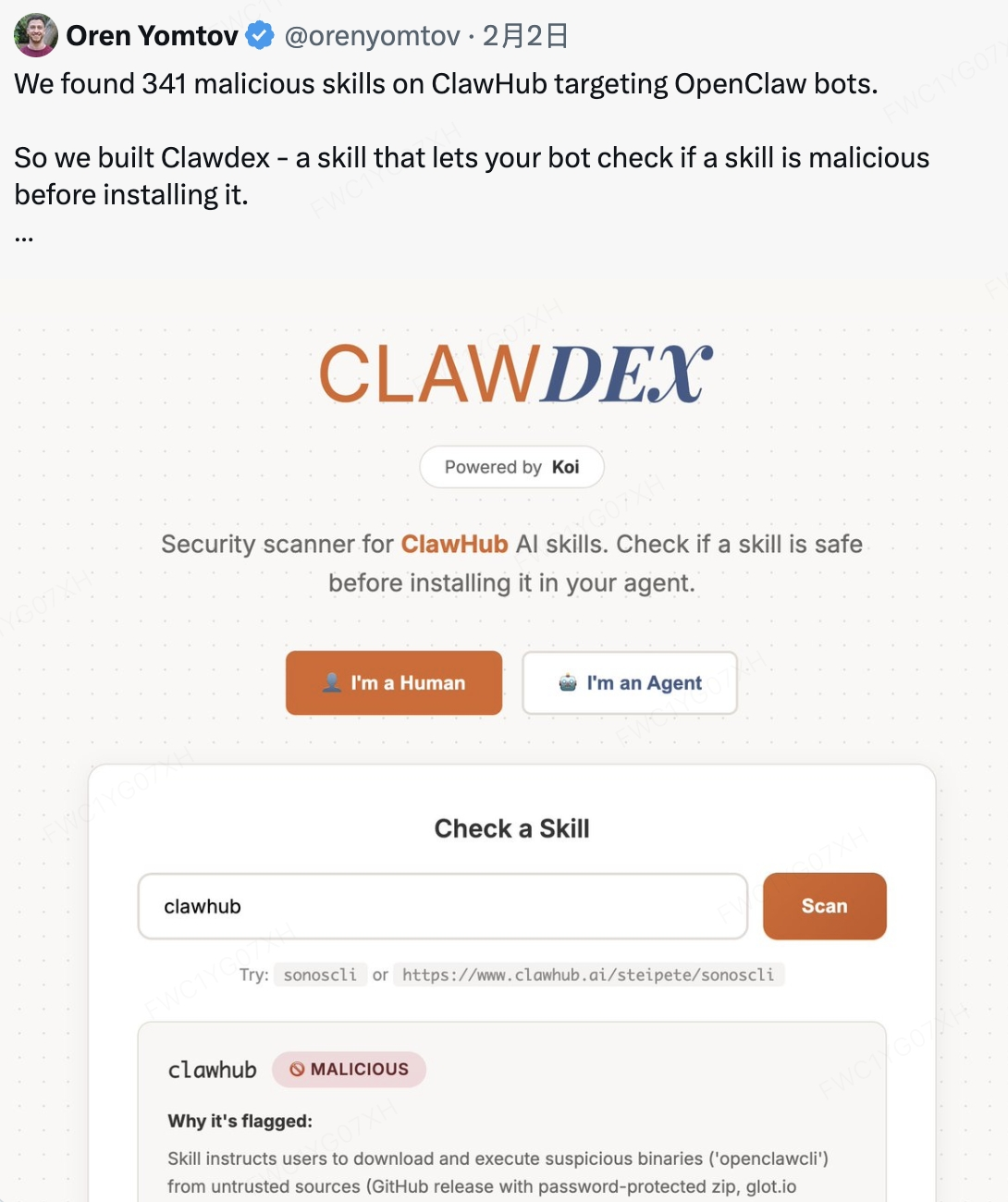
341 Malicious Clawed Skills Found by the Bot
More than 300 malicious AI plugins were identified.
- Malicious programs can steal: browser passwords, crypto wallet data, SSH keys, API keys, local files, and chat records.
- Some malicious programs even have: key logging capabilities, remote control capabilities, and backdoor access capabilities.
- Attackers can: directly read wallet files, obtain exchange login credentials, capture email verification codes, reset account passwords, and ultimately transfer assets.
‼️ The entire process does not require active user authorization.
III. Why AI Assistants Have Become a New Target for Attackers
The reason is simple: AI assistants have higher permissions and broader data access than ordinary software. Traditional malware can only steal limited data.
However, AI agents can access: including but not limited to file systems, browsers, email, wallets, chat records, and API permissions.
They are essential: automated executors with system administrator-level access. Once compromised, it is equivalent to attackers gaining control over your entire computer.
IV. Real Risks Faced by Crypto Users
If your AI assistant is implanted with malicious programs, attackers may obtain:
-
Mnemonic phrase leakage: mnemonic phrase = full control of the wallet Attackers can: restore the wallet and transfer all assets
-
Exchange account takeover Attackers can obtain: login passwords, email verification codes, API keys Then: log in to the account ➝ modify security settings ➝ withdraw and transfer assets
-
API key theft Attackers can: execute trades, create malicious orders, manipulate account funds
-
Email account compromise Email is the core of account security. Attackers can: reset exchange passwords ➝ take over multiple accounts
V. 7 Key Measures to Protect Your Account Security
To protect your account and asset security, please strictly follow these security principles:
-
Never store mnemonic phrases or private keys in AI tools
- ❌Avoid: entering mnemonic phrases in AI chats, saving mnemonic phrases in plaintext on your computer, storing mnemonic phrases in local files
- ✅Recommended: use offline storage methods and hardware wallets
-
Do not allow AI tools to access wallet files
- ❌Avoid: placing wallet files in public directories or granting AI read permissions.
-
Use a separate device for trading
- ✅Recommended: do not install experimental AI tools on trading devices. Separate AI usage devices and trading devices.
-
Do not install unknown AI plugins or skills
- 🧐Especially: plugins from unofficial sources, unverified GitHub projects, or tools that require running shell scripts
- ⚠️Attackers often use fake plugins, fake tools, and fake update programs to implant malware
-
Enable all KuCoin security features
- Including: login password, trading password, 2FA two-factor authentication, and Passkey authentication. These measures can effectively reduce risks
-
Do not expose API keys to AI tools
- ✅If necessary: restrict permissions and disable withdrawal permissions
-
Regularly check device security
- Including: installed software, browser plugins, and abnormal login activity
⚠️ Please remember: any software with system-level permissions may become an attack entry point.
Especially in the crypto world: once mnemonic phrases or account credentials are compromised, assets may be permanently lost.
Disclaimer: The information on this page may come from third parties and does not necessarily reflect KuCoin’s views. It is provided for general reference only and should not be interpreted as financial or investment advice.
Virtual asset investments may involve risk. Please carefully assess the product risks and your own risk tolerance. For more information, please refer to our Terms of Use and Risk Disclosure.