
Verification Code Bombing & Withdrawal Panic: When Scam SMS Join Forces to Attack Your Account
Beginner
Have you ever received multiple "verification code" text messages from an "exchange" in a short period, claiming you're changing your phone number or other security settings — when you never initiated any such action? This is unlikely to be a simple system error. In many cases, it may be part of a coordinated, multi-stage scam designed to create panic and push users into unsafe actions.
This article uses real cases involving KuCoin users to dissect how scammers use "verification code bombing" to create panic, followed by secondary scams through "fake customer support" or "fake withdrawal cancellation links," ultimately stealing your account and assets.
📱 Case Study: A Carefully Orchestrated SMS Chain Scam
The following case integrates reports from multiple KuCoin users. Scammers use a series of seemingly independent text messages to gradually lure victims into their trap.
-
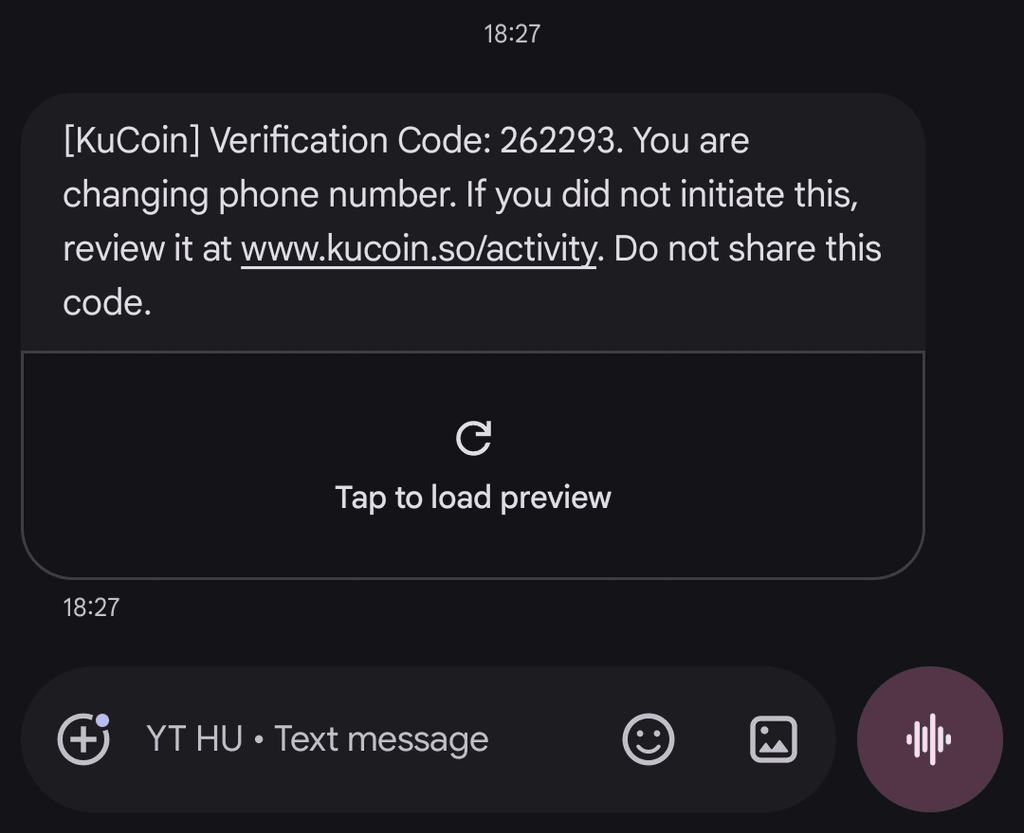
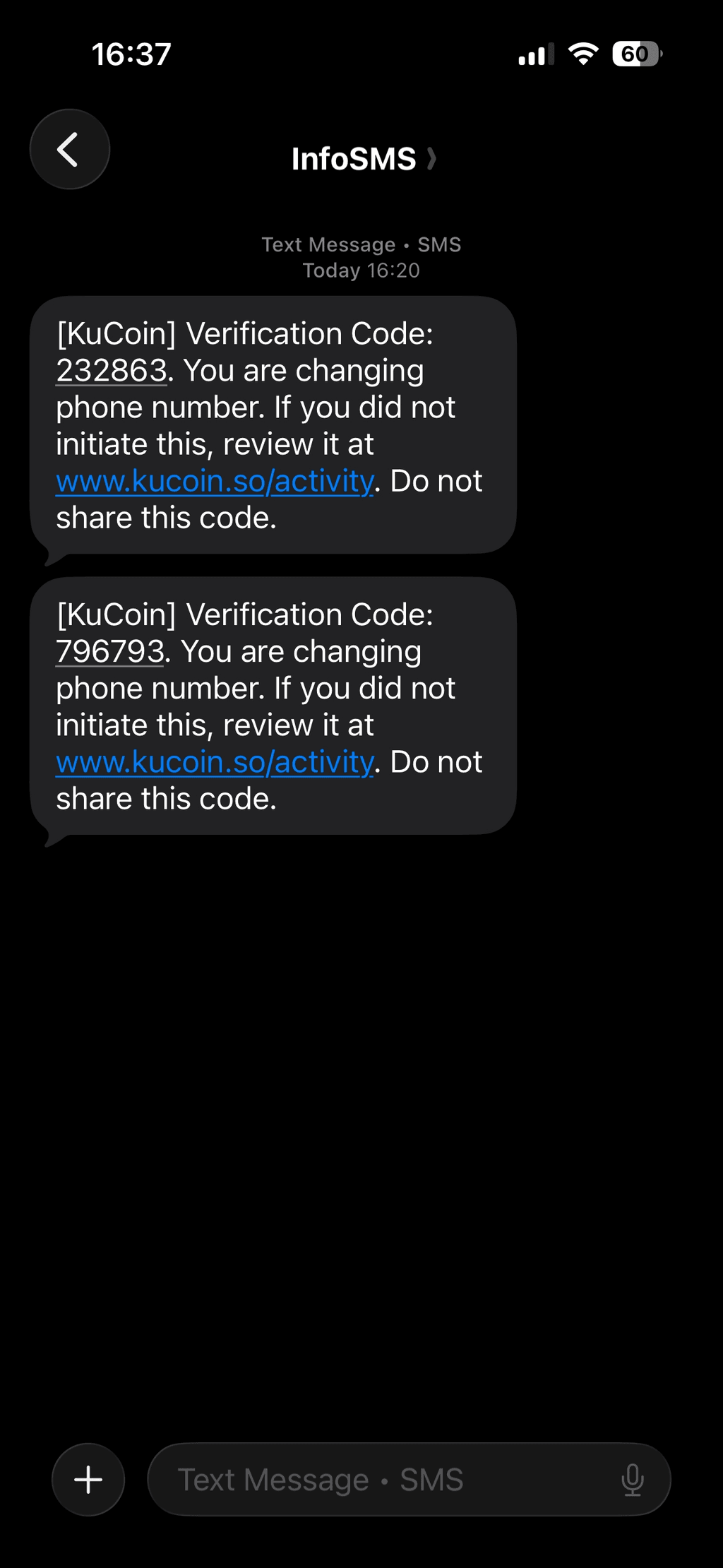
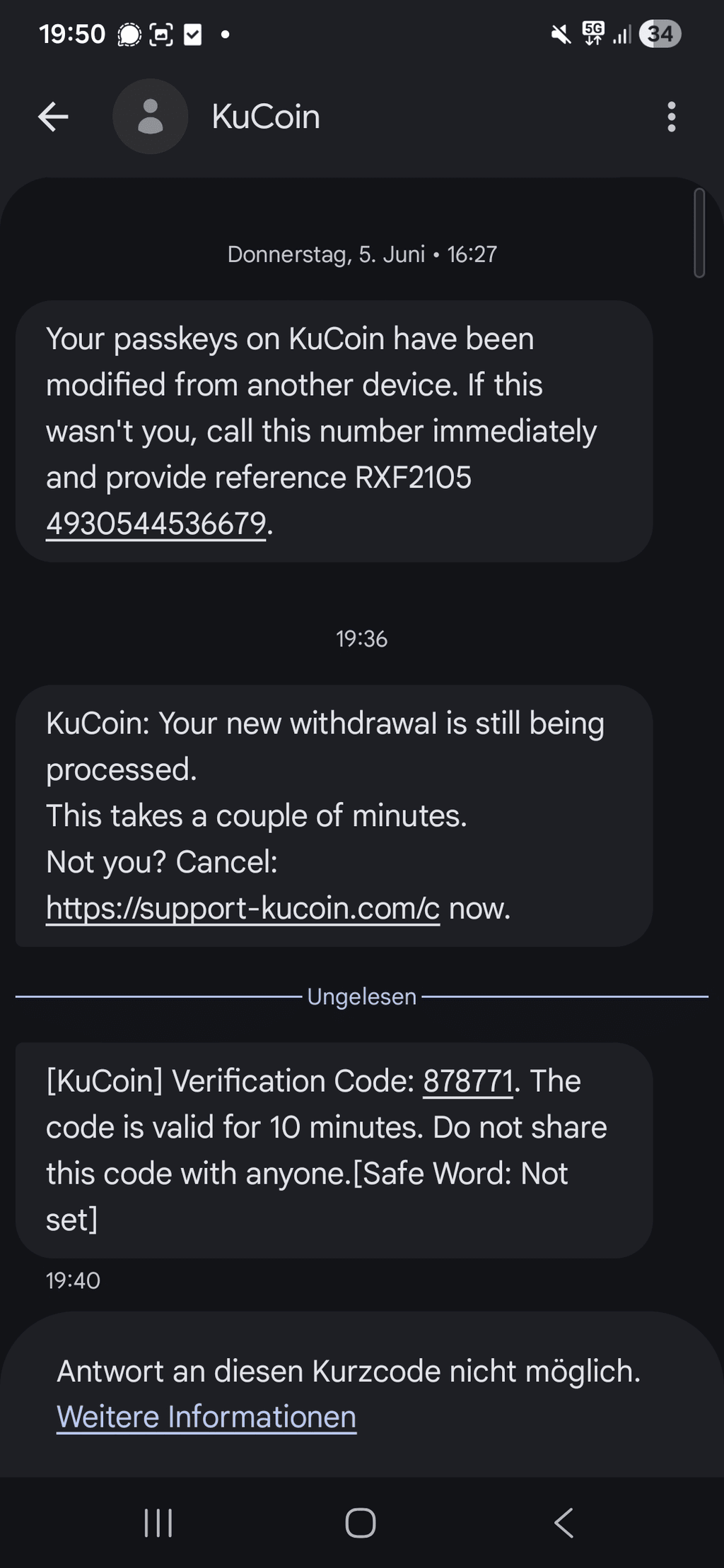
Multiple users reported receiving a dense series of verification code SMS messages claiming to be from KuCoin, all involving sensitive actions like "phone number changes," but none of the users had initiated any such requests.
-
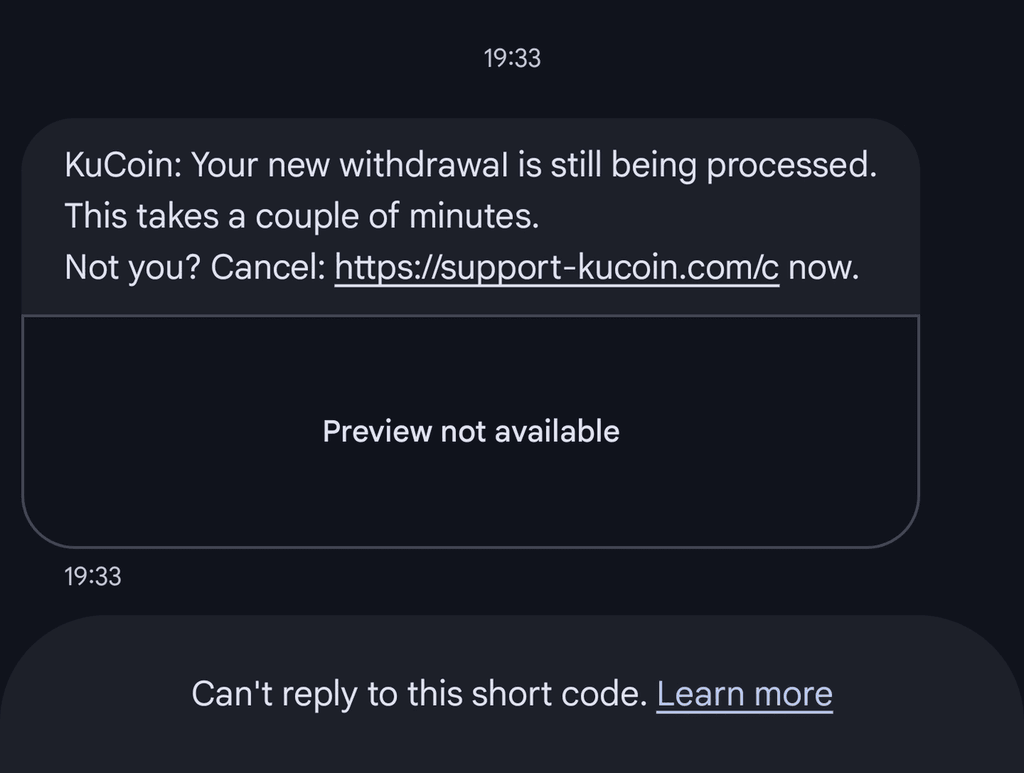
Creating Withdrawal Panic: Creating urgency around "someone is withdrawing your funds," pressuring users to click the "Cancel" link.
🎭 Deep Dive into the Scam: A Three-Act Play from Panic to Victimhood
This type of scam is not a single phishing SMS but an interconnected psychological warfare tactic.
| Scam Stage | Method & Mechanism | Common Victim Reactions |
| Stage One: Verification Code Bombing Creates Anxiety | Scammers use automated scripts to send a flood of "security setting changes" verification SMS messages to your phone number. These messages are highly convincing in format, designed to make you panic with the thought that "someone has already compromised my account." | Users become anxious after receiving multiple verification code messages, worried that their account is being hijacked. |
| Stage Two: Fake Withdrawal Warning Creates Urgency | While you're in a panicked state, another SMS about a "withdrawal in progress" conveniently arrives. Scammers exploit your fear of losing funds, directing you to click the "Cancel" link in the message. | Users, desperate to stop the "withdrawal," click the link in the SMS or call the provided phone number in a hurry. |
| Stage Three: Phishing Site Steals Credentials & Assets | After clicking the link, users are directed to a phishing website that looks nearly identical to KuCoin's official login page. After entering their username, password, and even 2FA codes, their account is compromised. Users who call the scam number are tricked into revealing verification codes or security information. | After entering all security information on the fake login page, scammers immediately use it to log into the real account and transfer out assets. |
🔍 Key Identification Techniques: How to Spot Scam SMS at a Glance
Learning to distinguish between official and scam SMS messages is your first line of defense.
| Checkpoint | Official (Genuine) Characteristics | Scam (Fake) Characteristics |
| Sender Number | Usually from a fixed official shortcode (e.g., 88888), rarely changes. | May come from a regular mobile number, or a shortcode that doesn't match official announcements. |
| Domain (Link) | Always the official domain, such as www.kucoin.com . | Uses highly similar variant domains, such as kucoin.so, kucoin-support.com, support-kucoin.com, kucoin-security.com. |
| Message Content | Only provides the verification code; does not ask users to click links to take action (e.g., "cancel withdrawal"), does not provide a phone number to call back. | Contains urgent calls to action ("If you don't cancel immediately, your funds will be transferred") and provides links or phone numbers. |
| Verification Code Volume | Only sends a single verification code SMS when you actively initiate an action. | Sends a dense series of verification codes in a short period, even when the user hasn't initiated any action. |
⚠️ Special Note: Genuine KuCoin withdrawal notification SMS will only inform you that a withdrawal has been "initiated" and will not provide a "click to cancel" link. All "cancel withdrawal" actions must be completed within the official website or app.
🛡️ Core Defense Strategy: Calmness Is Your Best Weapon Against Panic-Driven Scams
What scammers fear most is a user who can stay calm and verify rationally.
Strategy One: Establish a "Never Click SMS Links" Rule
-
Cardinal Rule: Never click on any links provided in SMS messages, no matter how urgent or convincing they appear.
-
Correct Practice: If you have any concerns, manually type the official URL (such as www.kucoin.com) into your browser, or open the official app to verify. Never rely on links in SMS messages.
Strategy Two: Verification Codes Are "Enter Only, Never Share, Never Act Through Links"
-
Cardinal Rule: Verification codes are for verification when you actively initiate an action on an official platform, not for "canceling" or "stopping" any events.
-
Correct Practices:
-
If you receive a verification code without initiating any action, do not enter or share it anywhere. It may indicate that someone is attempting to trigger a login, password reset, security setting change, or other sensitive action.
-
Never share your verification code with anyone, including those claiming to be customer support.
-
Never enter your verification code on any non-official website or app.
-
Strategy Three: Enable All Advanced Security Features
-
Anti-Phishing Code: Enable KuCoin's "anti-phishing code" feature. Every official email will thereafter contain your unique code, helping you distinguish genuine from fake communications.
-
Withdrawal Address Whitelist: Once enabled, withdrawals can only be sent to pre-set addresses, which can significantly reduce the risk of funds being sent to unknown addresses even if your account is compromised.
-
Hardware Security Key or Google Authenticator: Enable 2FA to avoid relying on SMS verification codes (due to SIM swap risks).
Strategy Four: Standard Procedure When Encountering Suspicious Situations
-
Stay Calm, Don't Act Hastily: Scammers exploit your panic. Calmness is your greatest advantage.
-
Verify Through Official Channels: Open the KuCoin official app or manually type the official URL to check your account status and latest announcements.
-
Check the Domain: If you've already clicked a link, immediately check the browser address bar to confirm it's the official domain.
-
Change Password & Revoke Authorizations: If you suspect information has been compromised, immediately change your password, revoke API authorizations, and contact official customer support.
🚨 If You've Clicked the Link or Compromised Information
| Situation | Emergency Response Steps |
| Clicked the malicious link but didn't enter any information | 1.Close the webpage immediately and do not perform any actions. 2. Clear browser cache and cookies. 3. Change your KuCoin account password and revoke all API authorizations. 4. Enable 2FA (if not already enabled). |
| Entered username/password or verification code on the phishing site | 1.Immediately log into the KuCoin official website (manually type the URL) and change your password. 2. Immediately revoke all API authorizations. 3. Check and freeze the withdrawal address whitelist to ensure no unknown addresses have been added. 4. Contact KuCoin official customer support to report potential account compromise. 5. Transfer assets to a secure wallet or enable account freezing (if the platform offers this feature). |
| Assets have already been transferred out | 1.Preserve all evidence: Screenshot the scam SMS, transaction hash (TxID), and scammer's address. 2. File a police report immediately: Bring all evidence to your local law enforcement. 3. Contact KuCoin official: Report to the security team with relevant information to assist with the investigation. |
💎 Conclusion: Panic Is the Catalyst for Scams; Calmness Is the Shield of Security
The success of this type of SMS scam has never been about the scammers' technical sophistication — it's about their precise manipulation of your emotions. When a flood of verification code SMS messages and withdrawal warnings hit you simultaneously, anyone could feel panicked.
Remember this core principle:
A real crisis will never ask you to solve it through an SMS link. A real platform will never use panic to drive your actions.
Before clicking any link, take a deep breath and ask yourself three questions:
-
Did I initiate this action?
-
Is this link's domain the official domain?
-
If this were real, what would it show on the official app/website?
Develop the habit of "verify first, act later," and you'll easily see through this panic-driven scam.
Disclaimer: The information on this page may come from third parties and does not necessarily reflect KuCoin’s views. It is provided for general reference only and should not be interpreted as financial or investment advice.
Virtual asset investments may involve risk. Please carefully assess the product risks and your own risk tolerance. For more information, please refer to our Terms of Use and Risk Disclosure.