

How to Trade ETH Futures Grid on KuCoin: Complete 2026 Setup Guide and Vital Notes for Success
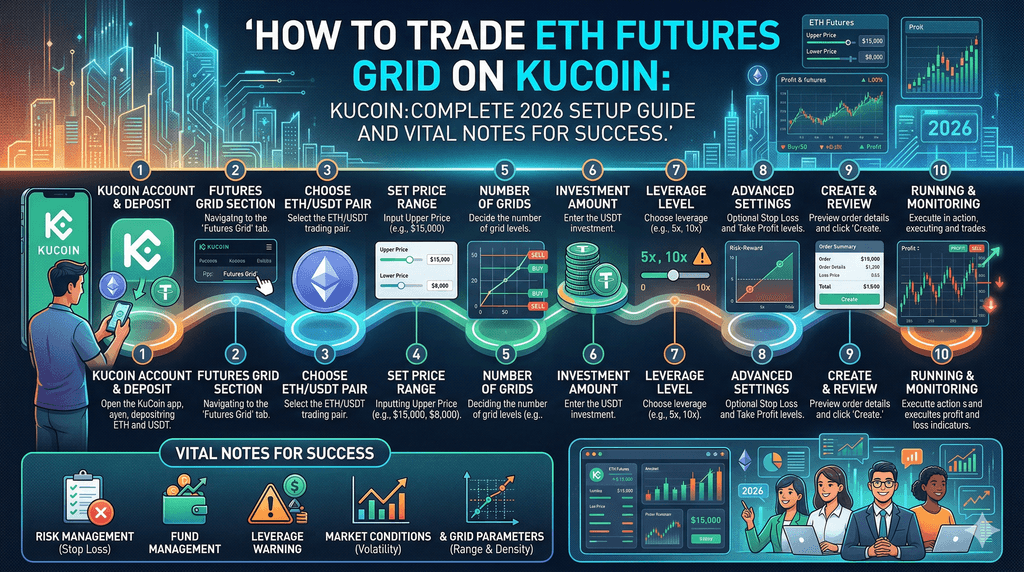
KuCoin has built one of the most active futures markets in crypto, with daily volumes often exceeding three billion USDT as of early April 2026. Ethereum continues to trade in a consolidating range around the two-thousand-dollar mark, creating ideal conditions for automated strategies that thrive on repeated price swings rather than strong directional moves. Traders who want to participate without staring at charts all day turn to the platform’s Futures Grid bot, which places buy and sell orders at preset intervals inside a chosen price zone on ETH perpetual contracts.
KuCoin’s Futures Grid delivers a structured way to automate ETH perpetual trading by capturing profits from volatility while users maintain full control over risk settings.
Discovering How KuCoin Futures Grid Turns ETH Price Swings Into Automated Gains
The Futures Grid bot on KuCoin applies grid logic directly to perpetual futures contracts such as ETHUSDTM, letting the system open and close positions automatically as the price of Ethereum moves up and down within a user-defined band. Instead of guessing market direction, the bot simply buys low and sells high at evenly spaced price levels, repeating the cycle whenever ETH oscillates. Recent platform data shows ETH perpetual contracts sitting near two thousand seventy dollars with daily swings of one to four percent, exactly the kind of movement that lets grids generate multiple small profits in a single day. Users select the number of grid lines, typically between five and fifty, which determines how densely the orders sit; tighter grids catch smaller moves while wider ones target bigger swings.
The system works twenty-four hours a day because perpetual contracts never expire, and KuCoin integrates real-time market price data to avoid unfair liquidations. A fresh update rolled out in March 2026 added a neutral direction mode that lets the bot trade both long and short sides without bias, perfect for ETH’s current sideways behavior. This automation removes the need to time entries manually, yet every parameter stays fully adjustable, so the strategy matches the exact volatility seen on the ETH chart. Traders who set the bot correctly report smoother equity curves compared with holding leveraged positions manually, simply because the grid locks in gains on every oscillation rather than waiting for a single big move. The entire process runs inside the KuCoin app or web interface, pulling funds straight from the futures wallet and displaying live trade history so users can see each filled order and the profit it contributed.
Preparing Your KuCoin Account Before Launching Any ETH Futures Grid Bot
Start by logging into your KuCoin account and completing the quick transfer of USDT from the main wallet into the futures wallet; the platform requires this separation so that only allocated funds can be used for leveraged positions. Once inside the futures section, locate the Trading Bot area and choose Futures Grid as the strategy type. KuCoin shows a clear list of available perpetual pairs, and ETHUSDTM appears prominently because of its high liquidity and consistent daily volume that often tops three hundred million USDT.
Make sure your account holds at least the minimum required margin, which the system displays automatically for ETH and usually starts around seven hundred sixty USDT, depending on current leverage settings. The platform also lets users enable two-factor authentication and review recent funding rates for the ETH contract before committing capital. With the account funded and verified, the interface loads historical price data for the past thirty days, helping users see how ETH has ranged between roughly two thousand and two thousand two hundred dollars since early March.
This preparation step takes less than five minutes yet prevents common surprises later, such as insufficient margin during a sudden wick. KuCoin’s interface highlights the current open interest on ETH perpetuals, giving a quick sense of market participation before the bot goes live. Every setting remains visible and editable until the final confirmation, so users can double-check that the futures wallet balance matches the planned investment amount.
Selecting the ETHUSDTM Pair Inside KuCoin’s Futures Grid Interface
Navigate to the Trading Bot Pro section and tap Futures Grid to open the pair selector; ETHUSDTM sits at the top of the USDT-margined list because it consistently ranks among the most traded contracts on the exchange. The page loads live price data showing Ethereum hovering near two thousand seventy dollars with an index price that updates every second to keep the bot aligned with fair value. Users see the twenty-four-hour change, current funding rate, and recent high-low range all in one glance, which helps confirm that volatility remains suitable for grid trading. Selecting this pair automatically loads default grid templates based on ETH’s historical behavior, including suggested price bands that match the coin’s typical daily moves of fifty to one hundred dollars. The interface also displays how many other users currently run grids on the same contract, offering a sense of community activity without revealing individual strategies. Because ETHUSDTM uses USDT as margin and settlement, profits and losses stay in stablecoin form, avoiding extra conversion steps when closing the bot.
KuCoin updates the pair’s parameters in real time, so any sudden increase in open interest appears immediately and can guide last-minute adjustments before launch. This choice of pair matters because its deep liquidity keeps slippage minimal even when the bot executes dozens of orders during active hours.
Choosing the Best Strategy Direction for Current ETH Market Conditions on KuCoin
The direction setting decides whether the bot leans bullish, bearish, or stays neutral, and the March 2026 addition of neutral mode gives users a powerful new option for ETH’s ongoing consolidation. In long mode, the bot focuses only on opening buy positions when the price dips to grid levels, ideal if recent on-chain data suggests accumulation around the two-thousand-dollar support. Short mode flips the logic to sell into strength and cover on dips, suiting scenarios where overhead resistance looks strong. Neutral mode, however, places both buy and sell orders symmetrically, letting the bot profit regardless of whether ETH drifts higher or lower inside the chosen range.
KuCoin’s interface shows the percentage of long versus short traders on the ETH contract at the moment of setup, helping users align their choice with broader sentiment. Once selected, the direction locks for the entire run unless the user pauses and edits the bot later. This flexibility lets the same ETH grid adapt quickly when the market shifts from sideways to trending, all without creating a new bot from scratch. The system calculates expected grid density differently for each direction, ensuring the number of active orders matches the chosen bias.
Setting the Ideal Price Range and Grid Levels for ETH on KuCoin
Define the lower price limit where the bot stops buying and the upper limit where it stops selling; for ETH trading near two thousand seventy dollars, many users set a two-hundred-dollar band to capture typical weekly swings. The number of grids then divides that band into equal steps; for example, twenty grids create ten-dollar intervals that trigger trades on even modest moves. KuCoin’s AI parameter button can suggest these values based on the past thirty days of ETH data, but manual entry remains available for full control.
Tighter grids increase trade frequency yet raise the chance of fast position buildup during a breakout, while wider grids reduce activity but allow larger profits per cycle. The platform instantly shows the total capital required for the chosen range and grid count, along with an estimated APR based on recent volatility. Users can also add a safety buffer by placing the range slightly inside the expected daily extremes, giving the bot room to breathe if ETH tests new highs or lows. Every change updates the preview chart live, so the exact placement of each grid line appears before confirmation. This step determines how aggressively the bot reacts to ETH’s natural ups and downs, making careful calibration the difference between steady small wins and occasional larger gains.
Deciding Leverage Levels When Running ETH Futures Grid on KuCoin
KuCoin allows up to ten times leverage on ETH perpetual contracts inside the grid bot, turning a one-thousand-USDT investment into ten thousand dollars of effective exposure. Lower leverage between two and five times keeps liquidation prices far from current levels and suits most users who want the grid to run for days or weeks without intervention. Higher settings amplify each grid profit yet shrink the distance to liquidation, especially during ETH’s occasional ten-percent daily moves. The interface displays the exact liquidation price for the entire grid once leverage is chosen, updating instantly as parameters change.
Many participants start at three times leverage on ETH because the coin’s liquidity keeps funding rates low and predictable. KuCoin also lets users add margin manually while the bot runs, providing an extra safety net if the price approaches dangerous territory. The platform’s risk engine factors in the full grid exposure rather than single orders, so the leverage decision affects overall position sizing from the first trade. Testing different levels in the preview window shows how profit potential scales while highlighting the tighter stop distances that come with higher multipliers.
Launching Your First ETH Futures Grid Bot Step by Step on KuCoin
After selecting the pair, direction, range, grids, and leverage, enter the exact investment amount from your futures wallet and review the final summary screen. KuCoin displays the total number of initial orders the bot will place, the estimated margin usage, and the projected daily profit range based on current volatility. Tap Create to activate the strategy; the system immediately begins placing limit orders at the first grid levels while keeping the rest ready for price movement.
A confirmation pop-up shows the exact entry price and direction for the opening positions, and the bot dashboard opens automatically with a live performance chart. Users receive a push notification once the first trade fills, confirming the automation has started. The entire launch process stays inside one screen, and the bot runs independently even if the app closes. KuCoin stores a full log of every parameter at creation time, allowing exact replication later if the strategy performs well. This simple sequence lets beginners go from zero to live trading in under ten minutes while experienced users fine-tune every detail before hitting the button.
Watching Your ETH Grid Bot Perform Live and Making Timely Adjustments
Once active, the KuCoin dashboard refreshes every few seconds with real-time profit and loss, number of grids filled, and current floating exposure on the ETH position. Users see a visual grid map highlighting which levels have already triggered and which remain open, plus a running tally of total realized profit. The platform alerts when the price nears the upper or lower boundary so traders can widen the range if ETH breaks out. Daily funding payments on the perpetual contract appear automatically in the P&L, and users can add extra margin with one tap to lower liquidation risk during larger moves.
The bot history lists every filled order with timestamp, size, and profit contribution, helping spot patterns in ETH’s intraday behavior. Many users check the dashboard twice daily, morning and evening, to confirm the strategy still matches the market’s rhythm. KuCoin also provides a one-click pause button that closes open positions at market price and returns margin to the wallet, giving full exit control without canceling the entire setup. This ongoing visibility turns the automated process into a transparent, manageable activity rather than a set-and-forget black box.
Understanding Exactly How Profits Accumulate in KuCoin ETH Futures Grid
Each time the price crosses a grid line, the bot closes one position and opens the opposite, locking the price difference as realized profit multiplied by the leverage used. For a ten-dollar grid interval on ETH with five times leverage, every completed cycle adds a measurable gain to the account balance in USDT. The system compounds these small wins because subsequent orders use the updated margin, gradually increasing position size if profits stay inside the grid. KuCoin displays both realized and unrealized figures separately, so users always know the true performance, separate from temporary mark-to-market swings.
Over a week of moderate ETH volatility around the two-thousand-dollar level, a well-set grid can complete dozens of cycles, turning modest daily returns into noticeable weekly growth. The platform also shows an annualized percentage rate calculated from actual trades rather than back-tested data, giving a realistic view of current performance. Profits remain available for withdrawal or reinvestment at any moment, and the bot continues running until manually stopped. This transparent accumulation mechanic rewards patience and proper range selection more than perfect market timing.
Adjusting Parameters Mid-Run to Match Shifting ETH Market Dynamics
When ETH breaks the original range, the bot simply stops trading at the extremes, but KuCoin lets users edit the price band, grid count, or leverage without stopping the strategy entirely. Open the running bot, tap Edit, and drag the upper or lower limit to follow the new price action; the system recalculates remaining orders instantly. Adding or removing grids mid-trade adjusts the spacing on the fly, helping capture fresh volatility after news events. Users can also increase the total investment amount directly from the futures wallet to scale exposure once confidence grows.
These live changes keep the grid relevant even as Ethereum moves from consolidation into a new trend, preventing the bot from sitting idle. KuCoin saves each edit in the strategy log so users can review what adjustments worked best over time. The ability to tweak without a full restart gives ETH grid traders a significant edge over static manual positions that require complete closure and re-entry.
Avoiding Setup Mistakes That Hurt ETH Futures Grid Performance on KuCoin
Setting the price range too narrow during quiet periods leads to excessive order frequency and higher cumulative fees, while placing it too wide leaves the bot inactive for days. Choosing leverage above five times on ETH without monitoring funding rates can push liquidation prices uncomfortably close during overnight wicks. Forgetting to transfer sufficient USDT into the futures wallet before launch causes immediate rejection at the final step. Ignoring the neutral direction option in sideways markets means missing profits on both sides of the range.
KuCoin’s preview screen flags many of these issues before confirmation, yet users still need to review the estimated margin and liquidation distance carefully. Starting with a small test amount on ETH lets beginners learn the rhythm without large exposure. Checking the bot at least once daily prevents small problems from growing during fast moves. These practical habits keep the strategy running smoothly and protect capital over multiple market cycles.
Exploring KuCoin’s AI Parameters to Fine-Tune ETH Futures Grid Strategies
The AI button inside the Futures Grid setup pulls the latest thirty-day volatility data for ETH and suggests an optimal range, grid count, and leverage combination in one click. Users can accept the full recommendation or adjust any single value while keeping the rest of the AI logic intact. This feature updates in real time with current price action, so the suggested band reflects the most recent ETH consolidation levels around two thousand dollars.
Traders who combine AI suggestions with their own range preference often achieve higher trade frequency without increasing risk. The system also estimates the expected number of daily cycles and potential APR based on historical fills, giving concrete numbers before launch. KuCoin continues to refine the AI model with fresh market data, making each new bot creation smarter than the last. This tool removes guesswork for beginners while still leaving full manual override for experienced users who want custom settings.
Scaling Your ETH Futures Grid Positions on KuCoin for Bigger Long-Term Results
Once a bot proves reliable over several days, users can duplicate the exact parameters and run multiple grids on the same ETHUSDTM pair with different ranges to spread exposure across various price zones. KuCoin allows up to several bots per contract, each with its own investment size and direction, so one can run neutral while another leans long during bullish signals. Reinvesting realized profits back into the same bot increases its total capital and grid density automatically, compounding gains over time. Monitoring total platform futures volume, which frequently tops three billion USDT daily, confirms that liquidity stays deep enough to support larger grid sizes without slippage.
Users who start small and scale gradually report steadier equity growth than those who jump in with maximum size from day one. The dashboard aggregates performance across all active ETH grids, showing combined profit and overall exposure at a glance. This progressive scaling approach turns a single successful strategy into a diversified automated portfolio that continues working through changing market phases.
FAQs
Q1: How much starting capital is typically needed to run an ETH Futures Grid bot on KuCoin?
Most users begin with between seven hundred and two thousand USDT transferred to the futures wallet, which covers the minimum margin for a moderate leverage setting and a reasonable price range on the ETHUSDTM contract. The exact amount depends on the chosen grid density and leverage, but the platform displays the precise requirement before creation, so no guesswork is involved. Smaller starters allow testing without heavy exposure while still letting the bot complete multiple cycles in normal volatility.
Q2: Can the Futures Grid bot on KuCoin run profitably if ETH enters a strong trending market?
Directional modes let the bot focus solely on long or short positions when a clear trend appears, while the neutral mode still captures oscillations inside the range even during broader moves. Users often widen the price band or switch direction when the market breaks out, keeping the strategy active rather than letting it idle. Real-time editing features ensure the grid adapts quickly without full closure.
Q3: Does KuCoin charge extra fees specifically for using the Futures Grid bot on ETH?
No subscription or bot-specific fees apply; traders pay only the standard perpetual futures trading fees on each filled order plus any funding rates that accrue on open positions. The platform shows the exact fee impact inside the bot preview and live dashboard so users can factor it into expected returns.
Q4: How quickly can profits be withdrawn after an ETH Futures Grid bot closes trades?
Realized profits are credited to the futures wallet immediately after each grid cycle completes, and users can transfer them back to the main account or withdraw to an external wallet at any time. The process usually clears within minutes once the futures wallet balance updates.
Q5: What happens to open positions if the ETH price moves outside the set grid range?
The bot simply stops placing new orders at the extremes and holds existing positions until the price returns or the user manually adjusts the range. No automatic closure occurs, giving traders full control to extend the band or close out manually if desired.
Q6: Is it possible to run multiple ETH Futures Grid bots simultaneously on KuCoin?
Yes, the platform supports several active bots on the same ETHUSDTM pair with different ranges or directions, letting users diversify across various price zones. The unified dashboard tracks combined performance while each bot operates independently.
Disclaimer: This content is for informational purposes only and does not constitute investment advice. Cryptocurrency investments carry risk. Please do your own research (DYOR).