

Comprehensive Guide: How to Use Your KuCard-AU?

How to Freeze or Terminate My KuCard-AU?
How do I freeze my KuCard?
You can temporarily freeze your KuCard via the KuCoin AU app or the KuCard AU web portal.
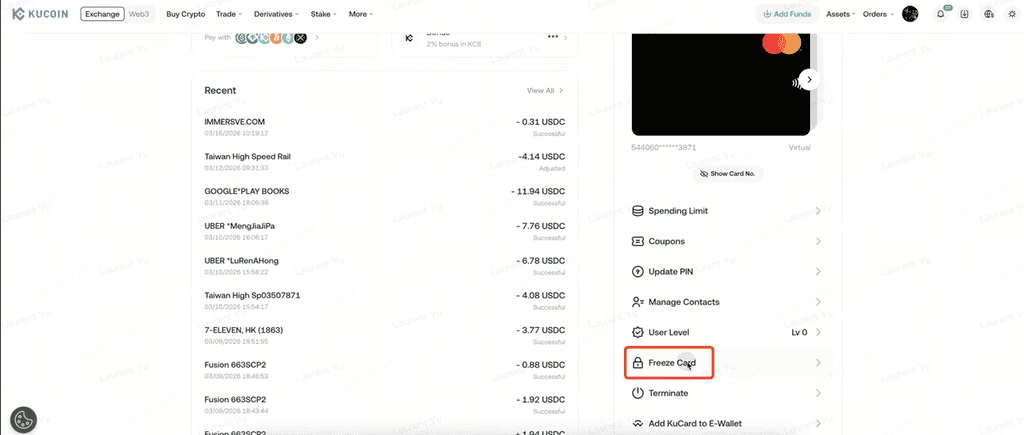
Freezing your card:
Prevents unauthorized transactions can be reversed at any time, subject to verification.This feature is intended as a security measure and does not terminate the card.
Will my KuCard be suspended if my KuCoin account is suspended?
Yes. If your KuCoin account is suspended or restricted, all associated KuCards will be frozen accordingly.This measure is part of KuCoin AUs compliance, risk management, and regulatory obligations.
How do I terminate my KuCard?
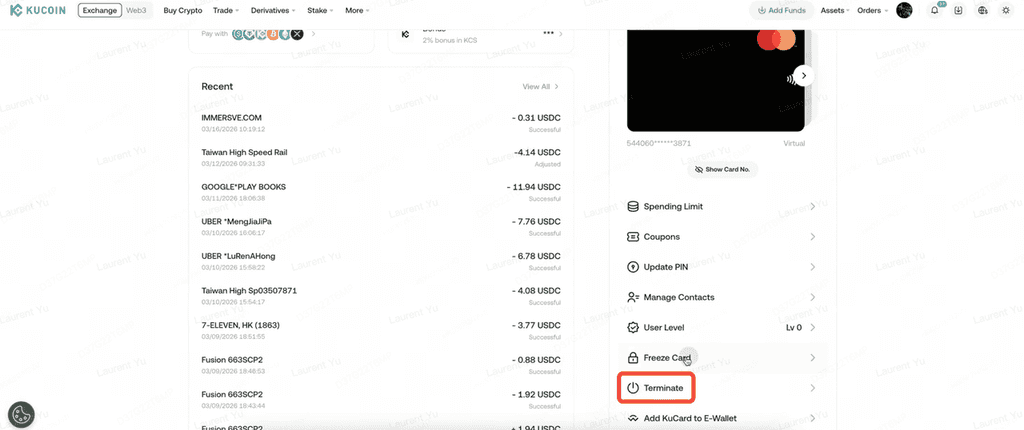
To permanently deactivate a KuCard, follow these steps:
-
Log in to your KuCoin account.
-
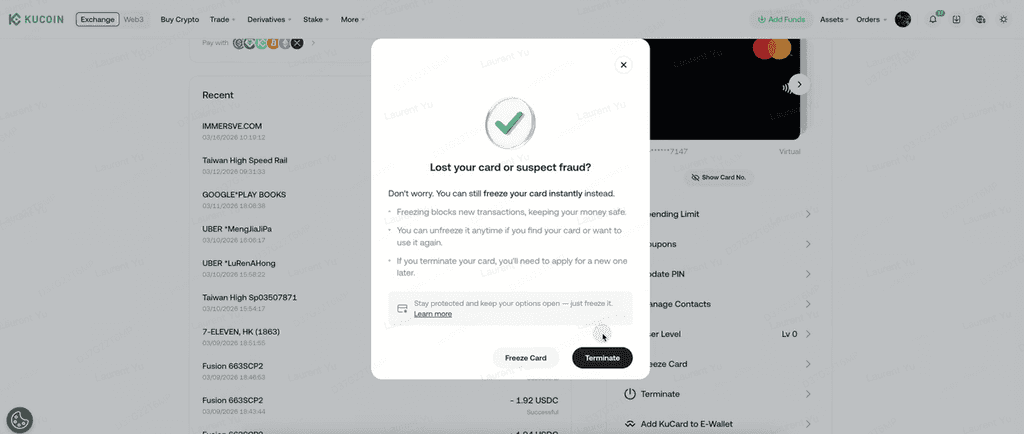
Select Terminate.
-
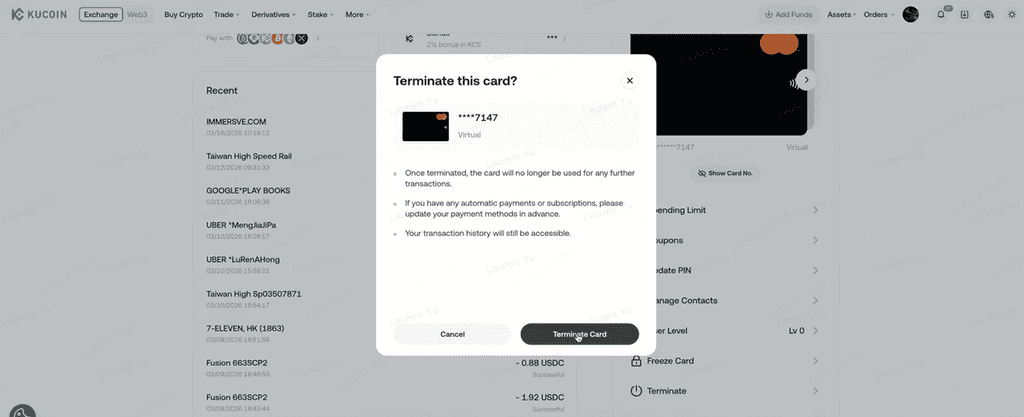
Confirm the card you wish to terminate.
-
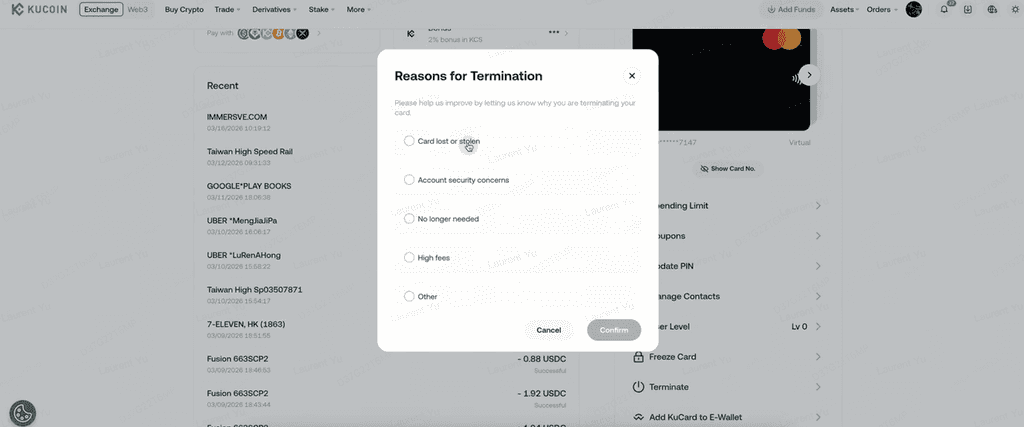
Select a reason for termination and confirm.
-
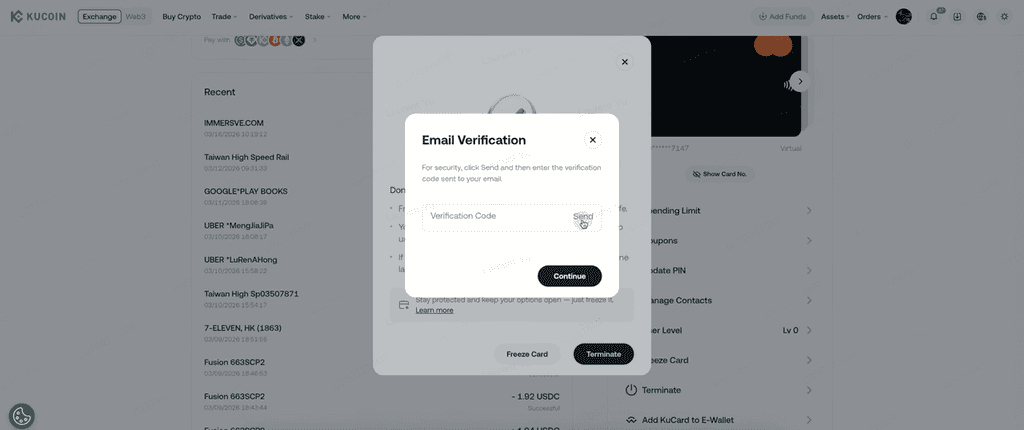
Enter the verification code sent to your registered email address.
-
The selected KuCard will be permanently deactivated.
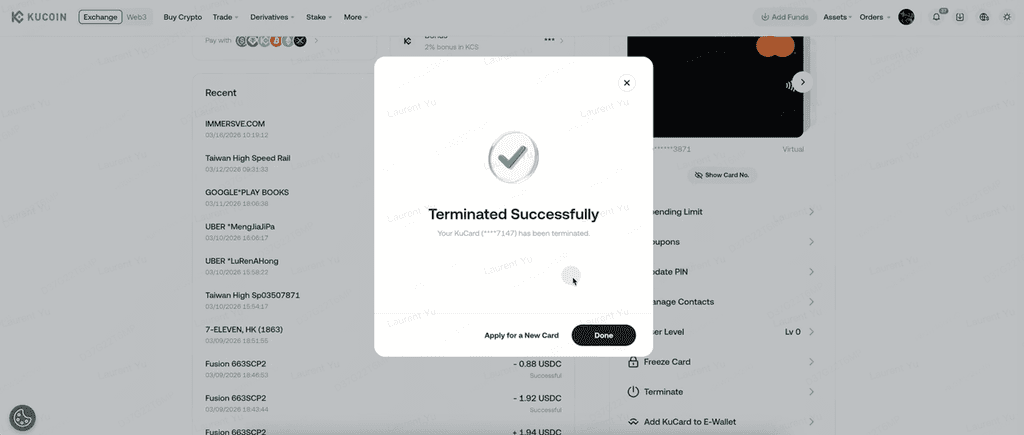
Once terminated, the card can no longer be used.
How to enroll for Out of Band (OOB) on KuCoin?
KuCoin App with Out of Band (OOB)
KuCard Out of Band (OOB) is an additional authentication method integrated into the KuCoin App that supports the secure authorisation of eligible online card transactions.
OOB is designed to enhance security while streamlining the user experience, in line with applicable regulatory and security requirements.
What is KuCoin App with Out of Band (OOB)?
Out of Band (OOB) authentication allows eligible transactions to be authorised directly within the KuCoin App on a trusted device.
When OOB is available, transaction approval may be completed through the KuCoin App without the need to manually enter an email one-time password (OTP), subject to risk assessment and security controls.
The use of OOB does not eliminate authentication requirements but provides an alternative secure channel for transaction authorisation.
How do I enroll for OOB on the KuCoin App?
No separate enrolment is required.
Once you have downloaded and logged in to the KuCoin App on a supported device, OOB authentication may be available automatically, subject to:
-
device recognition
-
account status
-
internal security checks
What are the benefits of OOB authentication?
Using OOB via the KuCoin App may offer the following benefits:
Enhanced security Authorisation is performed on a trusted device using secure app-based authentication.
Improved user experience Fewer manual steps may be required compared to email OTP authentication.
Faster transaction authorisation Reduced waiting times where OOB authentication is available and accepted.
Please note that KuCoin AU may still request additional verification (such as email OTP or other authentication factors) where required by regulation, security policy, or transaction risk assessment.
Important information
Availability of OOB authentication depends on device compatibility, account status, transaction type, and regulatory requirements.
KuCoin AU does not guarantee that OOB authentication will be available for all transactions.
Strong Customer Authentication (SCA) requirements continue to apply where mandated by applicable law.
How to Link My KuCard-AU to Apple Pay?
What is Apple Pay?
Apple Pay is a mobile payment and digital wallet service provided by Apple Inc. It enables users to make payments using compatible Apple devices, such as iPhone or Apple Watch, at merchants that support contactless payments and Apple Pay.
Eligible KuCards may be added to Apple Pay and used for contactless payments, subject to device compatibility, regional availability, and the terms and conditions of Apple Inc. and KuCoin.
How to add your KuCard to Apple Pay?
To add your KuCard to Apple Pay, follow these steps:
-
Log in to the KuCoin App Open the KuCoin App and navigate to the KuCard section.
-
Select “Add to Apple Wallet” Choose the KuCard you wish to add and tap Add to Apple Wallet.
-
Review and accept the terms Select Continue and review and accept the applicable terms and conditions.
-
Complete the on-screen steps Follow the instructions displayed on your device to complete the card provisioning process.
-
Confirmation Once completed successfully, your KuCard will be added to Apple Wallet and may be used for eligible contactless payments.
Important information
Availability of Apple Pay depends on device compatibility, operating system version, and regional support by Apple Inc.
KuCoin AU does not control Apple Pay functionality or availability.
Additional verification may be required during the card-adding process.
Transaction limits, authentication requirements, and fees continue to apply in accordance with the KuCard Terms of Use.
We hope this article has been helpful. If you have any other questions, please reach out to our 24/7 customer support via online chat or submit a ticket.