
Download the KuCoin EU Android App
KuCoin EU’s services are available on our web platform (www.kucoin.com/en-eu) and mobile apps. Many crypto traders prefer to use the KuCoin EU app as it allows you to trade anytime, anywhere. Here’s a detailed guide on how to download the KuCoin EU Android app.
You can either download the KuCoin EU Android app from Google Play, or download the Android APK from the KuCoin EU website.
1. Download from the Google Play Store
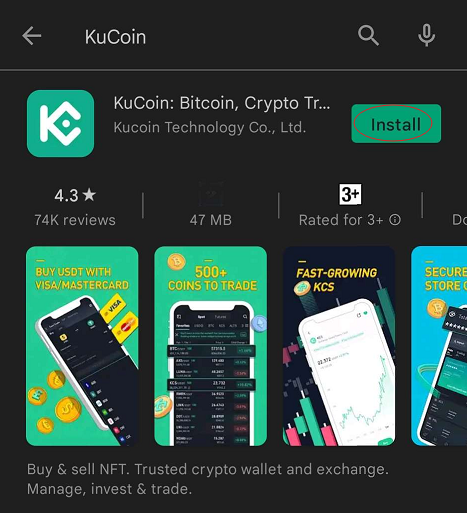
Click the link to head directly to the KuCoin EU app. Alternatively, search for “KuCoin EU” in the Google Play Store, and the KuCoin EU App will be displayed in the search results. Tap “Install” to begin downloading the KuCoin EU App.
2. Download from the KuCoin EU Website
Visit the download page via this link, then tap Download to install the app onto your device.
Note that certain Android systems may disable third-party app installation permissions, which may cause app installation to fail. Please refer to the following tutorial for installation instructions.
For Android 8.0 or Above
The location of your settings and process may vary slightly depending on your device's manufacturer.
Using this image as an example:
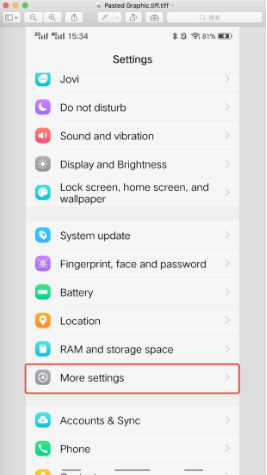
i. Go to “Settings”
ii. Look for “More settings”
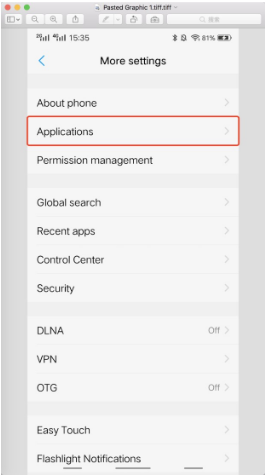
iii. Enter “Applications”
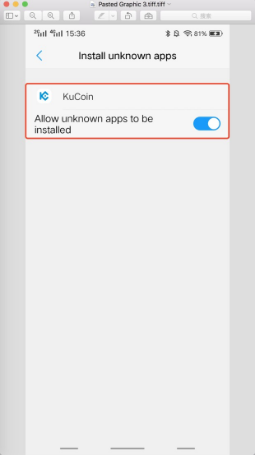
iv. Enable the installation of KuCoin EU
v. Install the KuCoin EU app
For Below Android 8.0
The location of your settings and process may vary slightly depending on your device's manufacturer.
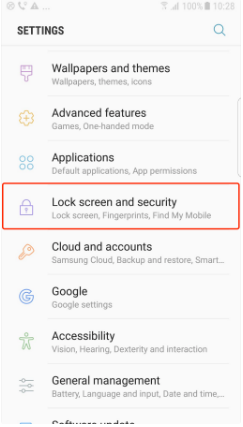
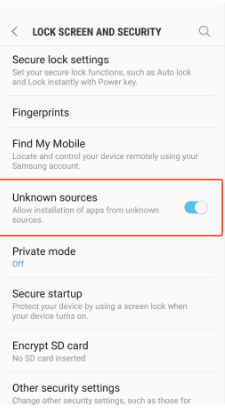
With Samsung OS, for example:
i. Enter “Settings”
ii. Look for the option shown here
iii. Enable “Unknown sources”
Important: Do not download the KuCoin EU App from any non-official KuCoin EU channels.
We hope this article has been helpful. If you have any other questions, please reach out to our 24/7 customer support via online chat or submit a ticket.