
What is Limit Orders & Market Orders?
1. Limit Order
A limit order is an order to buy or sell an asset at a specific price or better.
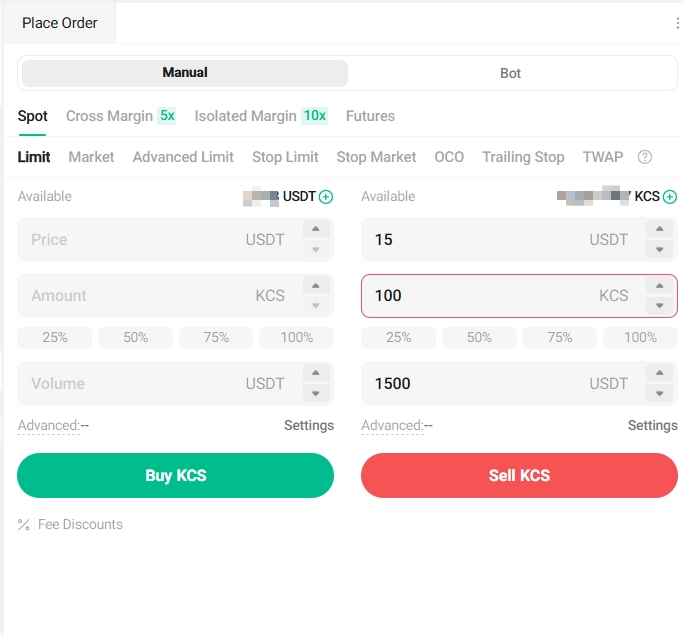
Take the KCS/USDT trading pair for example. Assuming the current price of KCS is 11 USDT, and you wish to sell 100 KCS at a price of 15 USDT each. To do this, you can place a limit order.
To place such a limit order, you would select Limit, set Price to 15 USDT, set Amount to 100 KCS, and click Sell KCS to confirm the order.
2. Market Order
A market order is an order that buys or sells an asset at the best available price on the market.
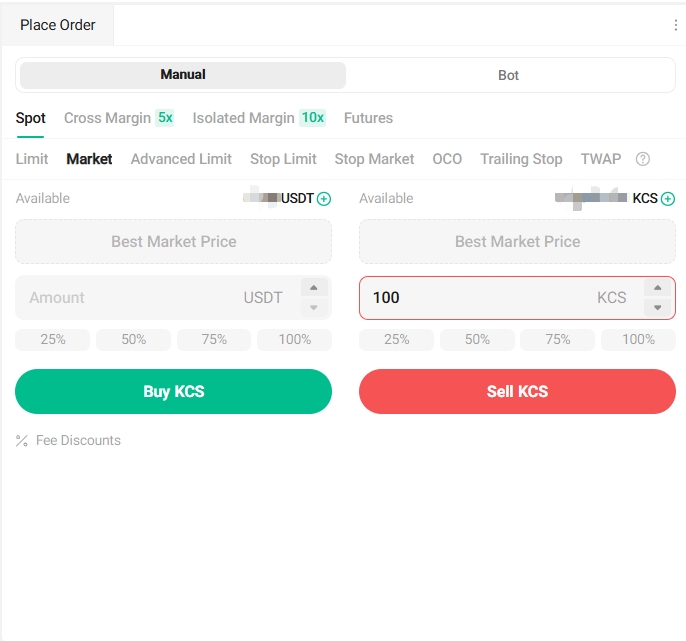
Take the KCS/USDT trading pair for example. Assuming the current price of KCS is 11 USDT, and you wish to quickly sell 100 KCS. To do this, you can place a market order. When you issue a market order, the system matches your sell order with the existing buy orders on the market, ensuring a swift execution of your order. Market orders are the best way to quickly buy or sell assets.
To place such a market order, you would select Market, set Amount to 100 KCS, and click Sell KCS to confirm the order.
Important note:
Since market orders allow you to buy or sell assets at the best current market price and once you place this order, your order will be fully or partly fulfilled immediately regardless of the current market price. You can review order and transaction details in your Order History and Trade History.
Market orders are matched with the best available maker order price in the market at the time and may be influenced by market depth. As such, please always check the price and amount before ordering. In extreme market conditions, your order might be partially fulfilled to protect your assets.