
Downloading the KuCoin Android App
KuCoin’s services are available on our web platform and mobile app. Many crypto traders prefer to use the KuCoin app as it allows you to trade anytime, anywhere. Here’s a detailed guide on how to download the KuCoin Android App.
You can either download the KuCoin Android app from Google Play Store, or download the Android APK from the KuCoin official website.
1. Downloading from Google Play Store
Click on this link to be redirected to the KuCoin App download page. Alternatively, search for “KuCoin” in the Google Play Store, and the KuCoin App will be displayed in the search results. Click on “Install” to begin downloading the KuCoin App.
2. Download from KuCoin Website
Visit the download page via this link, then click on Download to install the app onto your device.
Once you have downloaded the KuCoin App, you may proceed to sign up / log in to your account. Once logged in, you will be redirected to the respective site. For more information, you may refer to: How to Sign Up & Log In
Note: Certain Android systems may disable third-party app installation permissions, which may cause app installation to fail. Please refer to the following tutorial for installation instructions.
For Android 8.0 or Above
The location of your settings and process may vary slightly depending on your device's manufacturer.
Let's use the images below as an example:
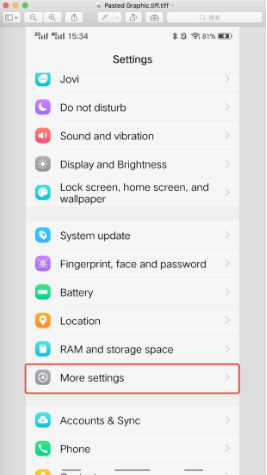
i. Go to “Settings”
ii. Look for “More settings”
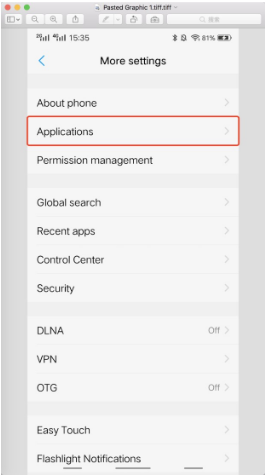
iii. Click on “Applications”
iv. Allow the installation of KuCoin app.
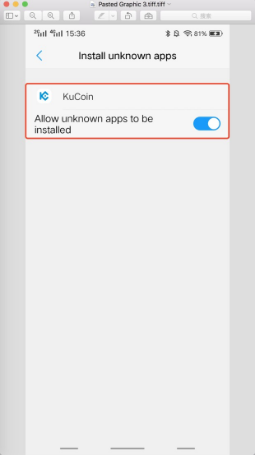
v. Install the KuCoin app
For Android 8.0 and Below
The location of your settings and process may vary slightly depending on your device's manufacturer.
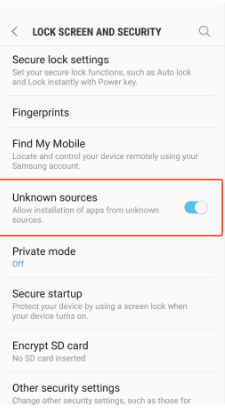
Take Samsung OS for example:
i. Enter “Settings”.
ii. Look for the option shown here.
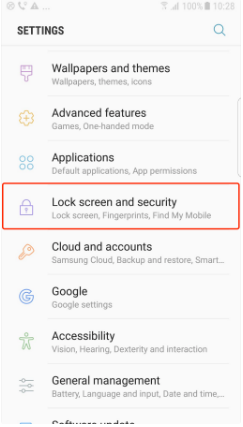
iii. Enable “Unknown sources”.
Important: Do not download the KuCoin App from any non-official KuCoin channels.
We hope this article has been helpful. If you have any other questions, please reach out to our 24/7 customer support via online chat or submit a ticket.
Happy trading on KuCoin!