KuCoin X BitGo: Solução fora da exchange
Última atualização: 03/03/2026
A KuCoin integrou-se à Solução Off-Exchange da BitGo, que combina custódia de terceiros com liquidação off-exchange. Essa integração permite que os clientes acessem a liquidez da KuCoin enquanto mantêm seus ativos seguramente guardados em custódia regulamentada com a BitGo.
Q1: O que é KuCoin OES?A1: KuCoin está em processo de integração da Solução Off Exchange da Bitgo, que é uma combinação de Serviço de Custódia de Terceiros e Solução Off Exchange.
Em nosso design, o cliente institucional do KuCoin pode definir uma “subconta de custodiante de terceiros” sob a conta principal do KuCoin, e essa “subconta de custodiante” possui uma delegação de ativos 1:1 com a conta Bitgo do cliente. Os clientes podem realizar “depósito”/“retirada” utilizando a função de “alocação/desalocação” da Bitgo.
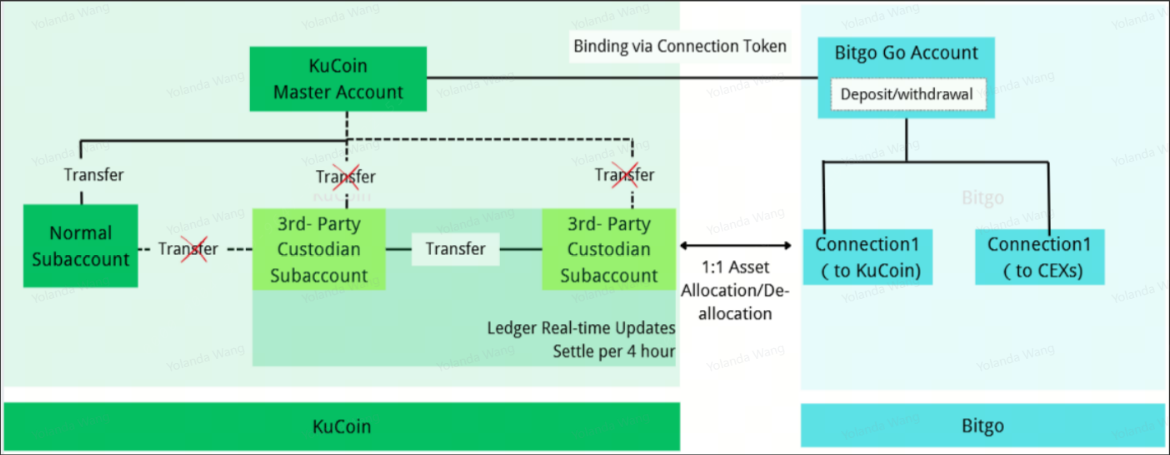
A negociação é projetada para ser liquidada em um horário fixo a cada 4 horas (começando às 0:00 UTC+8). KuCoin realizará a liquidação automática com a Bitgo, portanto, nenhuma ação especial é necessária do lado do cliente.
Q2: Quais são os benefícios do KuCoin OES?
A2: Aqui estão os benefícios de usar o serviço OES:
- custódia em ambiente seguro
- Minimize o risco de contraparte
- Minimize o custo para depósitos e saques frequentes entre exchanges
- Movimentos rápidos entre exchanges para arbitragem
Além disso, KuCoin oferecerá os seguintes privilégios:
- Locação gratuita para traders de API
- Novos usuários podem obter VIP12 nos primeiros 60 dias
Q3: Como usar o Bitgo Custody para negociação?
A3: consulte os seguintes passos.
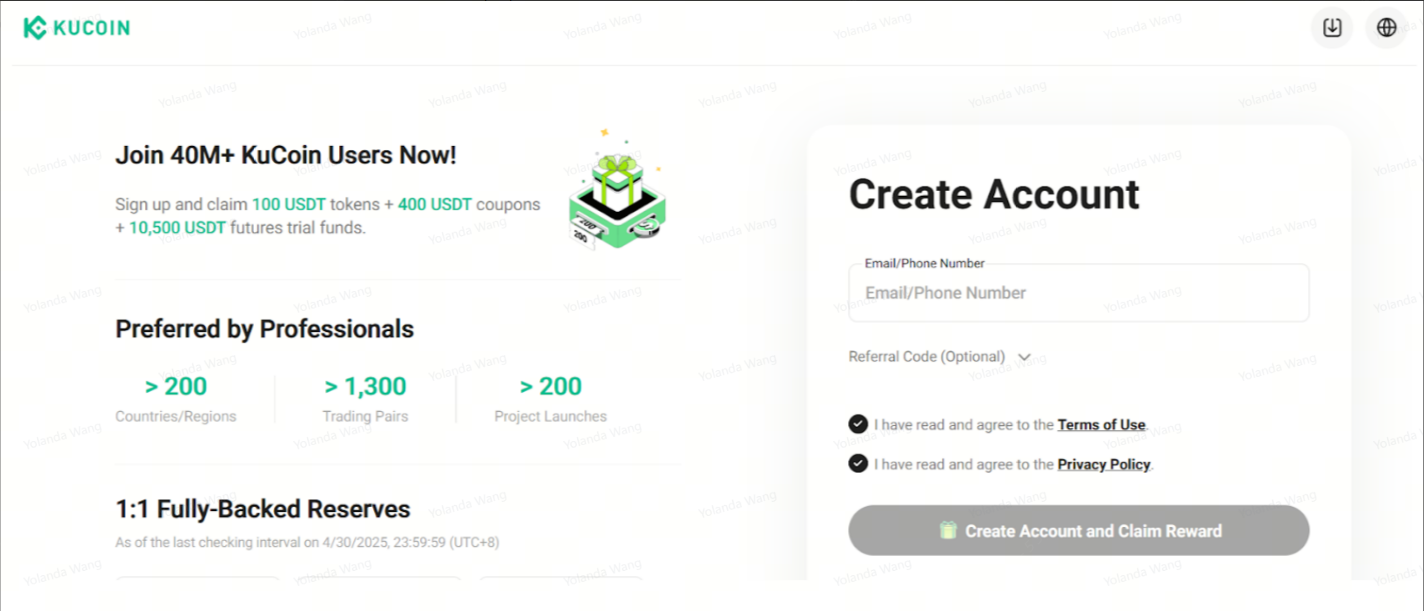
Etapa 1: Crie sua conta KuCoin
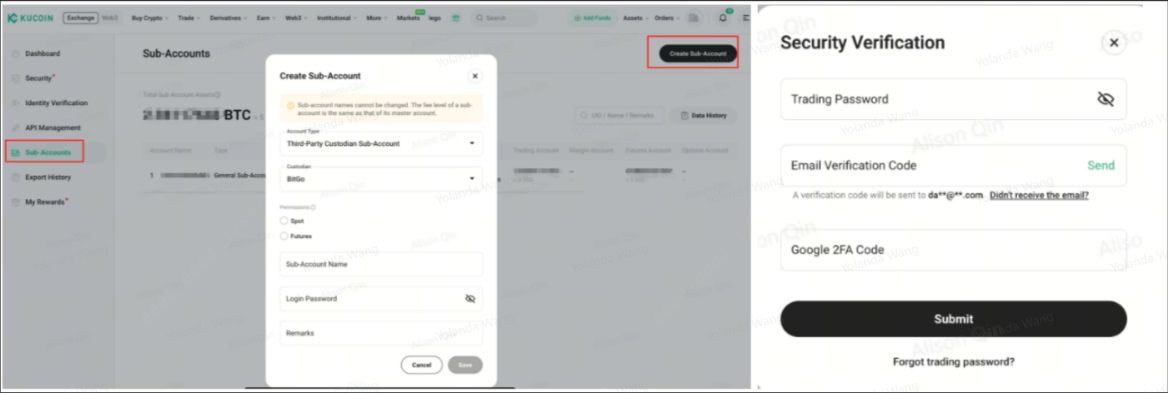
Etapa 2: Crie sua subconta de custodiante de terceiros do KuCoin
Etapa 3: Conecte sua conta Bitgo e sua conta KuCoin
Neste passo, localize primeiro o seu Token de conta na sua conta KuCoin e depois copie-o.
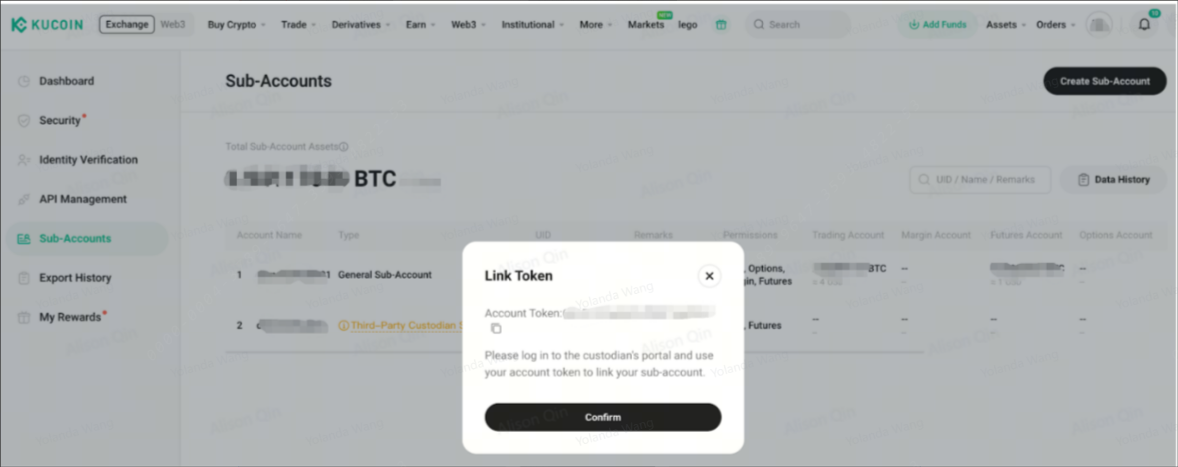
E depois faça login na sua conta Bitgo e estabeleça a conexão
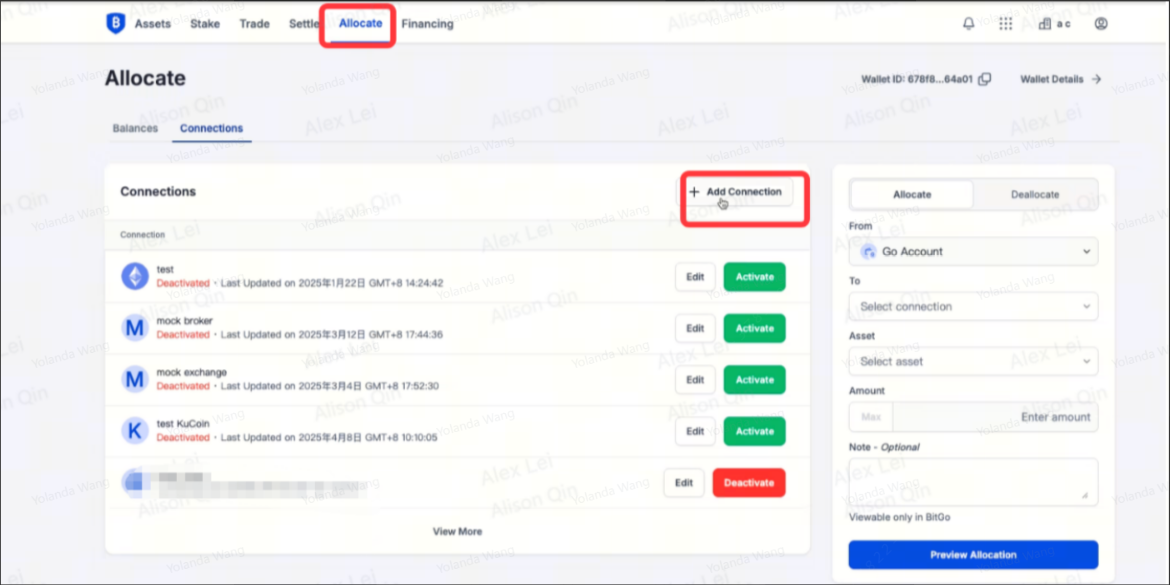
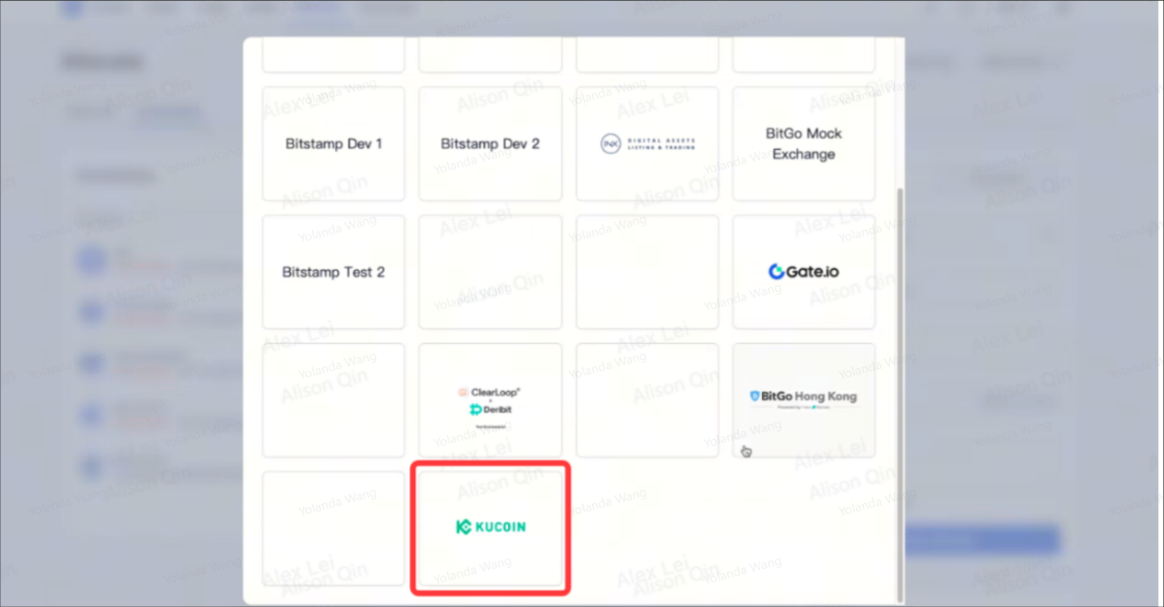
Você pode escolher KuCoin na próxima página.
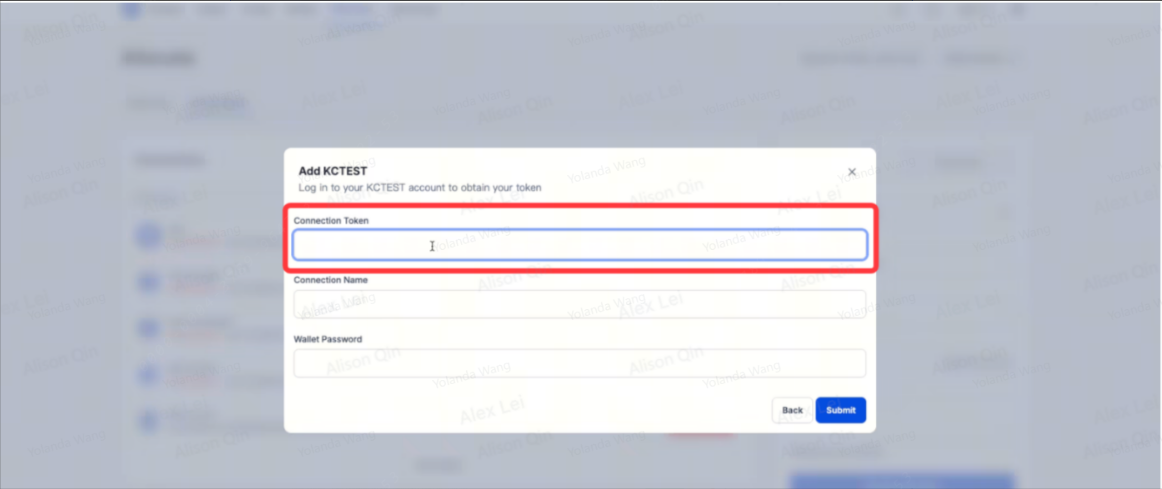
Escolha para adicionar o Token de Conexão
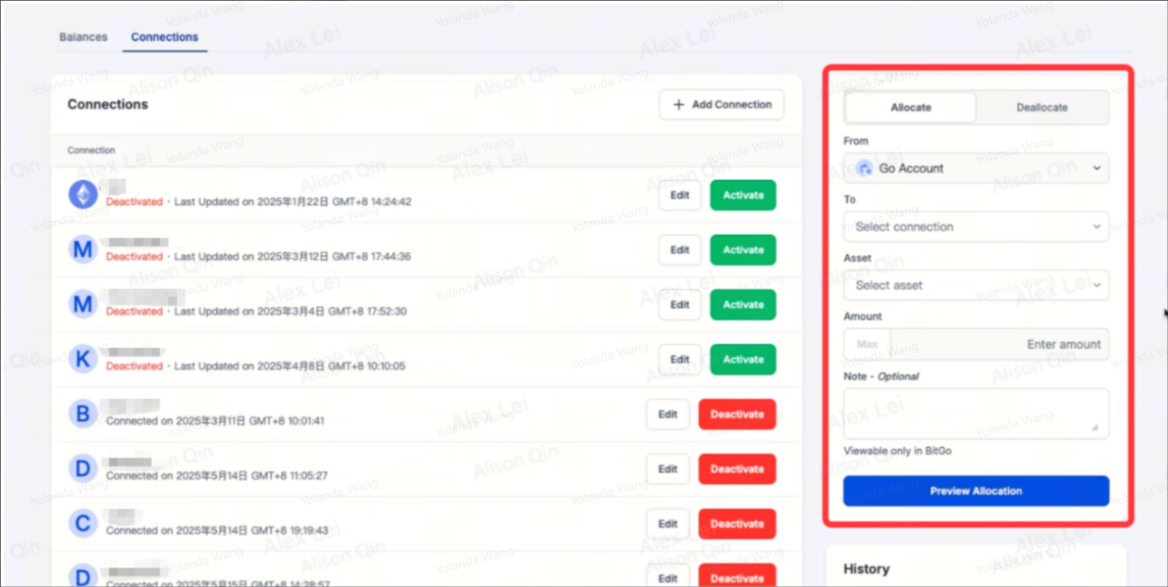
Etapa 4: alocação e desalocação
Passo 5: Negociar em KuCoin
-
Documento da API: https://www.kucoin.com/docs-new
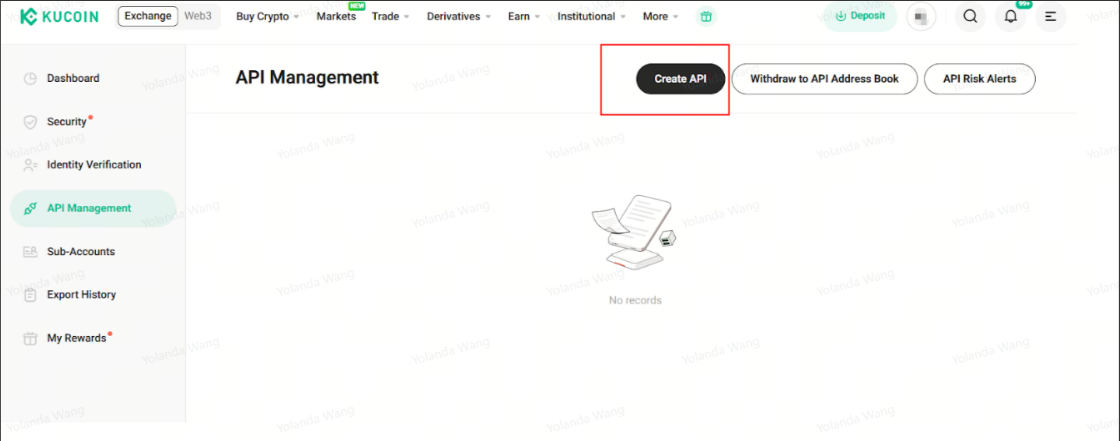
Crie sua chave API do KuCoin fazendo login na subconta de custodiante de terceiros (observe que a chave API da conta principal não é válida)
-
Negociar na Web: https://www.kucoin.com/markets
Q4: Subconta de Custodiante de Terceiros VS Subconta Comum
|
Função
|
Conta Principal
|
Subconta de Custodiante de Terceiros
|
Conta Subordinada Comum
|
|
Alocação e desalocação de criptomoedas
|
Não |
Sim
|
Não
|
|
Depósito/saque de criptomoeda
|
Sim | Não |
Sim apenas para depósito no site
Não para outras situações
|
|
Transferência interna dentro do KuCoin
|
Sim |
Sim para transferência entre subcontas de custodiante de terceiros
Não para outras situações
|
Sim |
|
Transferir entre conta principal e subconta
|
Sim | Não | Sim |
|
Transferir entre conta secundária e conta secundária
|
/ |
Sim para transferência entre subcontas de custodiante de terceiros
Não para outras situações
|
Sim |
|
Permissão de negociação
|
Spot/SpotMargin/Futuros
|
Spot/Futuros
|
Spot/SpotMargin/Futuros
|
|
KuCoin Ganhe
|
Sim
|
Não
|
Sim |
Q5: Quais ativos posso usar para liquidação na Go Network?
A5: Estamos atualizando constantemente a lista de tokens disponíveis.
|
Custódio
|
Ativos de suporte
|
|
BitGo US
|
USDT-ERC20, USDC-ERC20, USDE-ERC20, ADA, AVAX, BCH, BTC, DOGE, ETH, HBAR, LINK-ERC20, LTC, SHIB-ERC20, SOL, SUI, TON, TRX, UNI-ERC20, XLM, XRP, RYT, UMINT
|
|
BitGo SG
|
USDT-ERC20, USDC-ERC20, USDE-ERC20, ADA, AVAX, BCH, BTC, DOGE, ETH, HBAR, LINK-ERC20, LTC, SHIB-ERC20, SOL, SUI, TON, TRX, UNI-ERC20, XLM, XRP
|
Nota:
-
A menos que especificado de outra forma, os ativos listados sem uma blockchain designada estão utilizando sua blockchain nativa para liquidação.
-
Para a lista mais atualizada de ativos suportados, entre em contato com seu gerente de conta.
Q6: Existe algum limite de cota para alocação?
A6: Sim. KuCoin definirá um limite de cota por token por conta para alocação. A cota é determinada pelos seus valores de depósito preferenciais inicialmente, ao se conectar a KuCoin. No entanto, você pode entrar em contato com seu gerente de conta a qualquer momento se desejar negociar a cota periodicamente. Se sua conta atingir o limite de cota, você não poderá alocar novos fundos do Bitgo. Os limites de cota são calculados como o saldo mais o P&L realizado (liquidado). A cota é independente por token.
Q7: Como faço para começar a usar o assentamento fora da exchange?
A7: Você precisa estar cadastrado tanto no BitGo Trust quanto na exchange KuCoin (verifique o FAQ de registro da conta KuCoin aqui: https://www.kucoin.com/support/31004360304153
Q8: Como alocar fundos para liquidação fora da exchange:
A8: Se você ainda não tiver fundos no BitGo Trust, precisará depositar fundos na sua GoAccount. Uma vez depositados, você poderá usar either a interface do BitGo ou a API para fazer solicitações de alocação para KuCoin. Após a aprovação da solicitação de alocação, você deverá ver o saldo alocado refletido na sua conta em KuCoin. Você poderá então negociar na exchange como normalmente faria, seja pela interface da exchange ou por suas APIs.
Q9: Com que frequência ocorre o liquidação com exchanges?
A9: KuCoin e a BitGo realizarão o liquidação pelo menos uma vez a cada 4 horas, desde que haja negócios que tenham sido totalmente executados durante esse período de 4 horas. A BitGo realizará uma verificação do saldo da conta da exchange na BitGo Trust para garantir que os fundos necessários para a liquidação tenham sido depositados. A BitGo então realizará uma movimentação no livro externo que transfere seus ativos alocados para a conta da exchange e os ativos da exchange para sua conta.
Q10: Como é o BitGo Go Network?
A10: A principal distinção da Go Network é que os ativos permanecem em nome do cliente em custódia qualificada na BitGo Trust, em vez de custódia própria ou com a exchange, sem necessidade de transferência de propriedade. Os ativos permanecem em nome do cliente e estão segurados até $250 milhões" (por favor, verifique mais detalhes aqui: https://www.bitgo.com/solutions/insurance/). A BitGo conquistou as certificações SOC 2 tipo 1 e SOC 2 tipo 2 de auditores externos, reforçando nosso compromisso em estabelecer e seguir as práticas mais seguras para proteger os ativos dos clientes.
Isenção de responsabilidade: Esta página foi traduzida com IA para facilitar a leitura. Para obter as informações mais precisas, consulte a versão original em inglês.Mostrar original