How to Use Crypto Up or Down Markets on Polymarket in KuCoin Web3 Wallet
Crypto Up or Down markets let users take a position on whether a crypto asset will finish up or down within a selected time range.
In KuCoin Web3 Wallet, you can open Polymarket, select Crypto, choose a time range, and view active crypto markets sorted by trading volume.
This article explains how to find Crypto Up or Down markets, how to read market details, and what to check before placing a trade.
What Are Crypto Up or Down Markets?
Crypto Up or Down markets are prediction markets based on short-term crypto price movement.
A market may ask whether BTC, ETH, SOL, or another crypto asset will finish up or down by the end of a specific time window.
Each market usually has two outcomes:
-
Up
-
Down
Choose Up if you think the asset price will finish above the market’s target price by the end of the time window.
Choose Down if you think the asset price will finish below the market’s target price by the end of the time window.
The final result depends on the market’s resolution rules.
Available Time Ranges
In KuCoin Web3 Wallet, Crypto markets on Polymarket may be available across different time ranges, including:
-
5 Min
-
15 Min
-
1H
-
4H
-
1D
After selecting a time range, you can view currently active markets for major crypto assets.
Available assets, time ranges, and active markets may change over time.
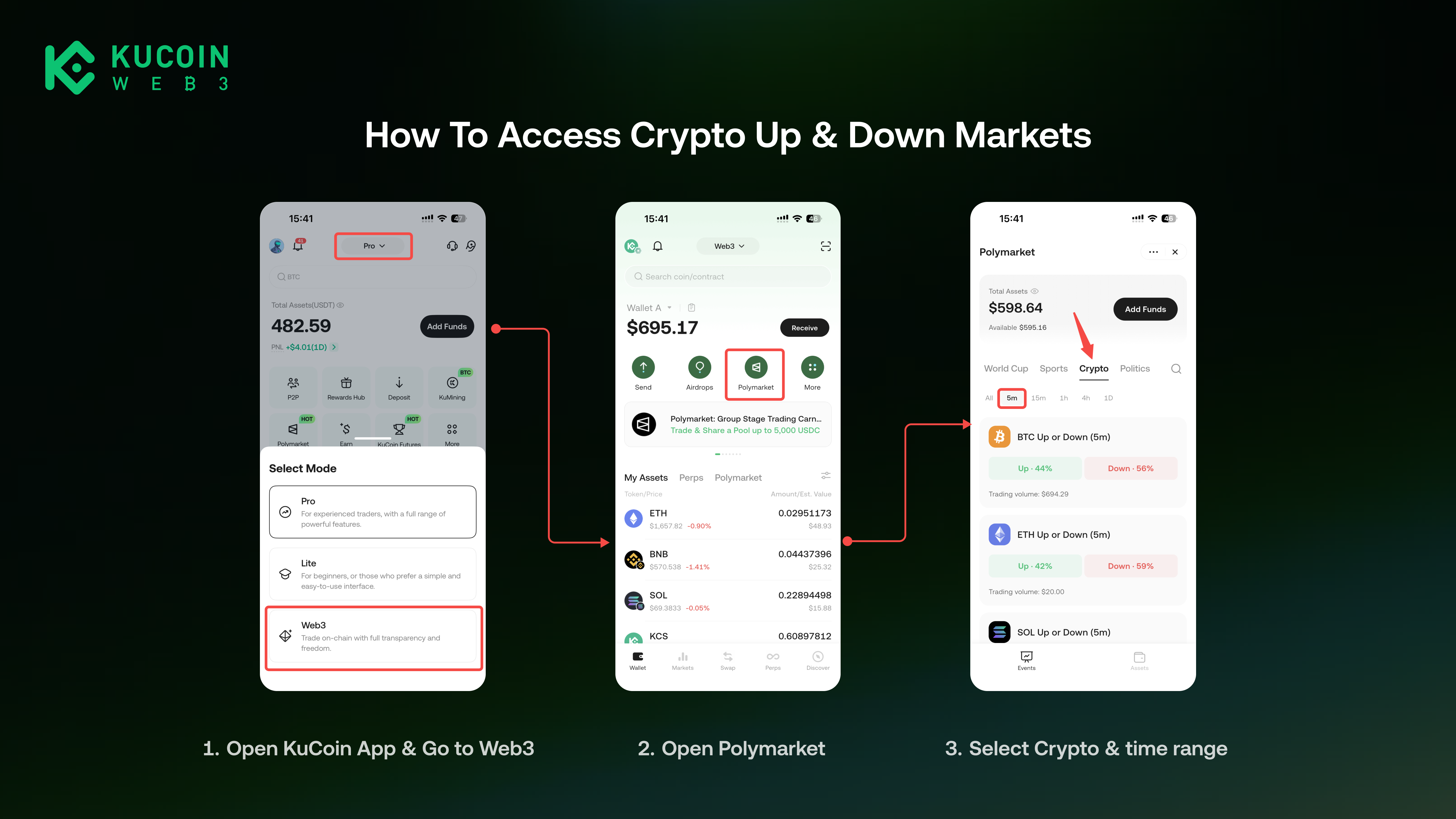
How to Access Crypto Up or Down Markets
-
Open the KuCoin App.
-
Switch to Web3 on top bar.
-
Open Polymarket.
-
Select Crypto.
-
Choose a time range, such as 5 Min, 15 Min, 1H, 4H, or 1D.
-
View the active markets sorted by trading volume.
How to Read a Crypto Up or Down Market
Before choosing Up or Down, check the key information on the market page.
1. Market Name
The market name usually shows the crypto asset and time window.
For example, a BTC market may ask whether BTC will finish up or down during a selected time range.
2. Time Range
The time range shows how long the market window lasts.
Shorter time ranges, such as 5m(5 minutes) or 15 Min(5 minutes), may move quickly and leave less time to adjust your position.
Longer time ranges, such as 1H(1 hour), 4H(4 hours), or 1D(1 day), give the market more time to move before settlement.
3. Target Price
The Target Price is used to determine whether the asset finishes up or down.
In general:
-
If the final price is above the Target Price, Up may be the winning outcome;
-
If the final price is below the Target Price, Down may be the winning outcome.
Always read the market rules before trading, as the exact resolution source, timing, and edge cases may vary by market.
4. Current Price
The current price shows the latest price of the underlying crypto asset.
Compare the current price with the target price to understand how close the market is to either outcome.
5. Up and Down Prices
Up and Down prices show how the market is pricing each outcome.
For example, if Up is priced at 60¢, it means one Up share costs about $0.60. If Up resolves as the winning outcome, each winning share pays out $1. If Up does not win, the share settles at $0.
Prices also reflect market-implied probability. For example, an Up price of 60¢ roughly means the market is pricing the Up outcome at around 60%.
This is not a guaranteed probability, official prediction, or financial advice. Prices may change as users trade and as the underlying crypto price moves.
6. Settlement Time
The settlement time shows when the market outcome will be determined.
For short time ranges, the market may close and settle quickly. Check the remaining time before placing a trade.
How Is This Different From Buying Crypto?
In a Crypto Up or Down market, you are not buying or selling the underlying crypto asset directly.
For example, choosing BTC Up does not mean you are buying BTC. It means you are taking a position on whether BTC will finish up within that market window.
This is also different from spot trading or perpetual futures trading. Your result depends on the market outcome and resolution rules, not simply on whether the asset price moves up or down during the trading window.
Before Placing a Trade
Before entering a Crypto Up or Down market, check:
-
The selected time range;
-
The market window;
-
The Target Price;
-
The current price;
-
The Up and Down prices;
Crypto prices can move quickly, especially in short time ranges. Make sure you understand the market before placing a trade.
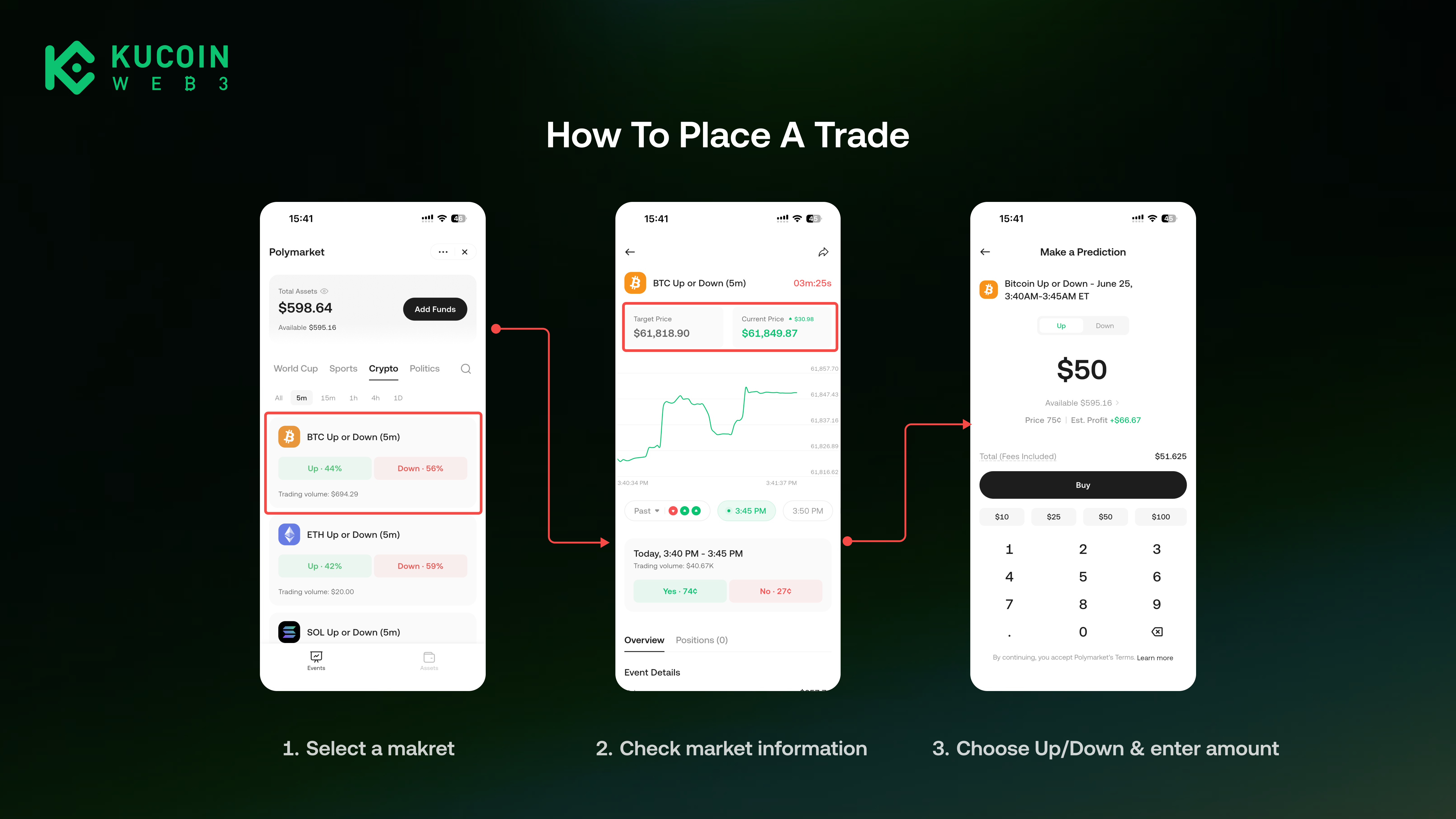
How to Place a Trade
-
Open the selected Crypto Up or Down market.
-
Check the Target Price, current price, and settlement time.
-
Choose Up or Down.
-
Enter your amount.
-
Confirm the trade.
After placing a trade, you can track your position on Polymarket Assests page
After Placing a Trade
After your trade is placed, you can:
-
View your open position on Polymarket Assests page;
-
Track price changes before the market closes;
-
Hold the position until settlement;
-
Sell before the market ends, if there is available liquidity and your order can be matched;
-
Check the final result after settlement.
Selling before the market ends is not guaranteed. It depends on market liquidity and whether another user matches your order.
How Settlement Works
When a market is resolved, the winning outcome is finalized according to the market rules.
If your selected outcome is correct, each winning share pays out $1.
If your selected outcome is incorrect, the share settles at $0.
After a market is resolved, trading for that market is no longer available.
Why Did My Order Not Go Through?
Your order may fail or remain incomplete for several reasons:
-
The market closed before your order was confirmed;
-
There was not enough liquidity;
-
Your balance was insufficient;
-
The network transaction failed or was not confirmed.
If this happens, check your wallet balance, market status, and any error message shown in the App.
Risk Reminder
Crypto Up or Down markets are time-sensitive. Crypto prices may change sharply within a short period, and incorrect predictions can lead to losses.
Prediction markets involve substantial risk, including the possible loss of your position value. Please read the market rules carefully and make your own decision before trading.
This content is for product education only and does not constitute financial advice, investment advice, trading advice, or a recommendation to buy or sell any asset or position.