What Is an EVM Address and How to Find It in KuCoin Web3 Wallet
An EVM address is a wallet address used on Ethereum and other EVM-compatible networks such as Base, BSC, Arbitrum, etc. In KuCoin Web3 Wallet, your EVM address can be used to receive assets, interact with DApps, participate in campaigns, and manage on-chain assets across supported EVM networks.
This article explains what an EVM address is, how it works, and how to find your EVM address in KuCoin Web3 Wallet.
What Is EVM?
EVM stands for Ethereum Virtual Machine. It is the environment that allows smart contracts to run on Ethereum and many other compatible blockchain networks. Networks that support Ethereum-compatible smart contracts and address formats are commonly known as EVM-compatible networks.
Common EVM-compatible networks include:
- Ethereum
- BNB Smart Chain
- Polygon
- Arbitrum
- Optimism
- Base
- Avalanche C-Chain
- Linea
- Scroll
Although these are separate blockchain networks, they usually support the same wallet address format.
What Is an EVM Address?
An EVM address is your wallet address on Ethereum and EVM-compatible networks. It is used to receive, send, and manage assets on supported EVM networks.
An EVM address usually:
- Starts with 0x
- Contains 42 characters
- Can be used across multiple EVM-compatible networks
- Looks like this: 0xd105b69d97f30ba129aff5ac46b06fce40d7ad2f
In KuCoin Web3 Wallet, the same EVM address can generally be used across supported EVM networks, such as Ethereum, BNB Smart Chain, Polygon, Arbitrum, Base, and more.
Is an EVM Address the Same as a KuCoin Exchange Deposit Address?
No. Your KuCoin Web3 Wallet EVM address and your KuCoin Exchange deposit address are different address types and should not be used interchangeably.
Your KuCoin Web3 Wallet EVM address is a self-custody wallet address. You control the wallet and are responsible for keeping your seed phrase or private key secure.
Your KuCoin Exchange deposit address is a custodial deposit address provided by KuCoin Exchange for receiving assets into your exchange account.
When joining KuCoin Web3 Wallet campaigns or receiving on-chain assets, always use the address type required by the campaign or service. If a campaign asks for your KuCoin Web3 Wallet EVM address, do not submit your KuCoin Exchange deposit address.
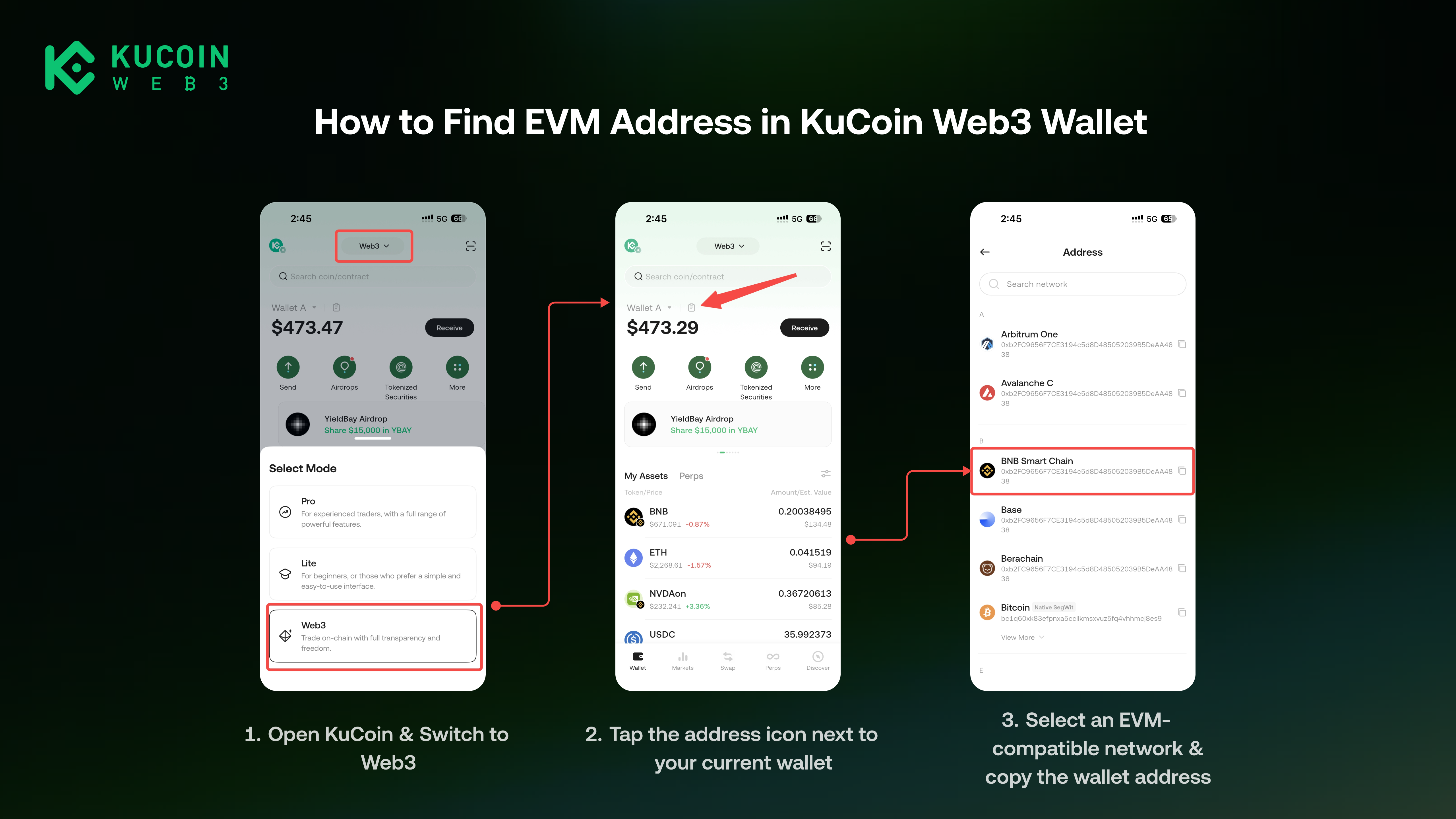
How to Find Your EVM Address in KuCoin Web3 Wallet
- Open the KuCoin App.
- Switch to the Web3
- Tap the address icon next to your current wallet on home page
- Select an EVM-compatible network, such as Ethereum, BNB Chain, Polygon, Arbitrum, or Base.
- Copy the wallet address that starts with 0x.
FAQ
1. Can I use my Ethereum address as my BNB Chain address?
Yes, in most cases. Ethereum and BNB Chain are both EVM-compatible networks, so the same EVM address can generally be used on both networks. However, assets do not automatically move between networks. Assets received on BNB Chain need to be viewed under the BNB Chain network.
2. Can an EVM address receive Solana or Bitcoin assets?
No. EVM addresses are mainly used for EVM-compatible networks. Solana, Bitcoin, and other non-EVM networks use different address formats. Do not send non-EVM assets directly to an EVM address unless the platform clearly states that the transaction is supported.