SEPA اوپن بینکنگ کے ذریعے EUR کیسے ڈپازٹ کریں
1. SEPA Open Banking کیا ہے؟
SEPA Open Banking ایک آسان اور محفوظ آن لائن بینکنگ ادائیگی کا طریقہ ہے جو صارفین کو پیچیدہ وصول کنندہ معلومات درج کیے بغیر ادائیگیاں مکمل کرنے کی اجازت دیتا ہے۔ یہ طریقہ SEPA اور SEPA Instant کو سپورٹ کرتا ہے، لیکن SEPA Instant کا سپورٹ صرف اس صورت میں ہوتا ہے جب آپ کا بینک اس سروس کو فراہم کرتا ہے۔
2. SEPA اوپن بینکنگ کے ذریعے EUR کیسے ڈپازٹ کریں؟
مرحلہ 1: KuCoin ویب سائٹ یا ایپ تک رسائی حاصل کریں۔ عرفی تصدیق کے ساتھ اپنا KuCoin اکاؤنٹ کھولیں یا آفیشل KuCoin ویب سائٹ پر جائیں۔
مرحلہ 2: ڈپازٹ EUR منتخب کریں
- ویب ورژن کے لیے:
براہ کرم اوپر کے نیویگیشن بار میں "Buy Crypto" پر کلک کریں، پھر "Fiat Deposit" منتخب کریں تاکہ فیاٹ ڈپازٹ صفحہ پر داخل ہو سکیں۔

- ایپ ورژن کے لیے:
براہ کرم "Deposit" پر ٹیپ کریں اور پھر "Fiat Deposit" منتخب کریں تاکہ فیاٹ ڈپازٹ صفحہ تک رسائی حاصل کر سکیں۔
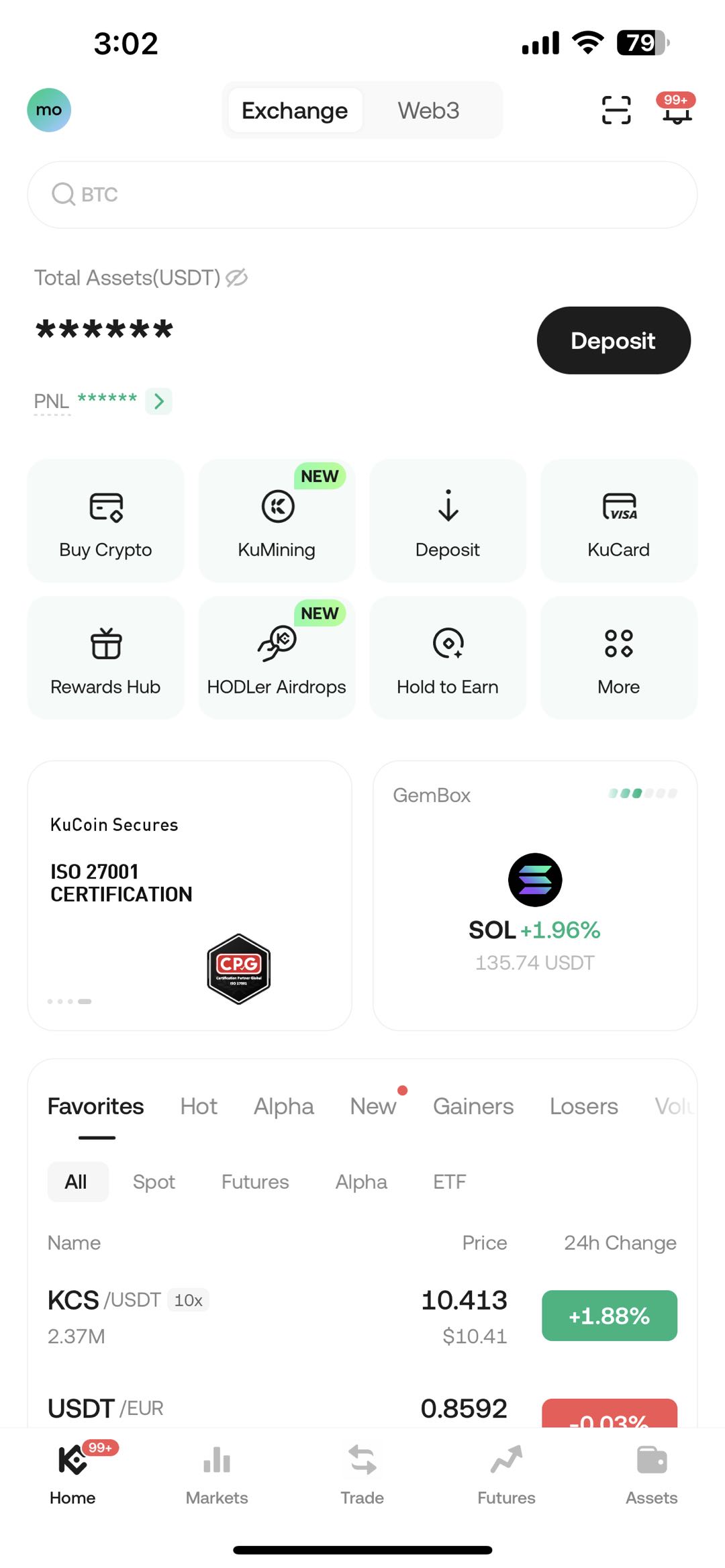
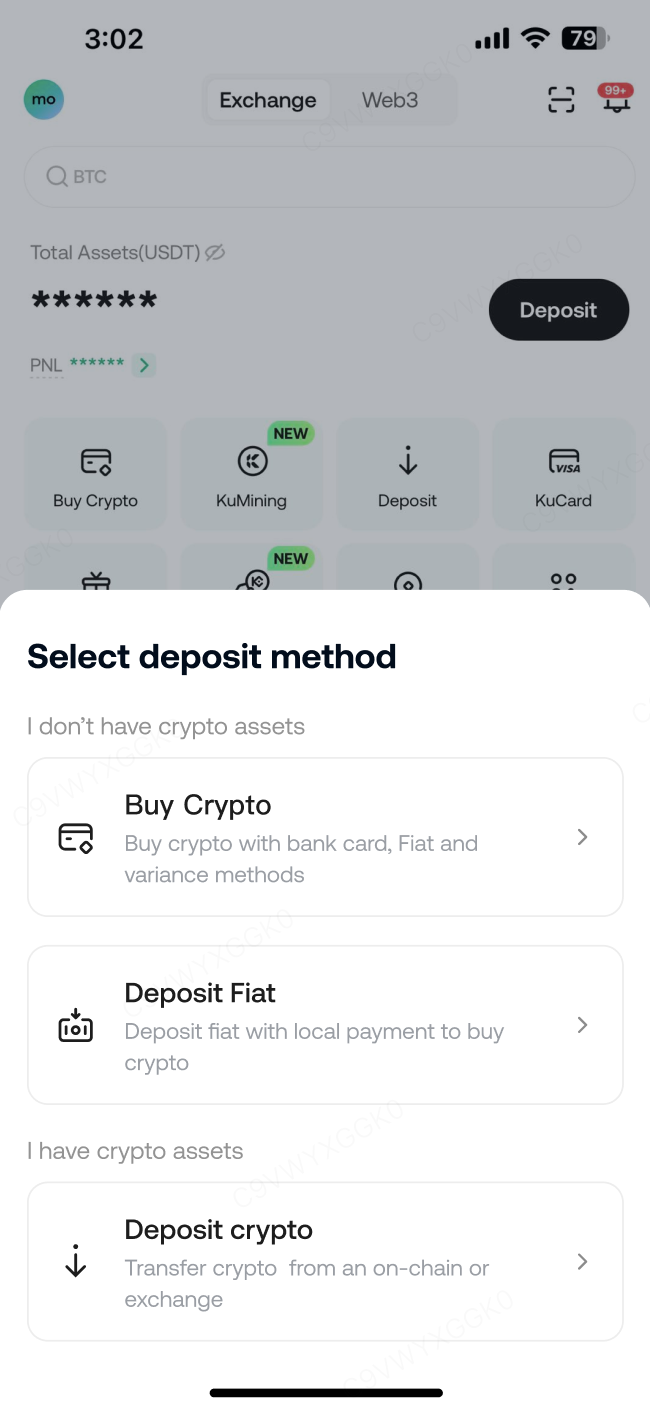
- درج ذیل مراحل ویب سائٹ اور ایپ دونوں پر لاگو ہوتے ہیں:
فیاٹ کرنسی کے طور پر "EUR" منتخب کریں اور SEPA آن لائن بینکنگ ڈپازٹ صفحہ تک پہنچنے کے لیے "SEPA Open Banking" منتخب کریں۔

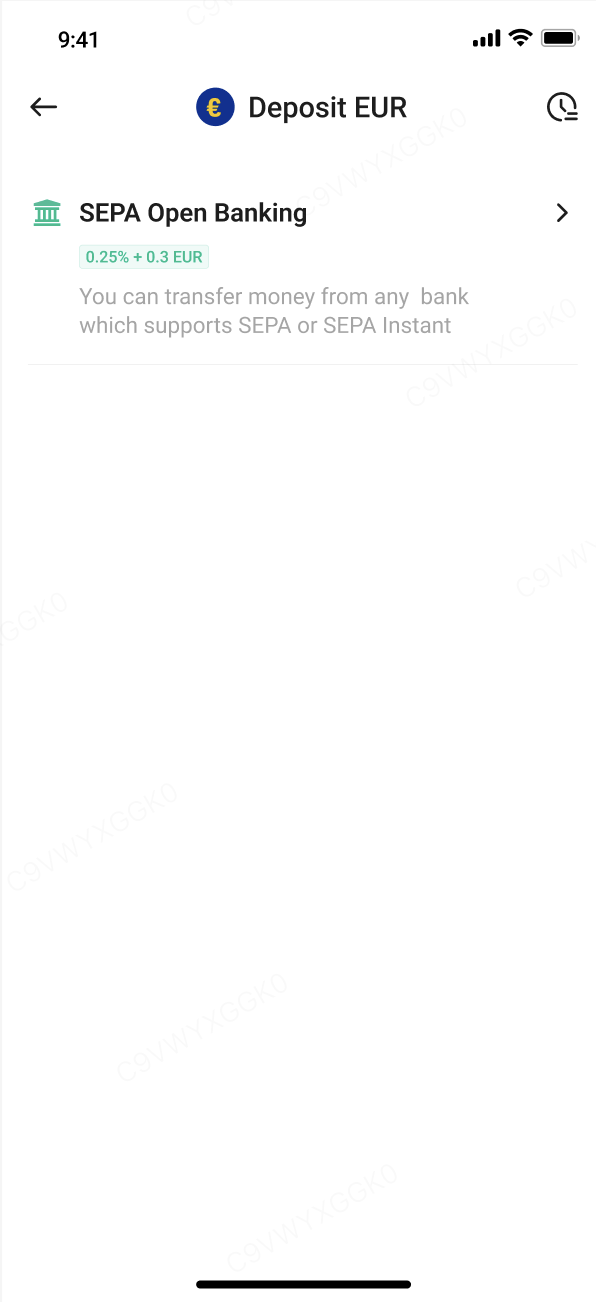
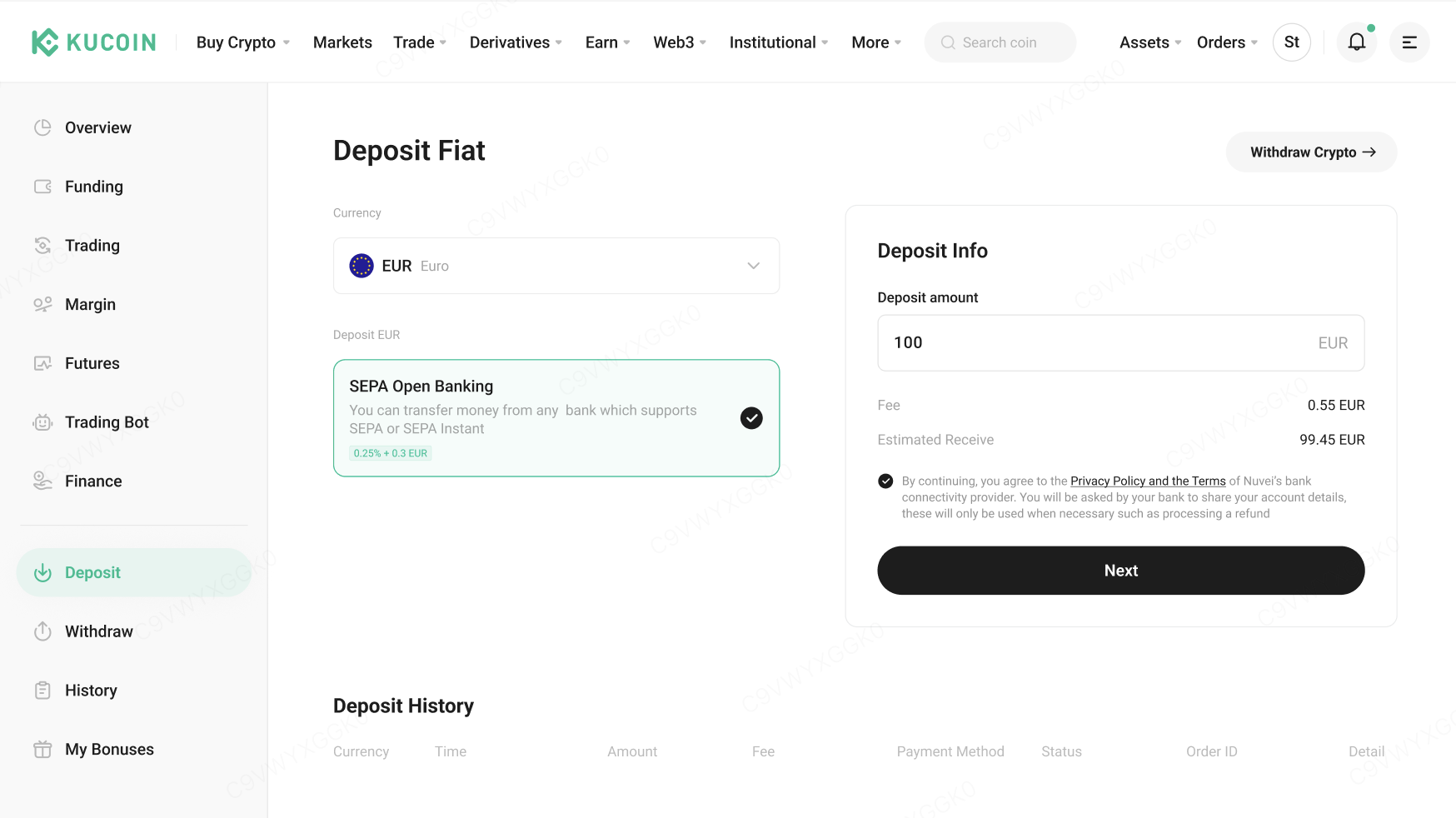
مرحلہ 3: ڈپازٹ رقم درج کریں
اپنی ڈپازٹ رقم درج کریں اور یقینی بنائیں کہ وہ ایکل آرڈر لِمٹ کے اندر ہے، پھر "اگلا" پر کلک کریں۔
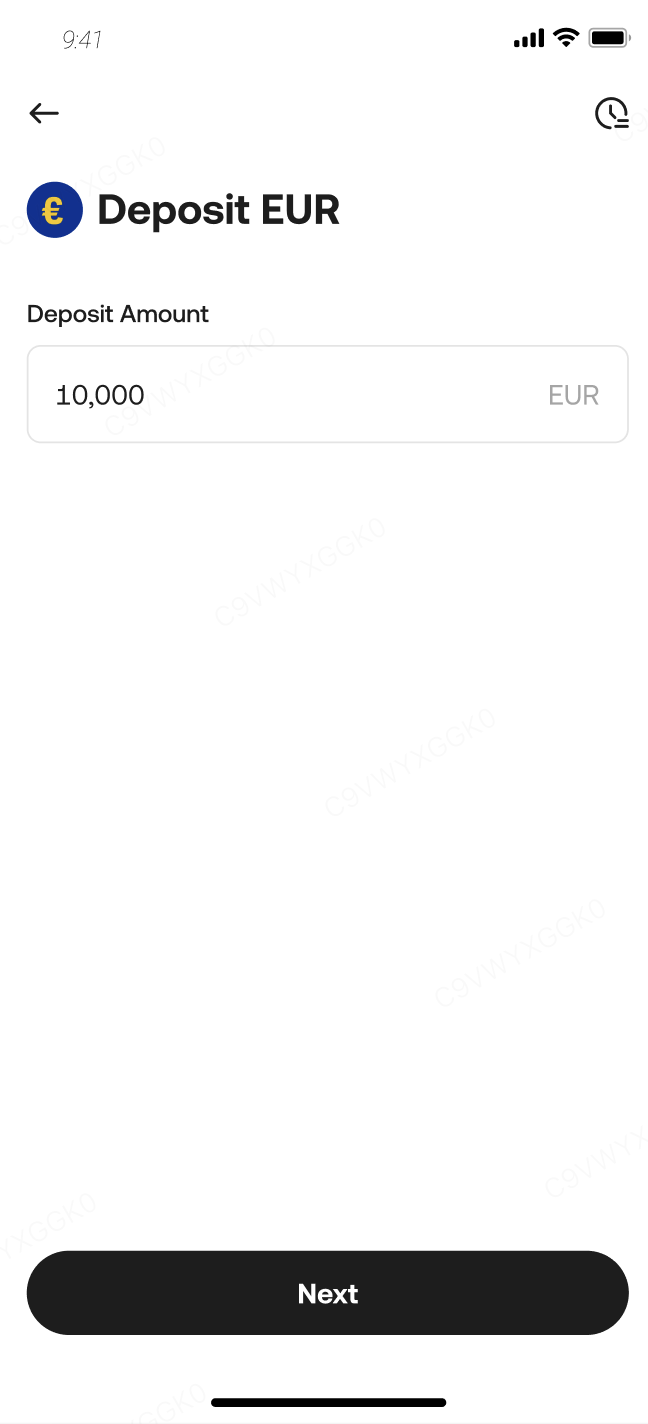
مرحلہ 4: اپنے KuCoin ڈپازٹ آرڈر کا جائزہ لینے کے لیے "آرڈر کا جائزہ لیں" پر کلک کریں
- آرڈر پیوریو صفحہ پر، متعلقہ شرائط پڑھیں اور ان سے متفق ہو جائیں، پھر "تصدیق کریں" پر کلک کریں۔ آپ کو تصدیق کے لیے بینک کے محفوظ وریفیکیشن صفحہ پر ہدایت کیا جائے گا۔
نوٹ کریں: ادائیگی کی تصدیق سے پہلے، یقینی بنائیں کہ ڈپازٹ ٹرانزیکشن آپ کے KuCoin اکاؤنٹ سے شروع کی گئی ہے۔ کسی تیسرے پارٹی کے سافٹ ویئر کے ٹرانزیکشن گائیڈز پر بھروسہ نہ کریں۔
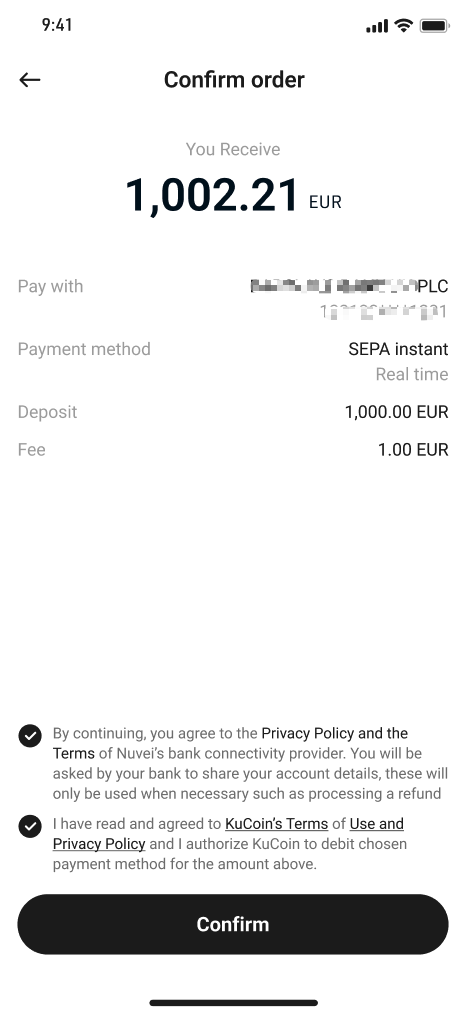

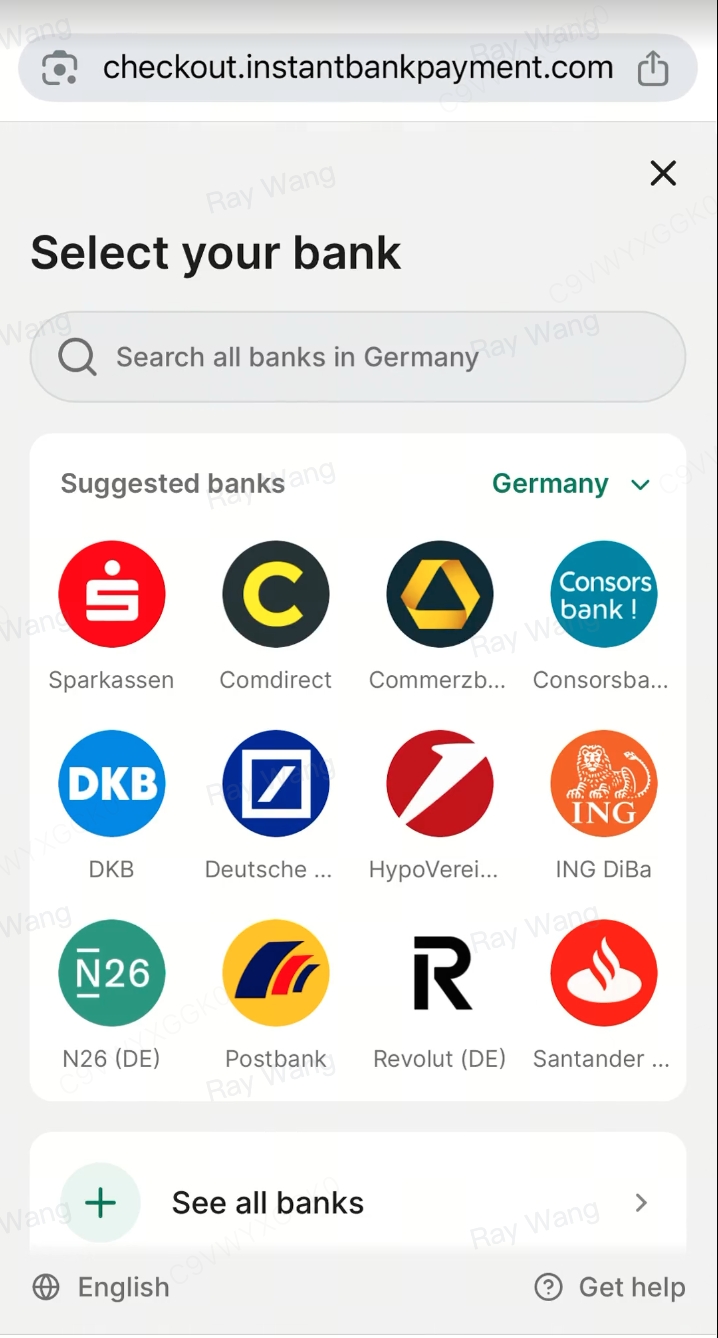
مرحلہ 5: آپ کو ٹرانسفر کو منظور کرنے کے لیے بینک کا انتخاب کرنے والی صفحہ پر ہدایت کی جائے گی۔
اپنا بینک منتخب کریں اور ٹرانسفر کے لیے اکاؤنٹ کی اجازت مکمل کریں۔ براہ راست کریں کہ یہ اجازت ہر لین دین کے لیے ایک بار کی ہے — ہر ٹرانسفر کے لیے آپ کی منظوری درکار ہے۔
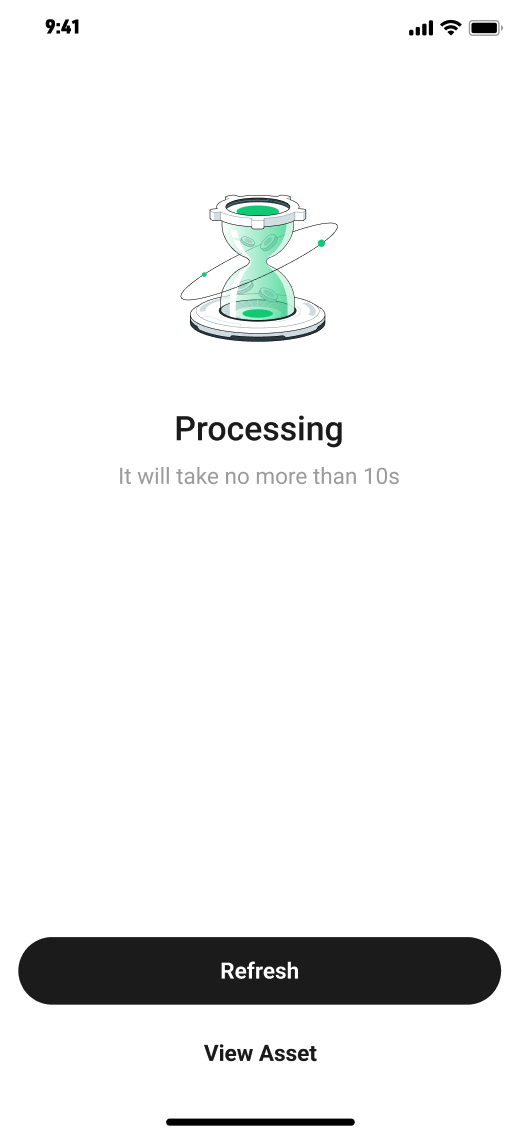
مرحلہ 6: رقم کے جمع ہونے کا انتظار کریں
- جب آپ نے ادائیگی مکمل کر لی ہو، تو براہ راست صبر کریں۔ جب KuCoin کو فنڈز حاصل ہو جائیں، تو وہ فوری طور پر پروسیس ہو جائیں گے اور آپ کے اکاؤنٹ میں جمع کر دیے جائیں گے۔ جمع ہونے کا وقت آپ کے منتخب کردہ ادائیگی کے طریقہ اور آپ کے بینک کی پروسیسنگ کی کارکردگی پر منحصر ہوگا۔ انتظار کے دوران، آپ کے ڈپازٹ آرڈر کی حالت "جاری" کے طور پر دکھائی دے گی۔
3. اکثر پوچھے جانے والے سوالات
3.1 SEPA Open Banking اور بینک ٹرانسفر (SEPA) کے درمیان فرق کیا ہے؟
SEPA اوپن بینکنگ ایک زیادہ آسان اور محفوظ آن لائن بینکنگ ادائیگی کا طریقہ ہے جو صارفین کو پیچیدہ وصول کنندہ کی تفصیلات دستی طور پر درج کیے بغیر ادائیگی کرنا ممکن بناتا ہے۔ دوسری طرف، بینک ٹرانسفر (SEPA) صارفین سے یہ معلومات درج کرنے کی ضرورت مانگتا ہے تاکہ ٹرانسفر مکمل کیا جا سکے۔
3.2 کیوں میرا SEPA Open Banking کے ذریعے EUR ڈپازٹ اب تک جمع نہیں ہوا؟
عام طور پر، SEPA اوپن بینکنگ کے ذریعے جمع کرائے گئے آرڈرز دو کام کرنے والے دنوں کے اندر مکمل ہو جاتے ہیں، جو آپ کے بینک کی پروسیسنگ رفتار پر منحصر ہیں۔ سب سے پہلے، تصدیق کریں کہ کیا آپ کی ادائیگی مکمل ہو چکی ہے اور ٹرانسفر کامیاب ہوا ہے۔ اگر دو کام کرنے والے دنوں سے زیادہ گزر چکے ہیں اور فنڈز اب بھی آپ کے KuCoin اکاؤنٹ میں جمع نہیں ہوئے ہیں، تو مزید مدد کے لیے کسٹمر سپورٹ سے رابطہ کریں۔
3.3 کیوں میرا EUR ڈپازٹ آرڈر اب بھی "جاری ہے" کے طور پر ظاہر ہو رہا ہے، جبکہ میں نے پہلے ہی ریفند حاصل کر لیا ہے؟
SEPA اوپن بینکنگ کے ذریعے جمع کرائے گئے فنڈز عام طور پر 2 کام کے دنوں کے اندر آ جاتے ہیں اور ان کا اسٹیٹس "کامیاب" کے طور پر نشان زد ہو جاتا ہے جب وہ حاصل ہو جائیں۔ فنڈز جمع ہونے پر آرڈر کا اسٹیٹس اپڈیٹ ہو جائے گا۔ اگر آپ کو پہلے ہی ریفند مل چکا ہے، تو "پروسیسنگ" کے اسٹیٹس کو نظرانداز کر دیں۔ جب ہمیں بینک سے اطلاع مل جائے گی، تو اسٹیٹس "ناکام" یا "منقضی" میں اپڈیٹ ہو جائے گا۔
3.4 میرا EUR ڈپازٹ درخواست کیوں مسترد ہو گیا؟
اگر آپ کا ڈپازٹ آرڈر مسترد کر دیا گیا، تو ہم ڈپازٹ کے عمل کو دوبارہ کرنے یا دوسرے بینک اکاؤنٹ کا استعمال کرنے کی تجویز کرتے ہیں۔ براہ راست یقینی بنائیں: ٹرانزیکشن آپ کے تصدیق شدہ بینک اکاؤنٹ سے شروع کیا گیا ہے۔ آپ بینک کی ٹرانزیکشن لِمٹس کے بارے میں آگاہ ہیں اور ان کی پابندی کرتے ہیں۔
3.5 جبکہ میں نے SEPA Open Banking کے ذریعے جمع کرایا ہے، تو EUR نکالنے پر اکاؤنٹ تصدیق کیوں مکمل کرنی ہے؟
KuCoin مطابقت کے اصولوں کی پابندی کرتا ہے، اور رقم نکلوانے والے اکاؤنٹ کی تصدیق منی لانڈرنگ (AML) کے لیے بنیادی اقدامات میں سے ایک ہے۔ آپ تصدیق درج ذیل طریقے سے مکمل کر سکتے ہیں: KuCoin کی فیاٹ رقم نکلوانے کی تصدیق کی سہولت استعمال کریں۔ اپنے مخصوص رقم نکلوانے والے بینک اکاؤنٹ کے ذریعے بینک ٹرانسفر (SEPA) کے ذریعے ایک چھوٹی سی ڈپازٹ کریں۔ اس میں سے ایک مرحلہ مکمل ہونے کے بعد، آپ اپنے فنڈز آزادانہ طور پر نکال سکتے ہیں۔
3.6 کیوں پلیٹ فارم میرا ڈپازٹ آرڈر نہیں دکھا رہا جبکہ میں نے SEPA Open Banking کے ذریعے کامیابی سے ادائیگی کر لی ہے؟
یہ عام طور پر اس لیے ہوتا ہے کہ آپ نے KuCoin ڈپازٹ صفحہ پر نیا ڈپازٹ آرڈر نہیں شروع کیا بلکہ پہلے کامیاب ٹرانزیکشن سے ادائیگی کی معلومات استعمال کیں۔ توجہ دیں کہ تمام SEPA Open Banking ڈپازٹس KuCoin ڈپازٹ صفحہ کے ذریعے شروع کی جانی چاہئیں اور آن لائن بینکنگ کے ذریعے مکمل کی جانی چاہئیں۔ پچھلے وصول کنندہ اکاؤنٹ کو براہ راست ٹرانسفر کرنے سے سسٹم انہیں نہیں پہچانے گا۔ اگر آپ کو مزید مدد کی ضرورت ہو، تو براہ راست صارف سہولت سے رابطہ کریں۔