How to Deposit EUR Using Regular Bank Transfer (SEPA)?
1. What is Regular Bank Transfer (SEPA)?
Regular Bank Transfer (SEPA) is a service provided by KuCoin that allows users to deposit EUR via SEPA. With this method, users transfer a specified amount of EUR to a designated bank account, and the funds are then credited to their KuCoin account. This method supports both SEPA and SEPA Instant transfers. However, the availability of SEPA Instant depends on whether the user’s payment bank supports this service.
2. Fees and Limits
Please note: The actual fees and limits are subject to the display in the KuCoin system.
|
Payment Method
|
Fiat Currency
|
Transaction Type
|
Payment Network
|
Processing Time
|
Fee
|
Single-Order Amount Limit
|
|
Regular Bank Transfer (SEPA)
|
EUR
|
Deposit
|
SEPA Instant
|
Instant
|
1 EUR
|
1.01 - 50,000 EUR
|
|
SEPA Credit
|
Within 2 working days
|
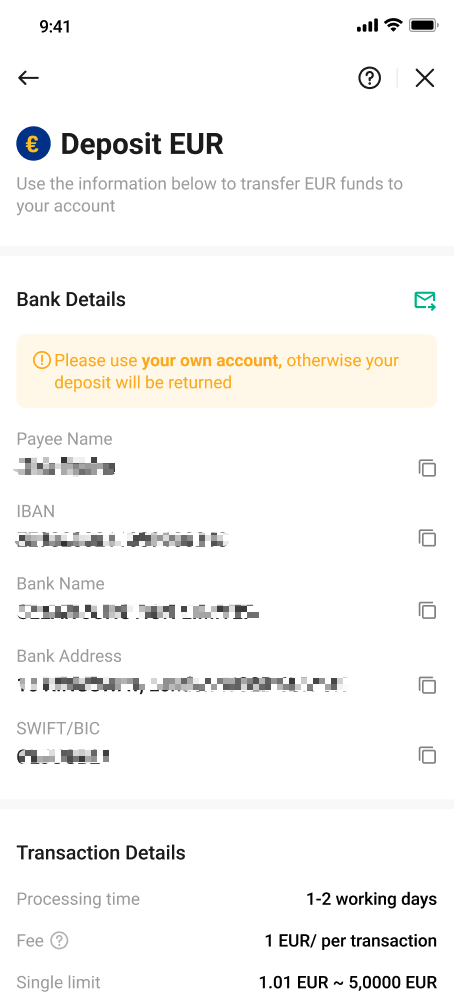
3. How to Deposit EUR Using Regular Bank Transfer (SEPA)? (App Version)
Step 1: Access the official KuCoin website or app and log in to your account that has completed KuCoin KYC verification.
Step 2: Please tap on "Add Funds" and then select "Fiat Deposit" to access the fiat deposit page.
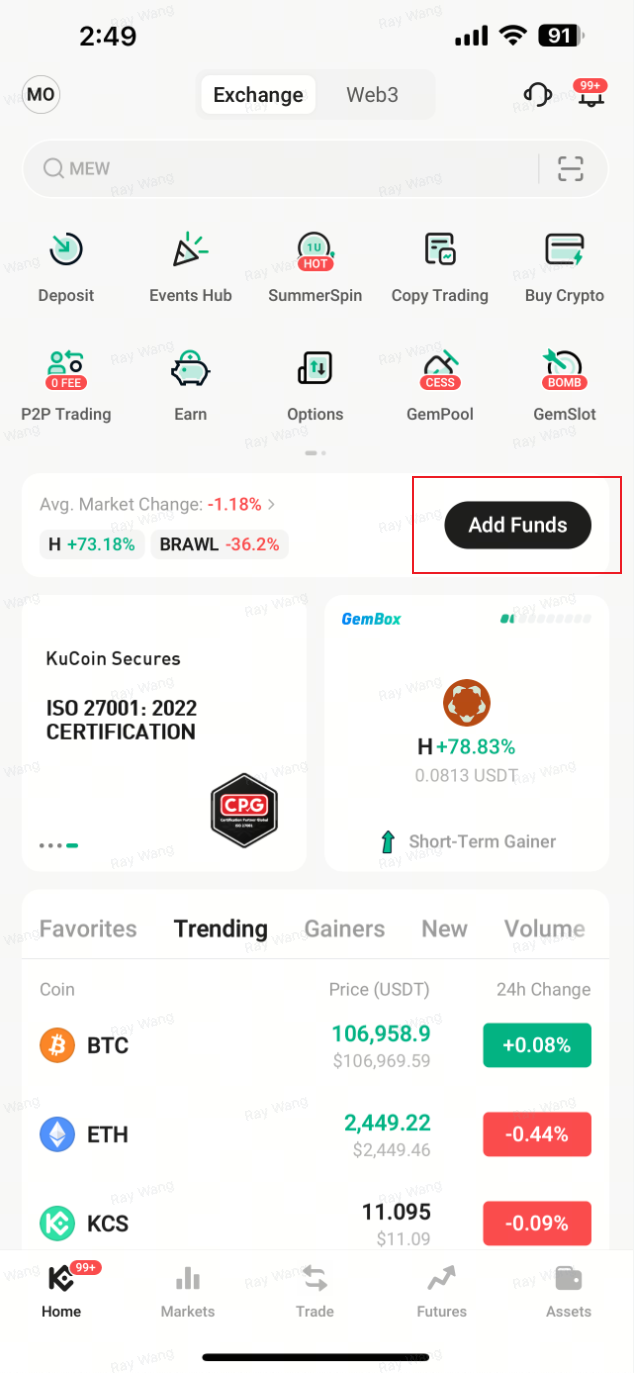
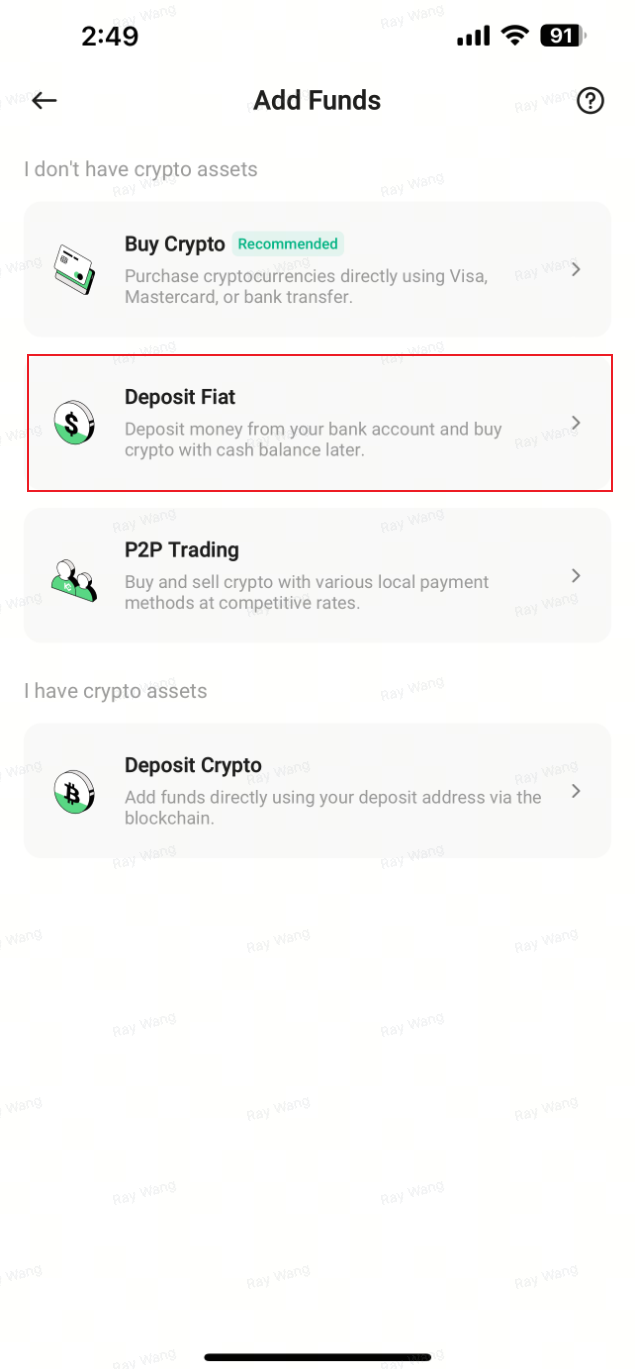
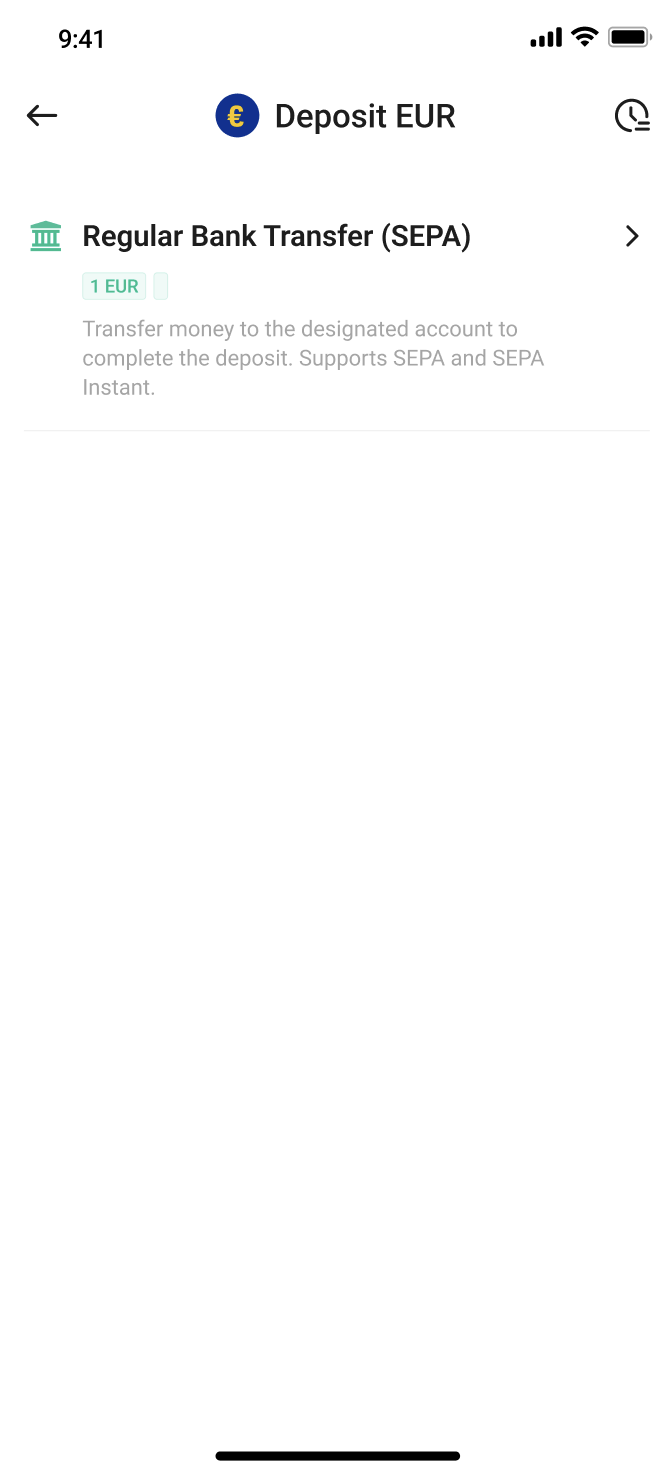
Step 3: Choose "EUR" as the fiat currency and select "Regular Bank Transfer (SEPA)" to enter the SEPA deposit page.

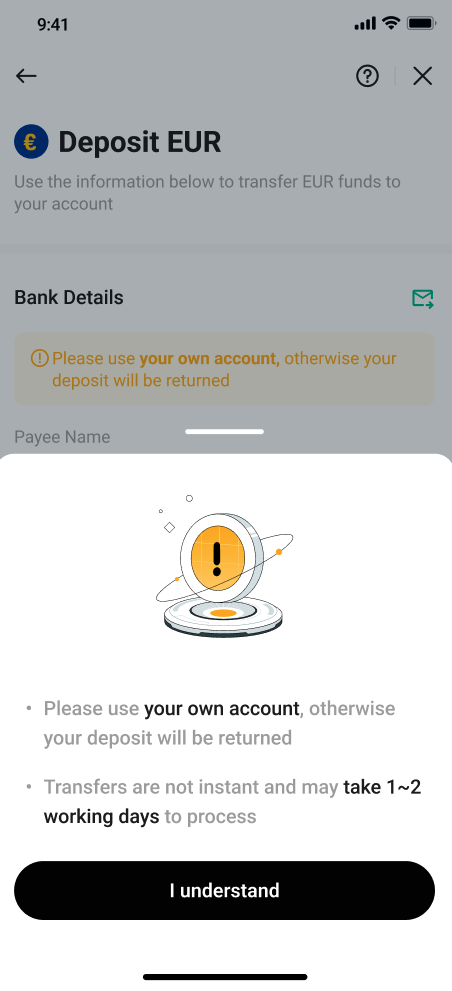
Step 4: Follow the prompts to complete the SEPA additional verification.
>>> Please refer to: How to Complete SEPA Additional Verification?
Step 5: Use your SEPA-enabled bank account to transfer EUR based on the beneficiary details shown on KuCoin.
- Once we receive the EUR funds, they will be immediately credited to your KuCoin Funding Account.
4. How to Deposit EUR Using Regular Bank Transfer (SEPA)? (Web Version)
Step 1: Access the official KuCoin website or app and log in to your account that has completed KuCoin KYC verification.
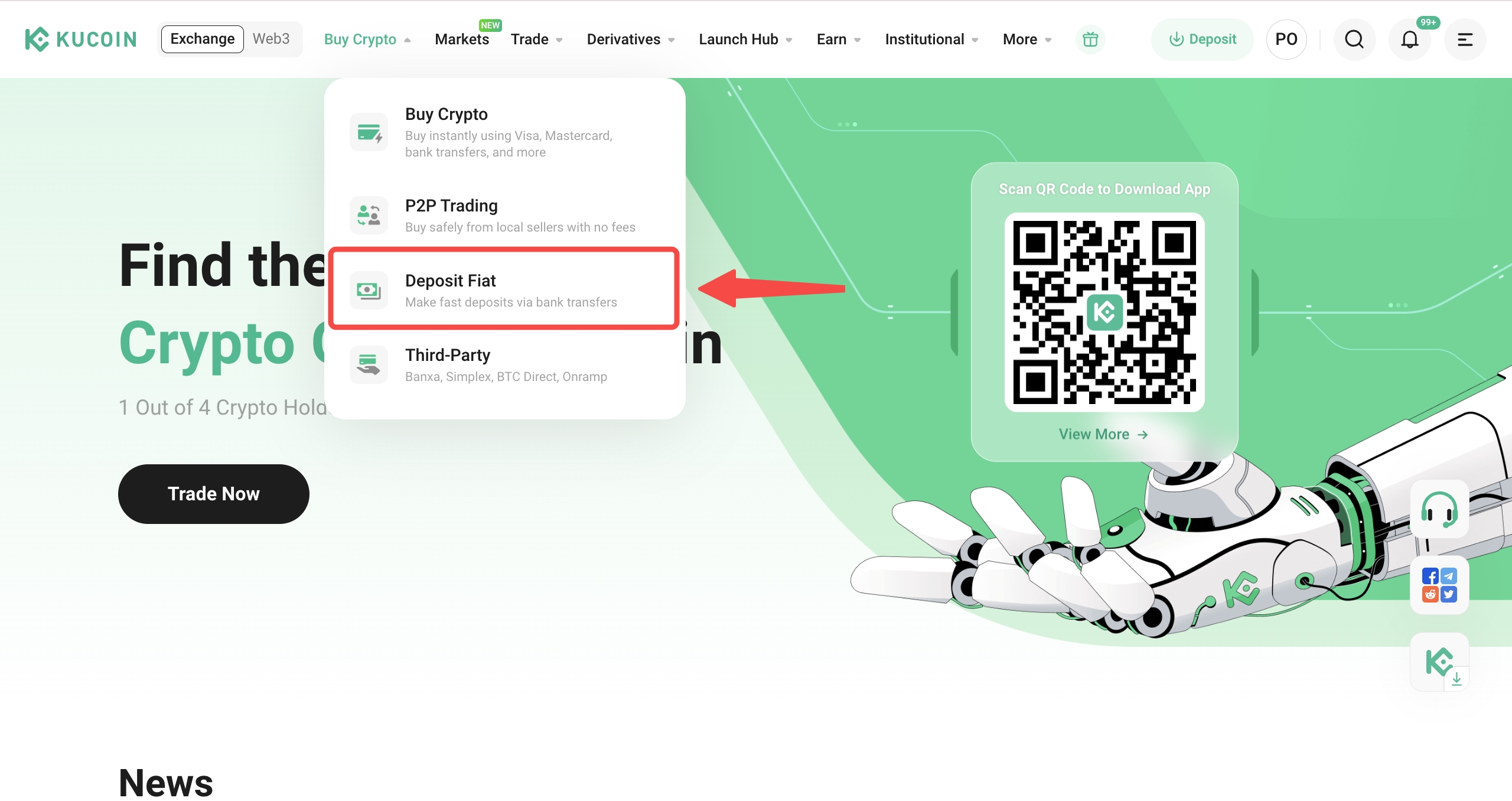
Step 2: Please click on "Buy Crypto" in the top navigation bar, then select "Fiat Deposit" to enter the fiat deposit page.
Step 3: Choose "EUR" as the fiat currency and select "Regular Bank Transfer (SEPA)" to enter the SEPA deposit page.
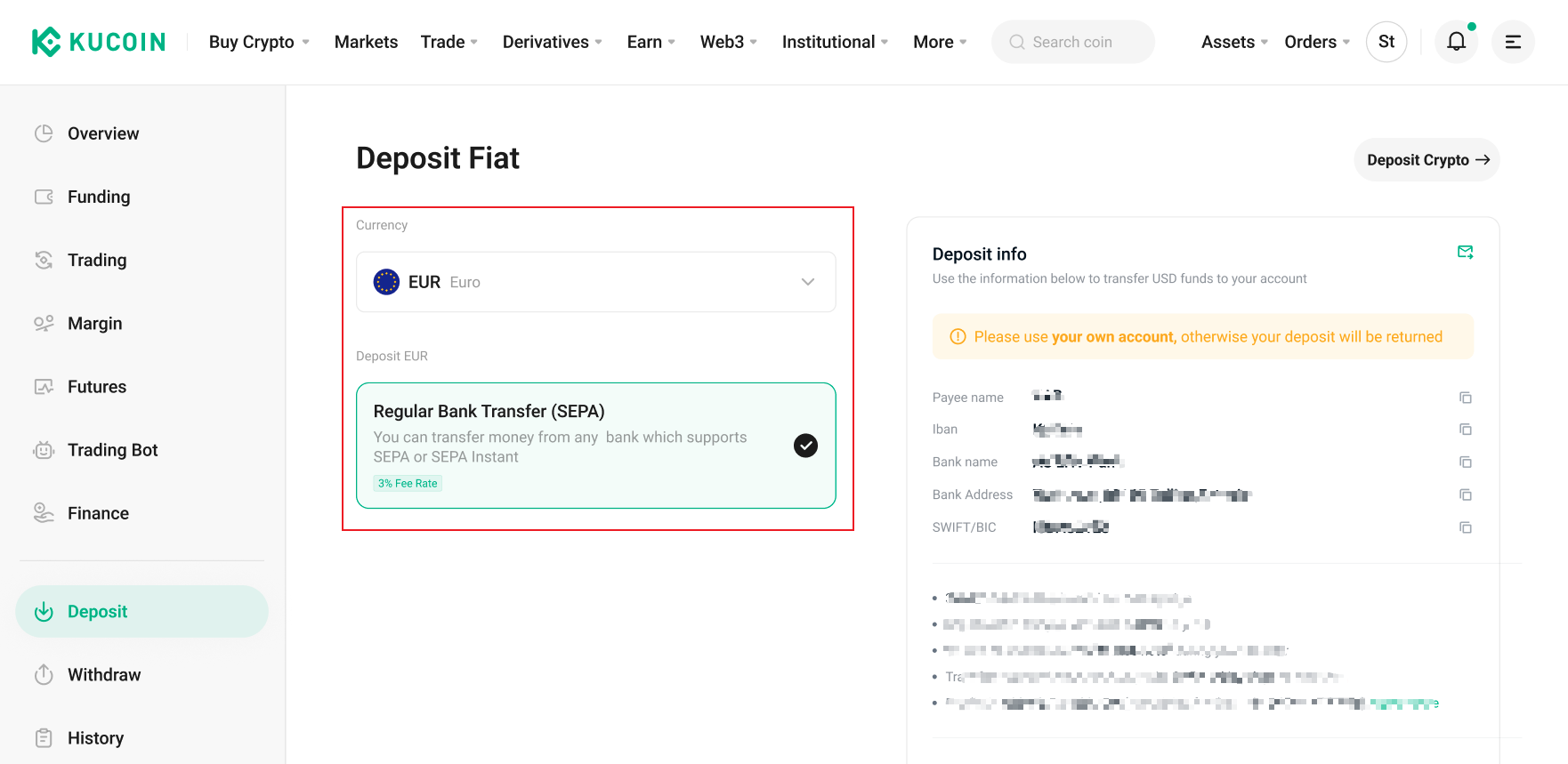
Step 4: Follow the prompts to complete the SEPA additional verification.
>>> Please refer to: How to Complete SEPA Additional Verification?
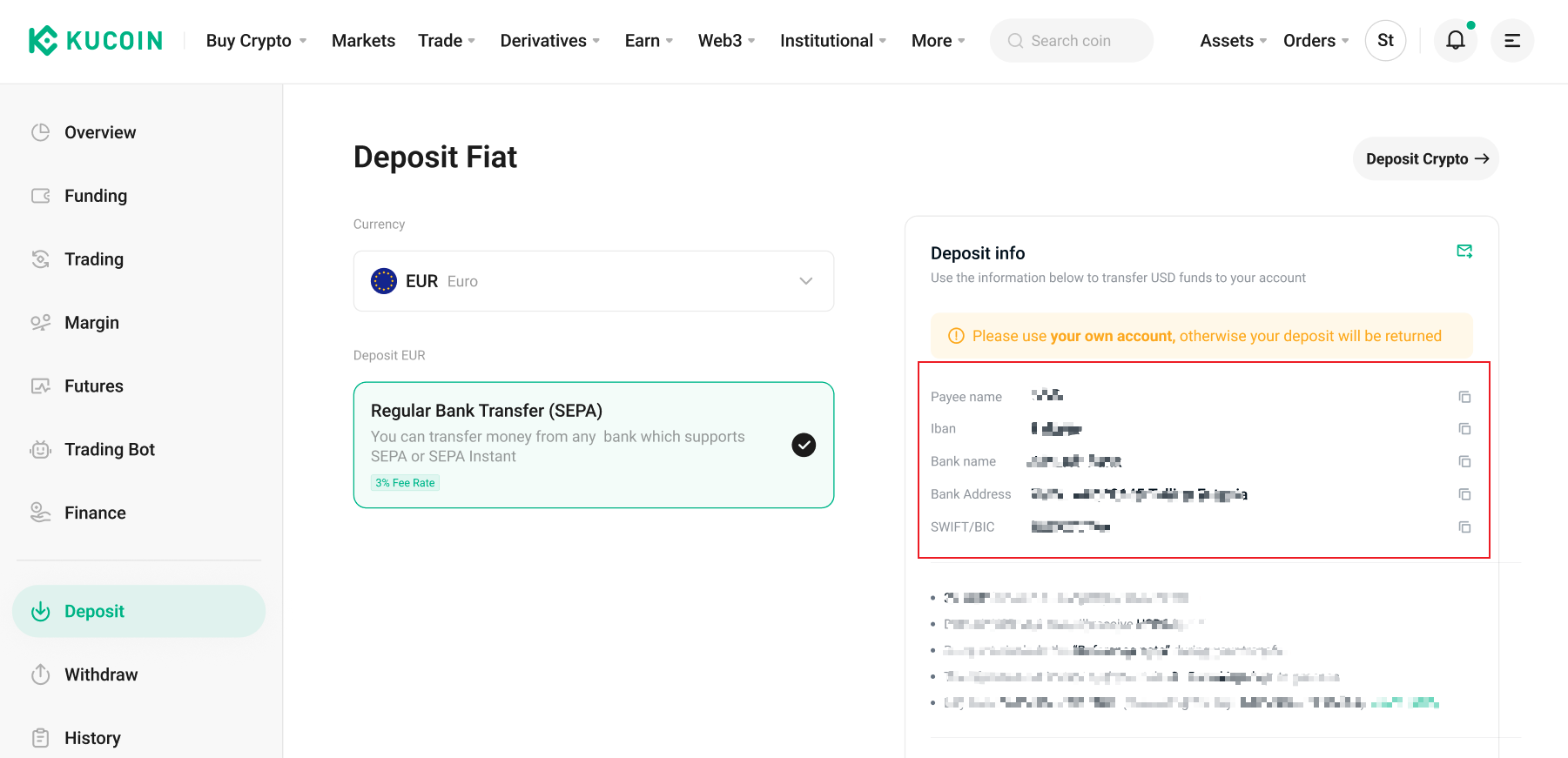
Step 5: Use your SEPA-enabled bank account to transfer EUR based on the beneficiary details shown on KuCoin.
- Once we receive the EUR funds, they will be immediately credited to your KuCoin Funding Account.
5. FAQ
5.1 How long does it take for EUR deposits to arrive?
SEPA Credit Transfer: Typically takes 1–2 business days, depending on your bank’s processing times and when the transfer was initiated.
SEPA Instant Transfer: Processed in real time and usually completed within seconds, provided your bank supports SEPA Instant.
5.2 Can I cancel a EUR deposit order that has already been initiated?
No, once a deposit order has been created, it cannot be canceled while it is being processed. Please double-check all payment details before initiating the transfer to avoid any issues.
5.3 Why are SEPA deposit and withdrawal options unavailable?
SEPA (Single Euro Payments Area) is a bank transfer system available only in select countries and regions. Due to regulatory and compliance requirements, SEPA EUR transfers are supported only in eligible locations. If you do not see the SEPA option, it means the service is not currently available in your region.
5.4 Where can I view the fiat currency I deposited once the order is completed?
You can view the status of your deposits—whether successful or failed—under "Deposit History." To check the available balance, go to "Assets" > "Funding".
5.5 My EUR deposit order has been stuck in “Refund in Progress” status.
If your EUR deposit has been in a refund status for more than 2 business days, it is likely due to either a failed initial refund attempt or a successful refund being rejected by your bank.
In such cases, please contact KuCoin Support and provide details of the situation. We will investigate whether the refund was processed correctly. If the refund has failed, you may be asked to provide a new bank account to reprocess the refund.
5.6 My EUR deposit order has triggered EDD.
Please follow the instructions on the KuCoin deposit page to submit the required EDD (Enhanced Due Diligence) information. Once submitted, the request will enter a manual review process, which usually takes 1–2 business days.
Make sure that the information you provide is accurate and complete. >>> For more details, please refer to: How to Complete SEPA Enhanced Due Diligence (EDD)?
If you do not submit the EDD information within 5 business days after the trigger, the deposit order will be automatically refunded.
If you choose not to submit the EDD information, you can locate the order in your deposit order list and click “I don't want to submit EDD information” to attempt a self-refund.
5.7 I was charged additional fees for my EUR deposit.
If your EUR deposit was charged more than the amount indicated on the KuCoin deposit page, the extra fees were likely imposed by your bank or intermediary banks involved in the transfer.
KuCoin does not charge any fees beyond the standard deposit fee. We recommend contacting your bank to confirm the source of the charges.