O que é KCS Staking?
Última atualização: 27/02/2026
1. O que é KCS Staking?
KCS, o token nativo da rede KCC, foi originalmente lançado como um token ERC-20 na blockchain Ethereum em 2017, antes de migrar para a KCC em 2021. O KCS é central para o ecossistema KCC, funcionando como seu token de utilidade principal e combustível subjacente. O KCS continua impulsionando novos recursos e oportunidades dentro do ecossistema.
O KCS Staking permite que os usuários bloqueiem o token nativo da KuCoin, o KCS, na plataforma para ganhar recompensas diárias.
|
Projeto
|
Descrição |
|
Plataforma de Staking
|
Fundação KCS
|
|
Staking Mínimo
|
1 KCS
|
|
Tipo de Rendimento
|
Recompensas diárias (geralmente emitidas em KCS)
|
|
APR
|
Cerca de 3%–8%, variável
|
|
Regras de Desstake
|
Desbloqueie a qualquer momento, com um período de bloqueio de 3 dias durante o qual nenhum recompensa é conquistada
|
|
Benefícios
|
Rendimento passivo constante e elegibilidade para eventos especiais (por exemplo, GemDrop)
|
2. Quanto posso ganhar?
Seus recompensas dependem da quantia stakeada e da duração do staking. A taxa percentual anual (APR) serve como referência. A APR representa a taxa estimada de recompensa anual distribuída aos stakers. Ela é calculada com base nos seus ganhos dos últimos dois dias, sem capitalização, e é atualizada a cada 24 horas.
Observação: A taxa percentual anual (APR) não é um valor fixo. Ela varia de dia para dia para refletir as condições de mercado e serve apenas como referência para aquele dia específico.
3. Como participar?
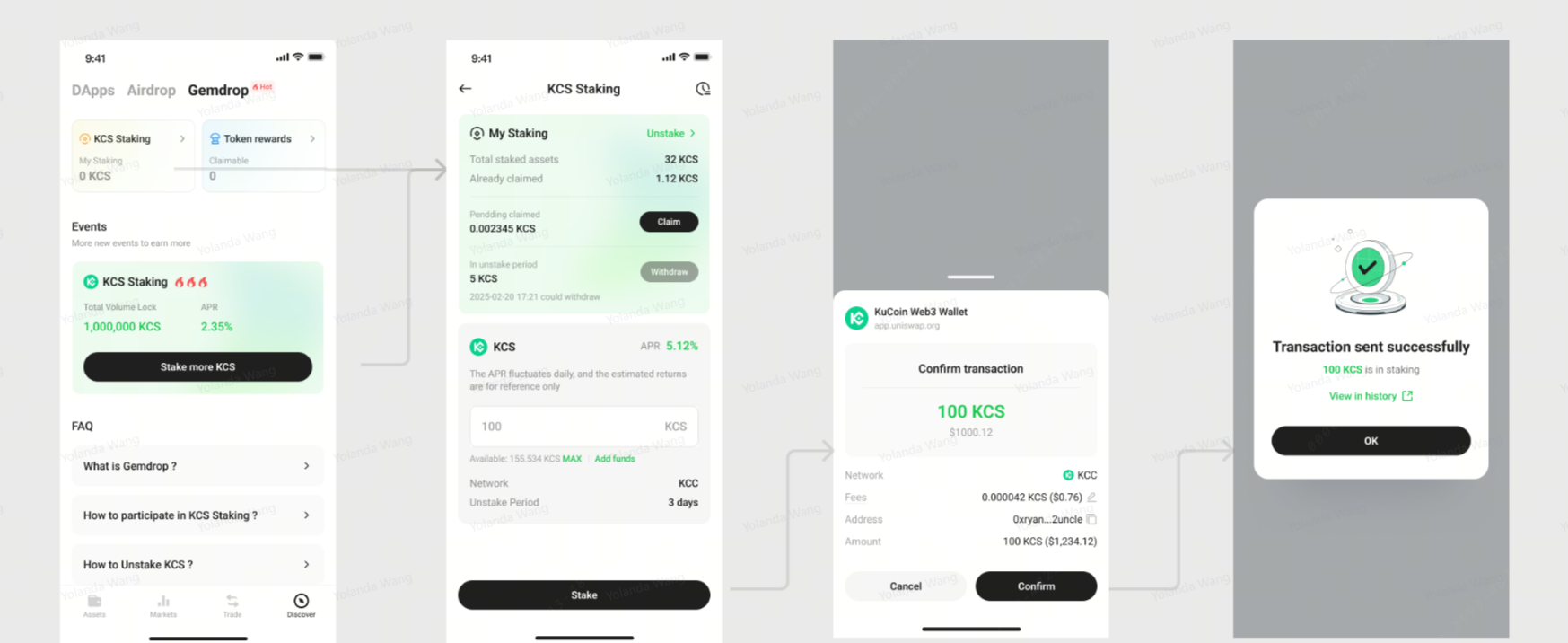
Se você não estiver familiarizado com o processo de KCS Staking, consulte o seguinte tutorial:
i. Toque em Discover, depois selecione GemDrop
ii. Toque em KCS Staking ou Stake Mais KCS
iii. Certifique-se de que sua carteira de criptomoeda tenha suficiente KCS na rede KCC. Caso contrário, faça um depósito ou transferência de KCS de outro exchange ou carteira.
iv. Insira a quantia de KCS que você deseja fazer staking
v. Toque em “Stake”
vi. Confirme e autorize a transação
vii. Quando você ver a mensagem “Staking bem-sucedido”, seus recompensas começarão a se acumular
viii. Você pode verificar e resgatar seus ganhos periodicamente e sacá-los para sua carteira
4. Quando posso sacar meus ganhos?
Você pode visualizar seus prêmios a qualquer momento em Rendimentos de Staking.
5. Como visualizar ou sacar meus recompensas de staking?
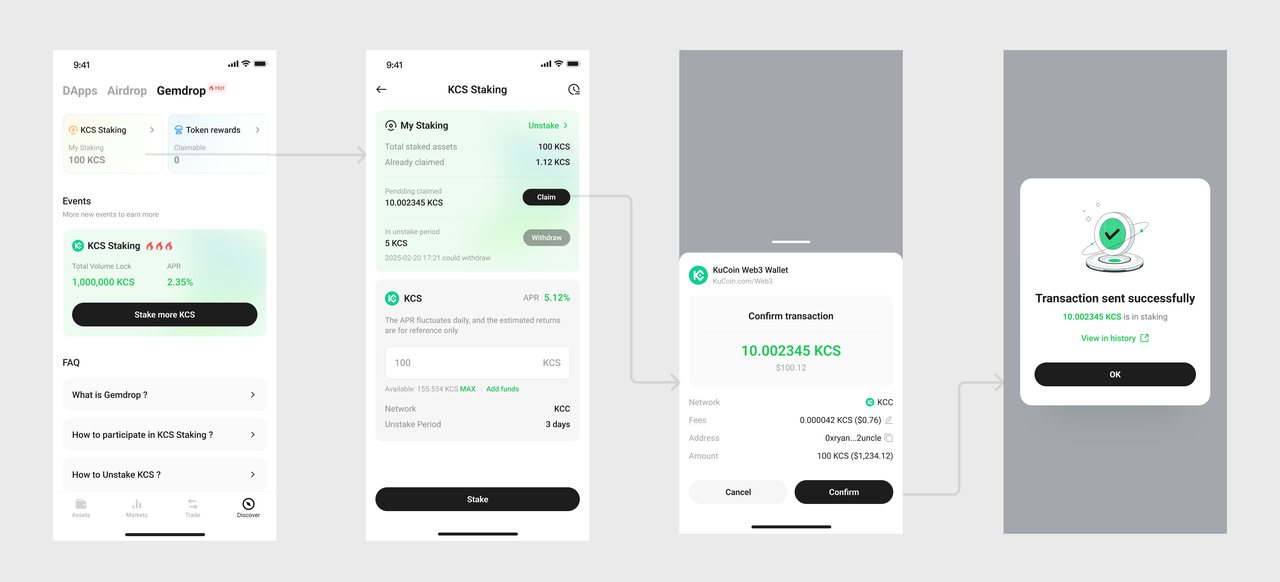
i. Verifique a quantia resgatável dos seus rendimentos.
ii. Selecione “Reivindicar”
iii. Confirme e autorize a transação
iv. Uma janela pop-up será exibida: Após a confirmação, os saques entrarão primeiro em um período de bloqueio de 3 dias, durante o qual não serão gerados rendimentos adicionais.
v. Você pode verificar o status do seu saque na aba “Período de Resgate”. Quando o botão “Sacar” ficar clicável, seus rendimentos estarão prontos para serem transferidos para sua carteira.
vi. Toque em Sacar, confirme a transação e está feito.
vii. Você pode visualizar seu KCS retirado em Ativos da Carteira ou no seu histórico de transações.
Aviso de Risco e Notificação de Conformidade
Este conteúdo é apenas para referência informativa geral e não constitui qualquer forma de aconselhamento de investimento, financeiro ou de negociação. O staking de KCS envolve riscos de mercado e liquidez. Por favor, avalie cuidadosamente sua própria tolerância ao risco antes de participar. Se necessário, consulte um consultor financeiro profissional.
Isenção de responsabilidade: Esta página foi traduzida com IA para facilitar a leitura. Para obter as informações mais precisas, consulte a versão original em inglês.Mostrar original