Como atualizar para a Conta Unificada?
Atualmente, a Conta Unificada da KuCoin (UTA) está em uma fase de teste beta limitada e está disponível apenas para usuários profissionais e institucionais selecionados. Vamos liberar gradualmente esse recurso para mais usuários da KuCoin—fique atento.
Lembrete: Nesta etapa, você pode alternar livremente entre o modo Conta Unificada e o modo Conta Clássica sem qualquer impacto na segurança dos ativos.
I. Pré-requisitos antes de atualizar para uma conta de negociação unificada
Antes de atualizar para a Conta Unificada, certifique-se de que todas as condições abaixo estão cumpridas:
Nenhuma posição em futuros aberta
Nenhuma ordem à vista ou futuros pendente
Nenhuma dívida pendente ou saldos negativos
Se sua conta não atender aos requisitos acima, conclua as ações necessárias antes de tentar atualizar novamente.
Para se juntar à lista branca da Conta Unificada, entre em contato com: @Kucoin_API_Support
II. Atualização para Conta Unificada e Instruções (Web)
Etapa 1: Acesse a entrada para a atualização da Conta Unificada
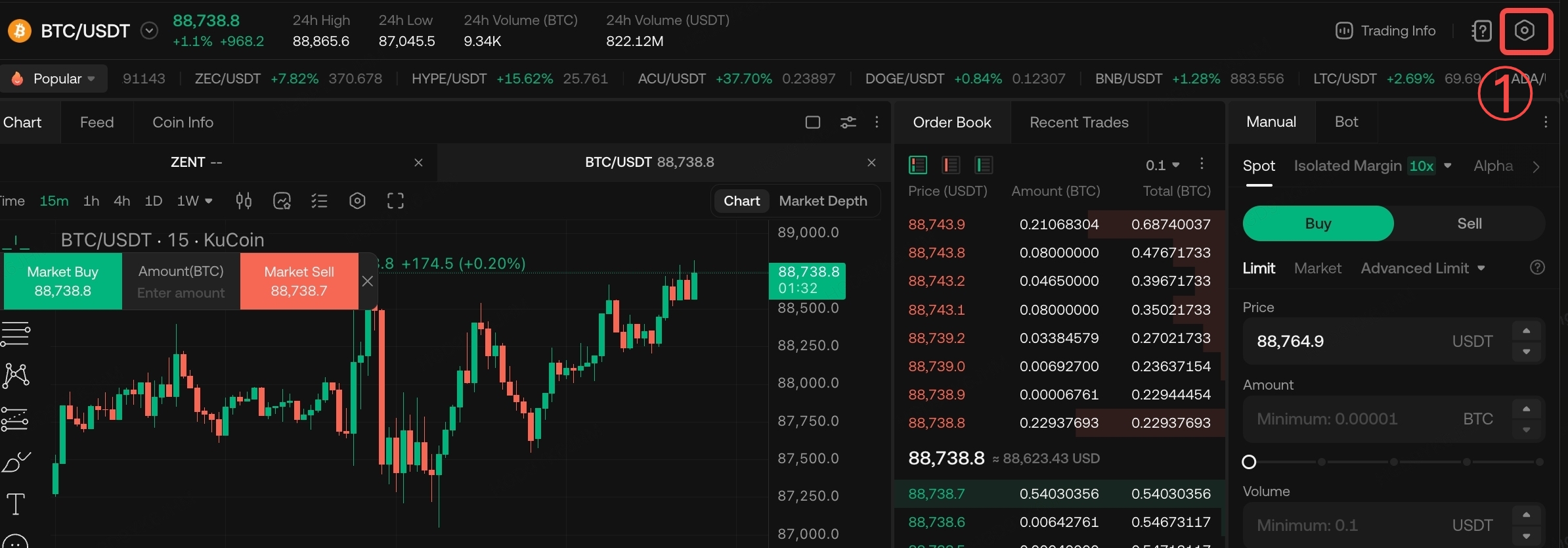
Vá para a Página de Negociação → Configurações (canto superior direito) → Configurações da Conta de Negociação → Atualizar para Conta Unificada
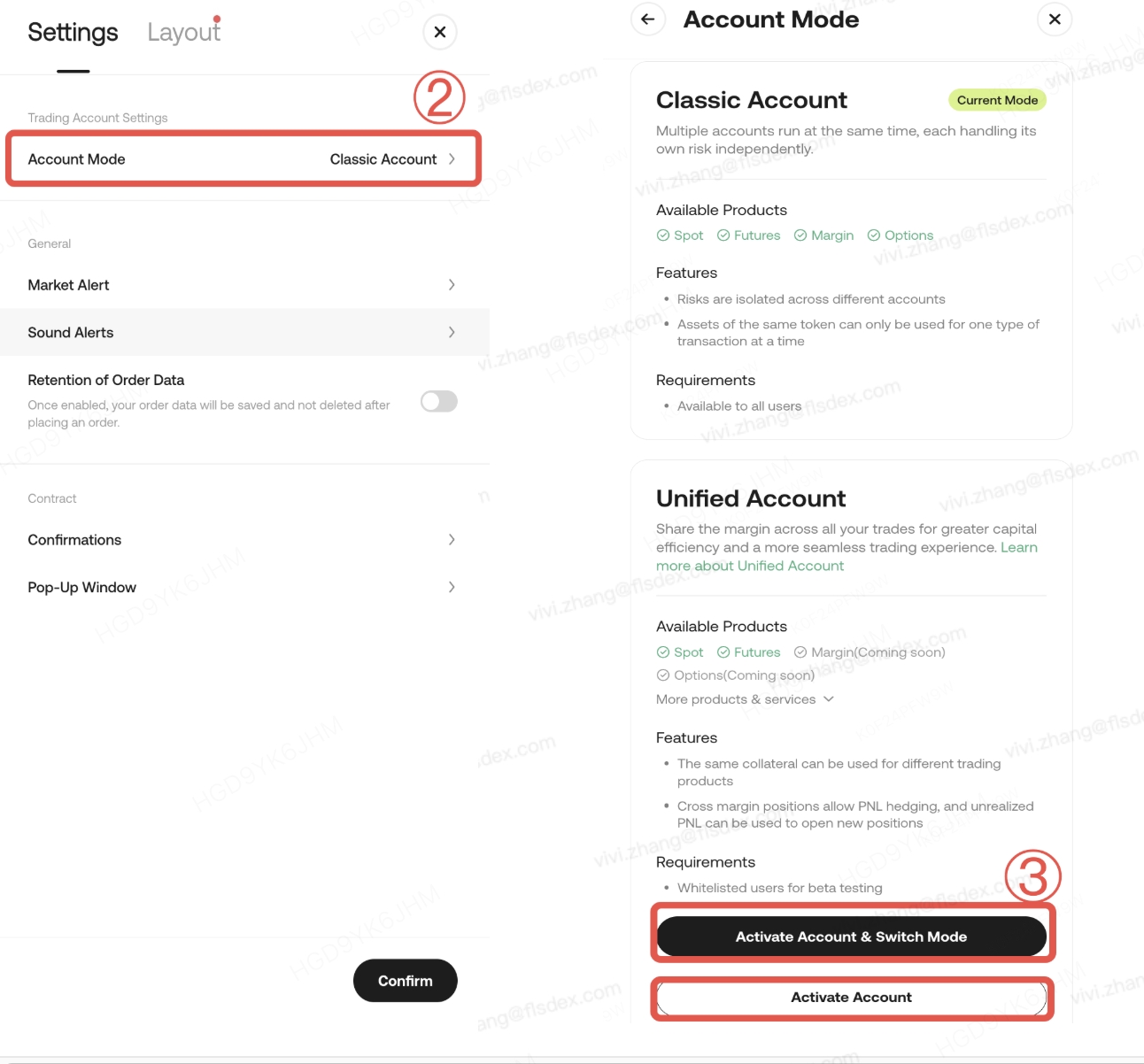
Cenário: Apenas Sub-contas Usam Conta Unificada
Se você deseja que apenas sub-contas utilizem a Conta Unificada, mantendo a conta principal no modo Conta Clássica, poderá selecionar 【Ativar Conta】.
Esta ação significa:
- A conta mestra deve concluir a avaliação de risco e concordar com os acordos relevantes.
- A própria conta mestra não será alterada para o modo Conta Unificada.
- As sub-contas podem usar normalmente os recursos da Conta Unificada.
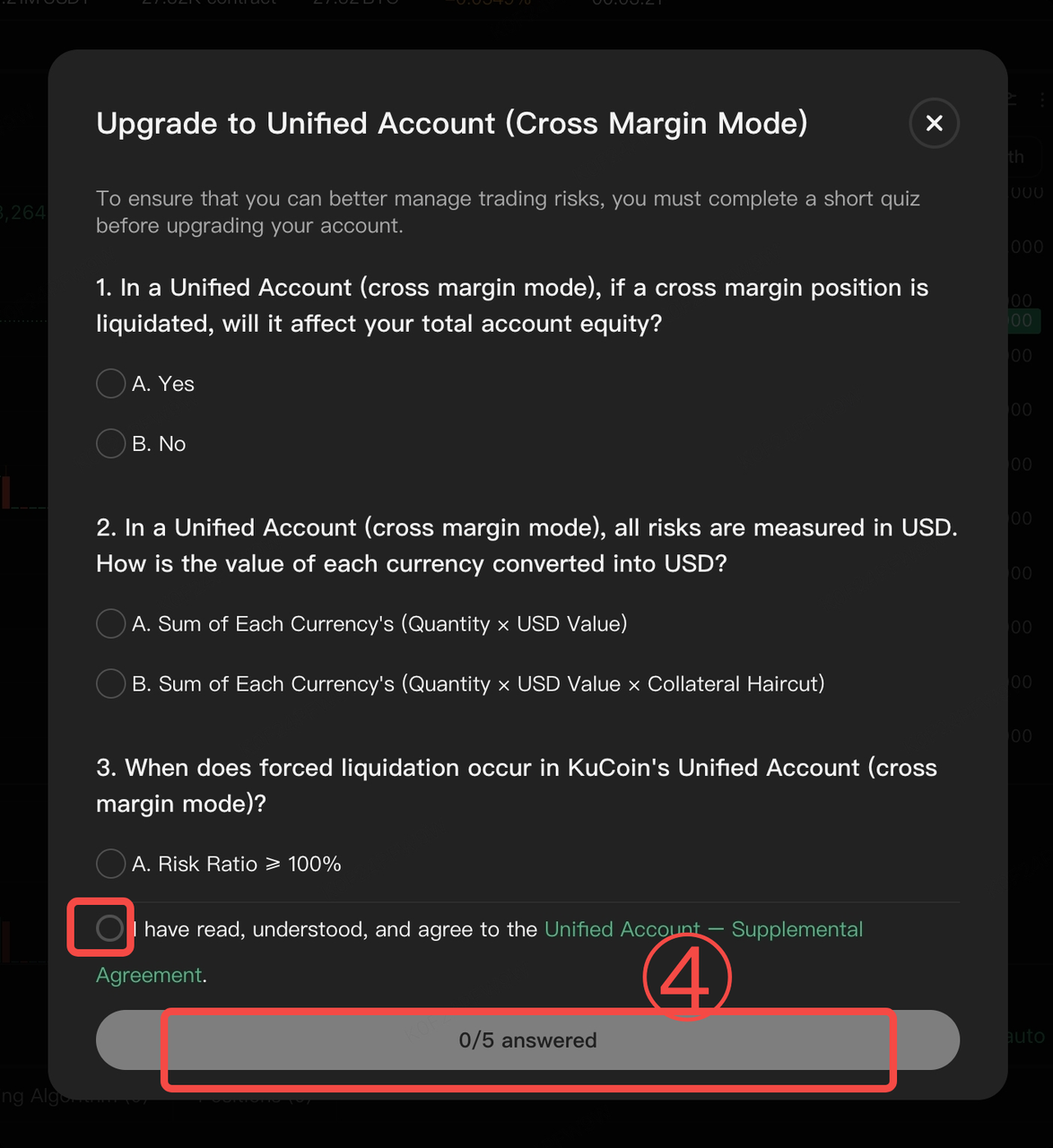
Etapa 2: Mude para a Conta Unificada e conclua a avaliação de risco
Siga os prompts do sistema para concluir o questionário de avaliação de risco. Após a submissão, aguarde a confirmação do sistema de que a atualização foi bem-sucedida.
Notas Importantes (Por favor, leia com atenção)
- O processo de atualização normalmente dura apenas alguns segundos
- Negociação e transferências de ativos estarão temporariamente indisponíveis durante a atualização
- A avaliação de risco aplica-se apenas à conta mestra
- As sub-contas não são obrigadas a concluir a avaliação.
- Importante: Os resultados da avaliação da conta mestra não restringem ou afetam as permissões de negociação das sub-contas.
Etapa 3: Criar sub-contas (para isolamento de estratégia ou negociação por API)
Se você ainda não criou sub-contas, siga as etapas abaixo:
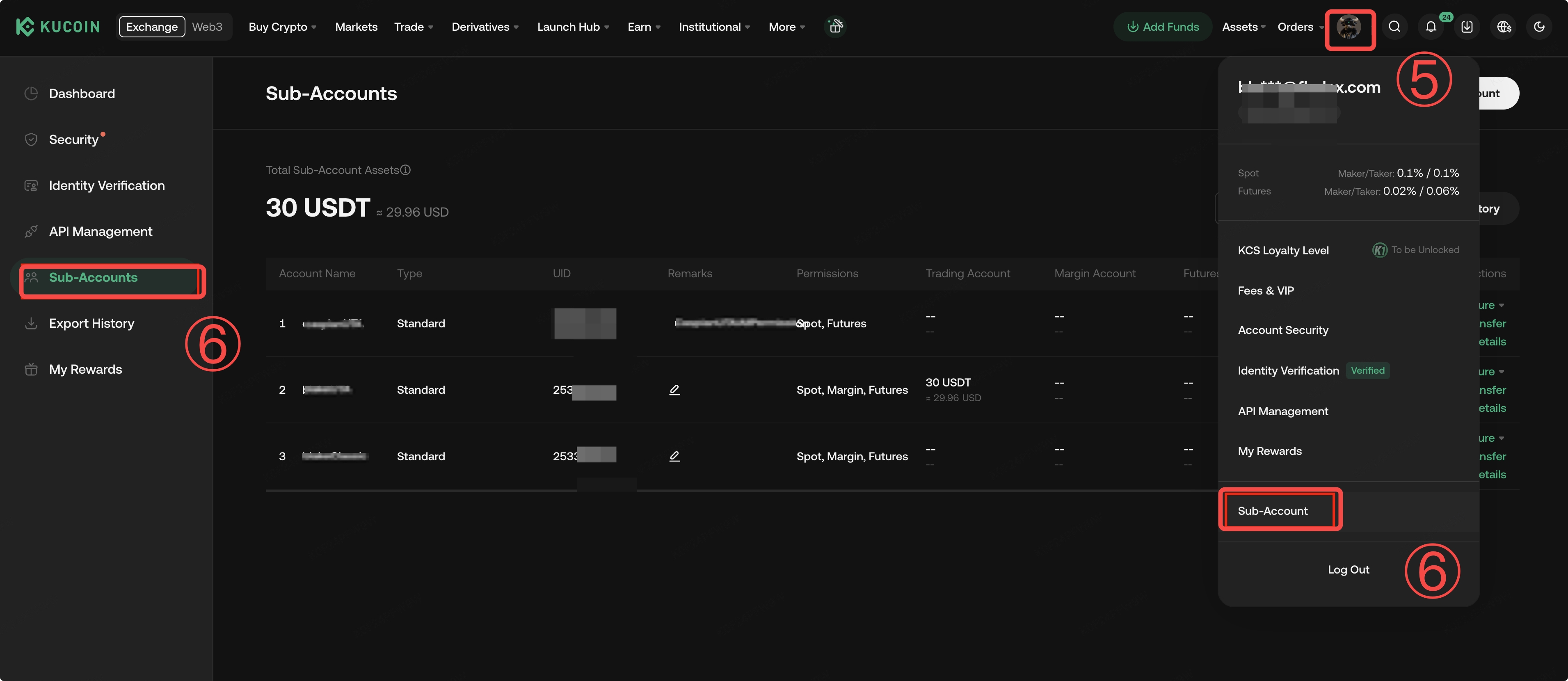
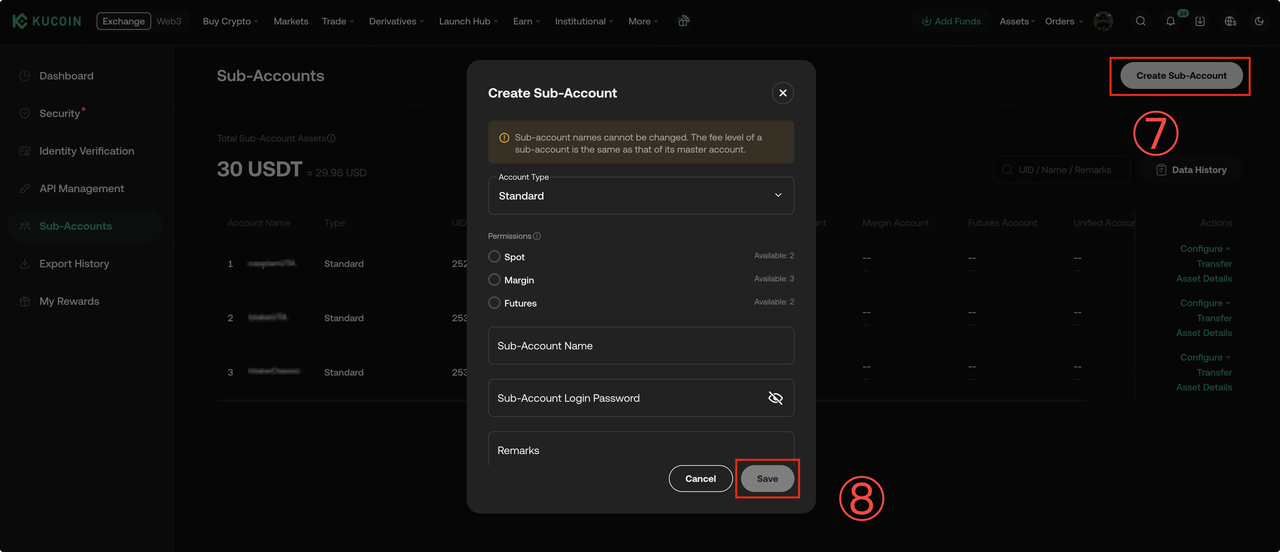
Uma vez criadas, as sub-contas podem ser usadas para:
- Isolando diferentes estratégias de negociação
- Negociação automatizada por API
- Gestão independente de risco e posição
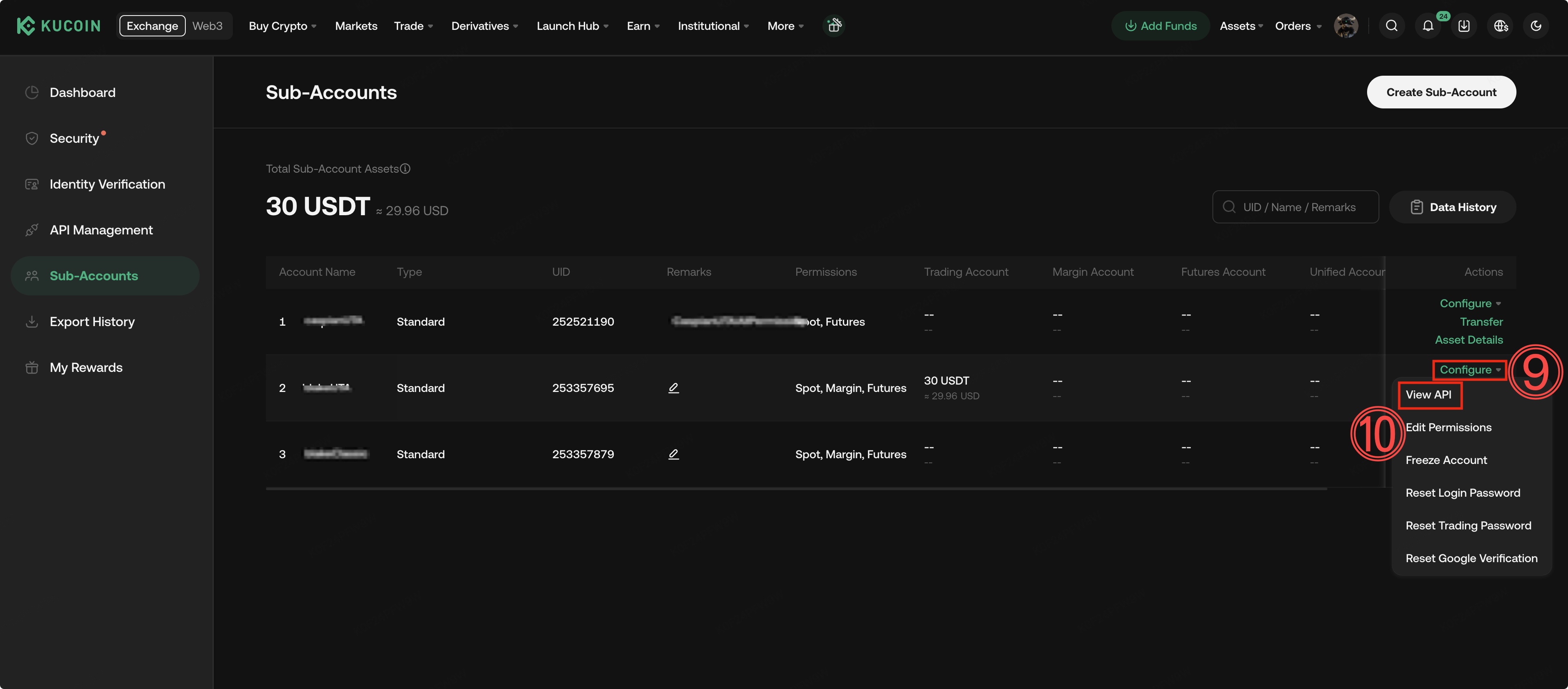
Etapa 4: Criar uma chave API para contas secundárias (se a negociação por API for necessária)
Siga as etapas abaixo:
- Acesse a página da sub-conta
- Selecione Configurar → Ver API
-
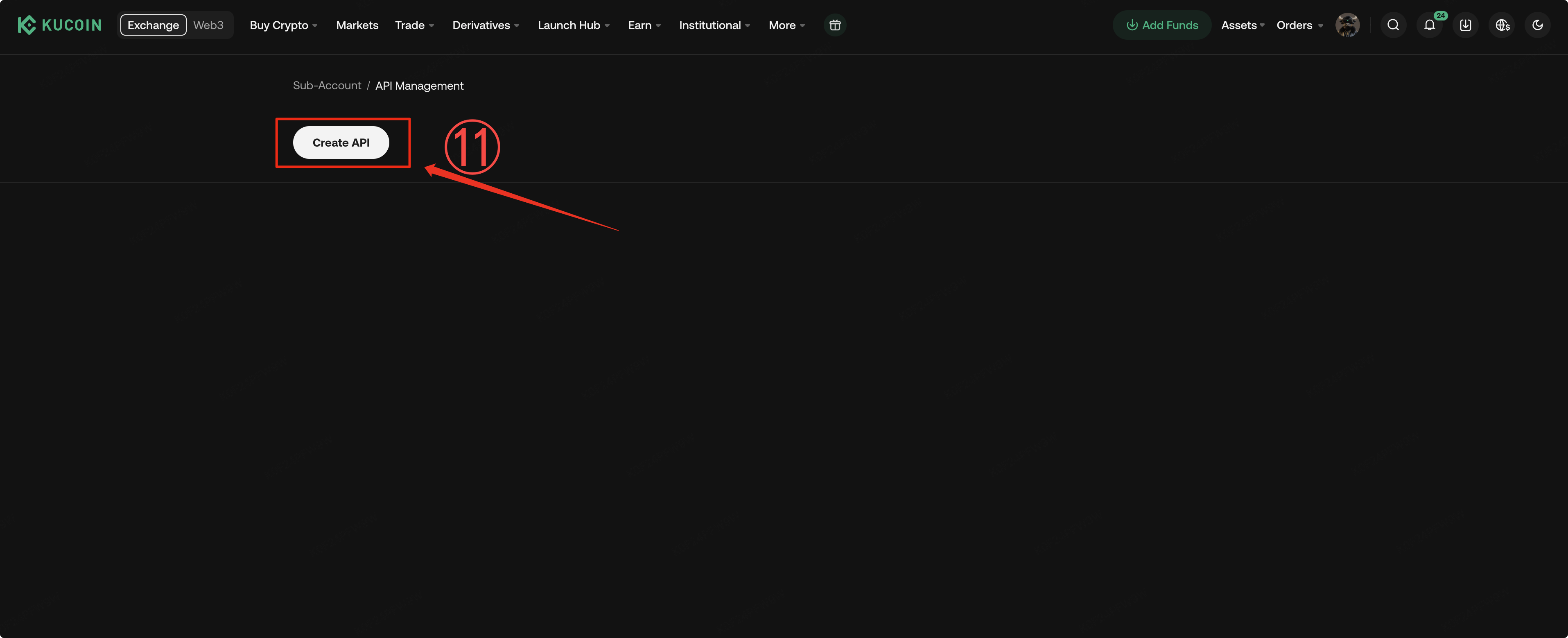
Clique em Criar API
-
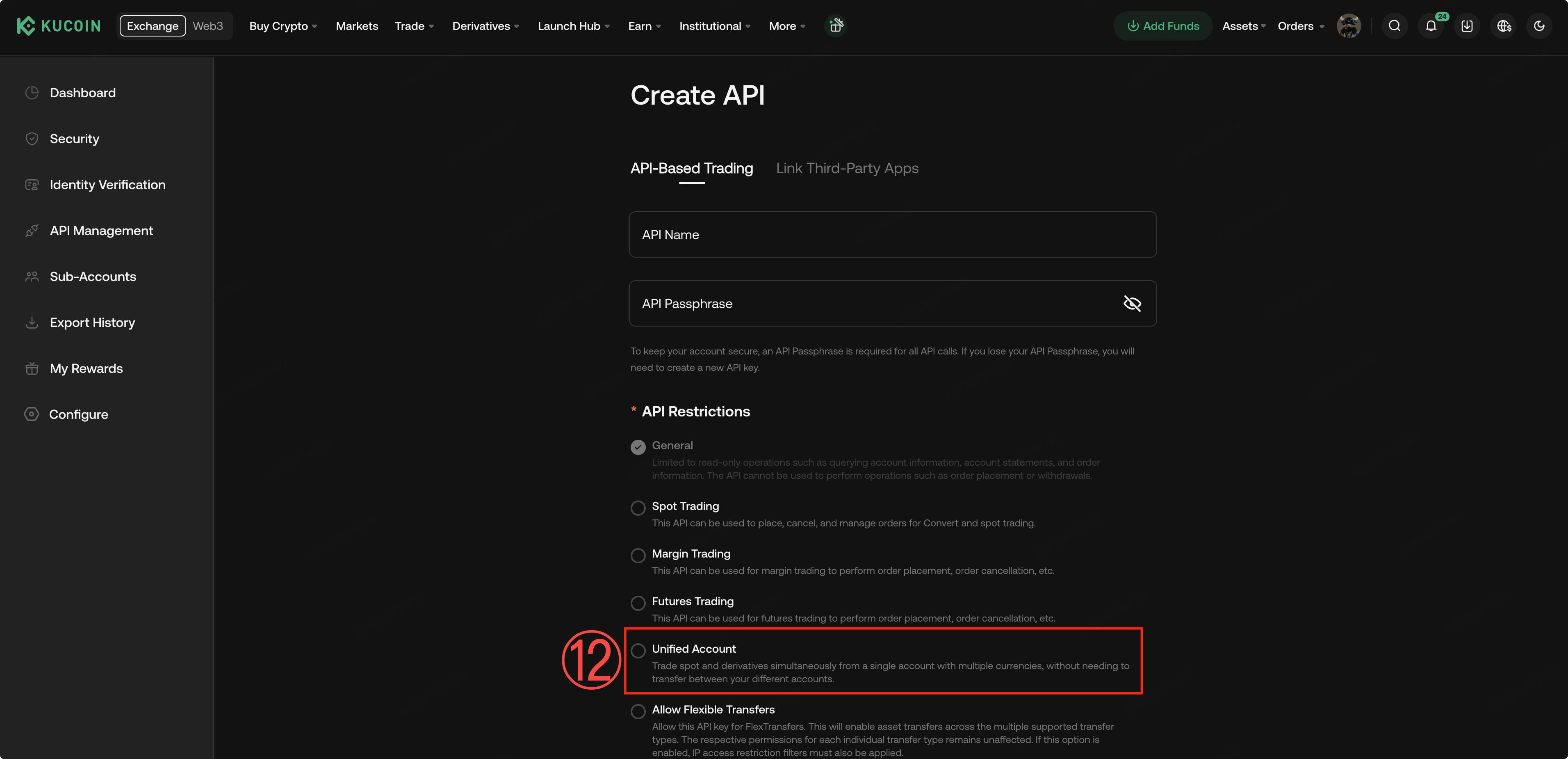
Certifique-se de verificar a opção Conta Unificada
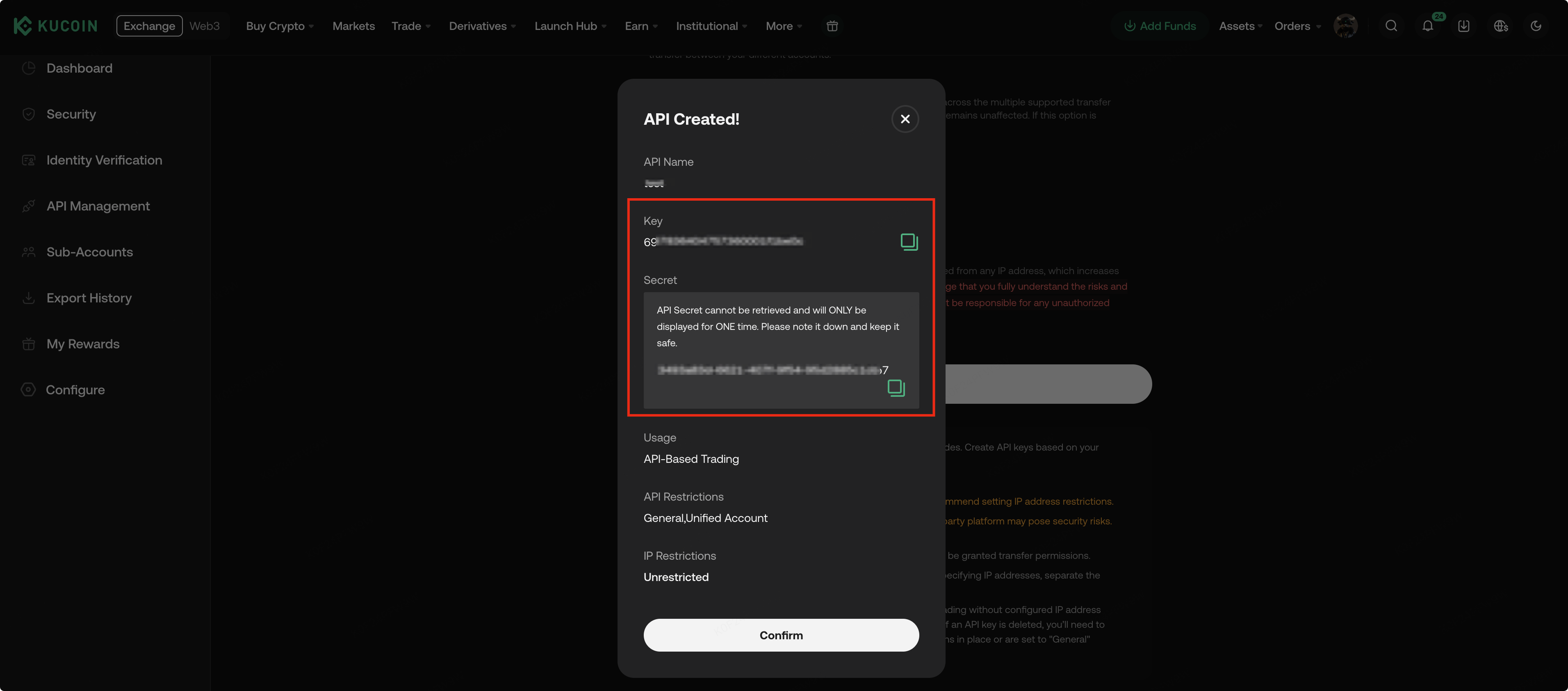
Notas de uso da API:
- As chaves da API da conta principal não podem ser usadas para negociação da conta filha.
- Cada sub-conta deve criar sua própria chave API.
- Ao criar uma chave API, a opção Conta Unificada deve ser selecionada
- Se não selecionado, a negociação por API sob a Conta Unificada não estará disponível.
Etapa 5: Comece a negociar com a Conta Unificada
Você pode começar a usar a Conta Unificada assim que qualquer uma das seguintes condições for atendida:
- A conta mestra concluiu a atualização para a Conta Unificada.
- O modo Unified Account foi ativado, ou uma conta secundária criou uma chave API da Unified Account.
Neste momento, você pode:
- Use a Margem Unificada para negociação à vista e futuros
- Alcance a isolamento de estratégia e o gerenciamento detalhado em várias sub-contas
III. Atualização para Conta Unificada e Instruções (App)
Etapa 1: Acesse a entrada para a atualização
Vá para a Página de Negociação → Configurações de Negociação → Preferências → Modo da Conta
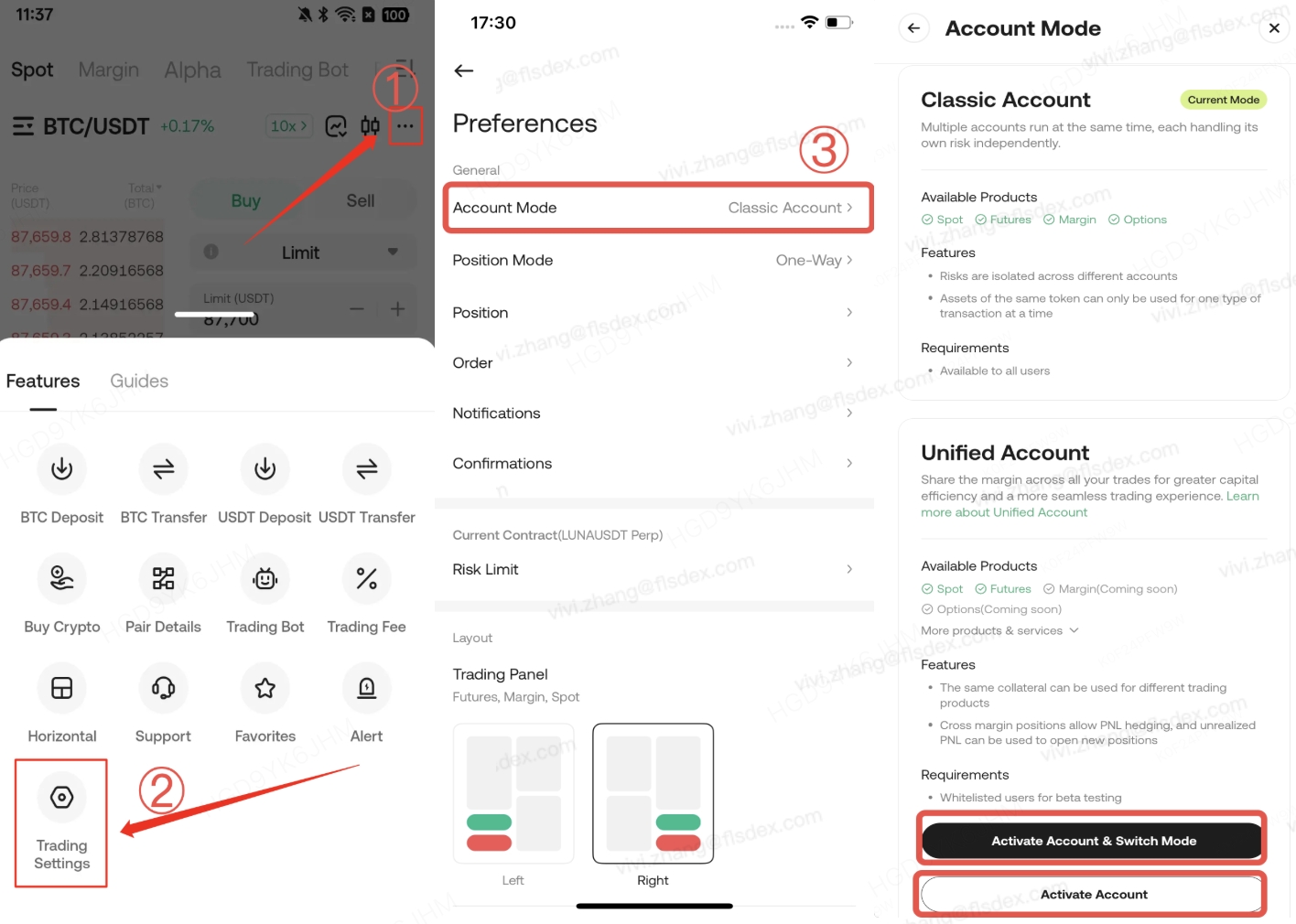
Cenário: Apenas Sub-contas Usam Conta Unificada
Se desejar que apenas sub-contas utilizem a Conta Unificada, selecione Ativar Conta.
Esta ação significa:
- A conta mestra conclui a avaliação de risco e a confirmação do acordo
- A própria conta mestra não se altera para o modo Conta Unificada
- As sub-contas podem usar normalmente os recursos da Conta Unificada.
Etapa 2: Mude para a Conta Unificada e conclua a avaliação de risco
Siga os prompts do sistema para concluir o questionário de avaliação de risco, envie-o e aguarde a conclusão da atualização.
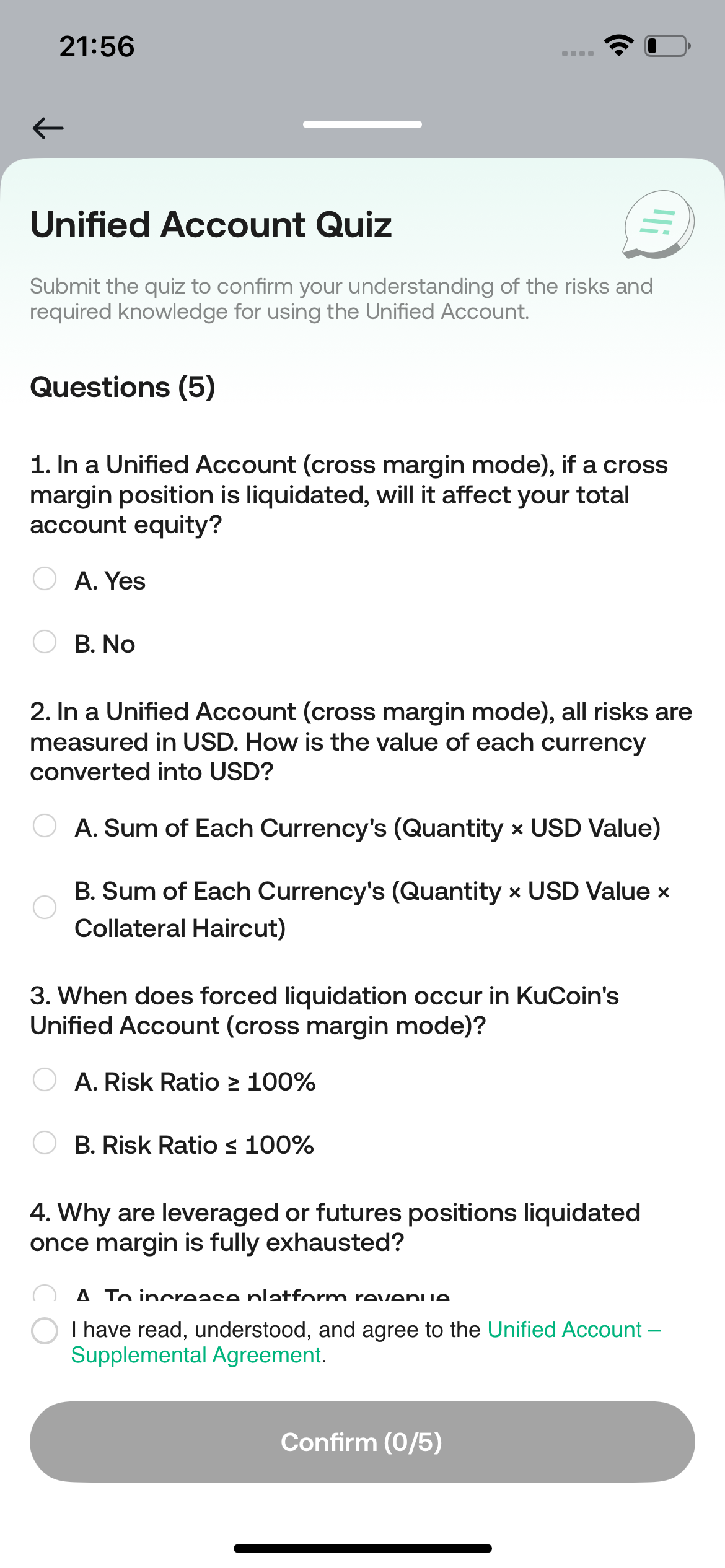
Notas
A atualização dura apenas alguns segundos
- Negociação e transferências de ativos estarão indisponíveis durante a atualização
- A avaliação de risco aplica-se apenas à conta mestra
- As sub-contas não precisam completar a avaliação novamente.
- Os resultados da avaliação da conta mestra não afetam as permissões de negociação da conta filha.
Etapa 3: Comece a negociar
Uma vez que a atualização seja concluída, você pode:
- Transferir ativos
- Use a Margem Unificada para negociação à vista e futuros
- Gerencie múltiplas estratégias de negociação em uma única estrutura de conta
Lembrete: O aplicativo atualmente não suporta a criação de sub-contas. Para criar sub-contas ou chaves API, acesse a versão web.
IV. Perguntas frequentes
Q: A avaliação de risco da conta mestra afetará as sub-contas?
A: Não. A avaliação é apenas para fins de conformidade e não restringe ou afeta as permissões de negociação de qualquer sub-conta.
Q: Posso ativar a Conta Unificada apenas para sub-contas?
A: Sim. Você pode escolher ativar a Conta Unificada sem alterar o modo da conta da conta principal.
Q: Posso usar a Conta Unificada sem usar APIs?
A: Sim. APIs são necessárias apenas para negociação automatizada ou programática.
Entre em contato conosco:@Kucoin_API_Support