How to Use the Auto Borrow and Manual Borrow Feature
KuCoin's Margin Trading platform offers a powerful tool: borrowing crypto to amplify your trading potential. Here’s how to use the Auto-Borrow and manual Borrow functions on the KuCoin margin trading interface.
Auto-Borrow
Auto-Boorrow will allow you automatically grabs the required currency for trades, simplifying leverage but limiting flexibility.
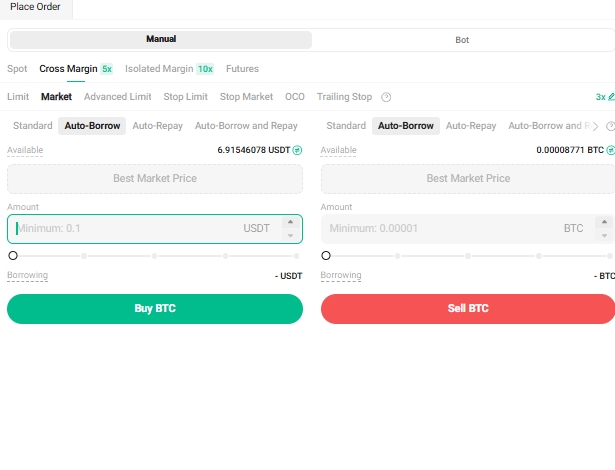
Step 1. Select Auto-Borrow
Select Auto-Borrow on the Margin trading interface (the same as the app).
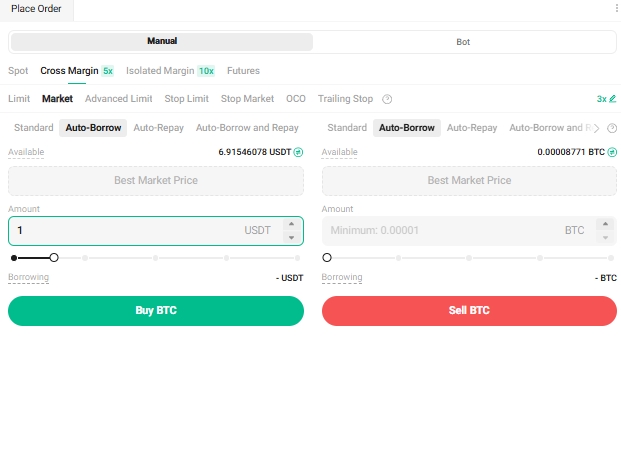
Step 2: Confirm Your Auto-Borrow Order
After confirming, your order will be auto-borrowed at the current market rate, which changes hourly.
Manual Borrow
Manual Borrow lets you pre-borrow specific assets from lenders, offering more control but requiring upfront action.
Step 1: Select Borrow on Margin Trading
Select Borrow on the Margin trading interface (Manual Borrow on the app).

Step 2: Confirm the Amount to Borrow
Confirm the amount of the token you want to borrow (please also confirm your expected borrowing account as Isolated Margin Account or Cross Margin Account before borrowing).
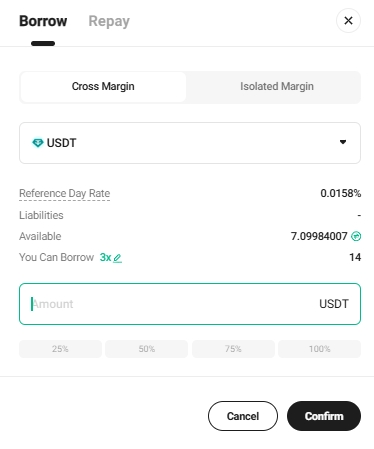
Step 3: Borrow the Token to Cross Margin or Isolated Margin Accout
You will then successfully borrow the corresponding token to the designated account (Cross Margin or Isolated Margin Account).

Step 4. Process Your Repayment
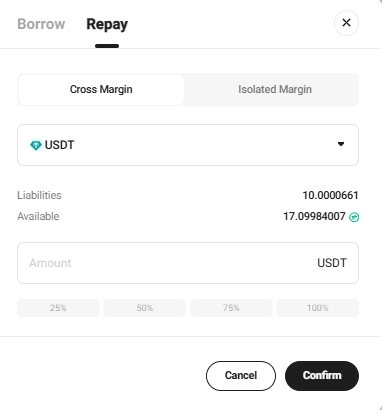
The repayment process is the same as the borrowing. Tick the repayment button to complete the repayment process.