Different Order Types in Spot Trading
KuCoin offers different order types in Spot Trading. You can use them to set your trading strategies and trade efficiently.
1.Limit Order: A limit order lets you buy or sell a cryptocurrency at a specified price or better.
For example, assume the current price of KCS in the KCS/USDT trading pair is 4 USDT. You wish to sell 100 KCS each at a price of 5 USDT. To do this, you could place a limit order for 100 KCS at 5 USDT.
First, you would select Limit, enter 5 USDT for the price, 100 KCS for the amount, and hit Sell KCS to confirm your order. 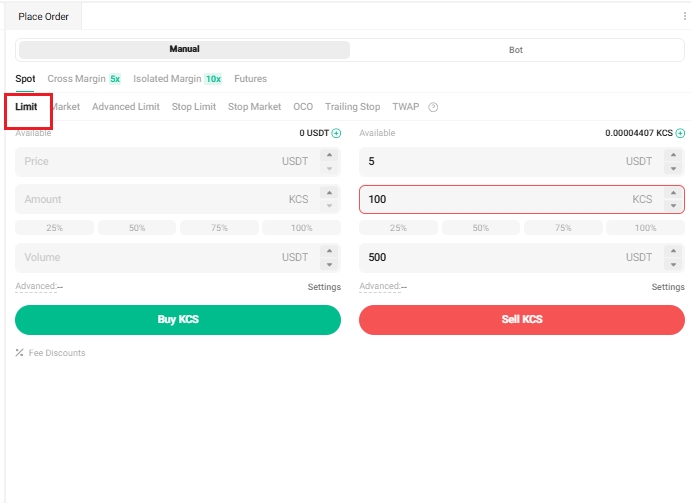
2.Market Order: A market order executes a buy or sell immediately, at the current best available price on the market.
Take the KCS/USDT trading pair for example. Assuming the current price of KCS reaches 4.1 USDT, and you decide to sell 100 KCS quickly. To do this, issue a market order. The system matches your sell order with the existing buy orders on the market, ensuring swift execution. Market orders are the best way to quickly buy or sell assets.
For the above scenario, you would select Market, enter 100 KCS for the amount, and click Sell KCS to confirm the order.
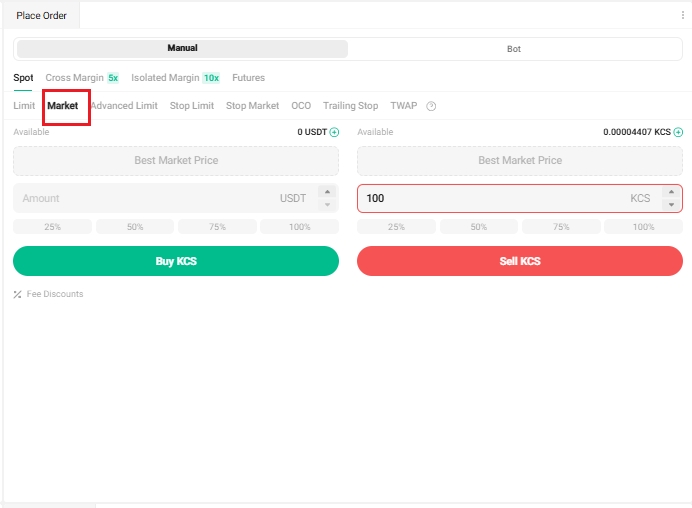
Note: Since market orders are filled instantly, they cannot be canceled. They are matched with the best available maker prices and are influenced by market depth, so it’s important to pay attention to this when placing your orders. Your order and transaction details can be found under Order History and Trade History.
3.Stop Limit Order: A stop limit order is a conditional trade that combines your limit order with a stop order.
To place a stop limit order, you set a stop (stop price), a price (the limit price), and enter the quantity (the amount of tokens you’re buying or selling). When the stop price is reached, a limit order will be placed based on the limit price and quantity specified.
Take the KCS/USDT trading pair for example. Assume the current price of KCS is 4 USDT. You believe its price resistance is around 5.5 USDT, suggesting that once the price of KCS reaches that level, it’s unlikely to go any higher in the short term. As such, your ideal selling price is 5.6 USDT, though you don't wish to monitor the market 24/7 just to maximize these profits. In such a scenario, you can opt to place a stop limit order.
To do this, select Stop Limit, and set a stop price of 5.5 USDT, a limit price of 5.6 USDT, and set quantity to 100 KCS. Then, click Sell KCS to place the order. When the price reaches or exceeds 5.5 USDT, the limit order will trigger, and once it reaches 5.6 USDT, your limit order should be filled.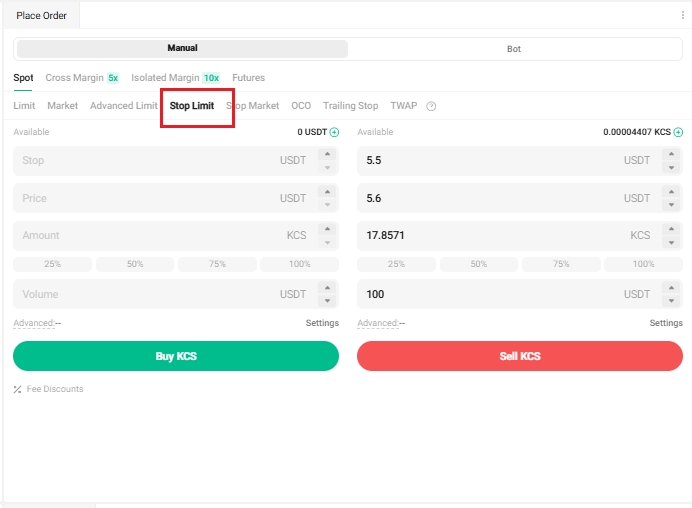
4.Stop Market Order: A stop market order is an order to buy or sell an asset once the price reaches a specific price (the "stop price").
It is similar to the stop limit order, but once the stop price is hit, it becomes a market order and is filled at the next available market price.
Take the KCS/USDT trading pair for example. Assume the current price of KCS is 4 USDT. You believe resistance is at 5.5 USDT, and that the price is unlikely to go any higher in the short term once it reaches that level. Again, you don't wish to have to monitor the market 24/7 just to sell at an ideal price. In this situation, you can opt for a stop market order.
To do this, you would select Stop Market, set a stop price of 5.5 USDT, quantity as 100 KCS, then click Sell KCS. When the price reaches or exceeds 5.5 USDT, the market order triggers and is filled at the next available market price.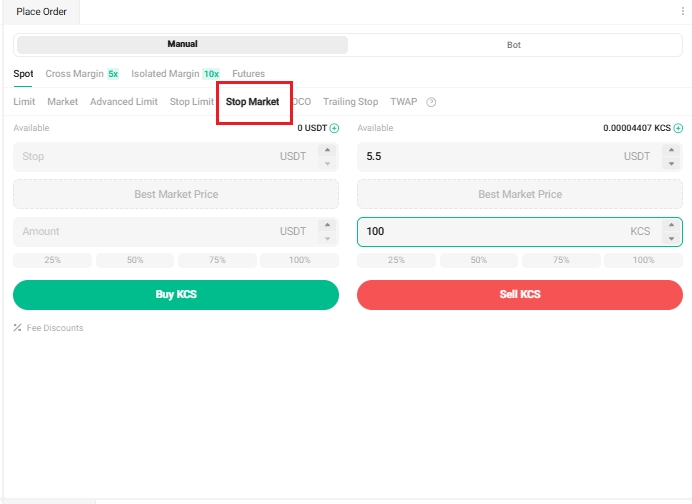
5.One-Cancels-the-Other (OCO) Order: This order allows you to place two orders at the same time; a limit and a stop limit order.
Depending on how the market moves, one order cancels the other as soon as one of them is executed.
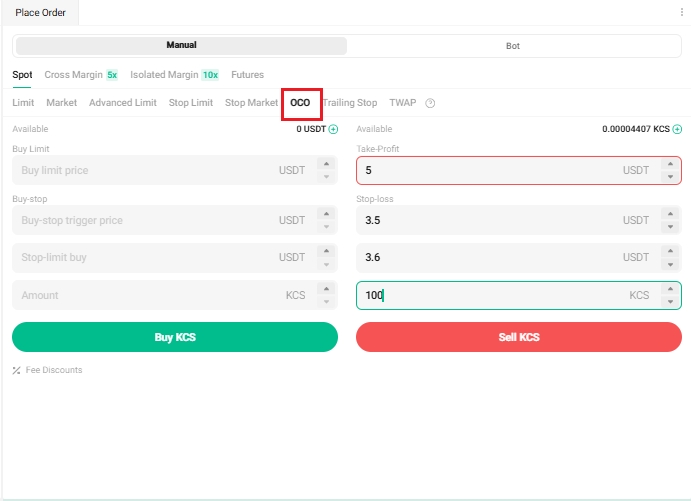
Take the KCS/USDT trading pair for example, and assume the price of KCS is 4 USDT. You believe the final price of KCS will eventually decline, either after rising to 5 USDT and falling, or by falling directly from where it is now. As such, you intend to sell at least at 3.6 USDT, just before the price drops below the support level of 3.5 USDT.
To do this, select OCO, set your price to 5 USDT, stop to 3.5 USDT (triggering a limit order should the price reach 3.5 USDT), limit to 3.6 USDT, quantity to 100, and then click Sell KCS.
6.Trailing Stop Order: This is a modified version of a typical stop order. It automatically adjusts the stop price at a fixed percentage below or above the market price.
When the market price meets both the stop and percentage conditions, the limit order triggers. With a trailing buy order, you’re able to start buying promptly the moment the market starts to rise after a drop. Likewise, with a trailing sell order, you’re able to start selling promptly when the market begins to fall after an upward trend. A trailing stop protects gains by allowing a trade to remain open and continue to profit, as long as the price moves in the user's favor. The trade is then closed if the price changes direction by a specified percentage.
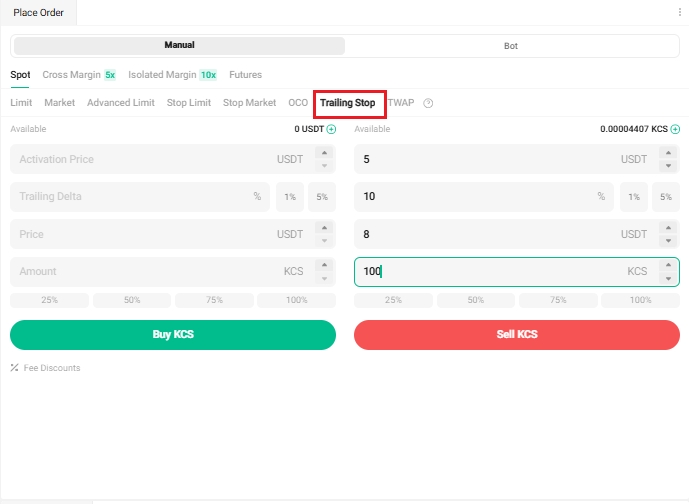
Take the KCS/USDT trading pair for example, and assume the price of KCS is 4 USDT. You anticipate the price of KCS will rise to 5 USDT, and that after it continues to rise, will at most retrace by 10% of a certain level before you consider selling again. For this, you would set your selling price at 8 USDT. Your strategy would be to place a sell order at 8 USDT, and another only when the price hits 5 USDT and experiences a 10% retracement.
To do this, select Trailing Stop, set the activation price to 5 USDT, trailing delta to 10%, price to 8 USDT, quantity to 100, then click Sell KCS.
7.Time-Weighted Average Price (TWAP) order: This order helps you split large orders into smaller ones, and execute them in batches.
For example, when you place a buy order and the market price is below your specified price, the system will create smaller sub-orders at prices slightly higher than the current best selling price. These sub-orders are smaller Immediate-Or-Cancel (IOC) buy orders, each placed at a specified interval or percentage.
Assume you wish to quickly buy 10 BTC at a cost no higher than 71,500 USDT per BTC without significantly affecting the market price. To do this, you would use a TWAP order for swift execution. You can set up this order as:
Total Order Amount: 10 BTC (The total you wish to trade for.)
Amount per Order: 0.05 BTC (The amount of each sub-order after splitting orders.)
Order Distance: 10 USDT (For a buy order, each sub-order is placed at slightly higher intervals of 10 USDT above the best asking price. The larger the price gap or percentage, the higher the likelihood of quicker execution, but this also increases the cost of the trade.)
Total Order Duration: 24 hours (This is the total time over which the order will be executed. The max duration is 99 hours and 59 minutes. The longer your duration, the higher the likelihood that your order will be fully executed.
Protection Price: 71,500 USDT per BTC (The trigger condition for a limit order. For example, a buy order will only be filled if the best asking price plus order distance are both below this protection price. If the protection price is set too far from the current market price, the order may not be filled quickly.)
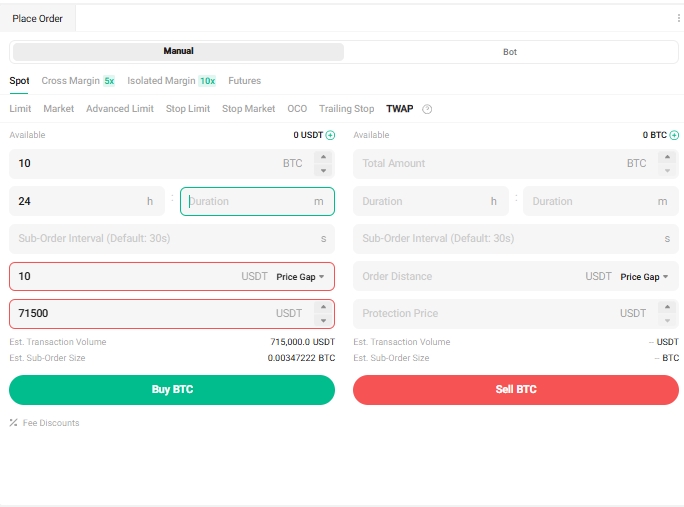
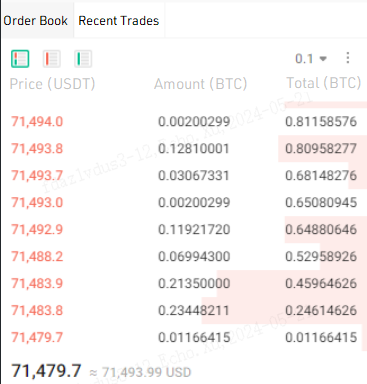
After placing the order, your sub-orders will automatically be batched and executed. Assuming the current order book is as shown below:
The time interval for each sub-order is calculated by dividing the total order duration in seconds by (total order amount / amount per order) and then multiplying by a random ratio. This continues until the total filled matches the total order amount, or until the order’s duration runs out.
Based on the above settings, the highest buy price will be the current best selling price of 71,479.7 USDT/BTC plus 10 USDT, totaling 71,489.7 USDT/BTC. The total sell orders below 71,489.7 USDT/BTC then amount to 0.529589261 BTC (0.01166415 + 0.234482111 + 0.21350000 + 0.06994300), which is more than your amount per order. Since this total is greater than your specified single order amount of 0.05 BTC, the system will only place limit orders based on your set amount (0.05 BTC) and price (71,489.97 USDT/BTC).
If the sub-order is not fully filled, it will be immediately canceled, meaning all sub-orders are IOC (Immediate or Cancel) orders. When the latest market price exceeds the protection price (71,500 USDT/BTC), the order pauses. Once the latest fill price falls below 71,500 USDT/BTC, it resumes. When the total filled amount equals the total order amount, the entire order is considered complete and stops running.