How to Withdraw Crypto via KuCoin Lite Version
শেষ আপডেট: ১৮/১১/২০২৫
The withdrawal process in KuCoin Lite Version is consistent with the Pro Version. There are two types of withdrawals: On-chain Transfer and Internal Transfer. Below, we will look at the process for withdrawing cryptocurrency in the Lite Version.
1.On-chain Transfer
-
Visit the Withdrawal Page
-
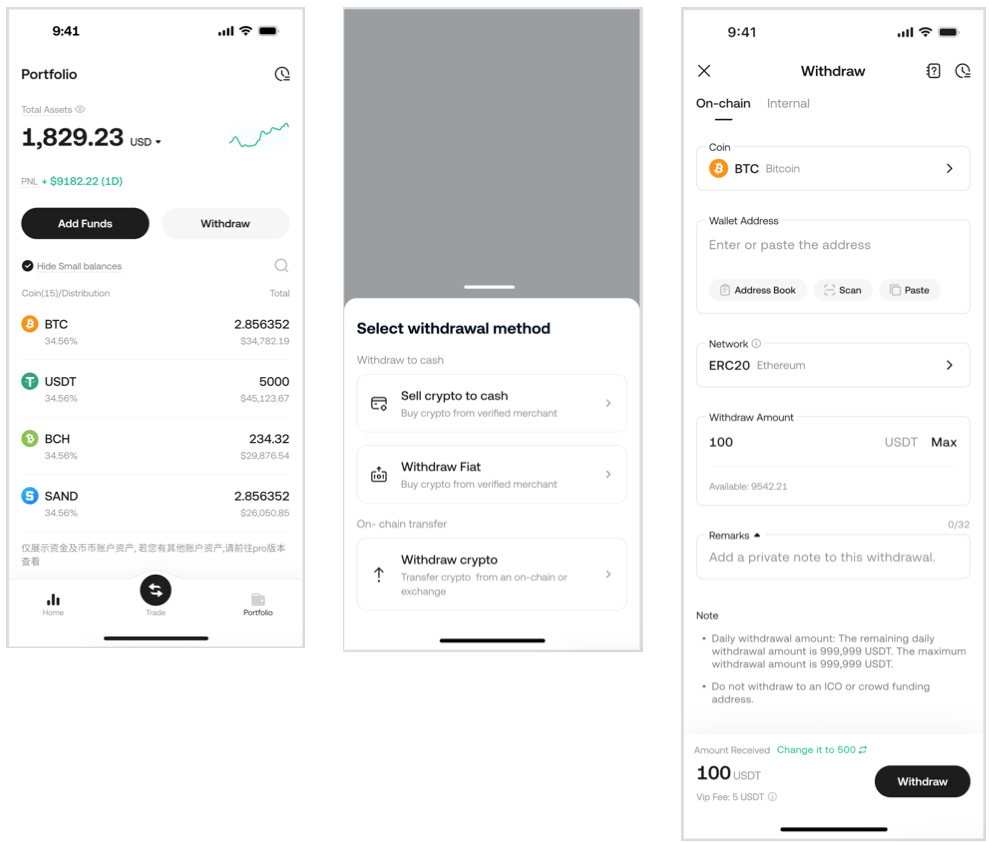
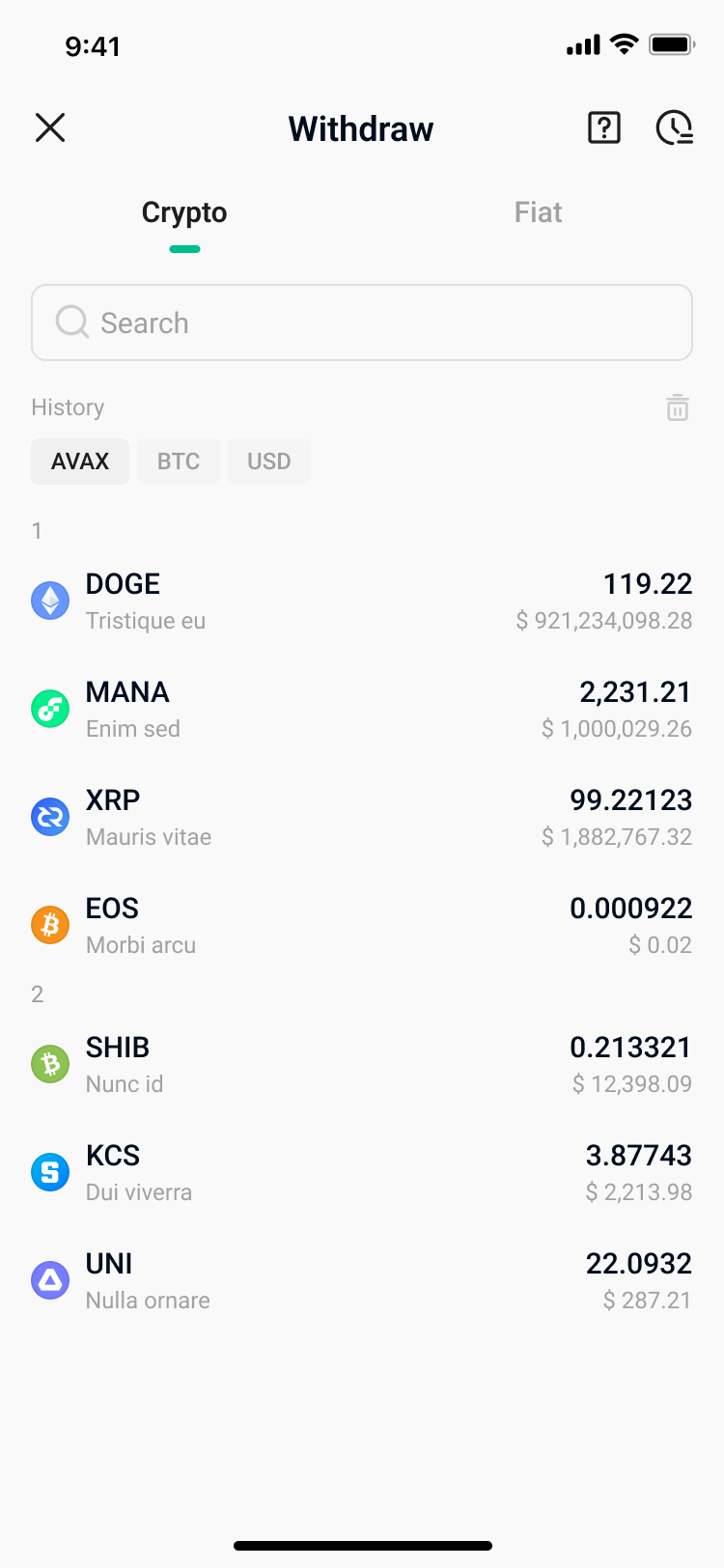
On the Portfolio page, tap the Withdraw button, then select "Withdrawal Crypto".
-
Select the Cryptocurrency You Want to Withdraw
-
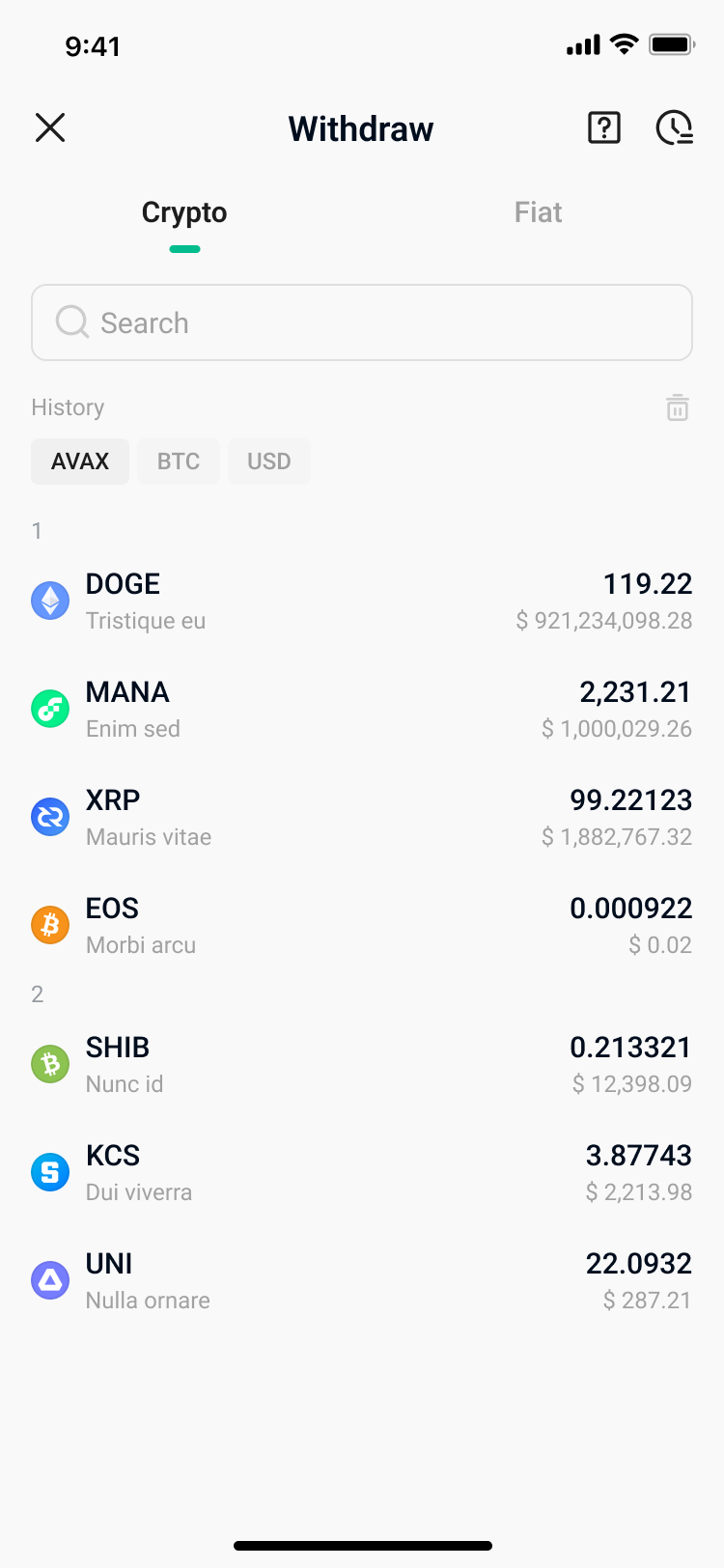
Choose the cryptocurrency you wish to withdraw (e.g., BTC) from the dropdown menu. Note: The dropdown menu in the KuCoin Lite Version only displays currencies with a non-zero balance. To view other currencies, you can search for them.
-
Enter Withdrawal Information
-
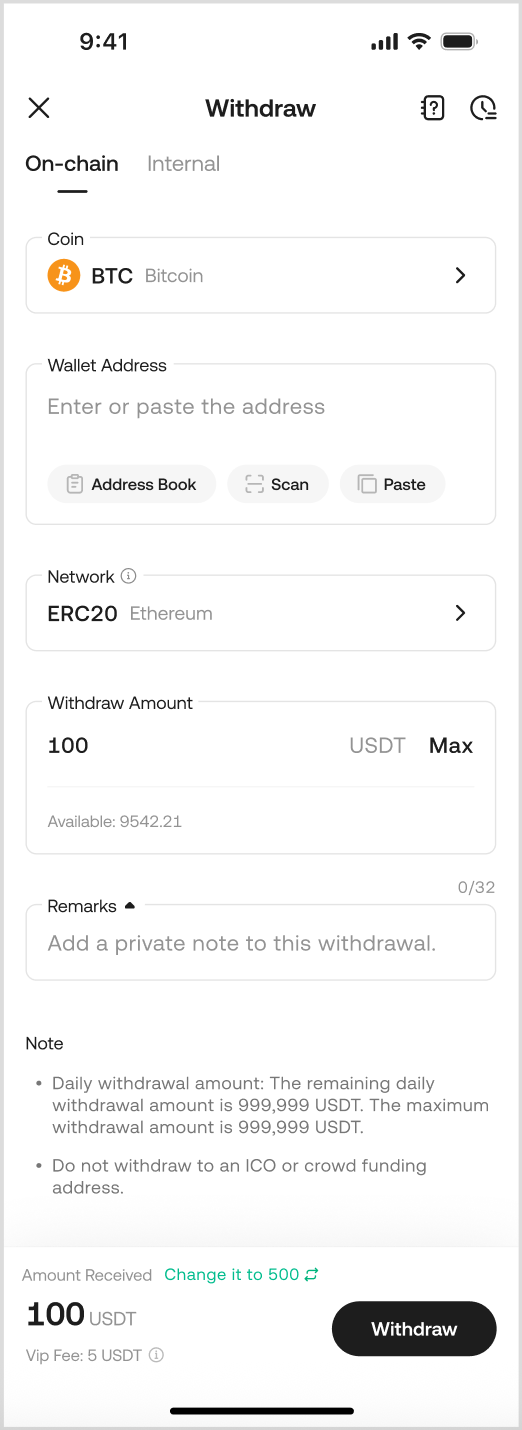
You need to enter the following information: Withdrawal Address, Withdrawal Amount, and select the Withdrawal Network. The Remark field is optional. Check if the address and amount are correct, then tap Confirm.
Please note that some networks require you to fill in a Memo/Tag when initiating a withdrawal, such as XLM and EOS. Therefore, when withdrawing, if you select a currency/network that requires a Memo, be sure to check whether the receiving platform requires you to fill it in. Incorrectly filling it in or forgetting to do so may lead to asset loss.
-
Select the Withdrawal Network
-
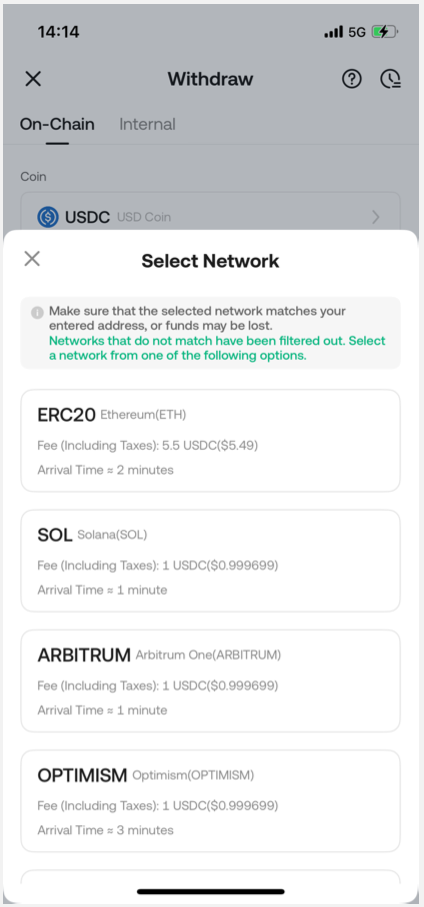
Carefully check and ensure the selected network is compatible with the address you entered. Depending on your cryptocurrency, you will see the supported networks and their respective transaction network fees. If you select an incompatible network, your funds may be lost and unrecoverable.
Note:
-
For cryptocurrencies that support multiple chains (e.g., USDC), the system will automatically detect the appropriate chain based on the recipient address you enter.
-
If you receive an "Invalid Address" error, check if the address entered is correct. If you still need further assistance, please contact our online support team.
-
Avoid choosing unsupported networks just because of low withdrawal fees. Select the network compatible with the external withdrawal address to prevent fund loss. Incorrect network selection may lead to irreversible loss of funds. For example, KCC tokens can only be sent to other KCC addresses.
-
For specific currencies like ERC20-USDC, withdrawal fees may vary.
-
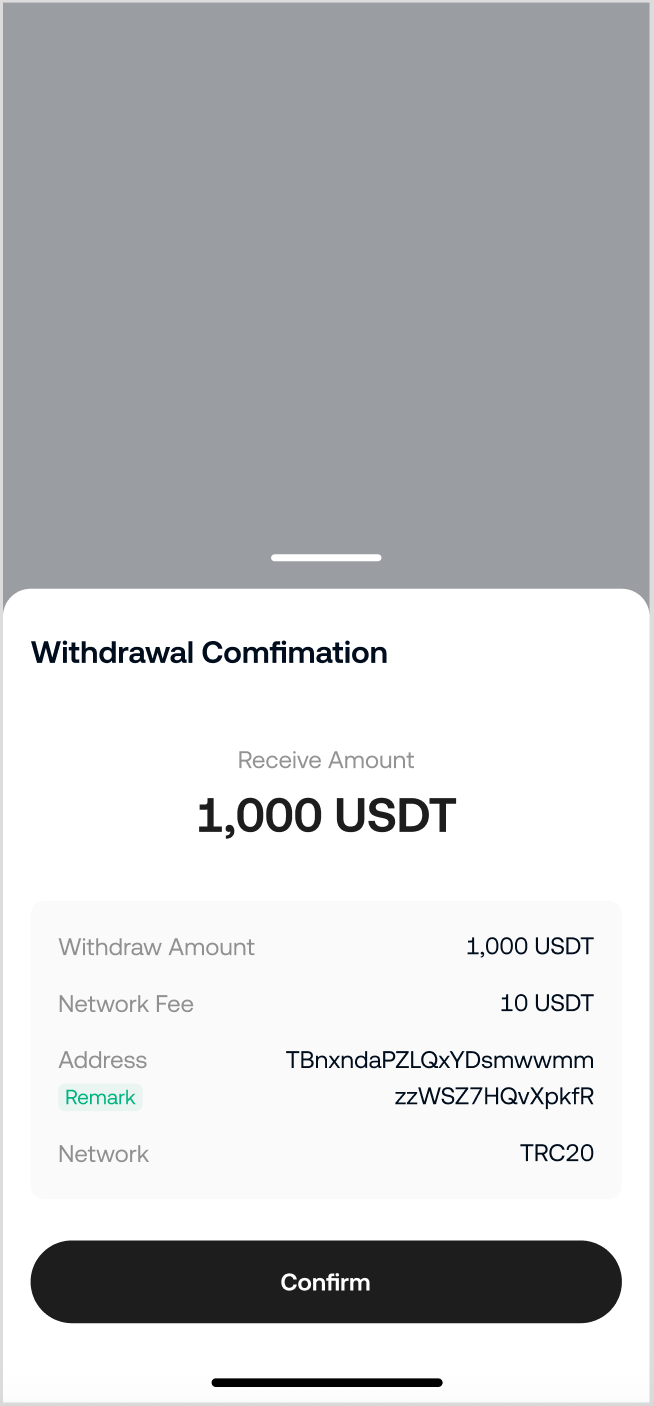
Order Confirmation
-
Here, you will have another chance to review your withdrawal details. Once you are ready, confirm the withdrawal.
-
Security Verification
-
Complete the security verification by entering the relevant codes, then tap Submit. Your withdrawal request will be processed.
-
If you encounter issues with security settings during this process, please refer to the following articles for help:
-
Trading Password
-
Unable to receive email code / SMS message
-
Google 2FA
2.Internal Transfer
The Internal Transfer function can be used to send funds between KuCoin accounts. It will be credited to the recipient's account instantly and do not incur transaction fees.
Please note: Internal transfers made on KuCoin will not generate a Transaction ID (TXID). For such transactions, the withdraw history will only show an internal transfer.
-
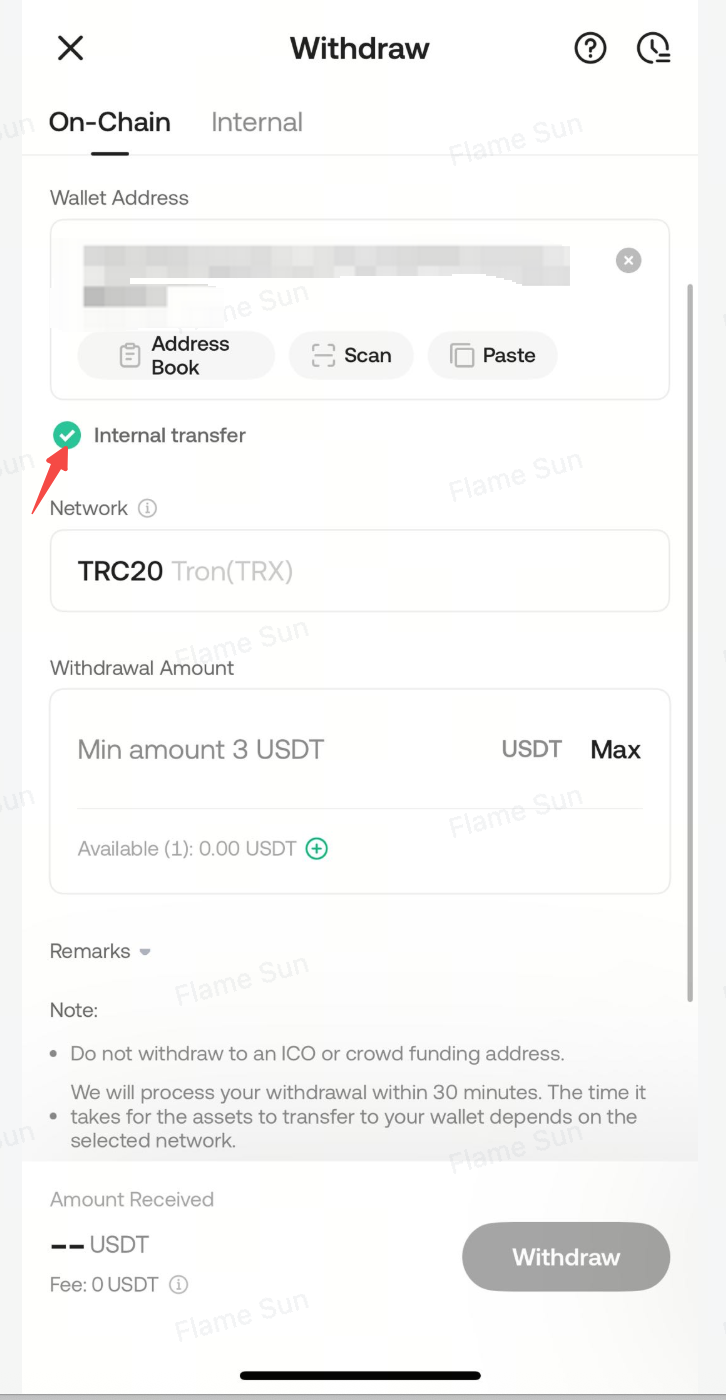
If the system detects that the recipient is a KuCoin withdrawal address, Internal Transfer will be selected.
Note:
If you are withdrawing to an internal address but still wish to have a TXID recorded, manually uncheck this option. Then, the transfer will be processed normally on the blockchain, which will generate a TXID but also incur the associated withdrawal fees.
-
Internal Transfer also supports sending funds directly to the corresponding KuCoin account via the recipient's registered email, phone number, or Account UID. These accounts can also be added to your Frequent Contacts. Internal transfers to them will be deposited directly into their accounts without any fees.
Important Notes:
-
Once a withdrawal request is submitted, the transaction will be confirmed on the blockchain. Confirmation times vary depending on the network and blockchain traffic at that time. Therefore, you need to wait patiently for the transfer to be fully processed.
-
When making an external transfer, always check that the withdrawal address is correct and corresponds to the same cryptocurrency. If it is incorrect or not the correct currency, the funds cannot be recovered.
-
On the withdrawal page, you will see the minimum withdrawal amount and the fee specific to each cryptocurrency. Specific withdrawal fees can be viewed by selecting them on the withdrawal interface.
-
Avoid selecting unsupported networks solely because of their low withdrawal fees. Only use networks compatible with the relevant external platform.
-
If you encounter any issues during the withdrawal process, please feel free to contact our support team for assistance.