হেজ মোড, এক-ক্লিক রিভার্স, এবং মার্কেট ক্লোজ ফাংশন অপারেশন গাইড
শেষ আপডেট: ২৮/০২/২০২৬
এই ডকুমেন্টটিতে কুকিন ফিউচার্সের জন্য চালু করা তিনটি নতুন ফিচার—হেজ মোড, ওয়ান-ক্লিক রিভার্স এবং মার্কেট ক্লোজ—এর বিস্তারিত বর্ণনা দেওয়া হয়েছে, যার মধ্যে রয়েছে ব্যবহারকারী গাইড, প্রযোজ্য পরিস্থিতি এবং ঝুঁকি সতর্কবার্তা।
হেজ মোড
1.1 ফিচার ওভারভিউ
এই ফাংশনটি আপনাকে একই কন্ট্রাক্ট ট্রেডিং যুগলের অধীনে স্বাধীনভাবে লং এবং শর্ট অবস্থান একসাথে রাখতে এবং তাদের আলাদাভাবে পরিচালনা করতে সক্ষম করে।
1.2 মূল সুবিধাগুলি
· ফ্লেক্সিবল স্ট্র্যাটেজি: সমান্তরাল লং এবং শর্ট অবস্থানকে সমর্থন করে, যা হেজিং এবং আর্বিট্রেজ এর মতো জটিল স্ট্র্যাটেজিকে সহজ করে।
· ঝুঁকি হেজিং: উত্তেজনাপূর্ণ বাজারে একক দিকের অবস্থানের ঝুঁকি কার্যকরভাবে কমায়।
· উন্নত দক্ষতা: প্রায়শই অবস্থান পরিবর্তনের প্রয়োজন নেই, যা মূলধন ব্যবহারের দক্ষতা উন্নত করে।
1.3 এটি কিভাবে সেটআপ করবেন?
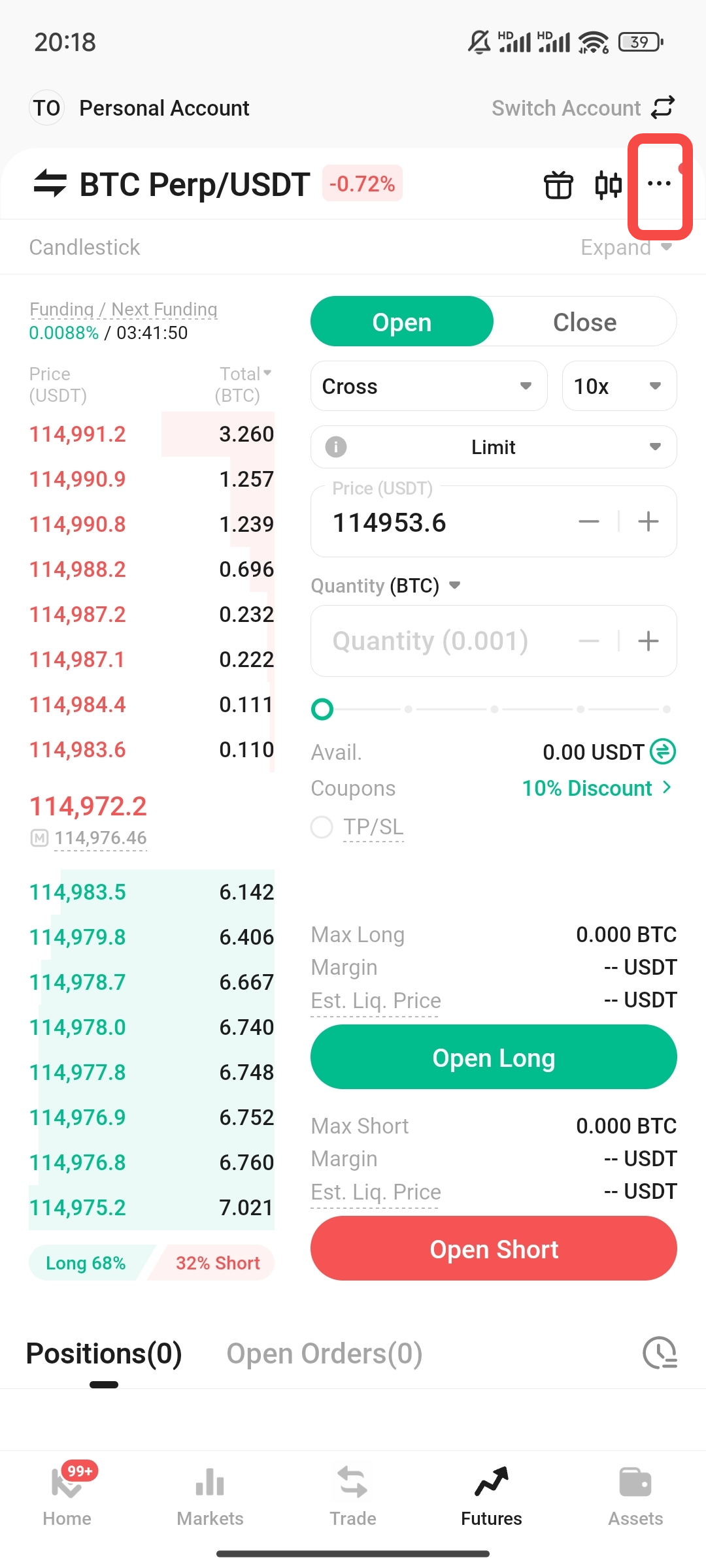
ফিউচার্স ট্রেডিং ইন্টারফেসে, ডান পাশের উপরের কোণে ... বাটনে ক্লিক করুন।
-
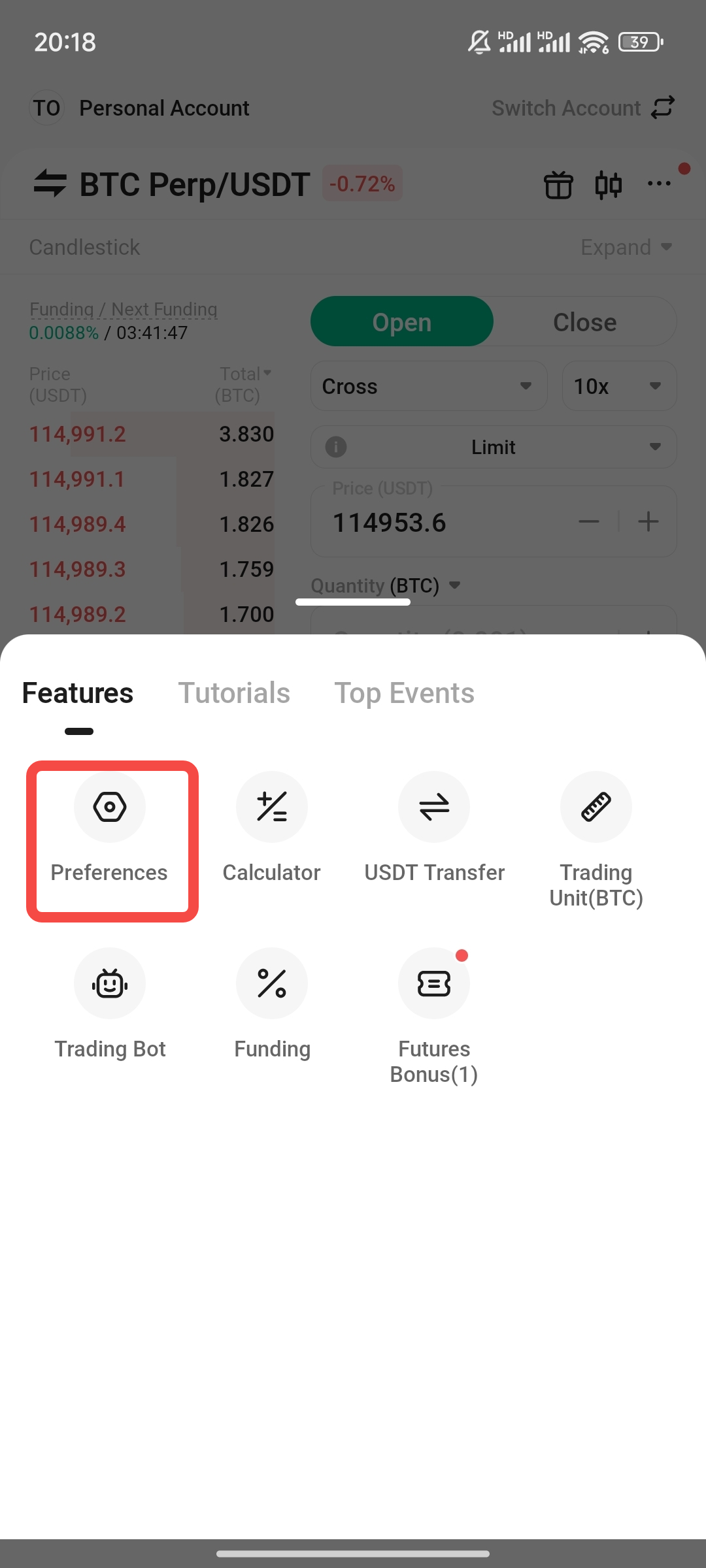
পছন্দ নির্বাচন করুন।
-
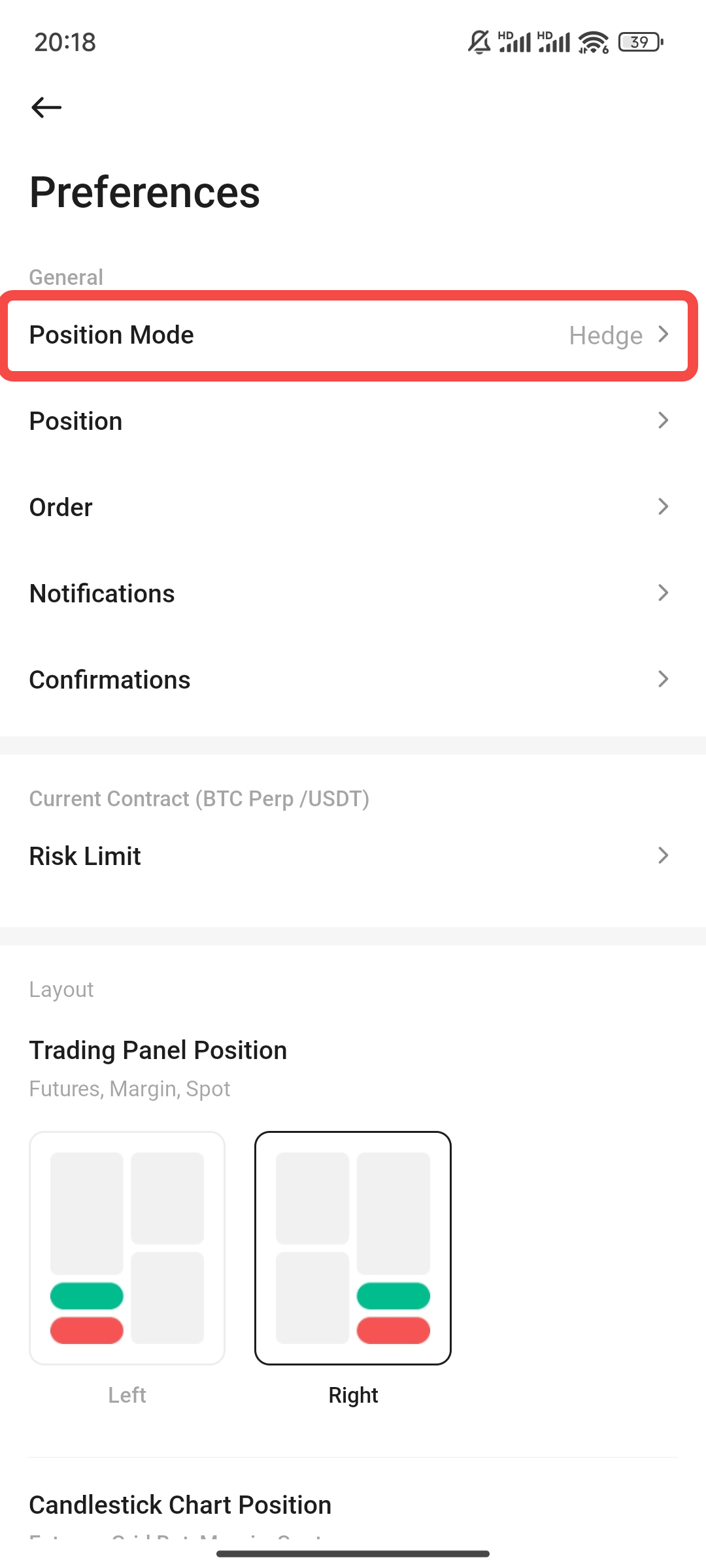
অবস্থান মোড বিকল্পটি খুঁজুন।
-
হেজ মোড নির্বাচন করুন এবং নিশ্চিত করুন।
নোট: যদি বিদ্যমান অবস্থান বা অপেক্ষমান অর্ডার থাকে, তাহলে মোড পরিবর্তনের আগে আপনাকে সেগুলি বন্ধ করতে বা অর্ডার বাতিল করতে হবে।
এক ক্লিক রিভার্স
2.1 ফিচার পরিচিতি
এই ফাংশনটি আপনাকে বর্তমান অবস্থানটি দ্রুত বন্ধ করতে এবং বাজার উল্টে গেলে একই পরিমাণের নতুন অবস্থানটি মার্কেট মূল্যে বিপরীত দিকে খুলতে সক্ষম করে।
2.2 প্রযোজ্য পরিস্থিতি
বাজার হঠাৎ উল্টে যায়, যার জন্য দ্রুত মোড় নেওয়া প্রয়োজন।
· সময়ের মধ্যে ক্ষতি বন্ধ করে একটি অবস্থান খুলতে পারলে নতুন ট্রেন্ড ধরা যাবে।
2.3 কিভাবে ব্যবহার করবেন?
-
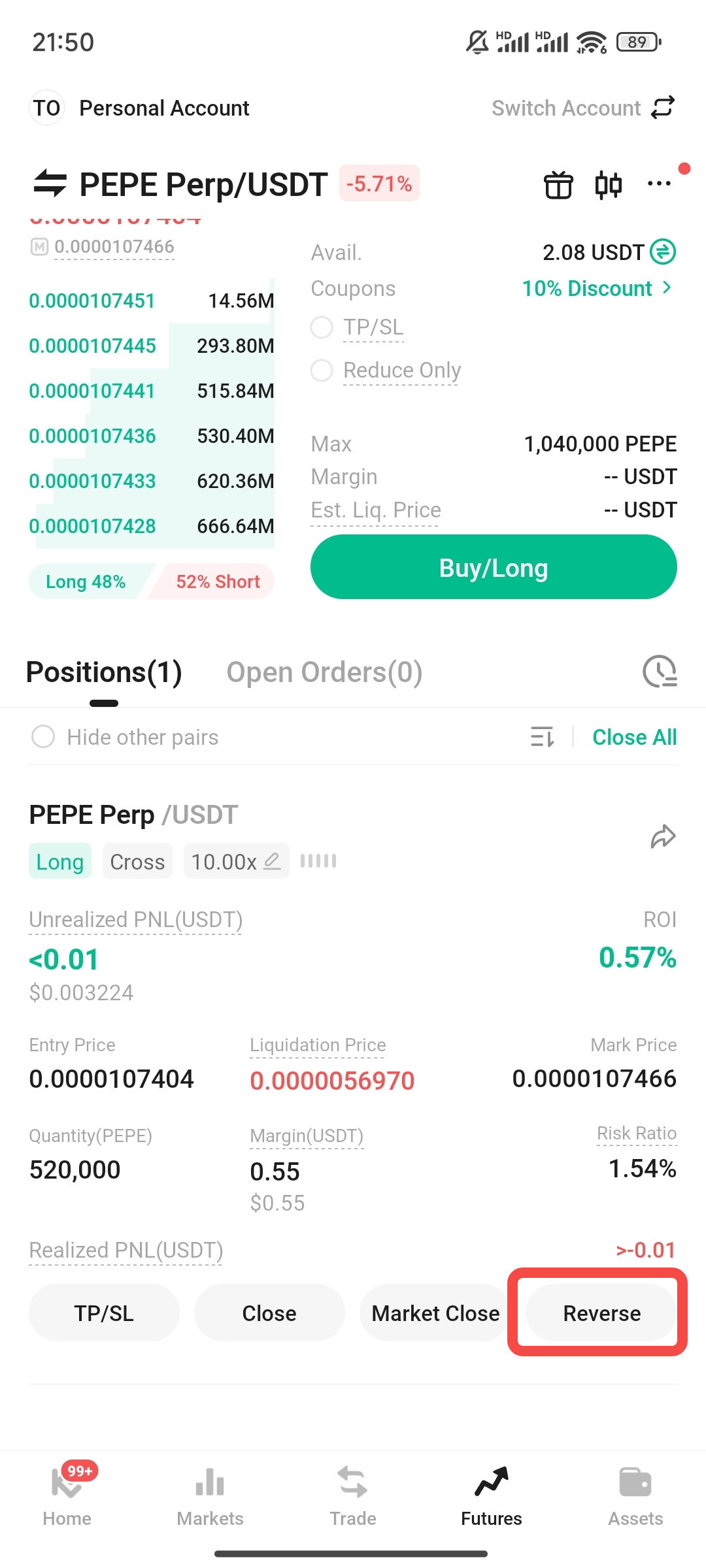
অবস্থানের তালিকায় লক্ষ্য অবস্থানটি খুঁজুন।
-
রিভার্স বোতামে ক্লিক করুন।
-
পপ-আপ নিশ্চিতকরণ উইন্ডোতে, বন্ধ এবং খোলা অবস্থানের দিক, পরিমাণ এবং মূল্য সাবধানে পরীক্ষা করুন।
-
সবকিছু সঠিক কিনা নিশ্চিত করার পর, প্রক্রিয়াটি সম্পন্ন করতে 【Confirm】 ক্লিক করুন।
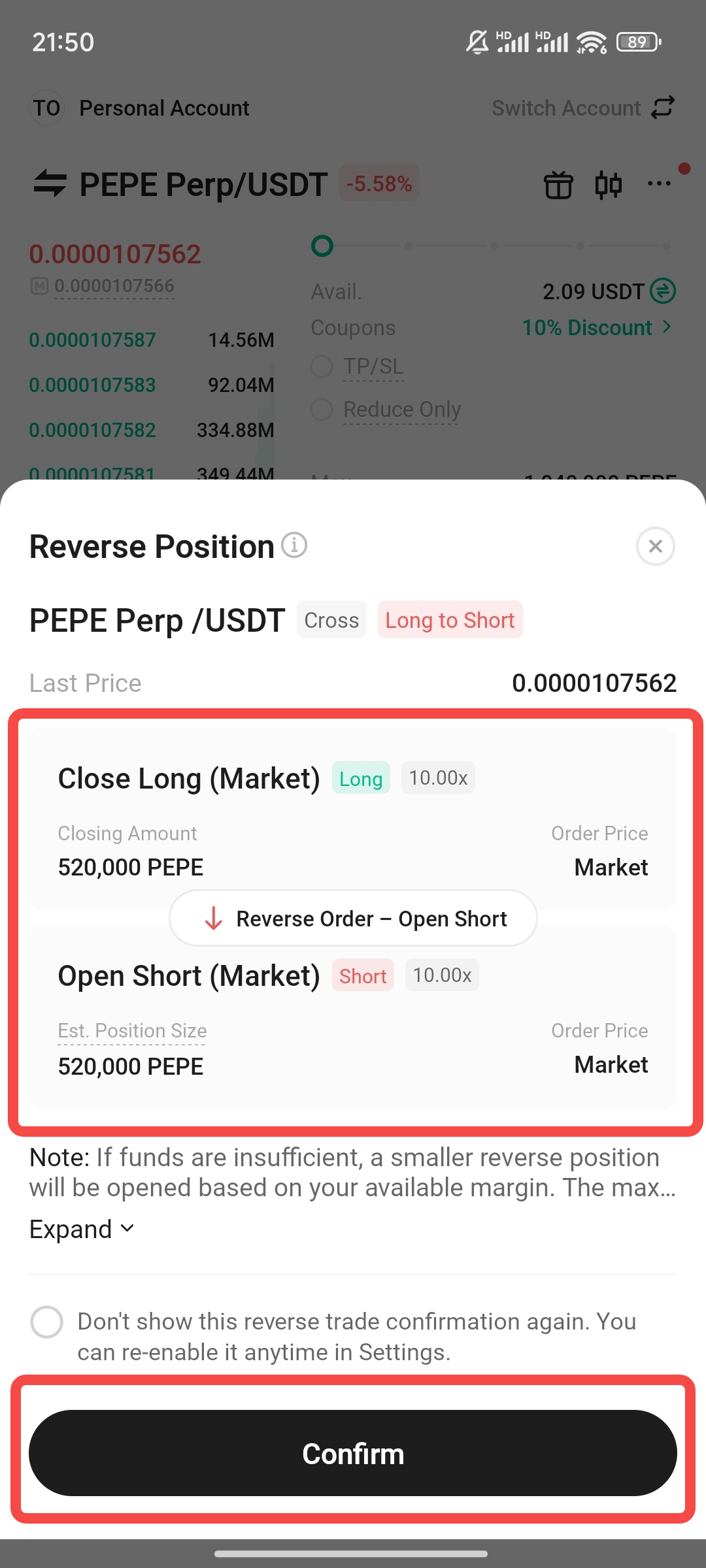
2.4 ব্যাবহারিক কেস
· কেস ১: দ্রুত স্টপ লস রিভার্স। ব্যবহারকারী একটি BTC লং অবস্থান ধারণ করেন এবং মূল্য হঠাৎ পতনের সময় রিভার্স ক্লিক করেন, সিস্টেম দ্রুত লং বন্ধ করে একটি শর্ট খোলে, যা ম্যানুয়াল অপারেশনের দেরির কারণে অতিরিক্ত ক্ষতি এড়ায় এবং পরবর্তী পতনে লাভ অর্জন করে।
· কেস ২: আংশিক বিপরীতকরণের সাথে অপেক্ষমান অর্ডারগুলি রাখা। ব্যবহারকারী একটি শর্ট অবস্থান ধারণ করেছেন এবং অপূর্ণ লিমিট শর্ট অর্ডার রেখেছেন। এক-ক্লিক বিপরীতকরণ ব্যবহার করার পরে, সিস্টেম শুধুমাত্র বিদ্যমান অবস্থানটি বিপরীতকরণ করে (শর্ট বন্ধ করে লং খোলে), মূল লিমিট অর্ডারটি রেখে দেয়, যা কৌশল সমন্বয়কে মূল পরিকল্পনার সাথে ভারসাম্যপূর্ণভাবে রাখে।
2.5 ঝুঁকির সতর্কবাণী
· স্লিপেজ ঝুঁকি: এই ফাংশনটি মার্কেট অর্ডার ব্যবহার করে, যা কম তরলতা বা উচ্চ অস্থিরতা বিশিষ্ট বাজারে স্লিপেজ ঘটাতে পারে।
· বাস্তবায়ন ঝুঁকি: চরম বাজার অবস্থার ক্ষেত্রে, বন্ধ করার বাস্তবায়ন মূল্য এবং বিপরীত খোলার মূল্যের মধ্যে উল্লেখযোগ্য পার্থক্য থাকতে পারে, অথবা কিছু অবস্থান বাস্তবায়িত হতে পারে না।
· সিস্টেম ঝুঁকি: নেটওয়ার্ক বিলম্ব বা সিস্টেম ঘনত্ব বাস্তবায়নের ফলাফলকে প্রভাবিত করতে পারে।
বাজার বন্ধ
3.1 ফিচার পরিচিতি
এই ফাংশনটি আপনাকে একক ক্লিকে বর্তমান মার্কেট মূল্যে একটি নির্দিষ্ট চুক্তির অধীনে সমস্ত অবস্থান থেকে দ্রুত বেরিয়ে আসতে সক্ষম করে।
3.2 কিভাবে ব্যবহার করবেন?
-
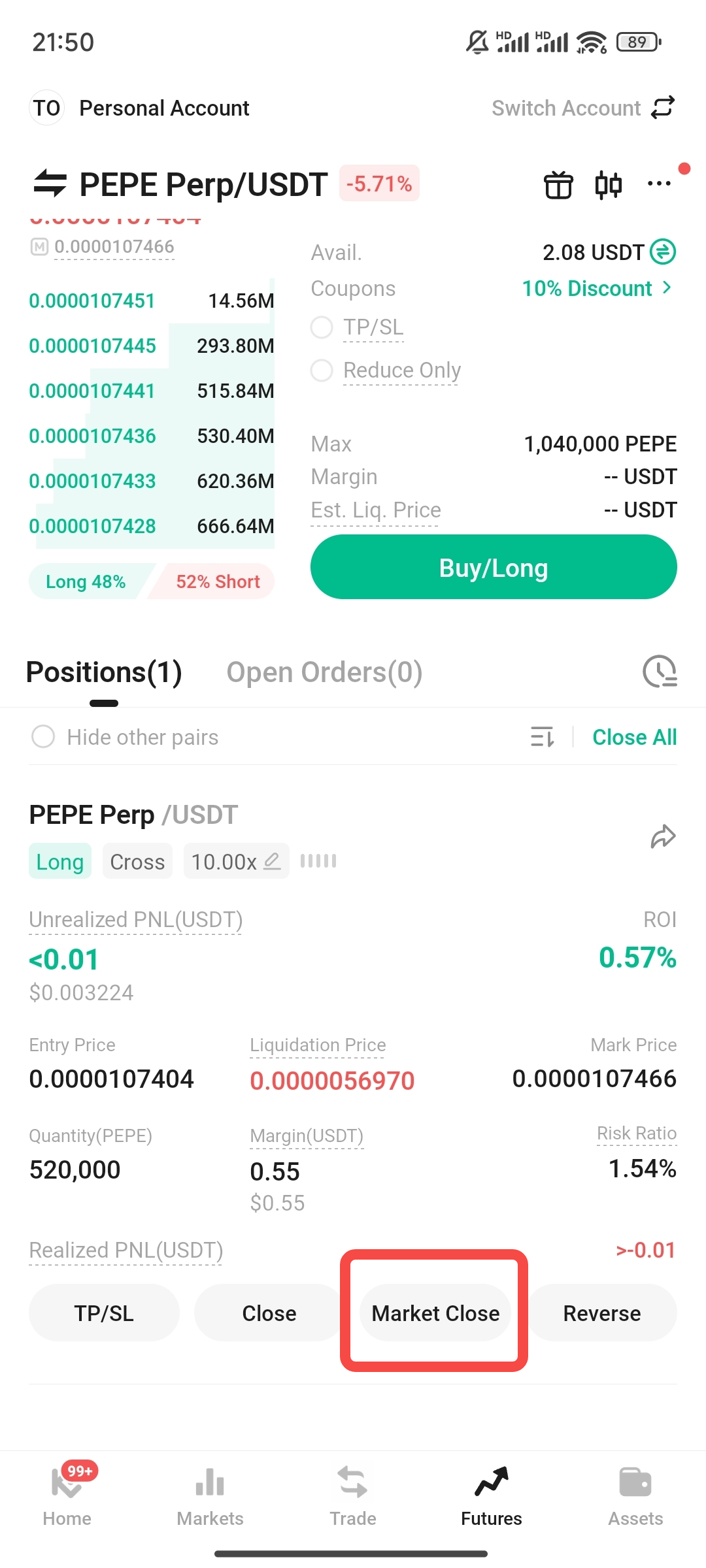
অবস্থানের তালিকায়, বন্ধ করার জন্য চুক্তির অবস্থানটি খুঁজুন।
-
মার্কেট ক্লোজ বাটনে ক্লিক করুন।
-
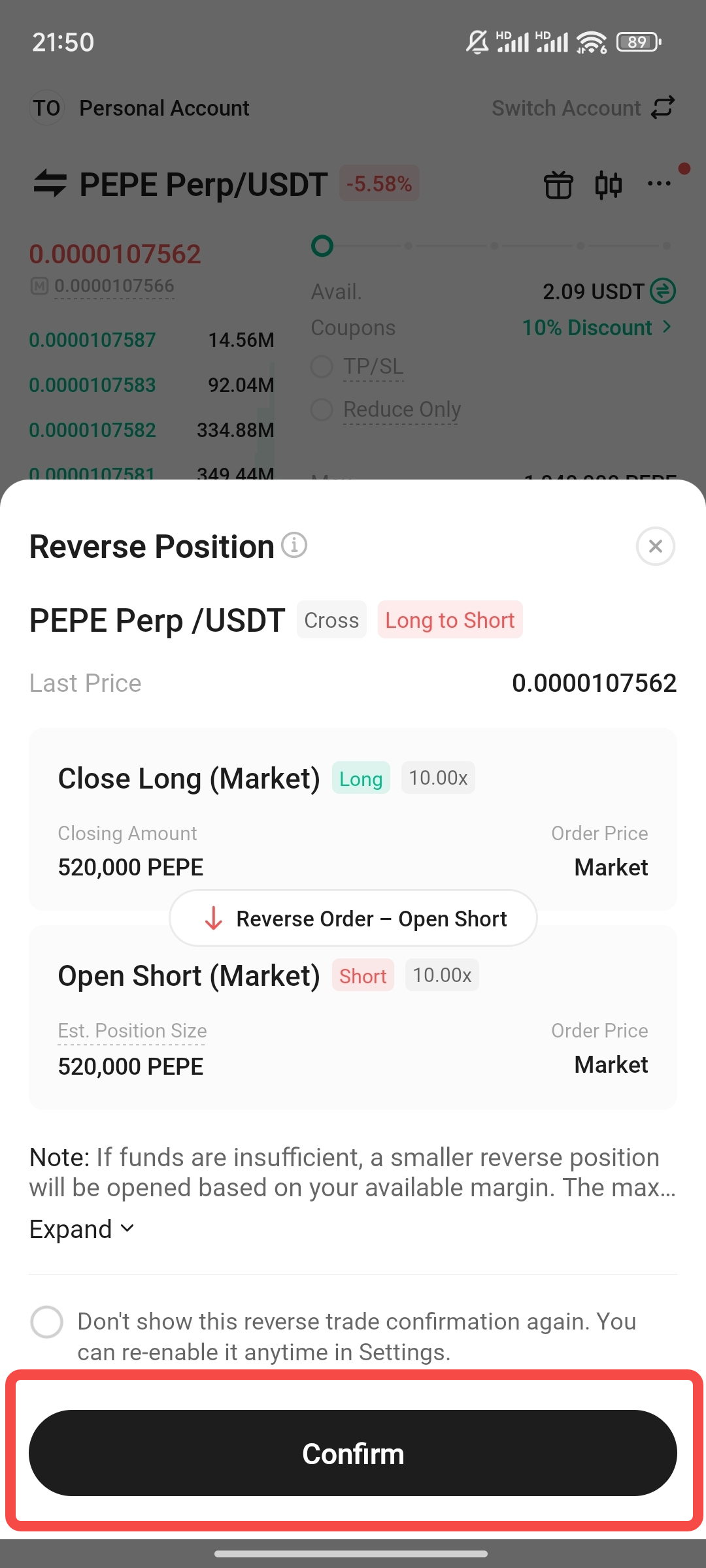
সিস্টেমটি একটি উইন্ডো পপ আপ করবে, দয়া করে কারেন্সি, দিক, পরিমাণ ইত্যাদি তথ্যগুলি সাবধানে পরীক্ষা করুন।
-
সবকিছু সঠিক কিনা তা নিশ্চিত করার পর, অবস্থানটি তাত্ক্ষণিকভাবে বন্ধ করতে 【Confirm】 ক্লিক করুন।
নোট: এই অপারেশনটি মার্কেট মূল্যে সম্পন্ন হয় এবং স্লিপেজ জড়িত হতে পারে, দয়া করে সাবধানে অপারেশন করুন।
ঝুঁকির সতর্কবার্তা:
লিভারেজ এবং ফিউচার্স ট্রেডিং হল উচ্চ ঝুঁকিপূর্ণ বিনিয়োগ কার্যক্রম যা উল্লেখযোগ্য রিটার্ন আনতে পারে কিন্তু পুরো মার্জিন ব্যালেন্স হারানোর মতো বড় ক্ষতিরও কারণ হতে পারে। আমরা আপনাকে শক্তিশালীভাবে সুপারিশ করি:
· উপরের ফাংশনগুলির সংশ্লিষ্ট ঝুঁকি এবং বৈশিষ্ট্যগুলি সম্পূর্ণভাবে বুঝুন।
· লিভারেজ গুণকটি সাবধানে বাছাই করুন।
· স্টপ-লস এবং টেক-প্রফিটের মতো ঝুঁকি নিয়ন্ত্রণ ব্যবস্থা যুক্তিসঙ্গতভাবে ব্যবহার করুন। সমস্ত ট্রেডিং সিদ্ধান্ত ব্যবহারকারী দ্বারা নেওয়া হয় এবং সমস্ত ঝুঁকি ব্যবহারকারীর উপর ন্যস্ত।
দাবিত্যাগ: এই পৃষ্ঠাটি সহজে পড়ার সুবিধার্থে AI ব্যবহার করে অনুবাদ করা হয়েছে। সবচেয়ে নির্ভুল তথ্যের জন্য মূল ইংরেজি সংস্করণটি দেখুন।আসল দেখান