জুগল পে (ভিসা/মাস্টারকার্ড) ব্যবহার করে ক্রিপ্টোকারেন্সি কিভাবে কিনবেন?
শেষ আপডেট: ০৯/০৩/২০২৬
Google Pay কী?
Google Pay হল Google দ্বারা বিকাশিত একটি ডিজিটাল পেমেন্ট সেবা এবং ইলেকট্রনিক ওয়ালেট অ্যাপ্লিকেশন। এটি ব্যবহারকারীদের অনলাইন পেমেন্ট, ভৌত দোকানে কন্টাক্টলেস পেমেন্ট এবং টাকা ট্রান্সফার করতে সক্ষম করে। অ্যাপটি ব্যাংক কার্ড, ক্রেডিট কার্ড এবং অন্যান্য পেমেন্ট পদ্ধতি লিঙ্ক করার সমর্থন করে, যা একটি নিরাপদ এবং সুবিধাজনক পেমেন্ট অভিজ্ঞতা প্রদান করে। এটি Android ডিভাইস এবং কিছু অন্যান্য প্ল্যাটফর্মের সাথে সামঞ্জস্যপূর্ণ। KuCoin-এর মাধ্যমে ক্রিপ্টো কিনতে, শুধুমাত্র Android ফোনে Google Pay-এর মধ্যে আপনার VISA বা MasterCard যোগ করুন। গুরুত্বপূর্ণ নোট: - KuCoin-এ Google Pay (VISA/MasterCard) P2P Express এবং তৃতীয়-পক্ষ Google Pay সেবাগুলির থেকে ভিন্ন। - Google Pay শুধুমাত্র Android ডিভাইস এবং ব্রাউজারগুলির সাথে কাজ করে। যদি আপনি সমস্যা অনুভব করেন, তবে দয়াকরে আপনার ডিভাইস এবং ব্রাউজারকে latest version-এ আপডেট করুন।
গুগল পে ব্যবহার করে ক্রিপ্টো কেনা (অ্যাপ)
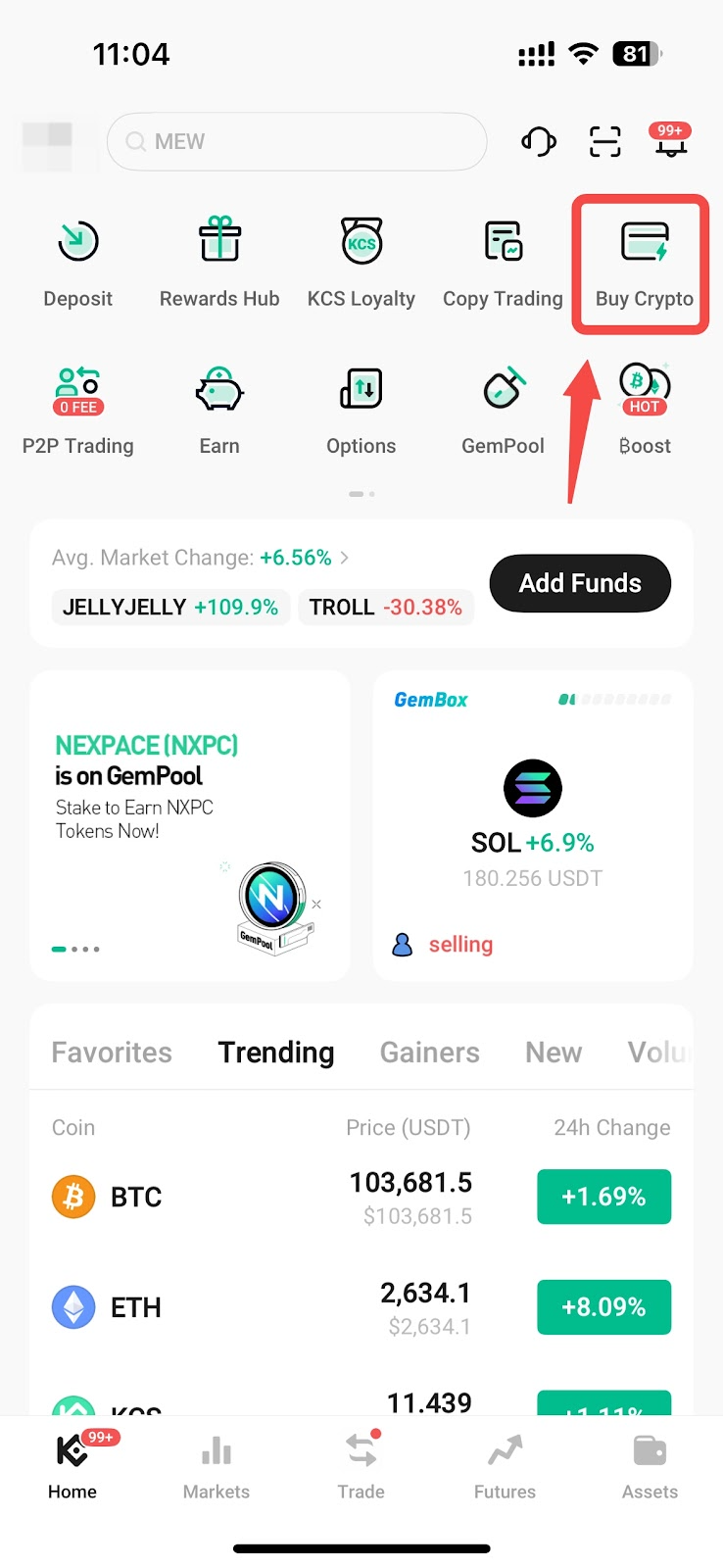
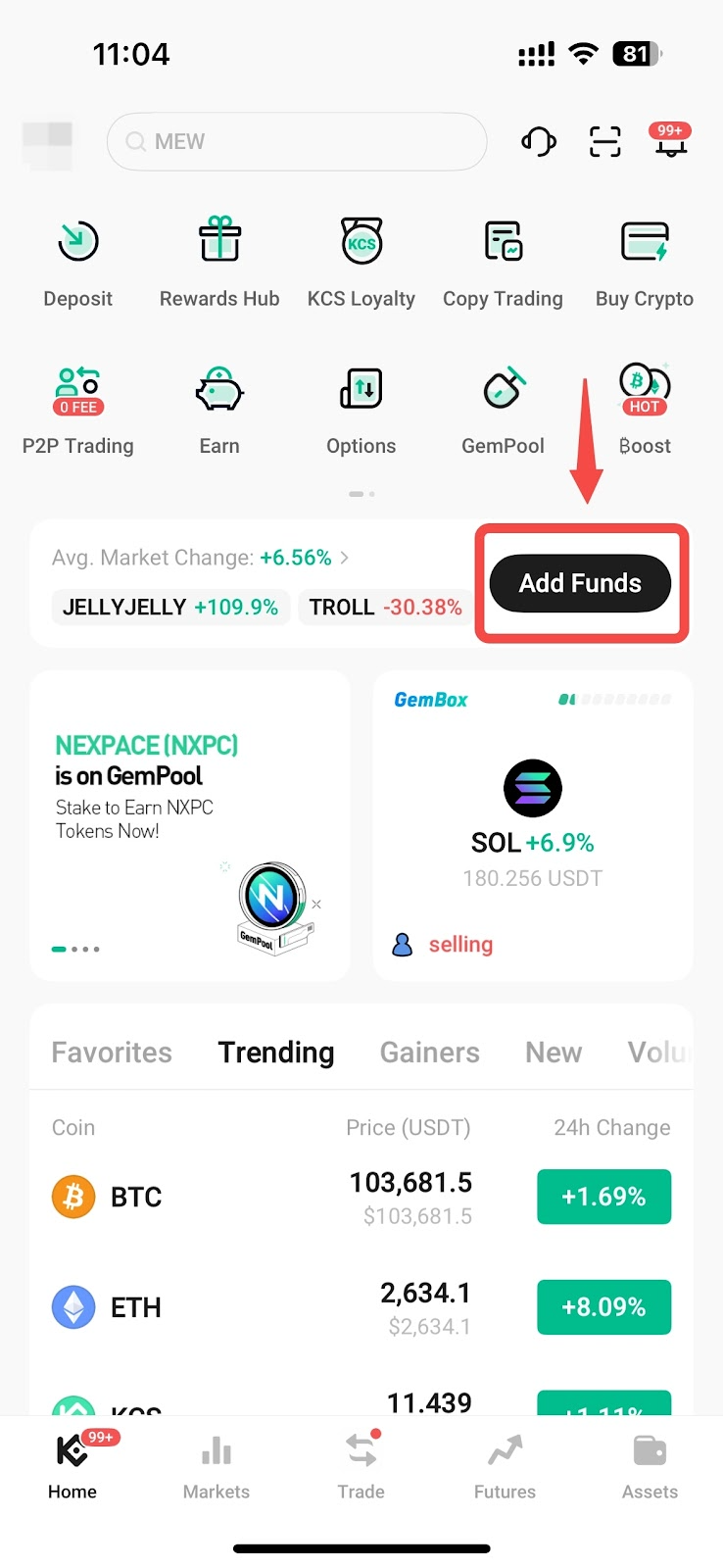
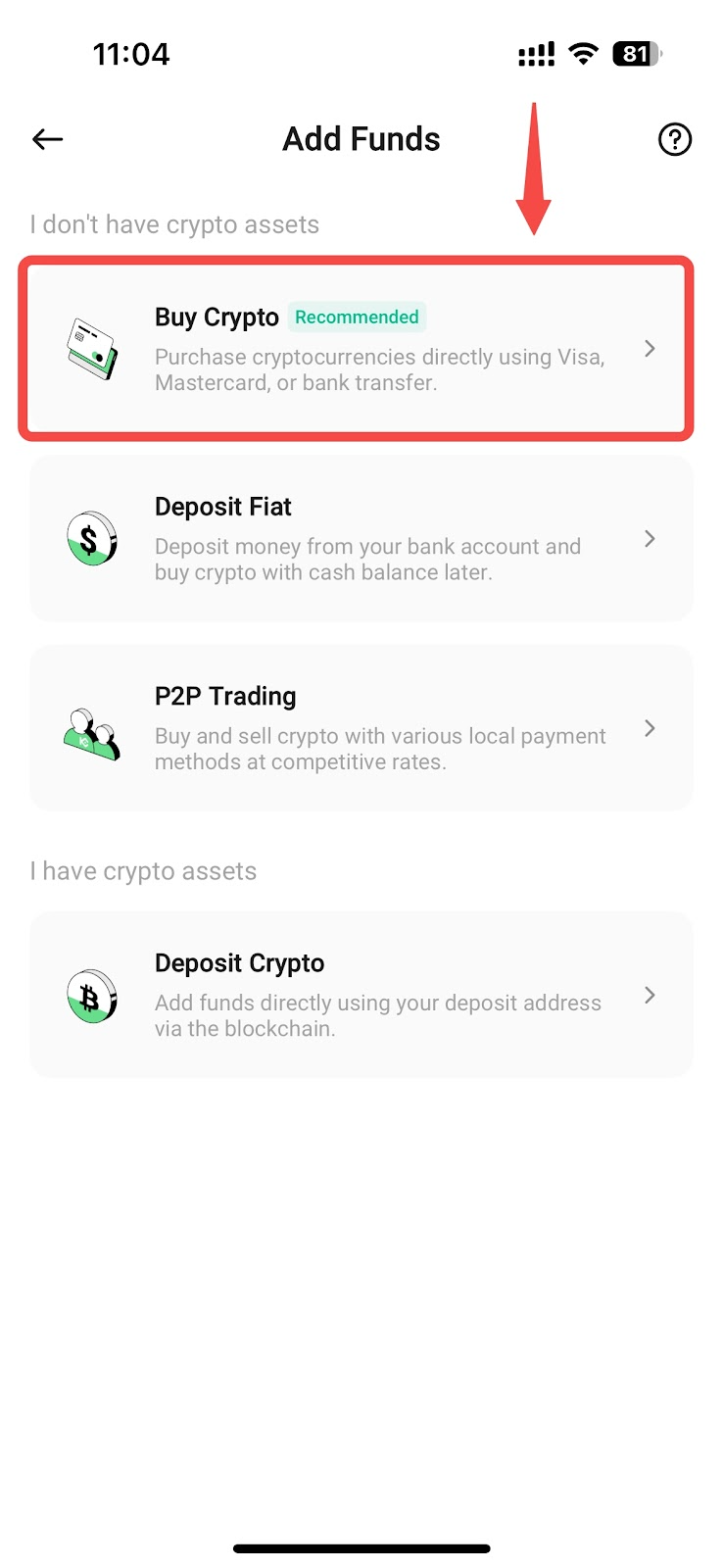
i. আপনার KuCoin অ্যাকাউন্টে লগ ইন করুন এবং হোমপেজে সরাসরি Buy Crypto-তে ট্যাপ করুন, অথবা Assets → Deposit → Buy Crypto-এ যান
ii. আপনার মুদ্রা নির্বাচন করুন: আপনি যে মুদ্রা দিয়ে পেমেন্ট করতে চান এবং যে ক্রিপ্টোকারেন্সি কিনতে চান তা নির্বাচন করুন (উদাহরণস্বরূপ, ধরুন আপনি USDT কিনছেন)। কিনুন ট্যাপ করুন, তারপর পেমেন্ট পদ্ধতির অধীনে Google Pay নির্বাচন করুন।
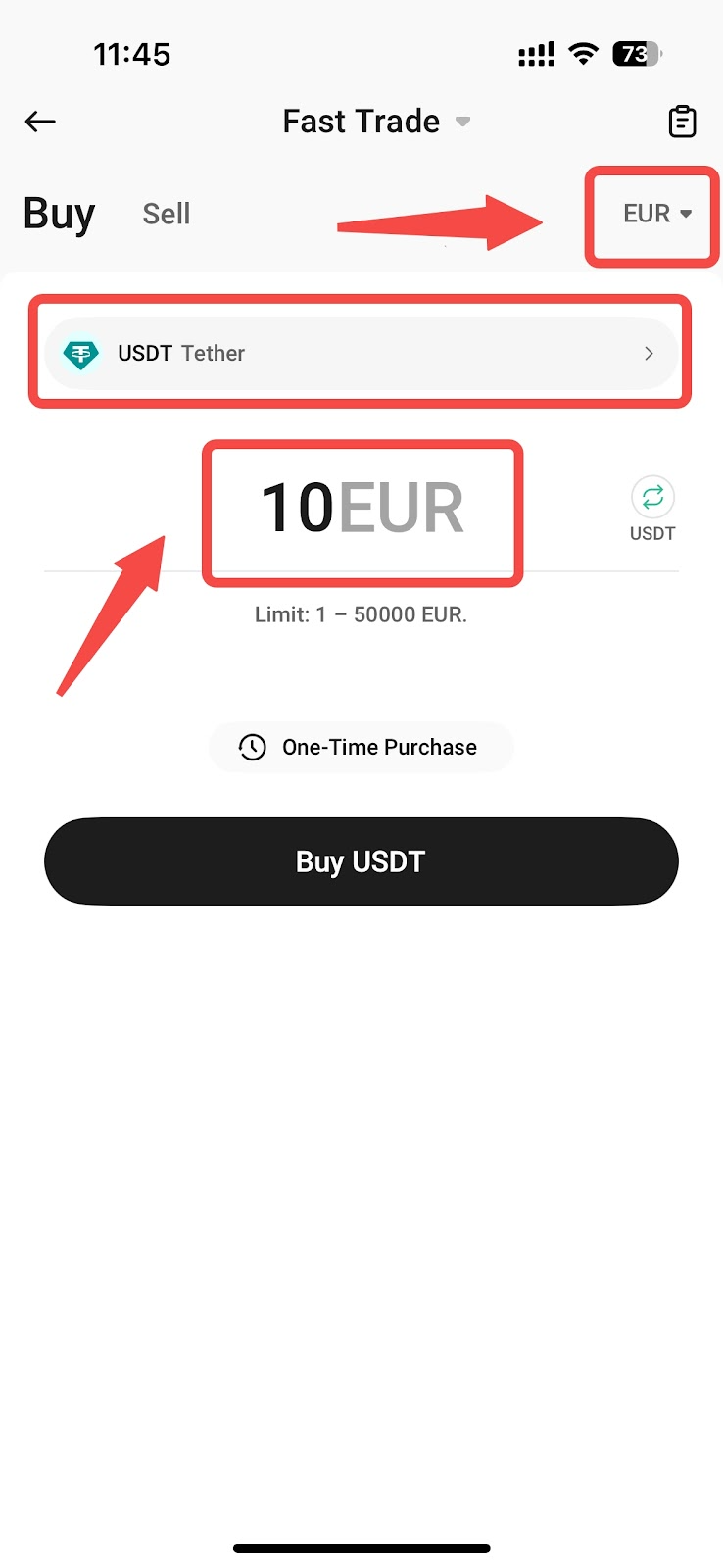
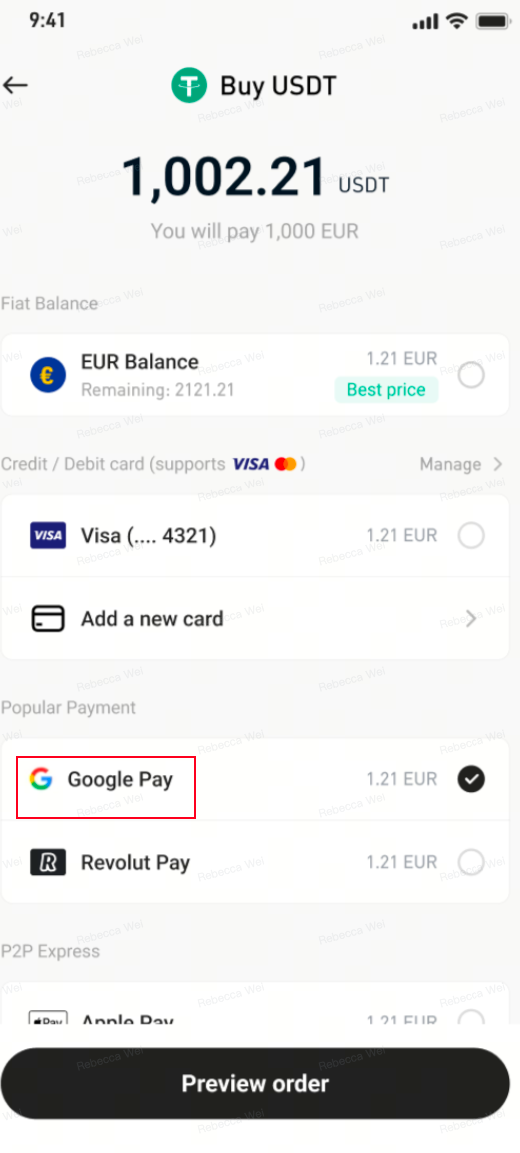
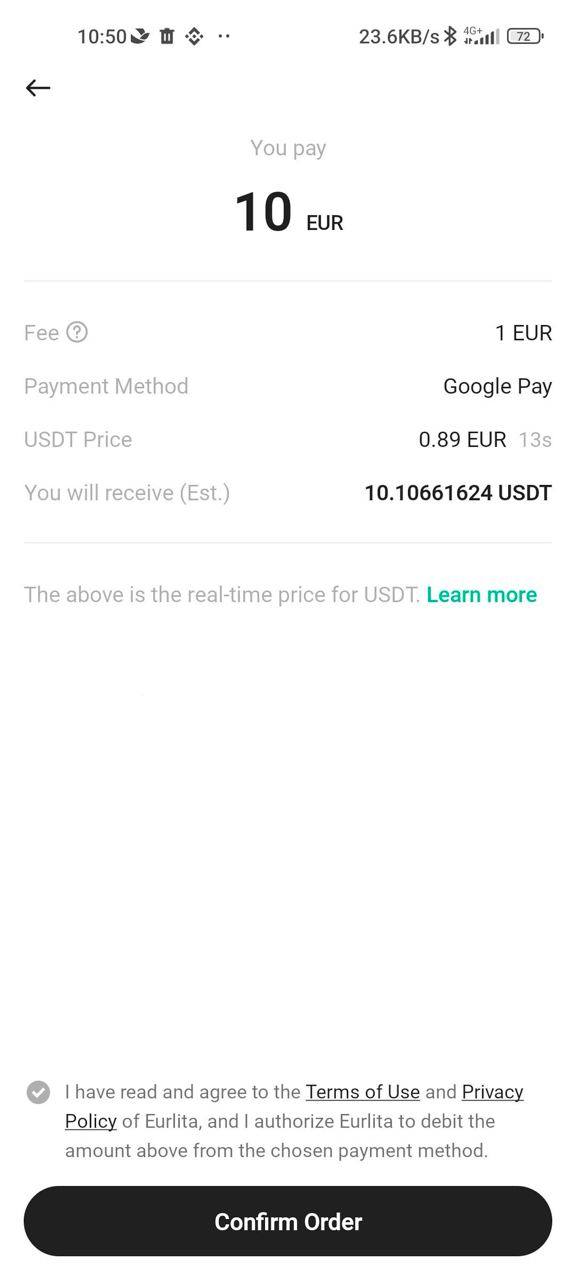
iii. অর্ডারটি পর্যালোচনা করুন: আপনি যে পরিমাণ প্রদান করতে চান এবং যে পরিমাণ ক্রিপ্টোকারেন্সি পেতে চান, তা নিশ্চিত করুন। তারপর এগিয়ে যাওয়ার জন্য কনফার্ম ট্যাপ করুন।
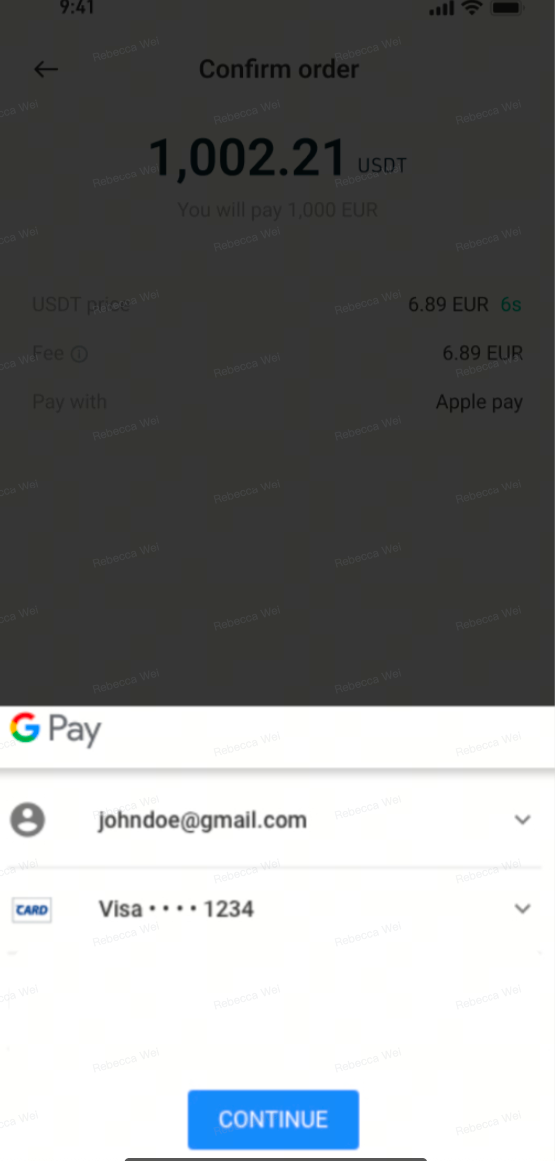
iv. পেমেন্ট প্রমাণীকরণ করুন।
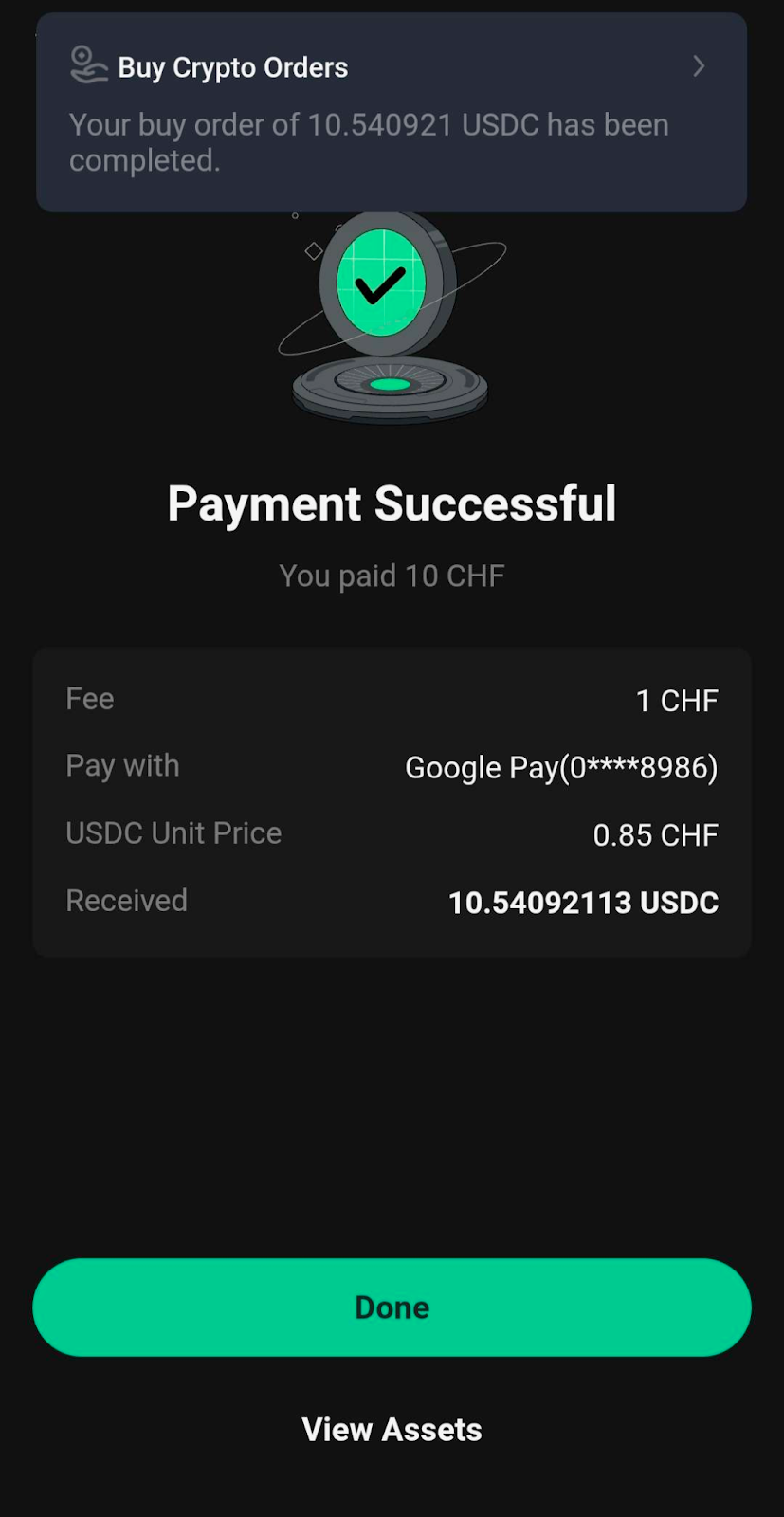
v. লেনদেন সম্পন্ন: লেনদেন সম্পন্ন হলে, আপনি একটি নিশ্চিতকরণ বার্তা দেখতে পাবেন। যদি কোনো ত্রুটি ঘটে, পুনরায় চেষ্টা করুন বা হোমপেজে ফিরে যান এবং আরও নির্দেশনা পান।
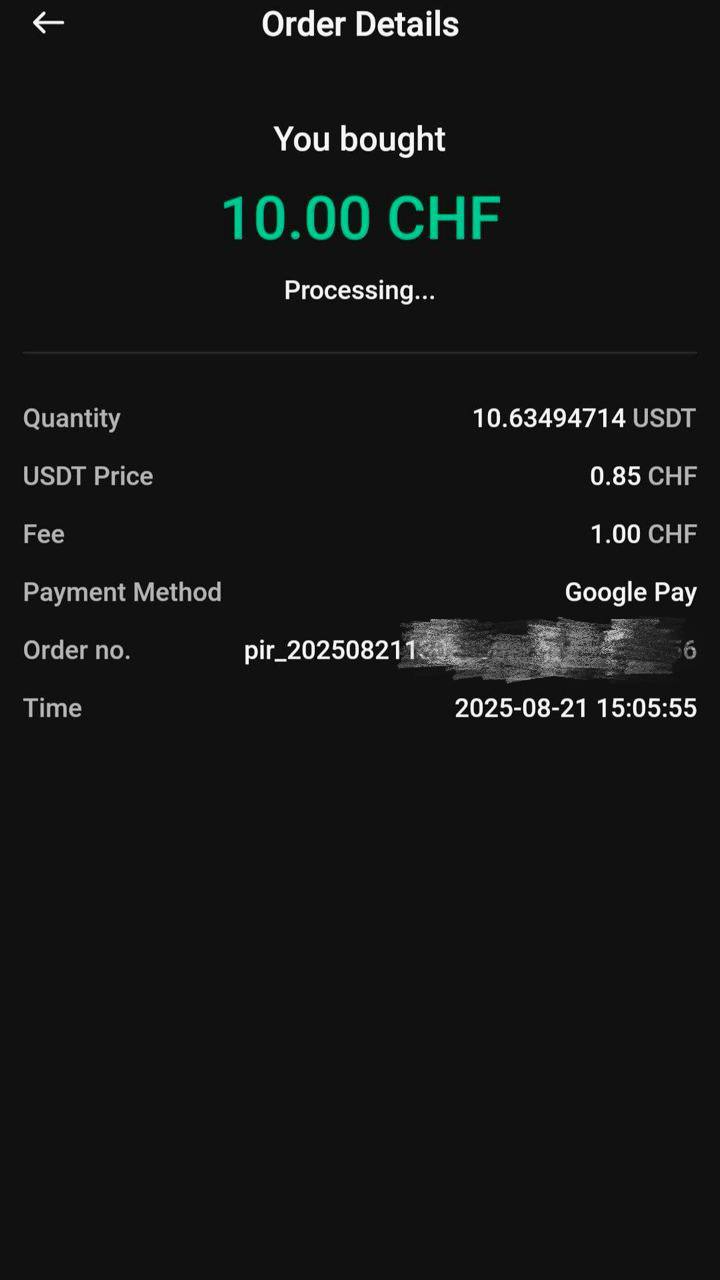
3. গুগল পে ব্যবহার করে ক্রিপ্টো ক্রয় করুন (ওয়েব)
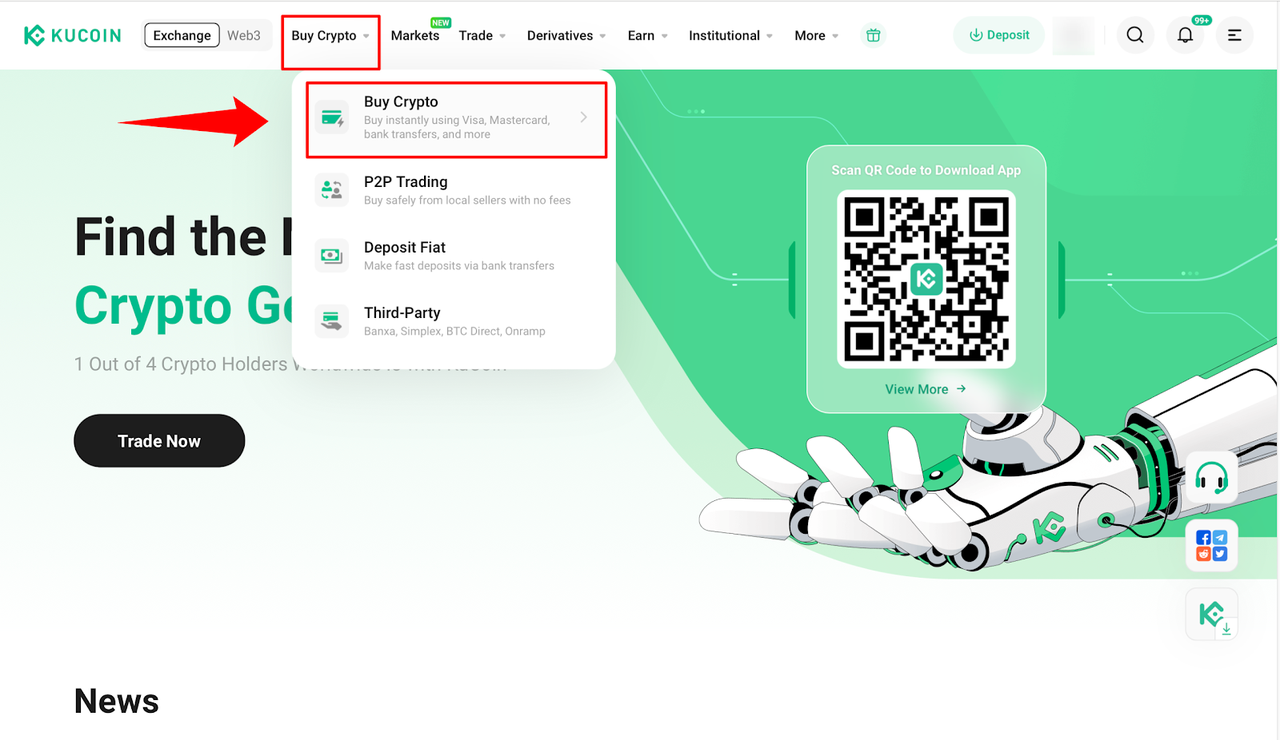
i. আপনার KuCoin অ্যাকাউন্টে লগ ইন করুন: ক্রিপ্টো কেনুন → ফাস্ট ট্রেড-এ যান।
ii. আপনার মুদ্রা নির্বাচন করুন: আপনি যে মুদ্রা দিয়ে পেমেন্ট করতে চান এবং যে ক্রিপ্টোকারেন্সি কিনতে চান তা নির্বাচন করুন (উদাহরণস্বরূপ, ধরুন আপনি USDT কিনছেন)। আপনার পেমেন্ট পদ্ধতির জন্য Google Pay নির্বাচন করুন। কিনুন নির্বাচন করুন।
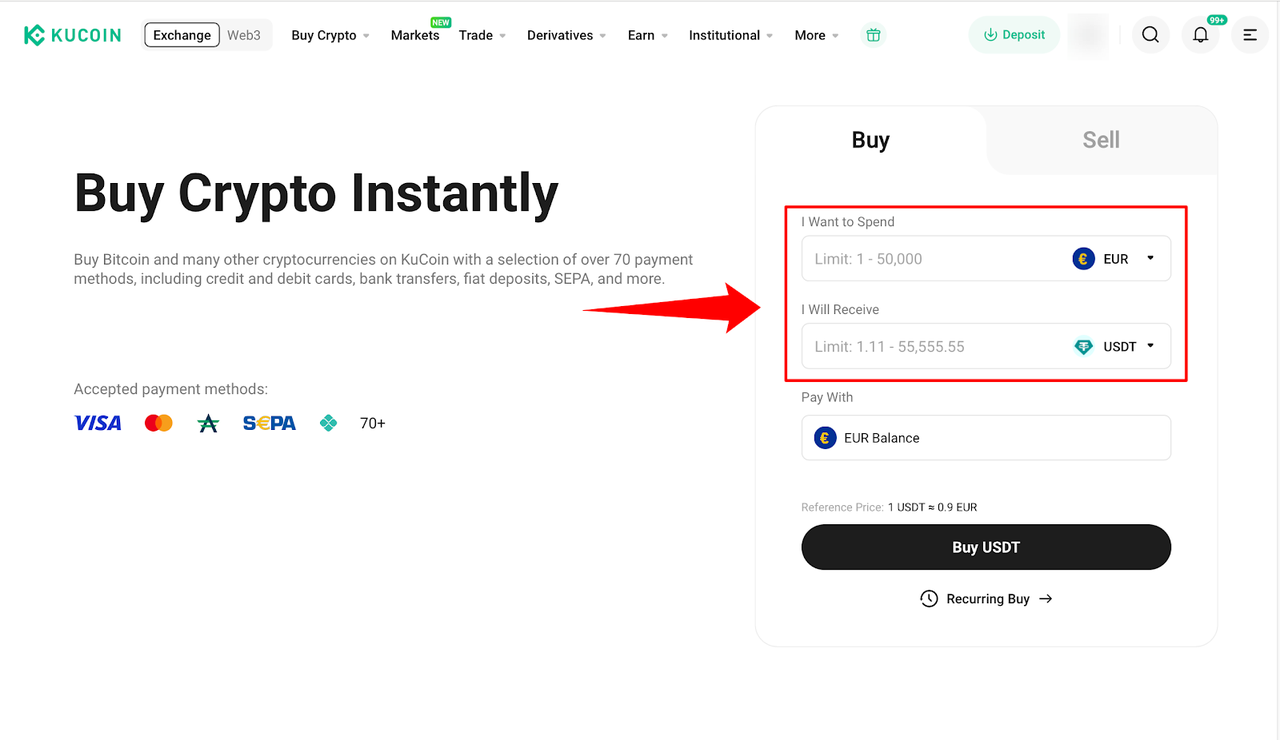
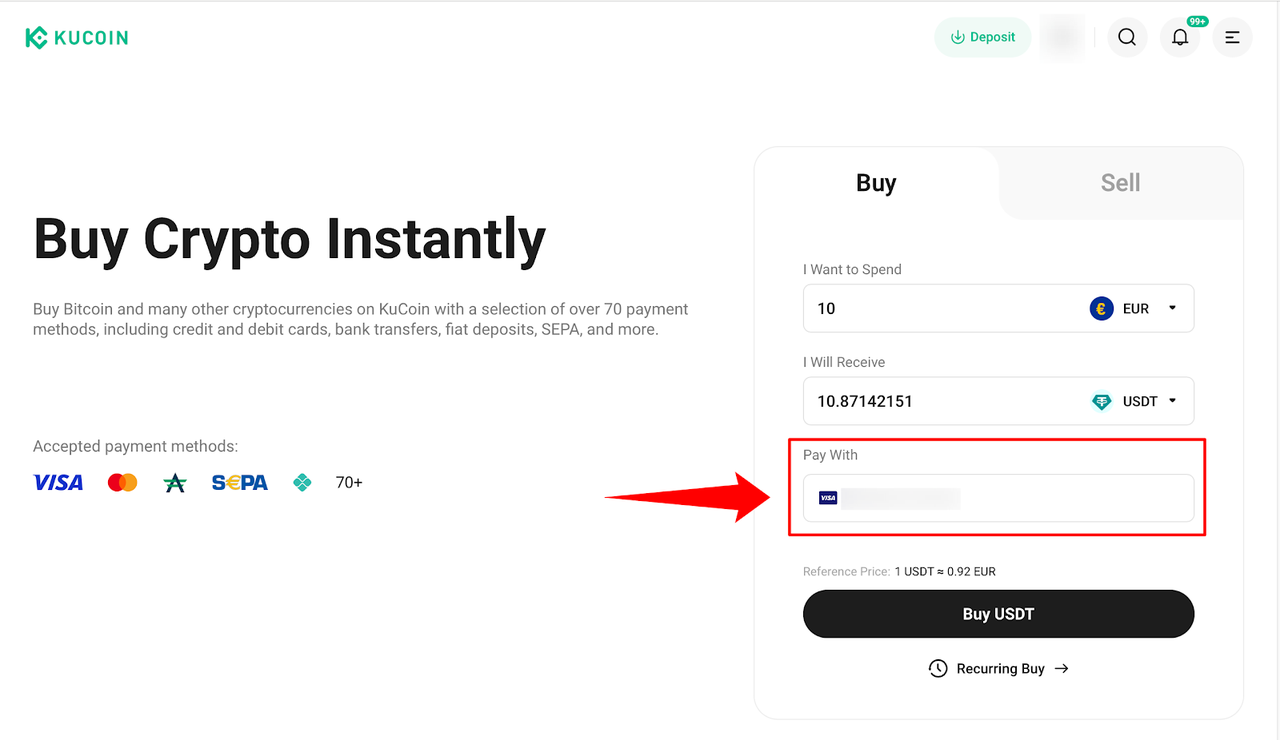
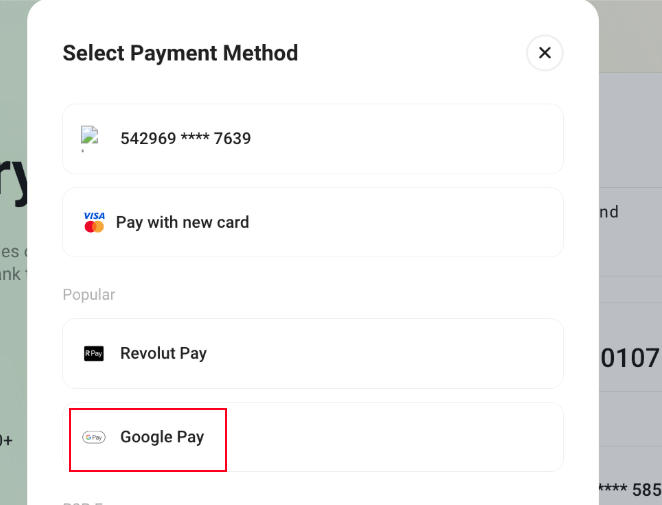
iii. অর্ডারটি পর্যালোচনা করুন: আপনি যে পরিমাণ প্রদান করতে চান এবং যে পরিমাণ ক্রিপ্টোকারেন্সি পেতে চান, তা নিশ্চিত করুন। তারপর এগিয়ে যাওয়ার জন্য নিশ্চিত করুন বাটনটি নির্বাচন করুন।
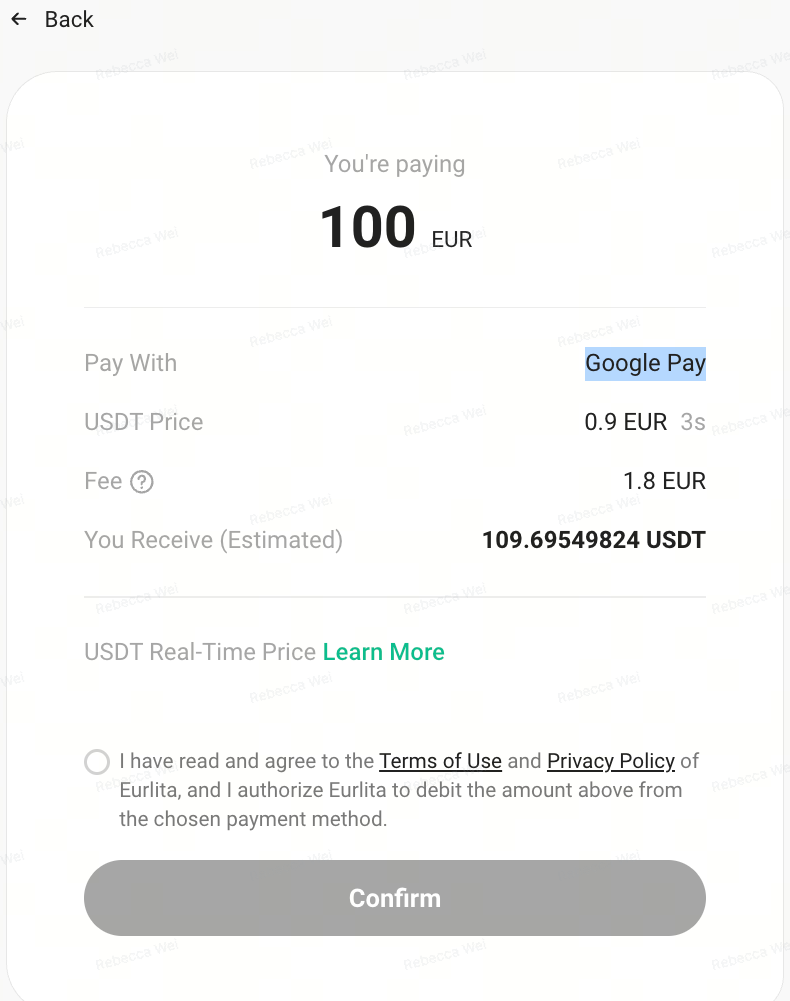
iv. পেমেন্ট প্রমাণীকরণ করুন।
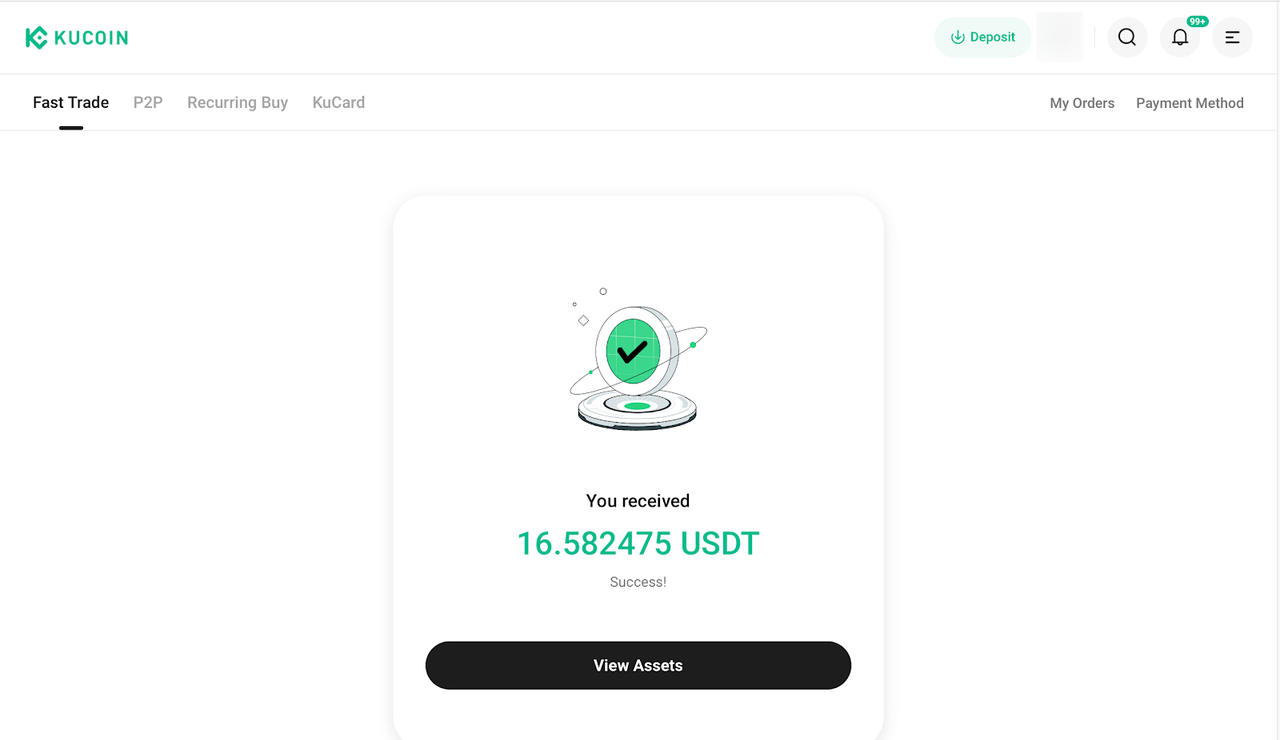
v. লেনদেন সম্পন্ন: লেনদেন সম্পন্ন হলে, আপনি একটি নিশ্চিতকরণ বার্তা দেখতে পাবেন। যদি কোনো ত্রুটি ঘটে, পুনরায় চেষ্টা করুন বা হোমপেজে ফিরে যান এবং আরও নির্দেশনা পান।
4. প্রায়শই জিজ্ঞাসিত প্রশ্নাবলী (FAQ)
আমি যে ক্রিপ্টো কিনেছি, তা আমার অ্যাকাউন্টে জমা হতে কতক্ষণ সময় লাগবে?
গুগল পে বা ব্যাংক কার্ডের মাধ্যমে ক্রিপ্টোকারেন্সি কেনা হলে তা তাৎক্ষণিকভাবে বা ২৪ ঘন্টার মধ্যে আপনার KuCoin ফান্ডিং অ্যাকাউন্টে জমা হবে। লেনদেনগুলি সাধারণত ১০ মিনিটের মধ্যে সম্পন্ন হয়। যদি আপনার পেমেন্ট সফল হয়ে থাকে কিন্তু অর্ডারটি মেয়াদোত্তীর্ণ হয়ে যায়, দয়া করে রিফান্ডের জন্য কাস্টমার সাপোর্টের সাথে যোগাযোগ করুন।
ii. আমি কোথায় আমার অর্ডার হিস্ট্রি চেক করতে পারি?
ওয়েবের জন্য: আপনার KuCoin অ্যাকাউন্টে লগ ইন করুন, ডান পাশের উপরের দিকে Orders-এ ক্লিক করুন, তারপর আপনার ইতিহাস দেখতে Buy Crypto Orders-এ যান।
অ্যাপের জন্য: হোম স্ক্রিনে যান → আরও ট্যাপ করুন → ক্রিপ্টো কিনুন → ডান উপরের কাগজের আইকনটি ট্যাপ করুন।
দাবিত্যাগ: এই পৃষ্ঠাটি সহজে পড়ার সুবিধার্থে AI ব্যবহার করে অনুবাদ করা হয়েছে। সবচেয়ে নির্ভুল তথ্যের জন্য মূল ইংরেজি সংস্করণটি দেখুন।আসল দেখান